UX vs. UI design: What makes them different?



Summarize with Ai





Key Takeaways
Searching for UX and UI design differences but feeling overwhelmed by non-practical examples? Well, you're in the right place!
UX design and UI design—both terms are used interchangeably in digital product development. However, there is a significant difference between UX and UI, which has never been noticed.
User experience design (UX) simplifies users' engagement with solving problems! On the other hand, user interface design (UI) ensures a more functional and intuitive interface that is easy to use.
In this complete guideline, we'll break down the user experience vs. user interface with practical examples to give you a clear answer!
Plus, we'll include a beginner's career guide to help you kickstart your journey as a UI or UX designer in 2025. Stay tuned!
What is UX Design: A Short Overview
UX design stands for user experience design that reflects how users interact with or feel about the product or service.
User experience involves numerous tasks that are directly connected to user satisfaction. Such a UX design ensures the quick and easy action a user wants—a visible button at the right corner of the website to subscribe to.
That means user experience design helps to simplify the functionality, layout, and product features that give users a steady, fast experience without further confusion.
UX designer roles and responsibilities
When you become a UX designer, you must conduct multiple tasks to ensure a seamless user experience. Here's how the UX role deals with that:
1. Research users
UX designers first research target audiences and collect personal information, their pain points, and what they seek.
It helps designers to note down what gives customers a value-driven product.
2. Competitor analysis
UX designers map out similar products that are already available in the market. In this case, he knows what features can be included in their digital product and gets revenue!
3. Make wireframes
In this section, a UX designer maps a rough skeleton that defines the user's journey from beginning to end. Mainly, it's a documentation or layout of UI design.
4. Testing usability
UX designers test to determine whether the interface meets the user's expectations. Are customers facing issues or confused about taking action?
5. Contribute to solutions
The UX designer's ultimate role is to break down the issues into solutions and improve user experience.
What is UI Design: A Short Overview
UI design stands for user interface design, simplifying putting on particular things from screen size to a page. In short, user interface design is the visual look and implementation of UX design. It involves front-end typography, buttons, icons, dropdown menus, and interaction.
UI designer responsibilities
UI designers are vital in designing the final product or services per UX design. Here's the overview of UI designer roles:
1. Create high-fidelity wireframes:
After receiving UX wireframes and customer flow data, UI designers produce high-fidelity wireframes.
2. Design visual elements
UI designers then design typography, color palette, style, font, spacing, and visual elements.
3. Finalize user interaction
Create interaction designs like buttons, dropdowns, and sidebars for a reader-friendly interface.UI designers also consider designing micro-interaction elements like small animations or transitions that help guide the user's action
UX vs. UI: Quick Comparison Chart
Detail key differences between UX and UI Design
Want to get a clear concept of UX and UI design? Check out this detailed comparison of UX and UI and explore the key features that set them apart.
1. Focus
UX design focuses more on the user experience and how they feel when using a product. In comparison, UI design creates a screen-to-screen visual design for better intuitive interfaces.
An example can help you to understand better! When designing a mobile app, UX design decides what features to include in product design and how it works.
User interface design focuses more on designing the layout and correctly placing the buttons or typography.
A gorgeous user interface design can't succeed until it's compatible with a user-friendly experience.
2. Involves
UX design involves a broader number of tasks than UI design.UI design focuses on just a single part of UX design. UX design involves tasks like:
Research
UX design involves researching users' personal information, pain points, and the solutions they seek!
Brainstorming
UX designers create user flow diagrams to ensure a smooth user experience when getting through it! Also, planning a rough skeleton of user interface design, known as a wireframe, is involved in this step.
Implement
This is the only one where the user interface designer is involved! They transform the design into a practical and final output interacting with users, such as front-end typography, branding, buttons, and dropdown menus.
Testing usability
Here, UX designers investigate how user engagement works, whether they face difficulties or have a seamless experience!
This is the fundamental difference made! UI designers handle the implementation part of the whole structure of UX design. In other words, UI/UX designers primarily work as UX designers.
3. Dependency
UX design depends on key features of product design and user engagement. At the same time, UI design is more reliant on UX design.
UX designers must plan and discuss the product's design, features, and user satisfaction with developer teams and colleagues. In contrast, a UI designer works after the UX development is completed.
4. Difficulty
Considering learning and implementing, UX design is slightly more complicated than UI design.UX designers must conduct in-depth research, surveys, and inquiries to plan. It's tough for UX designers to solve real user problems and ensure a smooth experience quickly.
UX designers must also balance website technical tasks to satisfy customers' specific needs and obtain business goals! On the other hand, UI designers need technical expertise to put everything in the right place according to user experience design. It's a far easier option.
So, yeah! That's a considerable amount of work involved in UX design compared to UI design.
5. Time frame
UX design takes longer to plan, execute, and test in a whole process than UI design.
From fundamental planning with teams to a great user satisfaction rate! It needs a longer way to ride without exact time boundaries.
The UX design process is complete until the desired user engages without issues. Most importantly, a responsive design. Until it receives additional reviews, UI designers can relax with just one task! Sorting and reviews—that simple?
No! But it is fast compared to user experience design!
6. Role in product
The function of both design systems in the finished product ultimately distinguishes them.
The focus of UX designers is on how users engage with product elements. These can include information flow, layout, and functionality to determine how to visualize those successfully.
UI design unwraps the user experience design, which actual users get to see and experience. It designs the expected product features and new ideas into easy-to-use tools or options.
How to build careers in UX and UI design:
In this digital era, UX and UI designers are the highest-paying jobs in the tech market.
According to Glassdoor, UX designer salaries will get an average of $65k-108k annually in the United States. UI designer jobs will pay almost the same as UX designer jobs.
That means the demand for skilled UX designers or UI designers is increasing rapidly. However, in this highly competitive market, it can be challenging to secure entry-level positions.
It's hard to survive in this field without advanced technical design skills and expertise. So, the more you explore and adapt to build your UX career, the higher your chances of securing an expected job!
Step-by-Step Guide on UX and UI Career Paths:
How do I get into it? Here's the ultimate guide to becoming a UI or UX designer as a beginner:
1. Understand the basic
First, you must identify what skills match your ambition and what you can do the best.
A scenario of UX vs. UI already gives you some hints. Be practical and choose one option to move forward.
You can take several free courses available online, like the Udemy course.
2. Master tools and specific skills
After learning the fundamentals, enrich your UX and UI skills! Mastering essential tools and skills helps you to get ahead faster!
Well, here are some essential tools you need to adapt first! Such as:
- UX design skills: learn wireframes, prototyping, research methods, and user testability.
- UI Design Tool: Sketch, Figma, Adobe XD.
Pro tips: A professional diploma in UX design will take you ahead of competitors.
3. Start practicing
Try looking for a free project from clients or make your website to carry on practicing.
Learn from faults and improve your skills more. Try free resources to explore UX or UI design in more depth.
4. Look for an internship opportunity
It's time to test your skills in a real-world situation. With an internship program, you can enhance your skills and build a strong portfolio to showcase projects.
5. Showcase your project
Use Behance, Dribble, and other platforms to showcase your projects. It'll help you attract potential clients from social media platforms. Connect a large number of people and build a network.
6. Apply for jobs
The final step that you desire is a high-paying job! Stay motivated and apply for a full-time job.
You can also try freelancing on Fiverr or Upwork platforms.
Continue learning and move forward!
FAQs
What is the difference between UI and UX design?
The main difference between UI and UX is based on design focus.
UX is more focused on user satisfaction to convert customer retention, whereas UI design allows intuitive layouts and interfaces for users. UX is how a user feels about your product or services. UI is how interactive design and elements are visually appealing.
What comes first, UI or UX?
UI comes fast when designing a product or service. UX design involves researching users, planning or brainstorming, creating wireframes, and testing usability. After all, a UI designer creates the final wireframes and designs interfaces according to UX.
Which is more challenging, UI or UX?
UX design is comparatively more complex than UI design. You need to adapt more skills and deal with multiple tasks compared to UI design.
Final Words
This debate on key differences between UX and UI will continue! As both UI and UX designs work together. But you've already figured out the actual difference between UI and UX.
Well, UX and UI design are crucial in making specific products or services at their peak!
Every business owner knows the importance of a UX or UI designer in improving user experience! So, they are looking for a highly skilled UI or UX designer!
Want to get in?
Then, build a strong portfolio of one of these particular skills and explore your career!
Enter your website URL to receive a detailed website analysis report in just 5 minutes!

Want to discuss your project?
Grow your project with Webflow Experts
Related Articles


Search is changing. More people now ask ChatGPT, Perplexity, Gemini, or Google's AI Overviews a question instead of typing keywords into a search box. If your website isn't easy for these AI systems to read, you become invisible in that conversation, even if your content is great.
This guide explains, in plain words, what makes a website "LLM-friendly," and gives you a clear, honest framework to follow. We'll also flag where common advice online overstates what actually helps, based on what Google and OpenAI have publicly confirmed.
If you want a hand implementing any of this, ideapeel's web development team builds sites with this exact architecture in mind.
What Is an LLM-Friendly Website?
An LLM-friendly website is one where crawlers and AI retrieval systems can easily reach, read, and understand your important content, and where that content is written clearly enough to be pulled into an AI-generated answer.
It's not one trick. It's a chain of small things working together: a crawler must be able to reach the page, get the real content (not a blank JavaScript shell), understand what each part means, and trust it enough to quote it.
How Do AI Search Systems Actually Read a Website?
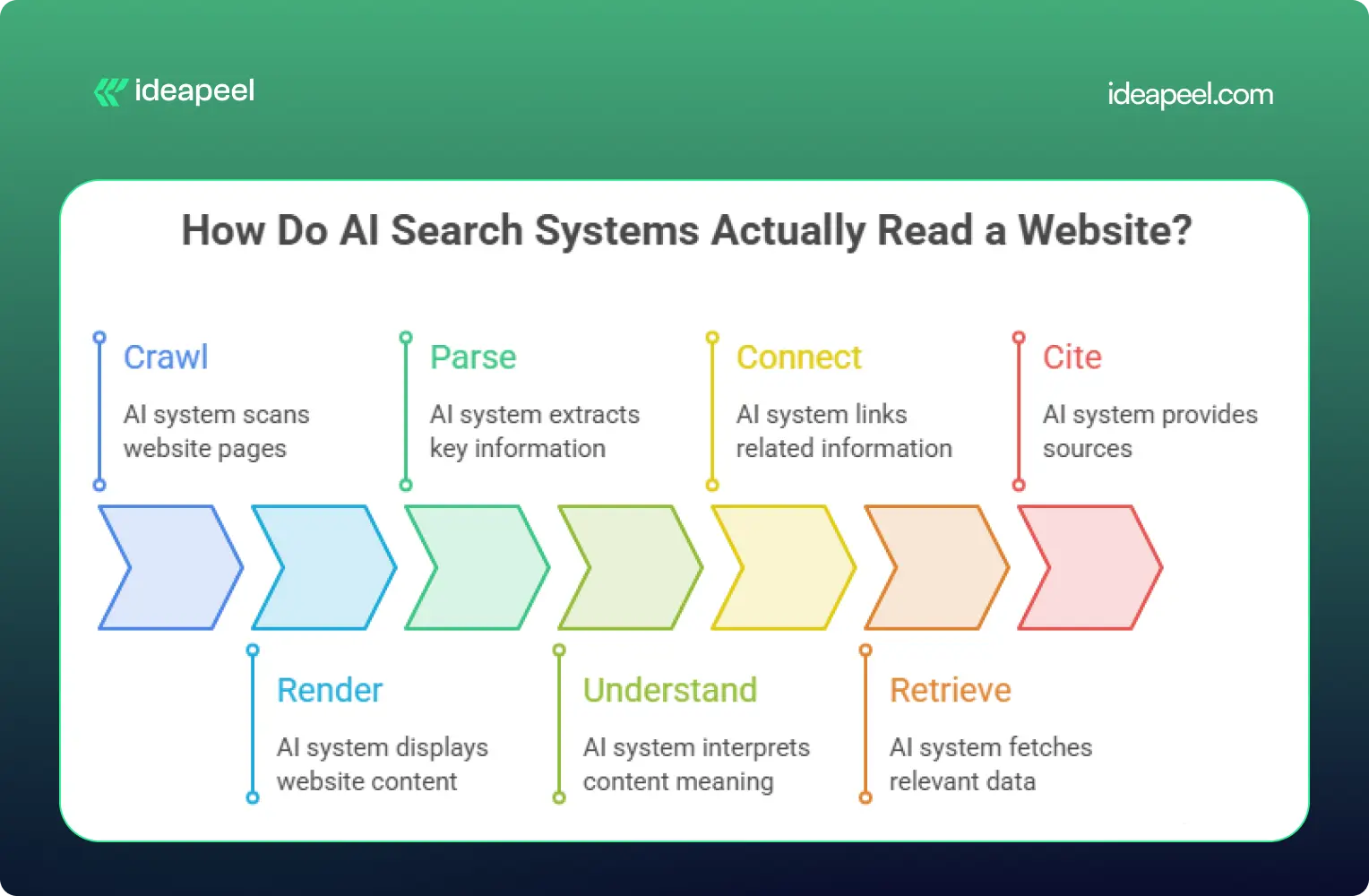
Most AI systems follow a simple path: crawl → render → parse → understand → connect → retrieve → cite.
- Crawl: the bot requests your page.
- Render: it tries to get the actual content (many AI bots skip JavaScript entirely).
- Parse: it reads the HTML structure to find headings, lists, and text.
- Understand: it works out what each section means.
- Connect: it links your content to entities and concepts it already knows.
- Retrieve: it pulls the relevant passage when someone asks a related question.
- Cite: it quotes or references your page in its answer.
Most articles online only talk about step 3 (structure). The real opportunity is making sure your site works at every step in this chain. That's the core idea behind ideapeel's GEO strategy work.
Does Semantic HTML Help AI Search?
Semantic HTML helps AI systems understand your content faster and more accurately, but it is not a confirmed ranking factor on its own.
Google has stated there are no special technical requirements beyond normal indexing and Search eligibility for a page to appear in AI Overviews or AI Mode. Semantic HTML is recommended mainly because it improves accessibility and human readability, and that clarity happens to help machines too.
So use semantic HTML because it's good practice, not because it's a magic switch.
A weak example:
<div class="title">What Is GEO?</div>
<div class="text">GEO means optimizing content for AI search...</div>
A strong example:
<article>
<header>
<h1>What Is Generative Engine Optimization?</h1>
</header>
<section>
<h2>What Is GEO?</h2>
<p>GEO is the practice of structuring content so AI search tools can find, understand, and cite it.</p>
</section>
</article>
The second version tells a crawler exactly what's a heading, what's an article, and what's a self-contained section.
Semantic HTML Elements Every Site Should Use
Keep headings in logical order (H1 → H2 → H3). Skipping levels or using headings purely for visual styling confuses both AI parsers and screen readers.
How Clean Code Improves AI Accessibility
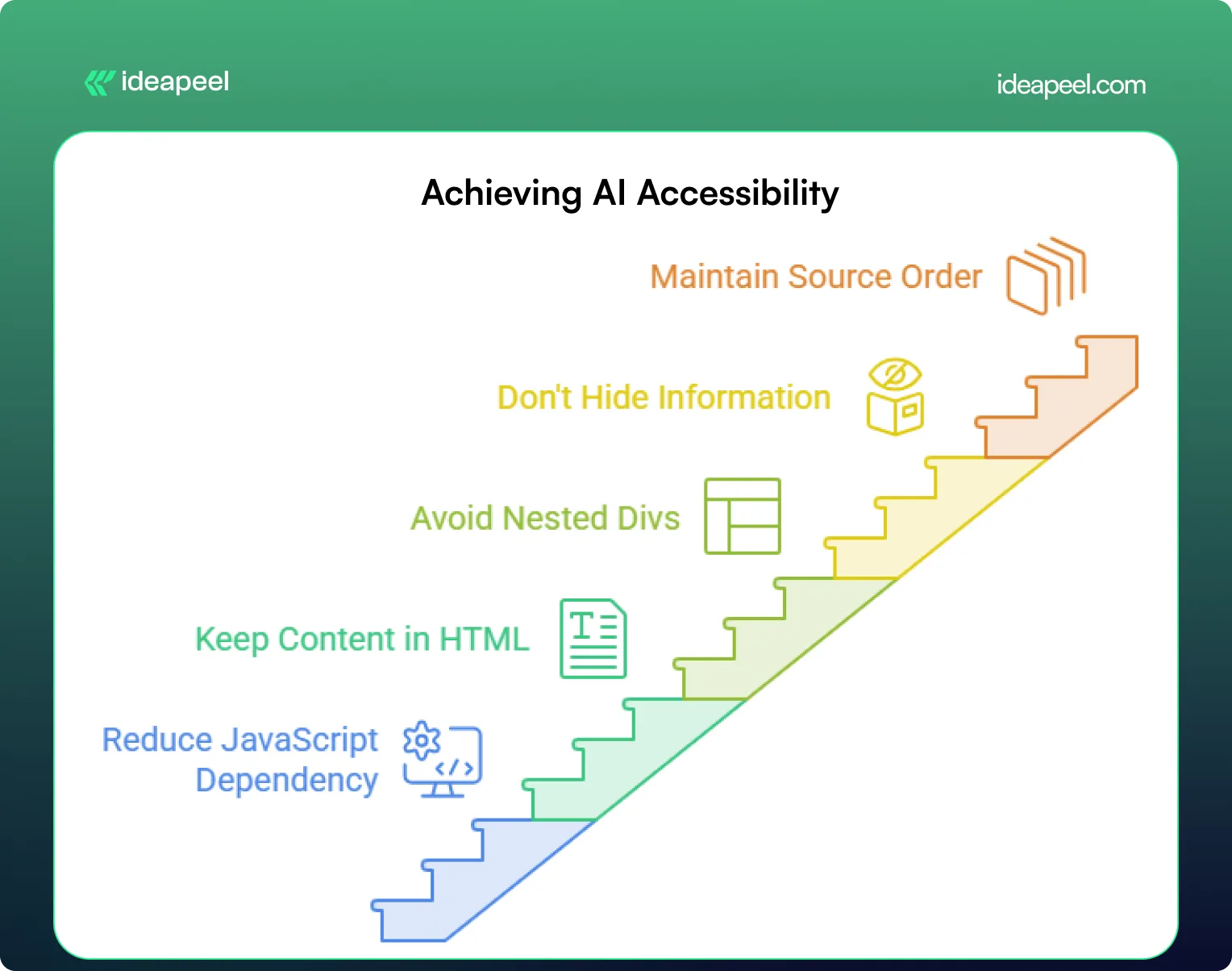
"Clean code helps AI" is vague advice. Here's what it actually means in practice:
- Reduce JavaScript dependency. Many AI crawlers don't execute JavaScript at all. If your key content only appears after a script runs, it may be invisible to them. Server-side rendering (SSR) or static generation puts real content directly in the HTML.
- Keep primary content in the HTML source. Your headline, intro, headings, and body text should be visible without any interaction.
- Avoid deeply nested <div> soup. Flat, logical markup is easier to parse and easier for your own team to maintain.
- Don't hide key information behind tabs or accordions unless there's a real usability reason; crawlers usually won't click.
- Maintain a sensible source order. The HTML should read logically top to bottom, even before CSS repositions anything visually. MDN's accessibility guidelines cover this well.
A simple test: turn off JavaScript in your browser and reload your most important page. Whatever's still visible is roughly what many AI crawlers see.
[[inner-cta]]
How to Structure Content for LLM Retrieval
AI systems tend to pull short, self-contained passages rather than reading an entire page in context. Structure your content so each section can stand on its own.
- Answer first. Put the direct answer to the heading's question in the first sentence or two, then explain further.
- One idea per paragraph. Keep paragraphs short, two to four sentences.
- Define terms as you use them. Don't assume the reader (or the AI) already knows what a term means.
- Use tables for comparisons. Tables are easy for AI systems to extract and quote cleanly.
- Add FAQs and summaries. These are naturally structured for extraction.
Build an Entity-First Content Architecture
Beyond individual pages, AI systems build an internal map of how topics and organizations relate to each other. Writing clearly about these relationships helps.
Weaker: "ideapeel builds websites. It also does Webflow work. The company works with SaaS brands."
Stronger: "ideapeel is a Webflow development agency that designs and builds websites for B2B SaaS companies."
The second sentence makes the relationships explicit:
- ideapeel → is a → Webflow agency
- ideapeel → serves → B2B SaaS companies
Apply the same idea to your whole site by grouping related content into a clear cluster, connected with internal links:
- Pillar page: What Is GEO?
- Supporting page: GEO vs SEO
- Supporting page: AI-Readable Website Checklist
- Commercial page: Webflow Development Services
Linking a pillar page to its subtopics, and back again, gives both readers and AI systems a clear map of how your content connects.
Technical SEO Requirements for AI Search
Does Google require special HTML for AI search? No. Google has confirmed there are no additional technical requirements for appearing in AI Overviews or AI Mode beyond meeting normal Search requirements and being eligible for a standard snippet.
That means the basics still matter most:
- Crawlability: nothing important is blocked in robots.txt
- Indexability: pages aren't accidentally set to noindex
- A clean XML sitemap: listing only real, indexable pages
- Canonical tags: one clear version per piece of content
- Fast load times: a slow, heavy page can fail before it's even read
Does Schema Markup Help AI Search?
Schema markup helps search engines and AI systems understand what your page is about and can make it eligible for rich results, but it doesn't guarantee an AI citation on its own.
Add schema where it genuinely matches your visible content:
- Article or BlogPosting for guides and posts
- Organization for your homepage
- FAQPage for pages with real Q&A content
- BreadcrumbList for site navigation
- Product or Service for commercial pages
Test your markup with Google's Rich Results Test before publishing.
Does llms.txt Improve AI Visibility?
This is one of the most debated points in AI search advice right now, and it deserves an honest answer instead of a confident one.
llms.txt is a proposed (not official) plain-text file placed at your site's root that summarizes your most important pages for AI systems, similar in spirit to a sitemap. Google has stated plainly that it does not require llms.txt and that Google Search ignores it for generative AI features. Independent log analysis from several agencies has also found little to no crawl activity from major AI bots on llms.txt files specifically.
The honest takeaway: llms.txt is low-effort and probably harmless to add, but it should never replace real technical SEO and content structure. Treat it as a small experiment, not a strategy.
How to Make Your Site Accessible to ChatGPT Search
OpenAI has said that sites that want their content discoverable and cited in ChatGPT Search should avoid blocking its search-related crawler in robots.txt. If you want visibility there, check that:
- OAI-SearchBot isn't blocked
- Your key pages return real HTML content on first load (not just after JavaScript runs)
- Internal links use standard <a href> tags, not JavaScript-only navigation
LLM-Friendly Website: Before and After
Before: Content loads via a JavaScript framework after the initial page request. Headings are styled <div> tags. Key answers are buried in paragraph eight. No internal links connect related topics.
After: Content is server-rendered and present in the raw HTML. Headings use proper <h1>–<h3> tags in order. Each section opens with a direct answer. Related pages link to each other with descriptive anchor text, not "click here."
The difference isn't a redesign; it's making sure the right things are already true in your source code.
[[question-block]]
Beyond the Basics: What Actually Builds Trust for AI Citation
Most guides stop at structure and code. But structure only gets you understood; it doesn't get you trusted. Two things matter more than most checklists admit:
- Third-party corroboration. AI systems tend to weigh independent sources (reviews, comparison articles, forum discussions, Wikipedia) more heavily than a company's own claims about itself. Being mentioned accurately elsewhere on the web matters as much as your own pages.
- Original data. A specific, original stat or finding is far more likely to be quoted than recycled general advice, simply because no one else has it.
If citation share matters to your business, these two levers are worth as much attention as the technical checklist.
LLM-Friendly Website Audit Checklist
- [ ] Key content is visible in raw HTML (test with JavaScript disabled)
- [ ] Headings follow a logical H1–H4 order
- [ ] Each section opens with a direct answer
- [ ] Important pages are within 3 clicks of the homepage
- [ ] Internal links use descriptive anchor text
- [ ] Robots.txt doesn't accidentally block useful AI bots
- [ ] XML sitemap is accurate and up to date
- [ ] Canonical tags are set correctly
- [ ] Relevant schema markup is added and validated
- [ ] Site loads quickly with minimal render-blocking scripts
Make Your Website Ready for AI Search With ideapeel
Building an LLM-friendly website is no longer just about making a page accessible to search engines. As AI changes how people discover businesses, your website needs a strong technical and content foundation that helps both traditional search and AI systems understand what you offer.
That starts with clean HTML, logical semantic HTML, and a clear content structure. Proper H1 and H2 headings, descriptive URLs, accurate metadata, accessible navigation, and relevant structured data markup help crawlers understand how your pages are organized. At the same time, important content should not depend entirely on JavaScript, CSS, or complex framework behavior that can make it harder for a crawler to access and parse.
But technical optimization is only one piece of the process.
Connect SEO, AEO, GEO, and LLM Optimization
An AI-ready website brings multiple disciplines together. SEO helps search engines discover and index your pages. Semantic HTML and accessibility make the information easier to interpret. Structured data gives additional context about your content. And LLM optimization focuses on making your information clear enough for AI systems to understand, retrieve, and potentially reference.
This requires a consistent workflow across your website:
Crawl → Parse → Understand → Connect → Retrieve → Answer
Your HTML structure, content architecture, internal links, metadata, APIs, and CMS should all support that workflow.
For businesses building on Webflow, this is where a technically strong development partner can make a difference.
How ideapeel Builds AI-Ready Websites
ideapeel combines web development, SEO, content architecture, and AI-search thinking to help SaaS and technology companies build websites that are designed for both people and machines.
Our approach can include:
- Semantic HTML and accessible website structures
- SEO-friendly headings, metadata, and URLs
- Clean Webflow development and CMS architecture
- LLM-friendly content and page structures
- Structured data and relevant schema markup
- Technical SEO and indexing best practices
- Internal linking and topic-cluster architecture
- Content structures designed for AI search and answer engines
- Performance-focused development with unnecessary JavaScript dependencies reduced where appropriate
If you're building a new website, redesigning an existing one, or trying to improve your AI search visibility, these elements should be considered from the beginning rather than added after development.
Explore ideapeel's Web Development Services to see how we approach modern website architecture, or learn more about GEO for AI search and Webflow development.
Your Website Should Be Easy for AI to Understand
The future of search is not only about ranking a URL. It is increasingly about whether your website can be found, understood, connected, and referenced when someone asks an AI system a question.
You do not need to rebuild everything around AI or add every new technology. Start with the fundamentals: clean HTML, semantic structure, accessible content, logical headings, strong SEO, reliable indexing, useful structured data, and a content architecture that clearly communicates what your business does.
Then build on that foundation with AEO and GEO.
If your website is difficult for a crawler to access, difficult for a search engine to index, or difficult for an LLM to parse and understand, great content may never reach the people searching for it.
ideapeel helps SaaS and technology brands turn their websites into clearer, faster, search-ready digital experiences built for the next generation of AI-powered search.
Ready to make your website AI-ready? Talk to the ideapeel team for an AI search, SEO, and website architecture assessment.
[[last-cta]]
%20for%20B2B%20SaaS_%20How%20to%20Get%20Cited%20in%20AI%20Search.webp)
More B2B buyers are starting their research in ChatGPT, Perplexity, and Google AI Overviews before they ever open a search results page. If your SaaS company isn't structured for those systems to find, understand, and cite it, you're invisible at the exact moment someone is deciding who to shortlist.
This guide breaks down what Generative Engine Optimization actually means for a B2B SaaS company, how it's different from (and connected to) SEO and AEO, and what to change on your website so AI systems can accurately represent your product - and hopefully recommend it.
Quick answer
Generative Engine Optimization (GEO) for B2B SaaS is the practice of structuring your website, content, and external presence so AI systems like ChatGPT, Perplexity, and Google AI Overviews can understand what your product does, who it's for, and why it's credible enough to cite. It builds on SEO fundamentals but adds a heavier emphasis on entity clarity, evidence, and machine-readable structure.
Key takeaways
- GEO isn't a replacement for SEO - it's what happens when SEO, entity clarity, and evidence-backed content work together for AI systems instead of just search rankings.
- AI search engines don't rank pages the way Google does. They gather evidence, compare it, and decide what's worth citing. That changes what "good content" looks like.
- Comparison pages, case studies, and author pages carry more weight in GEO than in traditional SEO, because they give AI systems something concrete to evaluate.
- No platform - not ChatGPT, not Perplexity, not Google - guarantees citations. The realistic goal is improving your eligibility and likelihood of being cited, not forcing a result.
- Webflow now ships native AEO tooling (Enterprise tier) and an MCP server (available on every plan, including the free tier) that both play into a GEO strategy in different ways.
What is Generative Engine Optimization for B2B SaaS?
.webp)
Traditional SEO helps your SaaS website compete for rankings on a results page. GEO helps make your company easier for AI systems to understand, evaluate, and potentially cite when someone asks for a recommendation.
The difference matters because the underlying task is different. A search engine matches a query to a set of pages and ranks them. A generative engine has to do more work: it interprets what the user actually needs, pulls together information from multiple sources, compares options, and produces an answer - with citations attached, if it's confident enough in what it found.
Take a query like "best Webflow development agencies for a B2B SaaS company." To answer that well, an AI system has to:
- Understand what the user actually needs (not just match keywords)
- Identify companies that plausibly fit
- Compare them against each other
- Evaluate the evidence available for each one
- Decide which sources are trustworthy enough to cite
- Generate a recommendation
- Attribute it to specific pages
Every one of those seven steps is a place where a well-structured SaaS website has an advantage over a vague one - and where GEO work actually pays off.
[[inner-cta]]
GEO vs. SEO vs. AEO vs. LLM optimization
These terms get used interchangeably a lot, which causes confusion. They're related, not identical, and none of them replaces the others.
A strong SEO foundation feeds AEO, which feeds GEO, which feeds how well LLMs represent your brand when someone asks about you in a completely different context. Treat them as layers on the same foundation, not four separate strategies competing for budget.
Why GEO matters for B2B SaaS specifically
B2B SaaS buying decisions involve research, comparison, and validation - which happens to be exactly the kind of query AI search engines are built to answer. Someone evaluating a new tool isn't typing one search and clicking the top result. They're asking follow-up questions, comparing named competitors, and asking an AI system to summarize the trade-offs.
If your product only exists as marketing copy with no comparison content, no evidence, and no clear entity definition, an AI system has very little to work with. It'll either skip you or, worse, describe you inaccurately based on scraps of information from third-party sites you don't control.
The 6E framework for GEO readiness
.webp)
Most GEO advice stops at "write good content." That's not specific enough to act on. Here's a framework built around what AI systems actually need to extract and trust information about a B2B SaaS company.
Entity - Clearly identify the company, the product, the people behind it, and the concepts it's associated with. An AI system needs to know what category you belong to before it can decide whether you're relevant to a query.
Explanation - State plainly what the company does. Not "we help companies grow," but a specific, checkable description of the product, who it serves, and the problem it solves.
Evidence - Back up claims with something concrete: numbers, named clients, measurable outcomes, third-party validation. Claims without evidence are easy for an AI system to ignore.
Experience - Show first-hand knowledge. Case studies, original research, documented projects. This is what separates a company that clearly does the work from one that's just describing a service category.
Ecosystem - Connect your company to the broader landscape: technologies, industries, partners, and related concepts. Isolated pages read as thin. Pages embedded in a network of related content read as authoritative.
Extraction - Structure content so a specific, useful answer can be pulled out cleanly. Clear headers, direct answers near the top, tables where comparison is the point.
Put together: GEO readiness = Entity + Explanation + Evidence + Experience + Ecosystem + Extraction.
How to structure a B2B SaaS website for GEO
.webp)
Generic advice to "create quality content" doesn't tell you what to build. Here's the actual architecture.
Homepage - Company description, core value proposition, primary services, target customers, industry expertise, differentiators, and proof (logos, numbers, testimonials).
Service or product pages - What it is, who it's for, the problem it solves, the process, deliverables, pricing context where it makes sense, FAQs, related case studies.
Case studies - Client, industry, the specific problem, the solution, how it was implemented, the results, the technology used, and a timeline. Vague case studies ("we improved their results") give an AI system nothing to cite.
Comparison pages - Product A vs. Product B, honest use cases, real limitations, pricing context, and who each option is actually best for.
Author pages - Name, role, expertise, experience, credentials, publications, and relevant work. This matters more than most companies realize - AI systems weigh author credibility as part of trust signals.
[[question-block]]
How to create content AI search engines can cite
.webp)
AI systems cite specific claims, not vague marketing language. Compare these three versions of the same statement:
Weak: "ideapeel builds high-converting Webflow websites."
Stronger: "ideapeel specializes in Webflow development for SaaS and technology companies, combining UI/UX design, Webflow development, CMS architecture, and SEO."
Evidence-rich: "ideapeel specializes in Webflow development for SaaS and technology companies. Its portfolio includes [named project], where the team handled [specific scope of work] and achieved [a verifiable, specific outcome]."
The third version is the only one an AI system can actually use as a citable claim, because it's specific enough to check.
Why comparison content matters more than you'd think
A large share of AI search queries are inherently comparative: "which is better," "what's the best tool for X," "alternatives to Y," "X vs. Y." That's the natural language version of how B2B buyers actually shop.
That means comparison pages, alternative pages, "best for" pages, and use-case pages carry real weight in a GEO strategy. The catch: thin competitor pages built purely to manipulate rankings don't hold up. Give readers genuine differences, real limitations, honest use cases, and pricing context. AI systems (and skeptical B2B buyers) can tell the difference between an honest comparison and a sales pitch dressed up as one.
.webp)
Optimizing for Perplexity
Perplexity describes itself as a web-first answer engine that provides cited answers, and it weighs site-level trust factors - including whether a site identifies its authors and corrects mistakes - as part of its source evaluation.
Its crawler, PerplexityBot, follows robots.txt directives. Block it, and Perplexity won't index the page's text content, though it may still index the domain, headline, and a brief factual summary pulled from elsewhere.
A practical checklist:
- Confirm robots.txt allows PerplexityBot
- Use clear, specific page titles
- Include visible author information
- Publish original information, not repackaged summaries
- Build external authority and third-party mentions
- Keep content dated and current
Optimizing for ChatGPT Search
OpenAI's current documentation states that public websites can appear in ChatGPT Search and recommends allowing OAI-SearchBot to crawl your content - but it also explicitly says placement isn't guaranteed.
That's the honest framing to use: you can't force ChatGPT to cite your site. You can improve your eligibility and likelihood by making content accessible, relevant, clear, authoritative, and easy to verify.
Optimizing for Google AI Overviews
Google's own guidance for generative AI features is consistent on one point: existing SEO best practices still matter. There's no separate playbook where schema markup alone earns you a spot in an AI Overview.
The formula holds up: a solid SEO foundation, useful content, entity clarity, original information, strong internal linking, structured data, and authority combine into AI-search readiness. Schema markup helps, but it's a supporting signal, not a shortcut.
How LLMs understand your brand
Entity clarity is the single biggest lever here. Compare:
"We help companies grow." - An LLM has almost nothing to work with. No category, no audience, no service.
"ideapeel is a Webflow development and digital design agency that helps SaaS and technology companies build, redesign, and optimize marketing websites." - Entity, category, audience, and service, all in one sentence.
Keep your core positioning language consistent across the site. If you're a "Webflow development agency," don't randomly switch to "website company," "digital agency," or "design studio" in different places. Natural variation is fine; inconsistent core positioning confuses entity recognition.
Internal linking as GEO architecture
Internal links aren't just for crawl paths anymore - they're how you signal topical relationships to AI systems parsing your site. A logical chain might look like:
Webflow Development → Webflow SaaS Websites → SaaS Website Design → SaaS Conversion Optimization → Webflow SEO → AEO for Webflow → GEO for B2B SaaS → AI Search Optimization
Each link in that chain reinforces what the next page is about, and builds a network an AI system can traverse to understand the full scope of what you do.
External authority matters as much as your own site
Your website shouldn't be the only source an AI system uses to understand your company. Build a broader evidence network: industry publications, LinkedIn, product directories, review platforms, partner sites, interviews, podcasts, guest contributions, and third-party mentions.
Your website is one part of your entity's online evidence - not the whole thing.
Schema and structured data
Structured data helps, but it's a supporting signal rather than the deciding factor. Prioritize:
- Organization and Person schema for entity clarity
- Article and FAQ schema on blog and resource content
- Product or Service schema where applicable
- BreadcrumbList schema to reinforce site structure
Technical GEO checklist
- Site is crawlable by major AI bots (verify robots.txt for GPTBot, PerplexityBot, ClaudeBot, and Google-Extended)
- Fast load times and clean mobile rendering
- Clear, unique page titles and meta descriptions
- Consistent entity naming across every page
- Author bylines with real credentials on published content
- Regularly updated dates on evergreen content
- Comparison, case study, and author pages actually exist (not just service pages)
GEO for B2B SaaS in Webflow
Webflow has become genuinely relevant to this conversation in 2026, though it's worth being precise about what's available to whom.
Webflow AEO launched in April 2026 as a closed-loop, agent-driven product: it measures AI citation activity, recommends fixes, and helps execute them from inside Webflow. It's a real, useful product - but it currently sits on the Enterprise tier as part of the Analyze add-on, so it isn't something every SaaS company on Webflow has access to out of the box.
Webflow MCP, on the other hand, is available on every Site plan, including the free Starter tier. It's an open-source (MIT-licensed) server that connects AI tools like Claude, Cursor, and ChatGPT directly to your Webflow site, letting you manage CMS collections, pages, and content through natural language instead of manual work in the Designer.
It's worth keeping these two straight: GEO is about optimizing your website so AI systems can discover and cite it. Webflow MCP is about letting AI tools help you build and maintain that website. They support the same goal from different directions, and the MCP server in particular is a practical entry point for smaller SaaS teams who won't have Enterprise-tier AEO access.
A GEO-ready CMS structure in Webflow typically includes:
- Services - name, description, target audience, benefits, process, related case studies
- Case studies - client, industry, challenge, solution, results, technology, related services
- Authors - name, role, expertise, bio, experience
- Industries - industry, problems, solutions, related services and case studies
- Blog - primary topic, search intent, a short direct answer near the top, full content, author, sources, related articles, updated date
Structured this way, the website functions less like a marketing brochure and more like a queryable information system - which is exactly what AI search engines are built to work with.
How to measure GEO performance
There's no single dashboard that tells you "GEO is working," but a few methods together give a reasonably clear picture:
- Manual prompt testing. Regularly ask ChatGPT, Perplexity, Gemini, and Google AI Overviews the questions your buyers would ask, and track whether and how you're mentioned or cited.
- AI-referral traffic. Check analytics for referral traffic from chat.openai.com, perplexity.ai, and similar sources - a signal that's grown from negligible to meaningful for most B2B sites over the past year.
- Third-party AI visibility tools. Platforms built specifically for tracking brand mentions across AI answers can automate what manual prompt testing does at a small scale.
- Webflow AEO analytics (if you're on Enterprise) - native tracking of citation frequency and the specific prompts triggering them.
- Citation source audits. When you are cited, note which page got cited and why. That tells you what kind of content is actually working, so you can build more of it.
GEO vs. traditional SEO
Common GEO mistakes
- Treating GEO as a checklist of keywords instead of a structural and evidentiary problem
- Publishing thin competitor comparison pages that read as manipulative rather than useful
- Inconsistent entity naming across the site, which confuses how AI systems categorize the brand
- No author information on published content
- Promising or implying guaranteed AI citations to clients or stakeholders
- Skipping case studies and evidence in favor of generic claims
B2B SaaS GEO checklist
- Clarify your brand entity and keep positioning language consistent
- Build out service, case study, comparison, and author pages - not just a homepage and blog
- Publish original evidence: data, named results, real case studies
- Create honest comparison content for your category
- Strengthen internal linking between related topics
- Build external authority through third-party mentions and publications
- Confirm crawlability for AI bots
- Set up a regular process for measuring AI visibility
GEO for B2B SaaS: The Final Step
In 2026, Generative Engine Optimization (GEO) is becoming essential for B2B SaaS brands that want stronger AI search visibility. Unlike traditional SEO, which focuses mainly on ranking and organic search, GEO focuses on helping AI systems, search engines, and large language models understand your brand, content, and expertise.
An effective GEO strategy helps SaaS companies get cited by AI, increase AI visibility, earn more AI citations and brand mentions, and improve their chances of appearing in AI-generated answers across platforms like Perplexity, Gemini, and ChatGPT.
The fundamentals are simple: optimize content, structure content clearly, use structured data, strengthen internal and external authority, support claims with evidence, and make your website accessible to AI crawlers. Google confirms that traditional SEO best practices still support visibility in Google AI Overviews, while platforms such as Perplexity evaluate web content when generating cited answers. Google AI Features guidance, Perplexity crawler documentation
For SaaS companies and B2B brands, GEO is not about manipulating an AI platform. It is about building trustworthy content that AI tools can understand, verify, and confidently reference. Track citation frequency, AI referral traffic, share of voice, AI mentions, and how your brand appears in AI responses across platforms.
Ideapeel can help you build an AI-ready SaaS website through Webflow development, AEO for Webflow, and Webflow SEO for B2B SaaS.
Want to get your B2B SaaS brand cited in AI search? Get an AI Search & GEO Audit →
[[last-cta]]
What Is AEO for Webflow?
Answer Engine Optimization (AEO) for Webflow means structuring your CMS Collections, fields, and relationships so that search engines and AI systems can identify what your content is about, how it connects to everything else on your site, and which parts of it actually answer a question. Do that well, and you make it more likely to earn featured snippets, appear in AI Overviews, and get referenced by tools like ChatGPT or Perplexity, though none of that is ever guaranteed.
AEO doesn't replace SEO. It builds on the same fundamentals: useful content, crawlability, indexing, clear information architecture, internal linking, and authority. The Webflow-specific opportunity is that your CMS can do far more of this work than most sites let it.
Most "AEO for Webflow" advice stops at the page level: write a direct answer, add an FAQ block, sprinkle in some schema, call it done. That's not wrong; it's just incomplete. It treats each blog post as its own island, when the thing actually deciding whether Google or an AI system can understand your site sits one layer below the page: the CMS itself.
This guide focuses on the part most articles skip, designing the CMS so that structure, not just copy, carries the weight.
Key Takeaways
- Your Webflow CMS is more than a publishing tool; it's the foundation of your content architecture.
- Use descriptive fields (Short Answer, Primary Topic, Author Expertise, Related Questions) instead of generic ones like "Text 1."
- Connect content through Reference and Multi-reference fields wherever the relationship genuinely makes sense.
- Put direct answers near the top of important pages, then expand on them.
- Use schema markup to describe eligible content accurately, not exhaustively.
- Build internal links around topics and entities, not just for link count.
- Keep important pages crawlable, indexable, and consistent across CMS data and structured data.
- Demonstrate real expertise and original sourcing; structure alone doesn't build trust.
- Treat AEO, GEO, LLM optimization, and SEO as overlapping practices, not separate systems.
- Never assume CMS structure, schema, or an llms.txt file guarantees a snippet, AI Overview, or citation. It only improves your odds.
SEO vs. AEO vs. GEO vs. LLM SEO
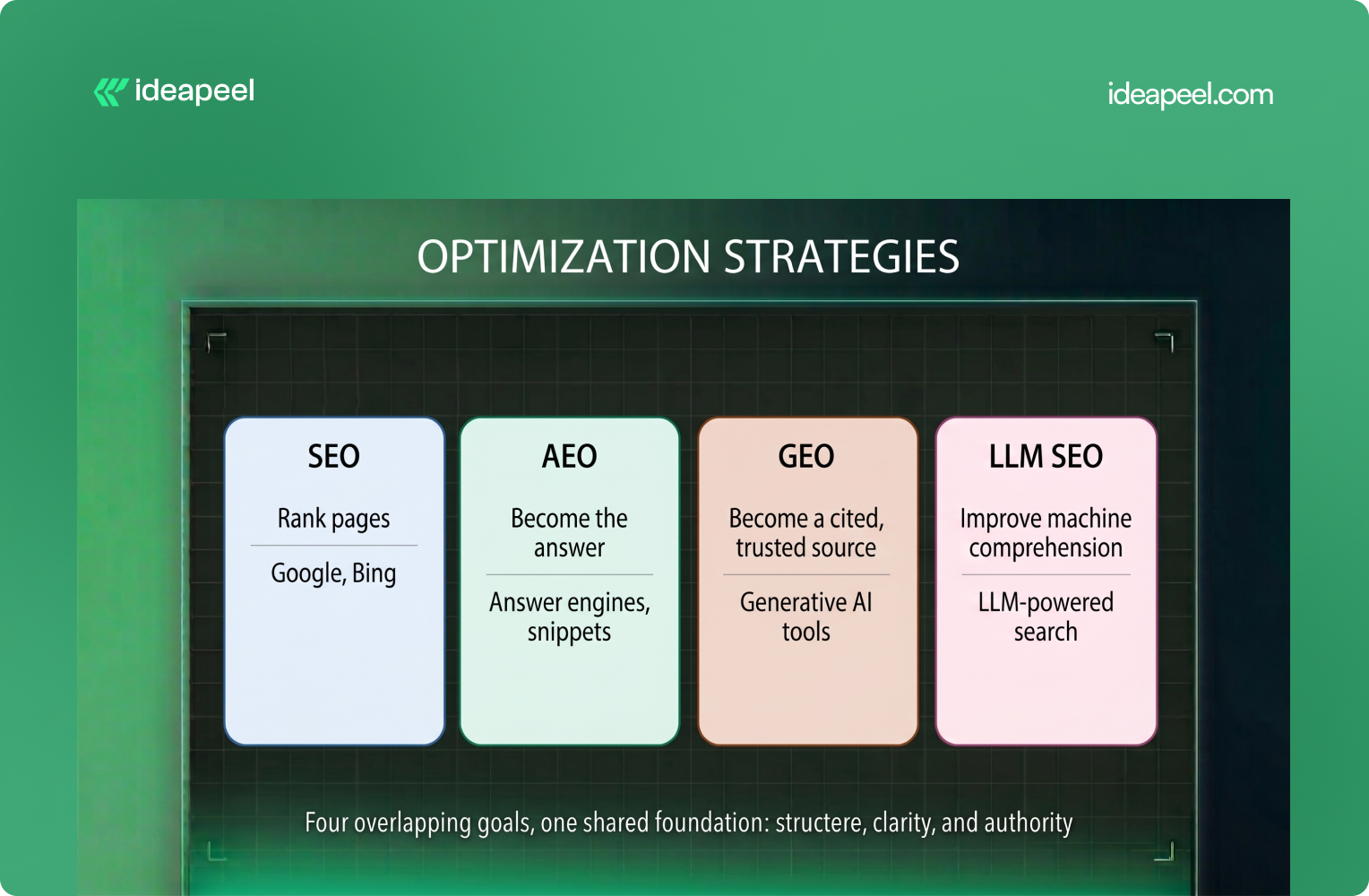
The acronyms are multiplying faster than most teams can track. Here's the short version.
These aren't four competing disciplines. They overlap heavily, and a well-structured Webflow CMS is one of the few assets that genuinely moves the needle on all four at once:
Useful content + clear structure + authority + accessibility + context
The difference is simply how that foundation gets used across different search experiences.
Why CMS Structure Matters More Than You Think
Here's the mental model worth adopting: your CMS shouldn't just store content; it should behave like a structured knowledge system, where every field has a job, and every relationship tells a search engine or AI model something about how your content fits together.
CMS fields → content structure → relationships → context → machine interpretation
Compare two blog post schemas.
Weak CMS setup:
- Title
- Body
- Image
- Author
AEO-structured setup:
- Title
- Short Answer
- Primary Topic
- Search Intent
- Key Takeaways
- Body
- Author + Author Bio
- Category / Topic
- Related Questions
- Related Articles
- Sources
- Updated Date
- SEO Title / Meta Description
- Schema Type
The second version isn't just "more SEO-friendly"; it's a different kind of object. It produces extractable answers, defined entities, and explicit relationships: the three things AI systems look for when deciding whether content is worth citing. That said, more fields don't automatically mean better interpretation; the point isn't field count, it's that your site now carries a clearer underlying information model.
How to Structure a Webflow CMS for AEO
1. Start With Clear Entities, Not Just "Blog Posts"
Think in terms of the real things your content is about: Blog, Author, Category, Topic, Product, Service, Location, Case Study, FAQ. Each deserves its own Collection with its own fields, not a tag buried inside a generic post.
For an agency site, that might look like:
- Service → Webflow Development
- Topic → Webflow SEO
- Author → SEO Specialist
- Case Study → SaaS Website Redesign
Each entity has a distinct purpose, which is far more useful than storing everything in one catch-all Collection.
2. Name Fields for What They Mean, Not What They Are
"Text 1" tells nobody anything, not your team, not a crawler, not an AI model parsing the page's underlying data. Fields like Short Answer, Primary Topic, or Author Expertise do double duty: they keep the CMS easier for humans to manage, and the field name itself acts as a semantic signal for machines.
To be clear: the field name is not itself a ranking factor. What matters is the meaningful information stored inside it; descriptive naming just makes that information easier to maintain consistently.
3. Build Relationships Between Collections
This is where most Webflow sites leave value on the table. A typical setup has fifty isolated blog posts with no formal connective tissue. A structured one looks more like this:
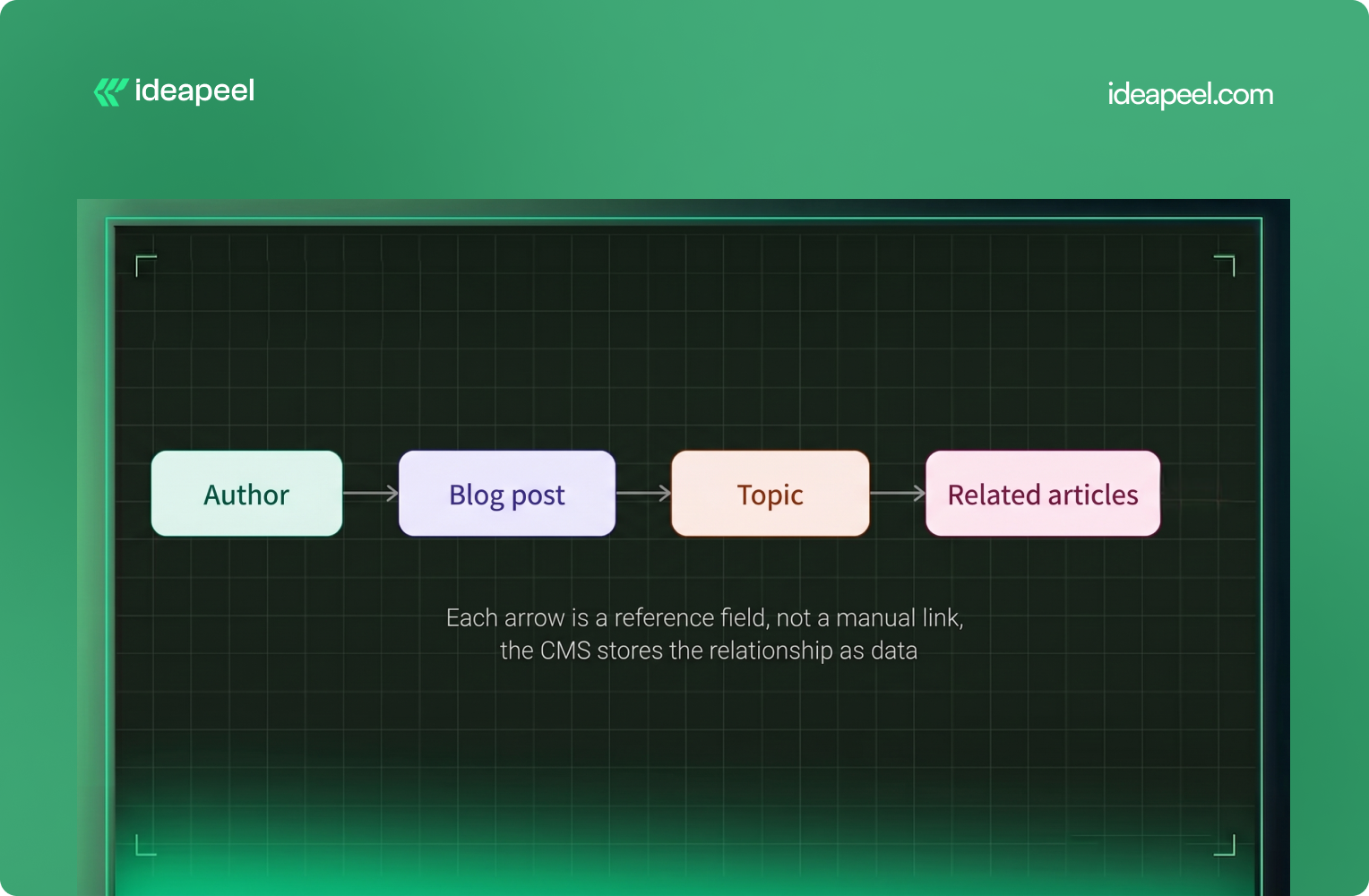
Author → Blog Post → Topic → Related Articles → Product / Service
That's not internal linking for its own sake; it's a content graph. Reference and multi-reference fields let Webflow express "this post belongs to this topic, was written by this author, and relates to these three other posts" as actual data, not just a manually inserted link. Those relationships can also power dynamic related-content sections automatically.
4. Add a Dedicated "Short Answer" Field
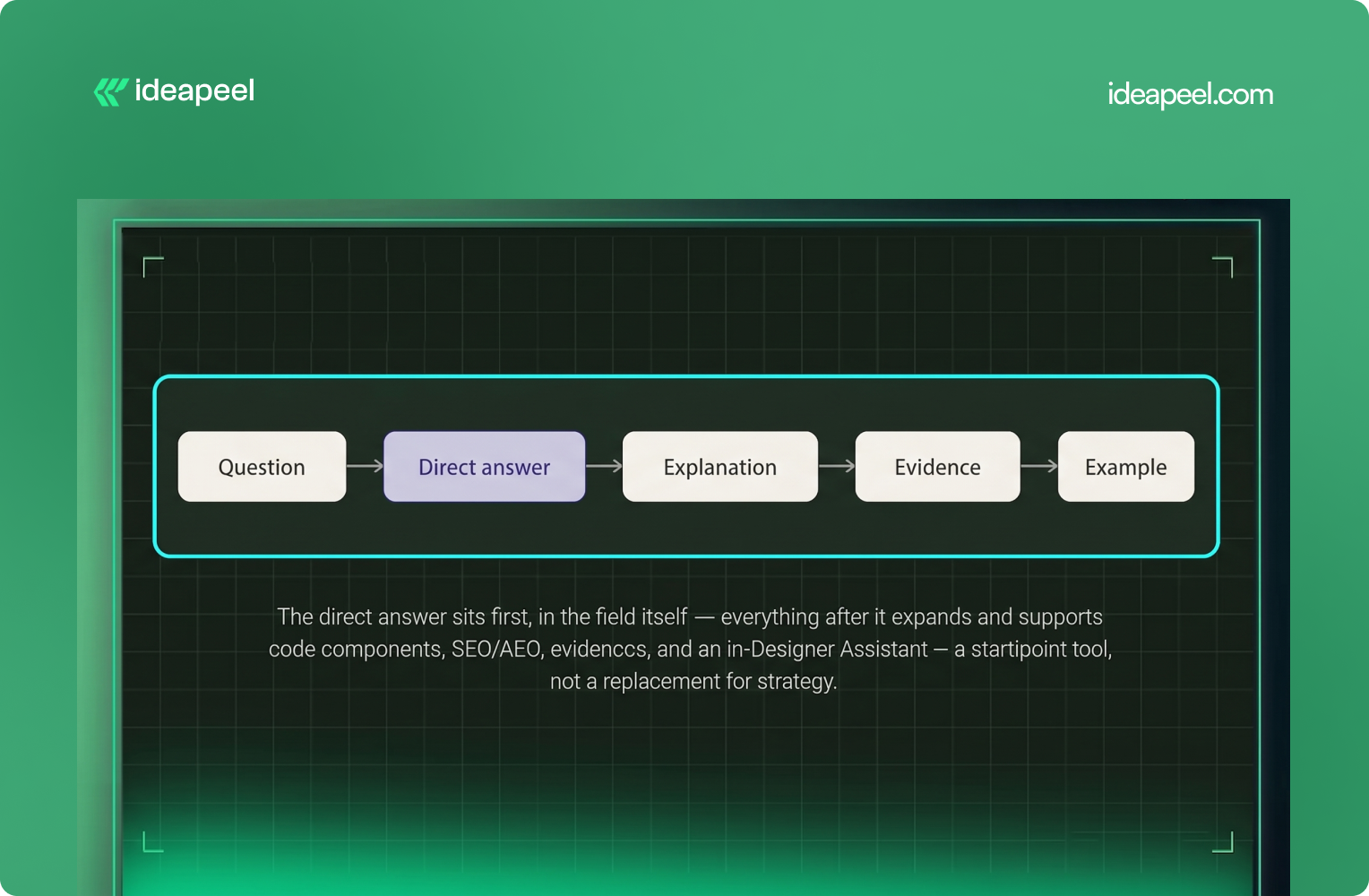
This might be the single highest-leverage change you can make. Create a field, literally called Short Answer, that holds a 40–60 word direct response to the implicit question the post is answering. For example:
What is Webflow AEO? Webflow AEO is the practice of structuring and optimizing Webflow content so search engines and AI answer engines can understand, retrieve, and potentially cite it in search results and AI-generated answers.
Let the rest of the article expand on it from there. Traditional blog structure buries the answer 500 words in; AEO structure puts it first and explains afterward, creating a simple, repeatable pattern:
Question → Direct answer → Explanation → Evidence → Example
5. Add Supporting Fields Where They Genuinely Help
Different content types need different fields; you don't need every field on every Collection.
Using Question-Based Headings the Right Way
Question-based headings help only when they match genuine search intent.
Compare:
- "Webflow CMS Structure" (generic)
- "How Should You Structure Webflow CMS Data for AI Search?" (specific, conversational)
The second version tells readers immediately what the section answers. But don't turn every heading into a question; content should read naturally first, and question framing should follow real search intent rather than force it.
Structuring Content for Google Featured Snippets
Structured CMS fields make it far easier to consistently produce the formats Google tends to pull into snippets: direct-answer paragraphs, numbered and bulleted lists, comparison tables, and clear definitions under question-based headings.
For example:
How do you optimize a Webflow site for AEO?
- Structure your CMS around meaningful content entities.
- Add direct-answer fields.
- Use clear, specific headings.
- Connect related content through relationships.
- Add relevant structured data.
- Confirm crawlability and indexing.
- Demonstrate expertise and supporting evidence.
That's easy for a reader to scan and gives search systems cleanly structured information to extract. But one caveat is worth stating plainly: none of this guarantees a snippet. Google decides what gets featured; CMS structure only improves your odds; it doesn't buy a placement. Any AEO advice that promises otherwise is overselling it.
Schema Markup With Webflow CMS
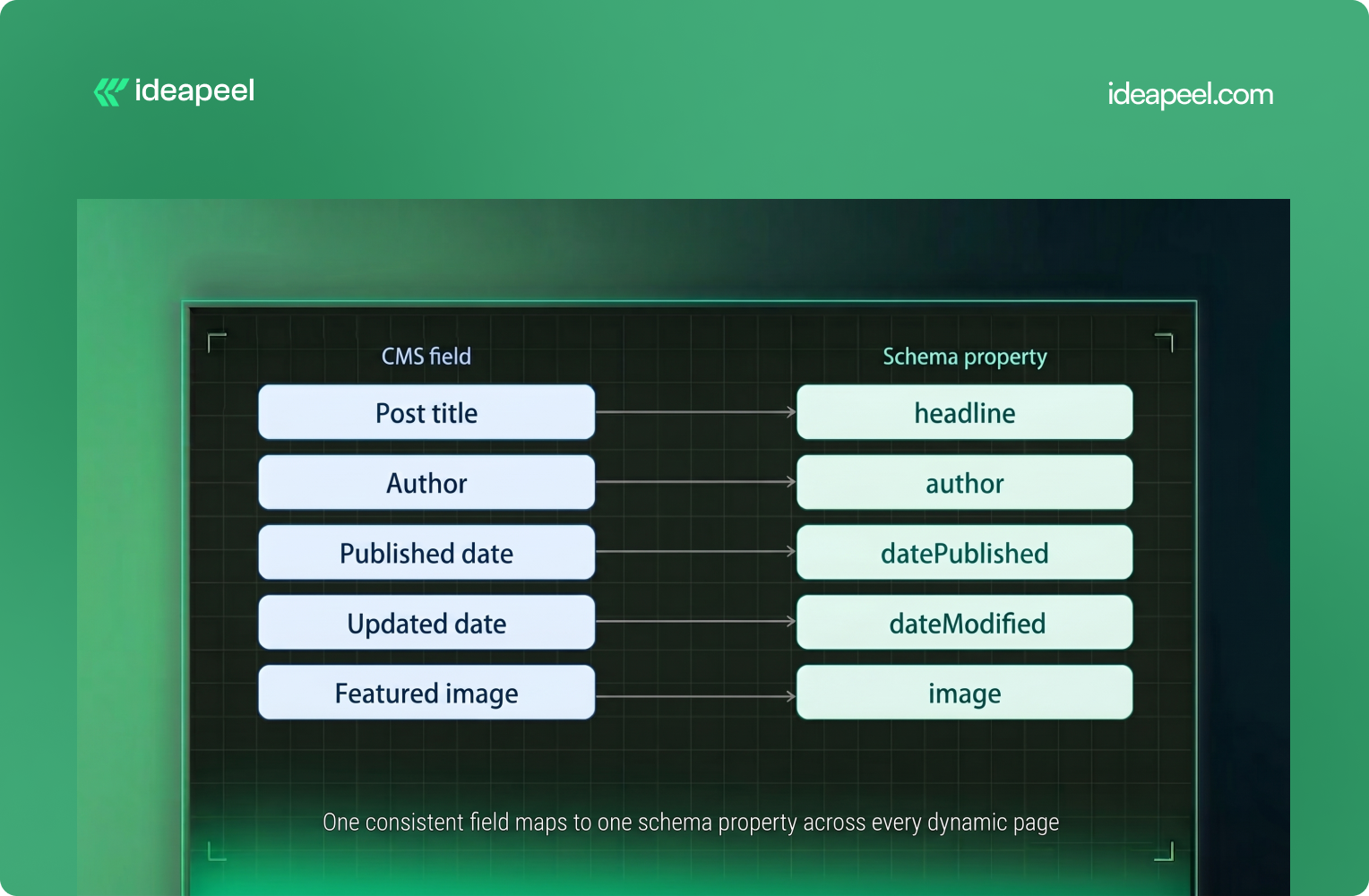
Schema is where CMS structure and machine-readability meet directly. The idea: map CMS fields to schema properties so dynamic pages generate valid structured data automatically, instead of someone hand-coding JSON-LD for every post.
The architecture flows like this:
Webflow CMS → CMS Fields → Collection Template → Dynamic Content → JSON-LD → Search Systems
This scales far better than manually building structured data for every article. One rule matters more than any other here: consistency. If your CMS shows one publish date and your structured data shows another, you've created conflicting signals; your visible content and your schema should describe the same page the same way.
Which Schema Types Should You Use?
- Article, the baseline for editorial blog content.
- Product, for genuine product pages.
- Organization / Person, for company and author information.
- BreadcrumbList, for page hierarchy and navigation.
- LocalBusiness, for eligible local business pages.
- FAQPage, only when a page genuinely contains qualifying question-and-answer content that's visible on the page, not as a blanket tactic.
Relevant schema beats maximum schema. Tagging every page with every schema type you can think of doesn't help; it just adds noise, and structured data never guarantees a rich result or an AI citation on its own.
[[inner-cta]]
Internal Linking as an AEO and GEO Signal
Internal links do more than pass authority around your site. They tell search engines and AI systems how your topics relate to each other, which pages support which claims, where the depth is, and how confidently a page can be trusted as part of a larger body of expertise.
A simple topic cluster might look like:
Webflow SEO → Webflow CMS SEO → Webflow Schema → Webflow AEO → Webflow GEO → Webflow AI Search
A fuller cluster structure:
- Pillar Page: The Complete Webflow SEO & AEO Guide
- Supporting Articles: Webflow SEO Checklist, Webflow CMS SEO, Webflow Schema Markup, Webflow AEO, Webflow GEO, Webflow AI Overviews, Webflow Technical SEO, Webflow Structured Data
Built out with CMS relationship fields rather than one-off manual links, this becomes a genuine content graph, the kind of thing that's much harder to fake with isolated posts, no matter how well each one is individually optimized. The key is relevance: link when another page genuinely helps the reader, not to inflate link counts.
Making Content Easier for LLMs to Understand
AI systems need context to interpret information correctly. A few habits help:
Use clear entity names. Instead of "It lets you build websites faster," write "Webflow allows teams to visually design, manage, and publish websites." Naming the subject explicitly removes ambiguity.
Keep terminology consistent. If you call something "Webflow CMS," don't randomly switch to "Webflow database" or "Webflow content engine" across different posts; inconsistent terms can read as different entities.
State relationships explicitly. Instead of assuming a connection is obvious, spell it out: "Webflow CMS is the content management system used to create and manage dynamic content in Webflow." Clear language helps people and machines interpret the same page the same way.
Optimizing for ChatGPT Search and Google AI Overviews
There's no reliable trick that guarantees a ChatGPT citation. A more realistic goal is making your content accessible, useful, clear, and trustworthy. OpenAI's publisher guidance notes that public websites can appear in ChatGPT Search and that site owners can allow its crawler to access content for search discovery, but allowing crawling doesn't guarantee a specific ranking, placement, or citation.
For Google AI Overviews, don't treat it as a separate game with separate rules. Strong fundamentals still carry the weight:
Technical SEO + useful content + structured information + entity clarity + topical authority + strong internal linking = better AI-search readiness
Schema doesn't get you into AI Overviews on its own; it helps machines parse structured information, while inclusion is still governed by relevance and quality signals the platform controls. For both Google and ChatGPT, the realistic framing is "increase the likelihood your content can be discovered and cited," not "get ranked."
AEO vs. GEO, One More Time
Worth separating clearly, because they call for different work:
- AEO asks: Can an AI system extract a clean, usable answer from this page?
- GEO asks: Does that AI system recognize this brand as a credible source worth citing at all?
CMS structure, short answers, clear fields, and defined relationships mostly serve AEO. Author credibility, original research, consistent brand information, and external citations mostly serve GEO. Both share a lot of the same underlying signals (clear content, entity clarity, crawlability). Still, you need both, and neither substitutes for the other.
Authority Still Matters More Than Field Names
Worth saying directly: CMS structure helps machines understand your content. It does very little for whether they trust it. That's a separate job, and it's the one most AEO checklists gloss over.
Where relevant, your content should reflect:
- Experienced authors with real bios
- Relevant, disclosed expertise
- Original research or first-party data
- Case studies and expert commentary
- Credible external references
- Transparent update history
- Mentions or backlinks from credible sites
This is E-E-A-T by another name, and no amount of clever field architecture replaces it. A simple way to frame the whole system:
CMS structure = context. Content quality = usefulness. Authority = trust. You need all three.
[[question-block]]
Crawlability: Robots.txt, Sitemaps, and llms.txt
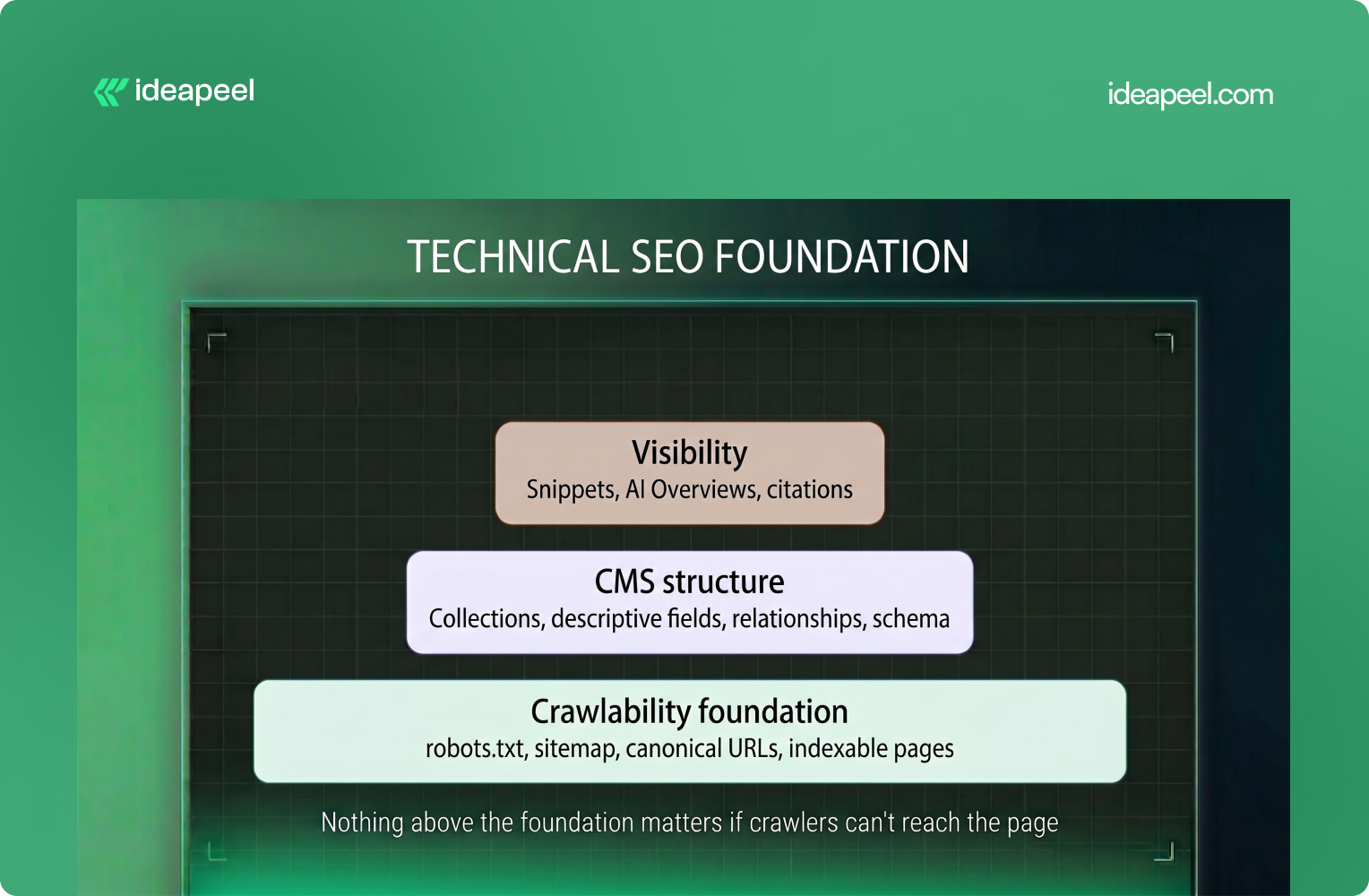
None of this architecture matters if important pages aren't accessible to crawlers. Review your:
- robots.txt
- XML sitemap
- Canonical URLs and indexing directives
- Internal linking and URL structure
- Page load performance
You may also come across llms.txt, a proposed way of providing AI-oriented information about a site. It's worth having, but it shouldn't be the center of your AEO strategy; a file can't replace useful content, strong information architecture, crawlability, internal linking, or authority. Treat machine accessibility as one part of a broader technical strategy, not a shortcut around it.
A Practical Webflow AEO Checklist
CMS
- Clear, purpose-built Collections
- Descriptive field names (not "Text 1")
- Logical relationships between Collections
- Author, topic, and category fields on every content type
- Direct-answer fields for important content types
On-Page Content
- One clear H1, question-based H2s where intent supports it
- Direct answers near the top
- Short paragraphs, lists, and tables where they genuinely help
- Relevant internal links supported by real evidence
Technical SEO
- Unique titles and meta descriptions
- Canonical URLs, sitemap, robots.txt in order
- Valid, accurate JSON-LD schema
- Fast, crawlable pages
AI Readiness
- AI crawlers allowed where visibility is wanted
- Consistent terminology for key entities
- Strong topical clusters instead of isolated posts
- AI visibility monitored where reliable tooling exists
Common Mistakes Worth Avoiding
A few claims show up constantly in AEO content that don't hold up:
- "Schema guarantees a snippet or a ChatGPT citation." It improves eligibility and machine understanding, nothing more.
- "llms.txt alone will get you ranked." It's a small accessibility signal, not a ranking mechanism.
- "AEO replaces SEO." It builds on SEO fundamentals; it doesn't substitute for them.
- "Stuffing keywords into every CMS field helps." It doesn't , it just adds noise for both readers and machines.
- "A bigger CMS is a better CMS." Only create fields that represent genuinely useful information.
- "More schema is always better." Structured data should accurately describe the page, not maximize markup.
The more defensible version: AEO builds on solid SEO fundamentals while improving how clearly your content can be understood, extracted, and represented by AI systems. That's a less exciting sentence than "guaranteed AI visibility" , but it's the true one.
Measuring Whether Any of This Is Working
Track it the same way you'd track any SEO initiative, plus a few AI-specific signals.
Organic search: impressions, clicks, rankings, featured snippet appearances, organic traffic.
AI search (where reliable data is available): referral traffic from AI tools, whether your brand appears when you query ChatGPT or Perplexity directly about topics you cover, and AI visibility tooling that platforms, including Webflow itself, have started building natively.
One AI answer citing your page isn't proof of a working strategy. Look for trends over time, not single data points.
The Real Takeaway
Don't just optimize the page. Optimize the CMS behind it.
The strongest AEO-ready websites are built with clear Webflow Collections, structured fields, and connected content from the start. This makes information easier for both people and AI systems to understand.
At ideapeel, we build Webflow websites with SEO, AEO, CMS architecture, and conversion in mind, not as separate tasks.
Explore our Webflow SEO Guide, Webflow SEO Checklist, or Webflow SEO Agency Guide for B2B SaaS to go deeper.
Need a Webflow site built for search and AI? Explore ideapeel's services or contact us.
[[last-cta]]