SaaS Website Migration From WordPress to Webflow [SEO-Safe Guide]

Post By
Shazzad Shoikat
Published Date
Jan 25, 2026
Last Updated
Jan 25, 2026
Category
Migration to Webflow

Summarize with Ai

ChatGPT logo with intertwined hexagonal shape and text.Grok logo featuring a stylized crossed-out eye symbol followed by the word 'Grok'.Claude logo with an abstract orange starburst icon to the left of the word 'Claude' in white text.Perplexity logo.Google AI logo with multicolored pattern and text.

Key Takeaways

  • SaaS website migration success only with a complete backup and a well-planned process.
  • Preserve SEO rankings, backlinks, and organic traffic during your WordPress to Webflow transition.
  • Maintain enterprise SaaS functionality like SSO, APIs, payment gateways, dashboards, and security.
  • Partner with a B2B SaaS Webflow agency to ensure a smooth migration without SEO loss, broken links, or security issues.

SaaS website migration is a technical process that focuses on preserving SEO, avoiding broken links, managing integrations, and ensuring security compliance for B2B and enterprise SaaS businesses.

You may fear losing search rankings, experiencing a drop in user subscriptions, or losing critical CMS data.

This guide explains an SEO-safe WordPress to Webflow migration, common mistakes to avoid, and a clear Webflow checklist. So your SaaS site can move safely while gaining speed, scalability, an easy CMS, and full design control.

What is SaaS Website Migration

SaaS website migration is the process of moving a SaaS marketing website from one CMS to another while preserving SEO ranking, custom integration, and data security.

SaaS websites are different from standard marketing sites. Because they support demos, sign-ups, content hubs, and product-related workflows.

For B2B SaaS teams, WordPress to Webflow migration is the most common upgrade.  

Due to better performance, fewer plugins isssues, and easier content management for marketing teams, B2B and enterprise SaaS choose Webflow over WordPress.

How to Prepare for SaaS Website Migration

Before migrating to a Webflow CMS, it's important to plan SaaS migration strategies.

Preparing for a SaaS website migration requires auditing all pages, identifying SEO-critical assets, documenting integrations, backing up data, and defining clear post-migration KPIs.

Without this preparation, SaaS companies risk SEO losses, broken workflows, and reduced conversions.

1. Audit your Current SaaS Site

Use SEO tools like Screaming Frog, MOZ and run a crawl of your domain.

This crawl gives you a list of all the pages of all the sites that exist on your domain, like:

  • Blog Posts
  • Landing Pages
  • Media and Images
  • PDF and downloadables assets

Export all crawl data into a Google Spreadsheet. This document becomes your migration blueprint and prevents missing important pages during the transition.

2. Identify Core SaaS Functionality and Workflows

SaaS websites often contain critical workflows that support revenue and user acquisition. These must be documented early to avoid functional gaps after migration.

Pay special attention to:

  • Product dashboards and logged-in experiences
  • Subscription flows and pricing logic
  • Demo, trial, and contact forms
  • Gated content and lead capture mechanisms

3. Markdown SEO Pages

Highlighted each product page and blog page that has high authority for SEO. Because you don't want to lose SEO ranking, traffic and constant leads of those pages.

 Use Google Search Console and Google Analytics to identify pages with:

  • High impressions and clicks
  • Strong keyword ranking
  • Existing backlinks
  • Consistent lead generation

Double-check with pages with SEO keyword tools like Semrush and Ahrefs.

4. Back Up the Full Website Data

Ensure you have a backup of the existing WordPress site, all data, and plugins are securely backed up. 

Your backup should include:

  • Website files and databases
  • Plugins and configuration
  • Images, videos, and media assets
  • User data and form submissions
  • SEO elements such as titles, meta descriptions, redirects, and anchor text

5. List Custom Integration and Tool

Thinks what the tools, CRM integration, and SaaS data need to migrate or rebuild in Webflow.

Create a detailed list of:

  • CRM systems (HubSpot, Salesforce, Pipedrive)
  • Payment gateways (Stripe, Paddle)
  • Authentication systems
  • Analytics and tracking tools
  • API connections and third-party services

Documenting dependencies helps ensure all integrations are rebuilt or connected correctly inside Webflow without disrupting functionality.

6. Sets Clear Goals and KPI 

Most SaaS website migrations fail without defining a clear result after migration.

Common SaaS site migration goals include:

  • Preserving or improving SEO rankings
  • Increasing demo or free trial sign-ups
  • Reducing friction in user journeys
  • Improving site speed and performance
  • Simplifying CMS management for the marketing team
  • Reducing reliance on developers for routine updates

Translate these goals into measurable KPIs, such as:

  • 20% increase in organic rankings within 60 days
  • Reducing page load time from 5 seconds to under 2 seconds

Track KPIs before and after migration for performance review

Bonus: Download the WordPress to Webflow Migration checklist, including how to handle redirects and SEO.

How to Migrate Your SaaS Website: Step-by-Step Process

You now have full backup, data, and clear goals for migrating the SaaS Website to Webflow.

Let's break down how Webflow agencies like ideapeel take care of B2B SaaS Webflow SEO preservation when migrating to a SaaS WordPress website.

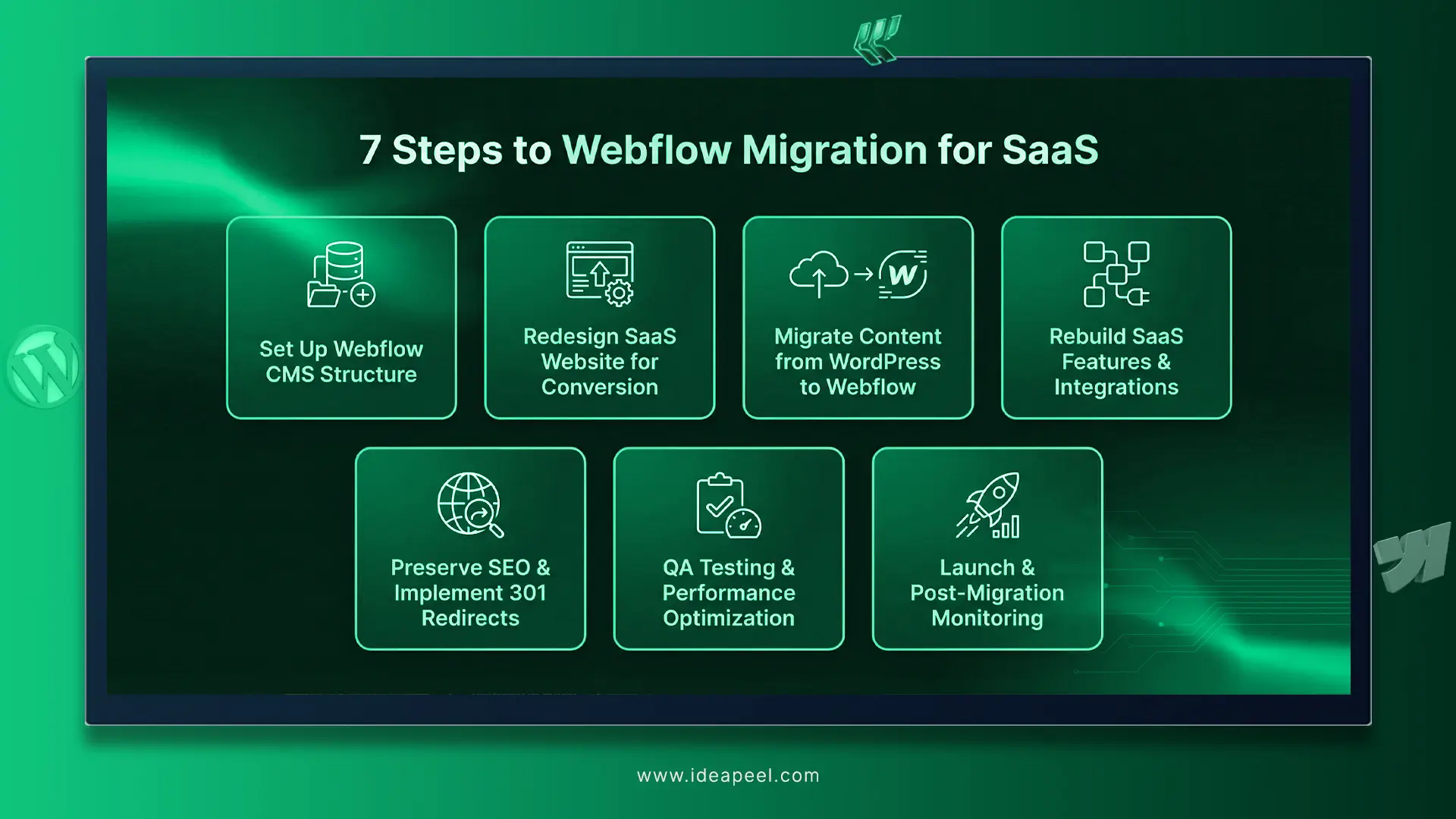
Step 1: Set up Webflow CMS Structure

Before jumping to Webflow website build, it's crucial to create a CMS collection similar to a WordPress site.

So, your marketing team feels a similar workflow without being overwhelmed. And, it will make the migration process go smoothly without errors or broken links.

Plan collection for blog posts, product pages, resource and landing pages. Define fields for SEO metadata, title tag, meta description, ALT text, and slug.

Step 2: Redesign SaaS Website 

Webflow migration is the best time to optimise SaaS website conversion rates, bounce rates, user experience, and SaaS dashboard, subscription flows complexity. 

Redesigning an enterprise SaaS marketing site needs scalability in mind, which most developers or agencies skip. 

Team ideapeel refreshes or redesigns enterprise SaaS product sites for SaaS provider with conversion mapping and reusable components. 

So, SaaS website redesign for startups and especially enterprise companies should focus on conversion, higher subscription and lower churn rates.

Pro Tip: Analyse Google Analytics to identify pages with high bounce rates and redesign them for better engagement.

Step 3: Migrate Content from SaaS WordPress site to Webflow

Export the full WordPress site’s content, like pages and custom folders, with WP All Export. Then download it as a CSV.

Next, import the CSV file into Webflow CMS. 

Explore detailed WordPress to Webflow migration steps for a smooth transition.

Step 4: Rebuild SaaS Features and Integration in Webflow

SaaS functionality sign-up/login forms, Subscription flows, dashboards, and user portals need to be carefully rebuilt in Webflow or connected through a secure API. 

External services such as CRMs, payment gateways like Stripe or PayPal, analytics, and marketing automation tools are reconnected and tested to work seamlessly with the new Webflow front end. 

Test every integration thoroughly before launch.

Step 5: Preserve SEO and 301 Redirect 

This is where Webflow migrations either win or crash.

Every old WordPress URL is mapped to its new Webflow version using 301 redirects

SEO titles, meta descriptions, internal links, image alt text, and sitemap structures are transferred into Webflow.

Then, Google Search Console is updated so Google can re-index the site without ranking loss.

Step 6: QA Testing and Performance Optimization

Before launch, the entire SaaS website is thoroughly tested to catch layout issues, broken links, form errors, and legacy systems CMS inconsistencies. 

Performance, data migration, security, and responsiveness are optimized to ensure fast load times, strong Core Web Vitals, and a smooth user experience across all devices.

Step 7: Launch & Post-Migration Monitoring

After launch, the site is closely monitored using analytics and SEO tools to track rankings, traffic and user behavior. 

Any indexing, redirect, or performance issues are resolved quickly to ensure a stable migration and continuous SaaS website growth on Webflow.

[[inner-cta]]

Enterprise SaaS Website Migration: What Changes?

Migrating an enterprise SaaS website to Webflow goes far beyond design or CMS updates.

Enterprise platforms depend on authentication systems, integrations, and security layers that must remain stable during migration. Webflow typically powers the marketing layer, while critical product logic stays securely in your backend.

SSO and Authentication Flows

Enterprise SaaS sites often use SSO providers like Okta or Azure AD. During migration, login and onboarding flows must continue routing users correctly without breaking access rules. 

API and Custom Integrations

Every integration must be audited, reconnected, and tested to ensure forms, demos, and gated content trigger the same backend actions as before.

CDN, Performance and Uptime

Enterprise traffic requires global speed and reliability. Webflow’s CDN improves performance, but migrating to SaaS site still needs traffic testing, uptime monitoring, and a controlled launch plan to avoid disruptions during campaigns or releases.

Security and Certificates

Enterprise-grade security certificates for SaaS vendors are crucial.

SSL, subdomains, security headers, data security and regulatory compliance must be preserved. Webflow should be configured to match existing enterprise security standards, not simplify them.

Common Mistakes to Avoid When Migrating a SaaS Website to Webflow

Common mistakes include ignoring SEO, overcomplicating with code, skipping scalability, breaking integrations, and launching without proper testing. Here's some best practices for successful migration.

1.Rebuilding the WordPress Website Entirely

Most Agency or freelance web developers directly jump to Webflow and recreate your WordPress site entirely in Webflow.

They don't care about how your SaaS website functions, workflows, or CMS logic. 

These common scenarios often drop off ranking, broken links, SaaS integration, CMS complexity after migration.

As a result, your marketing teams are frustrated when adding content, small updates and you blame the Webflow migration. 

Solution: Hiring a B2B SaaS Webflow Agency is the solution to a smooth transition.

2. Overengineering with Custom Code

You don't want a complicated Webflow CMS after escaping from plugin headaches, right?

But, some developers often overuse Webflow design with custom code, code embed and workarounds. 

And, here you need constant help from the developer for small updates, edit needs.

So, ask a question first– Will this website be fully editable with my non-technical marketing team after migration?

Solution: A good SaaS Webflow web development will ensure reusable components, a clear CMS structure, more scalability, and an easy-to-manage CMS for your SaaS marketing team

3. Ignoring Scalability

Skip the building style guide page in Webflow is terrible for continuous Q and A

Without a proper design system, every new page structure got overwhelmed. 

You can't find out the right size font,  button colour, or CTA alignment. This inconsistency slows down your landing page, or the copy requires design Q&A.

Solution: Ask for a reusable component UI for Navigation Bars, footers, CTAs and sections. 

4. Not Accounting for SaaS Integrations

Many developers rebuild the site but break or oversimplify integrations, causing data loss or funnel gaps.

Then sales teams ask: Why have leads stopped syncing?

A SaaS website is deeply connected to CRMs, analytics tools, onboarding flows, email automation, and lead tracking systems.

So, overlooking SaaS integration is a major mistake during the migration process.

Solution: Rebuild and test each integration in Webflow staging, not production. Submit test leads and verify data flows correctly into your CRM and analytics dashboards before going live.

5. Launching without a Post-Migration Plan

Launching the site without a post-migration validation plan creates long-term friction. 

Many agencies consider the job done once the site goes live, without thorough QA, performance monitoring, or documentation.

How Much Does SaaS Website Migration Cost?

SaaS website migration typically costs $2,000–$20,000, depending on the SaaS company's stage, complex SaaS websites, custom integration complexity, enterprise security requirements, and CMS structure. 

Startup SaaS Website Migration Cost: $2,000–$4,000

  • Basic CMS setup and content migration
  • Light redesign or template-based build
  • Essential SEO preservation and redirects
  • Few or no custom integrations

Mid-size B2B SaaS Website Migration Cost: $5,000–$8,000

  • Blog, resources, and multiple landing pages
  • Custom CMS structure for marketing teams
  • SEO-safe migration to protect rankings
  • CRM, analytics, and marketing tool integrations
  • Conversion-focused redesign

Enterprise SaaS Website Redesign+ Migration Cost:$8,000–$12,000+

  • Large CMS collections and complex page types
  • Custom integrations, APIs, SSO or auth flows
  • Enterprise security and performance requirements
  • Phased migration with staging and QA
  • Post-launch monitoring and optimisation

Get a custom quote now

Ready to Migrate Your SaaS Website?

SaaS website migration requires technical expertise rather than just redesign or development tactics.

Even small migration mistakes can disrupt team workflows, compromise user data, or cause a complete SEO drop.

That's why having a Webflow migration agency with hands-on experience in SaaS and enterprise-grade websites is essential.

You can choose ideapeel, trusted by 50+ B2B SaaS companies.

ideapeel , a Webflow agency for B2B SaaS, provides Webflow website design, redesign, and migration services.

So, ideapeel team can ease your migration headaches without causing SEO drops, loss of technical credibility, or integration issues.

Reach out to us. And, get your free customize Webflow migration checklist and cost estimate today.

[[last-cta]]

SaaS Website Migration FAQs

What are the benefits of migrating a SaaS website to Webflow?
Can my marketing team manage content in Webflow without technical help?
How much does SaaS website migration cost?
How long does a SaaS website migration typically take?
Free AI Powered website audit

Enter your website URL to receive a detailed website analysis report in just 5 minutes!

Invalid website URL
Analyze My Website Now

Related Articles

See More Articles
Migration to Webflow
SaaS Website Migration From WordPress to Webflow [SEO-Safe Guide]
Jan 25, 2026
August 31,2024

SaaS website migration is a technical process that focuses on preserving SEO, avoiding broken links, managing integrations, and ensuring security compliance for B2B and enterprise SaaS businesses.

You may fear losing search rankings, experiencing a drop in user subscriptions, or losing critical CMS data.

This guide explains an SEO-safe WordPress to Webflow migration, common mistakes to avoid, and a clear Webflow checklist. So your SaaS site can move safely while gaining speed, scalability, an easy CMS, and full design control.

What is SaaS Website Migration

SaaS website migration is the process of moving a SaaS marketing website from one CMS to another while preserving SEO ranking, custom integration, and data security.

SaaS websites are different from standard marketing sites. Because they support demos, sign-ups, content hubs, and product-related workflows.

For B2B SaaS teams, WordPress to Webflow migration is the most common upgrade.  

Due to better performance, fewer plugins isssues, and easier content management for marketing teams, B2B and enterprise SaaS choose Webflow over WordPress.

How to Prepare for SaaS Website Migration

Before migrating to a Webflow CMS, it's important to plan SaaS migration strategies.

Preparing for a SaaS website migration requires auditing all pages, identifying SEO-critical assets, documenting integrations, backing up data, and defining clear post-migration KPIs.

Without this preparation, SaaS companies risk SEO losses, broken workflows, and reduced conversions.

1. Audit your Current SaaS Site

Use SEO tools like Screaming Frog, MOZ and run a crawl of your domain.

This crawl gives you a list of all the pages of all the sites that exist on your domain, like:

  • Blog Posts
  • Landing Pages
  • Media and Images
  • PDF and downloadables assets

Export all crawl data into a Google Spreadsheet. This document becomes your migration blueprint and prevents missing important pages during the transition.

2. Identify Core SaaS Functionality and Workflows

SaaS websites often contain critical workflows that support revenue and user acquisition. These must be documented early to avoid functional gaps after migration.

Pay special attention to:

  • Product dashboards and logged-in experiences
  • Subscription flows and pricing logic
  • Demo, trial, and contact forms
  • Gated content and lead capture mechanisms

3. Markdown SEO Pages

Highlighted each product page and blog page that has high authority for SEO. Because you don't want to lose SEO ranking, traffic and constant leads of those pages.

 Use Google Search Console and Google Analytics to identify pages with:

  • High impressions and clicks
  • Strong keyword ranking
  • Existing backlinks
  • Consistent lead generation

Double-check with pages with SEO keyword tools like Semrush and Ahrefs.

4. Back Up the Full Website Data

Ensure you have a backup of the existing WordPress site, all data, and plugins are securely backed up. 

Your backup should include:

  • Website files and databases
  • Plugins and configuration
  • Images, videos, and media assets
  • User data and form submissions
  • SEO elements such as titles, meta descriptions, redirects, and anchor text

5. List Custom Integration and Tool

Thinks what the tools, CRM integration, and SaaS data need to migrate or rebuild in Webflow.

Create a detailed list of:

  • CRM systems (HubSpot, Salesforce, Pipedrive)
  • Payment gateways (Stripe, Paddle)
  • Authentication systems
  • Analytics and tracking tools
  • API connections and third-party services

Documenting dependencies helps ensure all integrations are rebuilt or connected correctly inside Webflow without disrupting functionality.

6. Sets Clear Goals and KPI 

Most SaaS website migrations fail without defining a clear result after migration.

Common SaaS site migration goals include:

  • Preserving or improving SEO rankings
  • Increasing demo or free trial sign-ups
  • Reducing friction in user journeys
  • Improving site speed and performance
  • Simplifying CMS management for the marketing team
  • Reducing reliance on developers for routine updates

Translate these goals into measurable KPIs, such as:

  • 20% increase in organic rankings within 60 days
  • Reducing page load time from 5 seconds to under 2 seconds

Track KPIs before and after migration for performance review

Bonus: Download the WordPress to Webflow Migration checklist, including how to handle redirects and SEO.

How to Migrate Your SaaS Website: Step-by-Step Process
You now have full backup, data, and clear goals for migrating the SaaS Website to Webflow.

Let's break down how Webflow agencies like ideapeel take care of B2B SaaS Webflow SEO preservation when migrating to a SaaS WordPress website.

Step 1: Set up Webflow CMS Structure

Before jumping to Webflow website build, it's crucial to create a CMS collection similar to a WordPress site.

So, your marketing team feels a similar workflow without being overwhelmed. And, it will make the migration process go smoothly without errors or broken links.

Plan collection for blog posts, product pages, resource and landing pages. Define fields for SEO metadata, title tag, meta description, ALT text, and slug.

Step 2: Redesign SaaS Website 

Webflow migration is the best time to optimise SaaS website conversion rates, bounce rates, user experience, and SaaS dashboard, subscription flows complexity. 

Redesigning an enterprise SaaS marketing site needs scalability in mind, which most developers or agencies skip. 

Team ideapeel refreshes or redesigns enterprise SaaS product sites for SaaS provider with conversion mapping and reusable components. 

So, SaaS website redesign for startups and especially enterprise companies should focus on conversion, higher subscription and lower churn rates.

Pro Tip: Analyse Google Analytics to identify pages with high bounce rates and redesign them for better engagement.

Step 3: Migrate Content from SaaS WordPress site to Webflow

Export the full WordPress site’s content, like pages and custom folders, with WP All Export. Then download it as a CSV.

Next, import the CSV file into Webflow CMS. 

Explore detailed WordPress to Webflow migration steps for a smooth transition.

Step 4: Rebuild SaaS Features and Integration in Webflow

SaaS functionality sign-up/login forms, Subscription flows, dashboards, and user portals need to be carefully rebuilt in Webflow or connected through a secure API. 

External services such as CRMs, payment gateways like Stripe or PayPal, analytics, and marketing automation tools are reconnected and tested to work seamlessly with the new Webflow front end. 

Test every integration thoroughly before launch.

Step 5: Preserve SEO and 301 Redirect 

This is where Webflow migrations either win or crash.

Every old WordPress URL is mapped to its new Webflow version using 301 redirects

SEO titles, meta descriptions, internal links, image alt text, and sitemap structures are transferred into Webflow.

Then, Google Search Console is updated so Google can re-index the site without ranking loss.

Step 6: QA Testing and Performance Optimization

Before launch, the entire SaaS website is thoroughly tested to catch layout issues, broken links, form errors, and legacy systems CMS inconsistencies. 

Performance, data migration, security, and responsiveness are optimized to ensure fast load times, strong Core Web Vitals, and a smooth user experience across all devices.

Step 7: Launch & Post-Migration Monitoring

After launch, the site is closely monitored using analytics and SEO tools to track rankings, traffic and user behavior. 

Any indexing, redirect, or performance issues are resolved quickly to ensure a stable migration and continuous SaaS website growth on Webflow.

[[inner-cta]]

Enterprise SaaS Website Migration: What Changes?

Migrating an enterprise SaaS website to Webflow goes far beyond design or CMS updates.

Enterprise platforms depend on authentication systems, integrations, and security layers that must remain stable during migration. Webflow typically powers the marketing layer, while critical product logic stays securely in your backend.

SSO and Authentication Flows

Enterprise SaaS sites often use SSO providers like Okta or Azure AD. During migration, login and onboarding flows must continue routing users correctly without breaking access rules. 

API and Custom Integrations

Every integration must be audited, reconnected, and tested to ensure forms, demos, and gated content trigger the same backend actions as before.

CDN, Performance and Uptime

Enterprise traffic requires global speed and reliability. Webflow’s CDN improves performance, but migrating to SaaS site still needs traffic testing, uptime monitoring, and a controlled launch plan to avoid disruptions during campaigns or releases.

Security and Certificates

Enterprise-grade security certificates for SaaS vendors are crucial.

SSL, subdomains, security headers, data security and regulatory compliance must be preserved. Webflow should be configured to match existing enterprise security standards, not simplify them.

Common Mistakes to Avoid When Migrating a SaaS Website to Webflow

Common mistakes include ignoring SEO, overcomplicating with code, skipping scalability, breaking integrations, and launching without proper testing. Here's some best practices for successful migration.

1.Rebuilding the WordPress Website Entirely

Most Agency or freelance web developers directly jump to Webflow and recreate your WordPress site entirely in Webflow.

They don't care about how your SaaS website functions, workflows, or CMS logic. 

These common scenarios often drop off ranking, broken links, SaaS integration, CMS complexity after migration.

As a result, your marketing teams are frustrated when adding content, small updates and you blame the Webflow migration. 

Solution: Hiring a B2B SaaS Webflow Agency is the solution to a smooth transition.

2. Overengineering with Custom Code

You don't want a complicated Webflow CMS after escaping from plugin headaches, right?

But, some developers often overuse Webflow design with custom code, code embed and workarounds. 

And, here you need constant help from the developer for small updates, edit needs.

So, ask a question first– Will this website be fully editable with my non-technical marketing team after migration?

Solution: A good SaaS Webflow web development will ensure reusable components, a clear CMS structure, more scalability, and an easy-to-manage CMS for your SaaS marketing team

3. Ignoring Scalability

Skip the building style guide page in Webflow is terrible for continuous Q and A

Without a proper design system, every new page structure got overwhelmed. 

You can't find out the right size font,  button colour, or CTA alignment. This inconsistency slows down your landing page, or the copy requires design Q&A.

Solution: Ask for a reusable component UI for Navigation Bars, footers, CTAs and sections. 

4. Not Accounting for SaaS Integrations

Many developers rebuild the site but break or oversimplify integrations, causing data loss or funnel gaps.

Then sales teams ask: Why have leads stopped syncing?

A SaaS website is deeply connected to CRMs, analytics tools, onboarding flows, email automation, and lead tracking systems.

So, overlooking SaaS integration is a major mistake during the migration process.

Solution: Rebuild and test each integration in Webflow staging, not production. Submit test leads and verify data flows correctly into your CRM and analytics dashboards before going live.

5. Launching without a Post-Migration Plan

Launching the site without a post-migration validation plan creates long-term friction. 

Many agencies consider the job done once the site goes live, without thorough QA, performance monitoring, or documentation.

How Much Does SaaS Website Migration Cost?

SaaS website migration typically costs $2,000–$20,000, depending on the SaaS company's stage, complex SaaS websites, custom integration complexity, enterprise security requirements, and CMS structure. 

Startup SaaS Website Migration Cost: $2,000–$4,000

  • Basic CMS setup and content migration
  • Light redesign or template-based build
  • Essential SEO preservation and redirects
  • Few or no custom integrations

Mid-size B2B SaaS Website Migration Cost: $5,000–$8,000

  • Blog, resources, and multiple landing pages
  • Custom CMS structure for marketing teams
  • SEO-safe migration to protect rankings
  • CRM, analytics, and marketing tool integrations
  • Conversion-focused redesign

Enterprise SaaS Website Redesign+ Migration Cost:$8,000–$12,000+

  • Large CMS collections and complex page types
  • Custom integrations, APIs, SSO or auth flows
  • Enterprise security and performance requirements
  • Phased migration with staging and QA
  • Post-launch monitoring and optimisation

Get a custom quote now

Ready to Migrate Your SaaS Website?

SaaS website migration requires technical expertise rather than just redesign or development tactics.

Even small migration mistakes can disrupt team workflows, compromise user data, or cause a complete SEO drop.

That's why having a Webflow migration agency with hands-on experience in SaaS and enterprise-grade websites is essential.

You can choose ideapeel, trusted by 50+ B2B SaaS companies.

ideapeel , a Webflow agency for B2B SaaS, provides Webflow website design, redesign, and migration services.

So, ideapeel team can ease your migration headaches without causing SEO drops, loss of technical credibility, or integration issues.

Reach out to us. And, get your free customize Webflow migration checklist and cost estimate today.

[[last-cta]]

Webflow
What are the best free & premium Webflow Templates worth using in 2026
Jan 17, 2026
August 31,2024

Webflow templates are revolutionizing web design in 2026. They offer an easy way to create stunning websites without coding.

You shouldn’t need to learn programming to bring your business online. Website builders now empower anyone to build a professional site quickly, affordably, and with total control.

Whether you're a doctor, a Lawyer, or a business owner, Webflow templates cater to your needs. They offer a range of designs tailored to various industries.

In 2026, both free and premium templates will be available. Free templates are perfect for beginners or small projects.

Premium templates come with advanced features and dedicated support for startups and businesses. 

So, in this guide, we will explore the Webflow template that takes you from zero to hero. And also give different suggestion templates for you that will be helpful to you.

What is a Webflow template?

A Webflow template is a pre-designed website layout that can be customized using Webflow’s editor and is easy to use. It can easily build a professional, delightful website quickly without coding.

Purpose

  • Fastly ready a site without hassle
  • Maintain design consistency
  • Focus on content and branding rather than starting from scratch

Types of Webflow Templates

  • Free Templates: Simple, beginner-friendly, ideal for small projects or MVPs
  • Premium Templates: Feature-rich, customizable, include support, suitable for startups, SaaS, and businesses

Best Uses / Applications

  • Startups & SaaS products
  • Portfolios & personal websites
  • Agencies & creative studios
  • E-commerce and product showcases

Why Choose Best Webflow Templates in 2026?

Webflow templates are incredibly popular in 2026 for many reasons. They simplify the web design process, offering stylish and functional solutions that require no coding.

Choosing Webflow templates allows for real-time design changes with its visual editor. This feature enhances creativity and flexibility, catering to your unique brand as needed.

Benefits of Webflow Templates:

  • Responsive and mobile-friendly designs
  • SEO-optimized system & Features
  • Customizable with a drag-and-drop interface
  • Don't need hassle for coding

Webflow ensures that your website not only looks good but also performs efficiently across devices. With consistent updates, templates stay relevant, adapting to new web standards and innovations.

Example of Best Free and Premium Webflow Templates 2026: Top Picks

1. Iftech – Technology Website Template

Iftech – Technology Website Template

Price: Free
URL: Iftech Webflow Template

Overview:
Iftech is a professional Webflow template designed for startups and tech. It helps showcase applications, attract users, and provide a seamless browsing experience across devices. Fully responsive and optimized for mobile, tablet, and desktop.

Key Features: free Webflow template

  • Fully responsive across all devices
  • Smooth animations and interactive elements
  • Easy customization without coding
  • Good user experience and Webflow CMS

Pages Included:

Home, Style Guide, Custom 404 Page, Licenses

Why Use It:

Perfect for tech startups needing a standout website, good for conversions, and fast, user-friendly performance.

2. LawX – Professional Services Website Template

 LawX – Professional Services Website Template

Price: Free
URL: LawX Webflow Template

Overview:

LawX is the free Webflow template for Legal Practitioners. This template is perfectly made for showcasing your service, portfolio, and case results. and a fully responsive design, ensuring your website looks flawless on desktops, tablets, and mobile devices. 

Key Features:

  • Fully responsive design for all devices
  • Easy-to-update CMS for content management
  • Elegant layout tailored for legal services
  • Smooth animations to enhance user connection
  • SEO-friendly structure

Pages Included:

Services, Team, Case Results, Home, About

Why Use It:

LawX is ideal for legal professionals seeking a credible, modern online presence that fosters trust with potential clients.

3. Arvora – Environment & Sustainability Website Template

Arvora – Environment & Sustainability Website Template

Price: Free

Overview:
Arvora is a Webflow template focused on eco-friendly businesses, renewable energy companies, and sustainability-focused organizations. Its clean and modern design allows companies to highlight projects, services, and missions while keeping visitors engaged with user-focused design and responsive layouts.

Key Features:

  • Modern, eco-friendly design
  • Fully responsive on different devices
  • Smooth animations and interactive elements
  • SEO-optimized and performance-ready
  • Easy no-code customization
  • Free Figma file included with it

Pages Included:

Home, About, Service (CMS), Service Details (CMS), Blog (CMS), Blog Details (CMS), Contact, Tag (CMS), Category (CMS), Style Guide, Licenses, Changelog, Search Results, Protected Page, 404

Why Use It:

Arvora is perfect for green businesses like sustainability, natural resource optimization, and also for renewable companies that want to showcase their work.

[[inner-cta]]

4. Reliacare – Wellness & Medical Website Template

Reliacare – Wellness & Medical Website Template

Price: $99
Explore Now : Reliacare Webflow Template

Overview:
Reliacare is a professional Webflow template built for clinics, medical centers, wellness providers, and healthcare startups. It combines a clean, trustworthy design with structured layouts, making it easy for patients to find the information they need.

Key Features:

  • Fully responsive and mobile-friendly
  • Clean healthcare aesthetics
  • CMS-powered blog and services
  • Modular UI components for flexible layouts
  • Easy no-code customization
  • Smooth animations and interactions
  • SEO-optimized
  • Clear typography for accessibility
  • Free Figma file (upon request)

Pages Overview:

  • Static Pages: Home, About, Services, Service Details, Doctors, Doctor Profile, Pricing, FAQs, Contact, Style Guide, Licenses, Changelog, 404 Page
  • CMS Pages: Blog, Blog Post Template, Services Template
Support: Email ideapeel@gmail.com for assistance or to request the free Figma file.

5. FundMate – Technology & Startup Funding Template

FundMate – Technology & Startup Funding Template

Price: $99
URL: FundMate Webflow Template

Overview:
FundMate is a bold and modern template for startup funding platforms, venture capital firms, and accelerators. It blends authority and energy, helping founders and investors connect seamlessly.

This template helps startups grow with simple sections for funding, mentors, partners, reviews, and a built-in blog.

Built-in Features:

  • 20+ polished pages & 50+ modular sections
  • Funding program overview & portfolio layouts
  • CMS blog & case studies
  • Fully responsive design
  • SEO-optimized with fast-loading animations
  • Global styles and reusable components
  • Free editable Figma file
Support: Contact ideapeel@gmail.com for assistance or to receive the Figma file.

6. Relatik – Technology & SaaS Website Template

Relatik – Technology & SaaS Website Template

Price: $99

Best for you : Relatik Webflow Template

Overview:
Relatik is a fully user-focused Webflow template designed for SaaS startups, CRM platforms, and tech-driven businesses. It combines clean visuals, storytelling, and conversion psychology to make your product instantly understandable.

Includes CMS-powered blog, Clean visual,  testimonials, integrations page, and e-commerce shop. 

Key Features:

  • CMS blog, testimonials, product pages
  • Fully responsive
  • E-commerce-ready layouts
  • Free Figma file
  • Global style guide and organized class system
  • Smooth GSAP-style animations and transitions

Perfect for: SaaS startups, CRM tools, productivity platforms, AI software, B2B tech brands

Support: ideapeel@gmail.com

7. Metrocard – Fintech Website Template

Metrocard – Fintech Website Template

Price: $29
Try it now: Metrocard Webflow Template

Overview:
Metrocard is a sleek finance webflow template with a single-page design that controls smooth navigation and interactive components. Perfect for finance startups or banking type company.

Key Features:

  • Intuitive class naming
  • Webflow-optimized
  • SEO-ready
  • Easy to customize
  • 100% Mobile Responsive

Pages Included: Home, Style Guide, Licenses, Changelog, 404 Not Found, 401 Protected Page

Support: Contact ideapeel@gmail.com

8. Kawkab – Webflow Portfolio Template

 Kawkab – Webflow Portfolio Template

Price: $129
Best for you: Kawkab Webflow Template

Overview:
Kawkab is designed for digital agencies and creative studios. It combines multiple homepages, about, pricing, and blog layouts, allowing agencies to showcase their work and attract clients efficiently, making it best for conversion.

Key Features:

  • Versatile homepage layouts
  • Multiple About Us and customizable Pricing pages
  • Career and e-commerce pages included
  • Fully responsive and SEO-optimized
  • High-performance ui/ux interection

Pages Included: Homepage (3 layouts), About Us (3 layouts), Pricing (3 layouts), Contact (3 layouts), Blog, Career, Shop, Product Details, Checkout, 404, Style Guide, Licenses, Changelog, Cookies Policy, Privacy Policy

9. Xanix – Portfolio & Agency Template

Xanix – Portfolio & Agency Template

Price: $49
Try now : Xanix Webflow Template

Overview:
Xanix is a professional portfolio webflow template for digital agencies. It combines creative design with fully responsive layouts and Webflow CMS collections for teams, services, projects, and blogs.

Key Features:

  • Creative, user-friendly design
  • Fully responsive and retina-ready
  • Customizable without coding
  • SEO-optimized and fast-loading
  • Smooth animations

Pages Included: Homepage, About Us, Services, Works, Blog, Contact Us, 404, Style Guide

Support: ideapeel@support.com

10. Active Aura – Wellness & Fitness webflow Template

Active Aura – Wellness & Fitness webflow Template

Price: $79
Explore Now : Active Aura Webflow Template

Overview:
Active Aura is perfect for gyms, fitness trainers, and wellness coaches. It highlights services, trainers, and fitness programs with a modern, sleek design. Fully responsive and SEO-optimized, it ensures a seamless experience on all devices.

Key Features:

  • Fresh and modern layout
  • Fully customizable
  • Mobile-first and responsive
  • High performance and SEO-ready
  • Free support (Contact Now)
  • Retina-ready

Pages Included: Home, About Us, Services, Trainer Profiles, Blog, E-commerce, Checkout, User Accounts, Privacy Policy, Terms & Conditions, 404, Style Guide, Instructions, Licenses, Changelog

Support: Email ideapeel@gmail.com to request the Figma file or assistance.

 11. Quickshift – Transportation Webflow Website Template

Quickshift – Transportation Webflow Website Template

Price: $79
URL: Quickshift Webflow Template

Overview:
Quickshift is a modern Webflow website template that helps businesses effectively showcase services, vehicles, routes, and booking options.  Fully responsive and optimized for user experience, Quickshift ensures your website performs seamlessly on all devices.

Key Features:

  • Mobile-first, fully responsive design
  • Clear layout for service and logistics
  • CMS-ready pages for easy content updates
  • Smooth interactions and animations
  • SEO-friendly module and blog page

Pages Included: Home, Services,  About, Contact, Blog, FAQs, 404, Packages.

[[question-block]]

12. Dwellis –  Real Estate Webflow Template

Dwellis –  Real Estate Webflow Template

Price: $169
URL: Dwellis Webflow Template

Overview:
Dwellis is a premium template for real estate teams, property managers, and multi-property portfolios. It includes 23 pages and multiple layouts, making it easy to feature apartments, complexes, floor plans, and neighborhood insights.

Key Features:

  • Fully responsive and retina-ready
  • 100% customizable with Client-First methodology
  • SEO-optimized for higher rankings
  • CMS-powered listings and services
  • Figma file included for full design customization
  • Fully Responsive & Retina Ready

Pages Included:

Home (3 layouts), Contact (3 layouts), Property Details, About, Blog, Blog Post, Leasing Info, Services Shop, Service Details, Terms & Conditions, Sign In/Forgot Password, Apply Now, 404.

13. Oblik - Construction Webflow website template

Oblik - Construction Webflow website template

Price: $59
URL: Oblik Webflow Template

Overview:
Oblik is designed for architects, furniture designers, and construction companies. Its flexible CMS project pages, animations, and fully responsive layouts make it easy to showcase portfolios creatively.

Key Features:

  • Sticky or dynamic header options
  • Creative CMS project pages
  • Customizable contact forms
  • Browser compatible (IE11+, Chrome, Safari, Firefox)
  • 100% no-code customization

Launch Your Website with the Best Webflow Templates 2026

If you wanted to make a successful website, seo friendly, with a top user experience design that must attract your users. So, thing the long term and future, not just think about the tommorow, the month, and years, think about the long time benfits and future sustainable factors.

Launch a clean, professional web page with ideapeel using ready-to-use Webflow templates, perfect for business websites, SaaS, online stores, and marketing agencies, all built with a minimalist, fully functional design.

Ready to turn a Webflow template into a high-converting website?

Let ideapeel customize it for your brand.

[[last-cta]]

SaaS
SaaS Website Redesign: Complete Guide for B2B SaaS Company
Dec 31, 2025
August 31,2024

You know, SaaS founders now update their website design frequently to improve conversion, build authority, and deliver a clean UI.

You may feel the same.

But when it comes to B2B SaaS, redesigning a website raises real concerns: data security, migration risks, and conversion drops during the redesign process.

In this guide, you’ll get clear answers to help you decide on a SaaS website redesign with SEO-safe migration, enterprise-grade security, and maximum conversion growth.

Signs Your SaaS Website Needs a Redesign 

A SaaS website needs a redesign when conversions drop, demo requests decline, or users bounce due to unclear messaging and poor UX. Here’s when you should consider a redesign:

Your Website Conversions Dropped

No signup, zero conversion rate, and fewer form fill-ups are clear signs that your SaaS website needs a redesign. 

Bounce rate increases, and users can't convince or satisfy when landing on your homepage. The reason?

  • Hero section doesn't clearly say about your product.
  • Multiple CTA confuse users
  • Poor social proof display
  • SaaS landing page feels trap for the user.

Day by day, your SaaS conversion kills with such small yet costly mistakes. 

Your Demo Form Doesn’t Convert Anymore

‘Request a demo page’ can't convert visitors, and you are still hopeful for high ROI? 

Fixing the demo form isn't a solution. You need to redesign the overall website ICP, messaging and branding elements to keep it direct, simple and easy for users.

Your Website UX looks Outdated

Just copying other competitors' websites' UI and look-alikes can't drive B2B SaaS growth. 

At the beginning of a SaaS product launch, you may be busy with a fast launch. And, just created a basic SaaS landing page. 

What have you got?

  • An online presence without conversion
  • A digital brochure without targeted visitors
  • Displaying SaaS product features without generating subscriptions

SaaS UI/UX design is crucial to improving onboarding user flow and encouraging user experience on sites. 

Clear navigation, messaging clarity, mobile-responsive layout, and easy user flow journey are ways to improve SaaS website conversion.

Your Current CMS Isn’t Built for Modern SaaS Growth

Want to scale your SaaS website but with plugin frustration, poor integration or slower site speed? It can't give you the expected SaaS growth

If your marketing team can't manage content easily or iterate and update anything on the existing CMS, you should migrate platforms and redesign your saas website.

Poor SEO and Speed Performance

Your website loads slowly and thus frustrates users.  It not only increases bounce rate,  but also affects SEO performance on search engines.

The ultimate goal is to drive traffic to your website and get subscribers. And, here's what you need to boost SEO and add AI schema markup to grow visibility. 

Either optimize your site for SEO. Or move to the best SaaS web builder platform for better hosting and SEO built-in features.

Why Webflow is Popular for B2B SaaS Website Redesigns

Most SaaS businesses and founders migrate to Webflow for better enterprise-grade security for B2B SaaS, scalability, SEO features, and better CMS features.

Webflow is the best choice for SaaS product marketing sites. Here's a quick explanation: 

  • CMS flexibility: Non–technical marketing teams and founders can manage CMS without having a developer.
  • Faster iteration and prototyping: Visual drag and drop interfaces without writing a single code.
  • Enterprise-grade security for B2B SaaS: Built-in hosting on AWS, automatic updates, SSL, advanced security protocols, and a no-plugin architecture.
  • Scalable Infrastructure: Webflow automatically scales server resources without broken plugins, bandwidth limits, or unexpected downtime

SaaS Website Redesign Process: Step-by-Step 

Fear of losing traffic or SEO during a redesign? Here’s how a Webflow agency like ideapeel ensures a successful SaaS website redesign while preserving rankings and conversions.

Step 1: Discovery and Research

The first crucial step is to find out about your SaaS product, audience behavior and market fit alignment. And, overall, discussion sessions can bring a successful SaaS website redesign.

  • ICP research: Identify your ideal customer profile, pain points, demographics, and user behavior.
  • Competitor teardown: Find gaps in UX,  UI components, branding, and copy.
  • UX heatmaps: Review scroll depth, dead clicks and mapping what’s hurting your SaaS conversion.
  • Message-market-fit alignment: Refine the  Unique value proposition that clearly communicates with the audience.

Finally, we conduct a SaaS UX audit to clarify which website pages or sections to change. And, schedule a discussion for your open feedback. 

Step 2: UX and Wireframe Stage

After an approval, ideapeel starts refining the site or the existing page structure. 

  • Page-level conversion mapping: User flow journey mapping with conversion in mind
  • Content structure for SEO & AEO: Apply Semantic SEO,  AEO question blocks and keyword-based content hierarchy.

Step 3: UI and Design System in Figma

At this stage, ideapeel creates the component-based design system in Figma. And it ensures a scalable, consistent visual component across all websites.

  • Brand development: brand design, color, typography, and tone across all web pages.
  • Component-based design: Reusable components to form molecules, atoms, templates and pages for future updates without the need for a developer.
  • Conversion-focused UX: Combine social proof, CTA, demo flows and trial offers to engage visitors.

Step 4: Webflow Development (Enterprise Standards)

ideapeel rebuild SaaS marketing site on Webflow. Basically, Figma to Webflow migration helps maintain enterprise-level standards for performance, scalability and accessibility.

  • CMS structure: Dynamic content management for blogs, product pages, and use cases.
  • Modular design system: Reusable sections for consistent design and fast iteration.
  • Accessibility compliance: WCAG standards for inclusive user experiences.
  • Page speed optimization: Lightweight builds and optimized assets to ensure fast-loading, high-performance pages.

Step 5:  Webflow SEO Migration

During migration, we ensure B2B SaaS Webflow SEO is preserved. In enterprise-grade SaaS website design, team ideapeel seamlessly migrates your content, sets up redirects, and protects SEO.

Redirect mapping: Implement 301 redirects to preserve link equity and avoid traffic loss.
Indexing and crawl checks: Ensure all critical pages are crawlable and indexed correctly.
On-page SEO validation: Review metadata, headings, internal links, and structured content post-launch.

Step 6:Launch and Performance Setup

Clearly test and iterate any changes with valuable feedback. We set up and integrate GA4,Hotjar and tracking tools to monitor and improve the functionality of SaaS websites.

  • Analytics setup: GA4, Google Search Console, and conversion tracking configuration.
  • Performance setup: Final speed, responsiveness, and cross-device testing before and after launch.

[[inner-cta]]

SEO and Conversion Preservation Strategies

Webflow SEO migration for SaaS includes backup of full content, metadata, URL, images and transferring it to Webflow.

It’s crucial for enterprise-grade SaaS as well as fast-growing startups. Because migration risk can ultimately drop demo conversion or organic traffic.

Here's a quick checklist for SEO safe SaaS website migration:

  • Pre-migration content planning and SEO backup
  • Mapping 301 redirect to preserve ranking
  • Using AWS migration hub to automate migrating data and content safely.
  • Maintain or improve existing SaaS information architecture to avoid SEO and UX disruption.
  • Protect demo, trial, and signup flows during redesign to avoid conversion loss.
  • Ensure heading structure, content layout, and CMS logic match SEO best practices.

[[question-block]]

How Much Does a SaaS Website Redesign Cost?

SaaS website redesign cost may range between 2k–20k for a marketing site. Again, a fully functional and complex SaaS site with backend development may cost $20k–$40k even more.

Depending on pages, features, integration, SEO, migration and goals, the cost varies.

  1. Cost for basic update: If you need to customize the template, or a quick conversion fixed site without integration, it may cost $3k – $8k.
  2. Cost for Growth-focused SaaS site: You need to invest $7k– $15k for full UX, Webflow development, integration and CRO setup 
  3. Cost for enterprise SaaS: Advanced SaaS automation infrastructure, Full SaaS Webflow migration, and custom integration can cost $20k–$40K.
Check our affordable packages for SaaS website design. 

B2B SaaS Website Redesign Examples 

ZipID: LegalTech SaaS Website Redesign

ZipID SaaS Website Redesign

ZipID is an enterprise-grade SaaS Legal Tech App, focusing on compliance-ready security and privacy for the audience.

Redesign Overview: 

  • Clean and modern UI aligned with legal industry tone
  • Clear content hierarchy
  • CTA-focused layouts 
  • Responsive design optimized 
  • CMS-powered blog, press, and legal policy pages 
See the full ZipID website redesign case studies.

Gymstory: Healthcare SaaS App and Web Redesign

Gymstory SaaS web redesign

Gymstory is a healthcare app, came to us to design an intuitive app dashboard, real-time tracking integration, and members' subscriptions.

Redesign overview:

  • Modern app dashboard UI with data-first layouts
  • Seamless integration with time-tracking systems
  • Membership subscription flow redesign for higher conversions
  • Smart fitness offering and pricing page optimization
Explore the Gymstory web redesign case studies.

Famous Tracker: Influencer Time Tracking App

Famous Tracker SaaS web redesign

Famous Tracker is a real-time detection app for influencers to track sales and grow their business.

Redesign overview:

  • Real-time tracking system integration
  • End-to-end SaaS UI/UX design implementation
  • Refined brand experience with a modern visual system
  • Improved data visualization for faster insights
Explore the Famous Tracker web redesign case studies.

How Often Should a SaaS Company Redesign Their Website? 

SaaS companies mainly redesign their website at least between 2-3 years.

Rapidly changing SaaS web design trends, integration capability, SEO opportunity, and SaaS site scalability influence to redesign SaaS website.

Well, minor changes like layout, navigation pattern, site updates, interface color, CMS blog structure are common things SaaS founders take immediately to refresh and improve conversion.

Note: SaaS websites should be monitored at least once every 2-3 months for updates. Or. Sooner or later, if conversions drop, messaging becomes outdated, or the product undergoes significant evolution.

Get Webflow Experts' help for SaaS Website Redesign

You've already got to know why and how your SaaS website redesign should take place to ensure SEO and data security. 

Another reminder: Most SaaS founders experience low conversions, slow site speed even loss of ranking. 

The reason? Doing redesign with a generic design agency who have less knowledge about SaaS infrastructure, conversion flow, and SaaS UX.

That's why choosing the right Webflow Agency for SaaS website redesign is crucial.

ideapeel is a dedicated Webflow development agency specialized in SaaS software development, SaaS consultation, SaaS website design and migration.

So, there’s no chance of feeling unsafe during SaaS site redesign or migration!

Reach out to ideapeel team and have a successful SaaS website redesign. 

[[last-cta]]

•  contact us

Ready to turn your website into a growth asset?

Shazzad Shoikat
Founder ideapeel & LegelPeel
Submit
Thank you! Your submission has been received!
Oops! Something went wrong while submitting the form.

Get Your Free Website Audit Report in Minutes 🚀

Check My Pulse™
Thank you! Your submission has been received!
Oops! Something went wrong while submitting the form.