Webflow Conference 2026: The Evaluation to AI Features, AEO, and SEO Strategies
.webp)


Summarize with Ai





Key Takeaways
- Webflow 2026 AI features and platform updates
- AI Search optimization with AEO and SEO best practices
- Claude MCP integration for SEO automation
- Next-Generation CMS, llms.txt, and technical SEO improvements
- Webflow pricing, optimization tools, and platform comparisons
If you built your website on Webflow two years ago and have not looked at what the platform can do in 2026, you are working with a completely different tool than what you think you have.
Webflow is no longer just a design tool. Since the beginning of 2026, it has evolved into what the company now calls an "agentic web marketing platform." That is not marketing language. It reflects a real, fundamental shift in what the platform does and who it is built for.
This guide covers everything that changed in 2026: the new AEO suite, the Claude connector, the next-generation CMS, the pricing restructure, and what all of it means for your search visibility in a world where AI is answering questions before users ever click a link.
What Is AEO and Why Does It Matter More Than Traditional SEO Right Now?
.webp)
What is Answer Engine Optimization (AEO)?
Answer Engine Optimization (AEO) is the practice of structuring your website content so that AI-powered search tools like Google's AI Overviews, ChatGPT, and Perplexity can find, understand, and cite your pages as authoritative answers. Unlike traditional SEO, which focuses on ranking in a list of blue links, AEO focuses on becoming the source that AI models pull from when a user asks a question.
What is the difference between SEO and AEO?
Traditional SEO optimizes for search engine crawlers and click-through rankings. AEO optimizes for AI models that extract, summarize, and cite content in conversational responses. SEO brings traffic to your site. AEO makes your brand the answer before a user even reaches your site.
Both matter. In 2026, you need both, and Webflow is one of the first platforms to build native tools for both at the same time.
Webflow's AEO Suite: What It Is and What It Actually Does
Webflow's AEO tools are built into the platform's Audit panel. They sit inside your Workspace, alongside your existing SEO controls, and they are designed to help your site get cited by AI models, not just ranked by search engines.
Here is what the AEO suite covers:
LLM Visibility Tracking: Webflow's built-in analytics now include an AEO dashboard that shows you traffic and conversions referred by large language models. You can see which AI tools are sending people to your site, which pages they are landing on, and whether those visits convert.
AEO Agents: These are native AI agents inside Webflow that scan your site and identify gaps in schema markup, content structure, and page architecture. They flag what is hurting your citeability the likelihood that an AI model will pull from your content and prioritize fixes by impact.
Competitive Benchmarking: The AEO suite includes tools to compare your AI visibility against competitors. You can see whether a competitor's page is being cited more frequently than yours for a shared topic, and understand structurally why that is happening.
Who gets AEO features? AEO agents are available on the Team plan and Enterprise. Basic AEO audit functionality is available to paid Workspace users across plans.
How Do You Actually Use AEO to Win AI Overviews?
How do you format content to appear in Google's AI Overviews?
To appear in Google AI Overviews, format each section of your content with a question as the H2 or H3 heading, followed immediately by a direct, concise answer of 40 to 80 words. Use schema markup to declare the content type. Write in plain, declarative language; avoid vague claims and opinion-heavy sentences that AI models cannot cleanly extract.
A few things that consistently improve citeability across AI tools:
Write one clear answer per section. AI models are not looking for nuanced paragraphs they are looking for the most direct, quotable response to a specific question. The faster your content gives them that, the better.
Use FAQ sections on every product and service page. A well-structured FAQ block is one of the highest-returning investments you can make for AEO. Short questions. Direct answers. Plain language.
Use structured data. FAQ schema, HowTo schema, and Article schema all signal to AI crawlers that your content is organized, factual, and citation-worthy.
Keep your content current. AI models favor recently updated, high-authority pages. A blog post from 2022 with no updates is being outcompeted by content that reflects what is happening now.
[[inner-cta]]
The Claude + Webflow Integration: What It Actually Unlocks
.webp)
What is the Webflow MCP connector? The Webflow MCP connector is an official integration between Webflow and Claude, launched on February 9, 2026. It uses Anthropic's Model Context Protocol (MCP) an open standard that lets AI models interact with external tools through a common protocol. The connector gives Claude direct read and write access to your Webflow CMS, metadata, pages, and variables, without custom code or complex configuration.
This is not a Zapier workflow. It is a first-party integration you can activate in under three minutes from the Claude interface.
What Can You Actually Do With the Claude + Webflow Connector?
Once connected, Claude can interact with your Webflow site through two sets of tools:
The Designer API handles everything: visual element creation, style management, CSS variables, components, and responsive breakpoints.
The Data API handles your content layer: CMS collections, items, fields, localization, SEO metadata, and custom code.
In practical terms, here is what marketing teams are using it for right now:
Bulk SEO Audits in Minutes: Claude reads your CMS pages through the connector, finds meta titles over 60 characters or missing target keywords, proposes corrected versions, and applies fixes. Tasks that previously took a team half a day can now run in under 30 minutes.
Bulk CMS Content at Scale: You can generate dozens or hundreds of CMS items from a single prompt session. One agency used the connector to produce 50 coherent property listing pages in 30 minutes after Claude analyzed the structure of their existing entries.
Schema and Metadata Management: Claude can audit your entire site for schema gaps, flag missing alt text, check canonical tags, and apply fixes across hundreds of pages at once.
Self-Optimizing Content Loops: Marketing teams are using the connector to run ongoing SEO maintenance without involving developers in every update. Claude audits, identifies, recommends, and applies all through the same interface where you run your content strategy.
One important operational note: for production sites, set the connector to manual approval mode at first. This way Claude asks for your confirmation before applying any changes, so you can review exactly what is happening before it goes live.
[[question-block]]
AI Code Components: Why Webflow Deprecated App Gen
On April 27, 2026, Webflow deprecated its earlier "App Gen" feature and replaced it with AI Code Components. This was a deliberate strategic decision, not a feature removal.
App Gen was a site generation tool: describe a site, get a generated layout. It worked well as a starting point, but it sat outside your design system. What it produced needed significant cleanup before it could live in a real production site.
AI Code Components work differently. You describe a complex element in plain language a custom pricing calculator, an interactive comparison table, a filterable resource library and Webflow generates production-ready React code that integrates natively with your existing design system.
Why does this matter for SEO and AEO?
Custom interactive components built with AI Code Components can be structured with clean semantic HTML, proper schema markup, and readable content architecture all from the start. There is no post-generation cleanup required to make the output search-engine readable. You build the component, it integrates with your system, and the SEO and AEO foundations are already there.
The Next-Gen CMS: Why Structured Content Is the Foundation of GEO
.webp)
What is Generative Engine Optimization (GEO)? Generative Engine Optimization (GEO) is the practice of structuring your website's content and data in a way that makes it easy for AI-powered generative search tools to understand, use, and recommend your brand. While AEO focuses on being cited in AI answers, GEO focuses on the underlying data architecture that makes your site readable and authoritative to AI systems in the first place.
AI systems need structured, relational data to work with. They are not just reading your pages; they are parsing the relationships between your content, your entities, and your authority signals. The stronger your content architecture, the more usable your site becomes for generative tools.
Webflow's next-generation CMS was built with this in mind.
What Changed in the Next-Gen CMS?
Increased Scale: The new Premium plan includes 20,000 CMS items and 40 Collections as standard. Previous plans capped at 10,000 items and required paid add-ons to go higher. For content-heavy sites resource libraries, feature pages, blog archives, dynamic landing pages this removes a ceiling that was causing real operational friction.
Deep Nesting: Webflow now supports three-layer nesting and up to 10 nested collection lists per page. This allows for content architectures that were previously impossible on the platform: complex relational structures like content hubs, interlinked use-case pages, and multi-tiered resource libraries.
Why does deep nesting matter for GEO?
AI search tools do not just read pages. They understand the relationships between pages, which topics connect, which content clusters around which entities, and which sites have genuine depth on a subject versus thin coverage across many topics. A site with three levels of relational content is architecturally more authoritative to a generative AI model than a site with flat, disconnected pages.
What is an llms.txt file?
An llms.txt file works like a robots.txt file, but instead of directing search engine crawlers, it directs AI language models. It tells AI tools which pages on your site are most authoritative, what your preferred citation details are, and how to interpret your content. It is a direct signal to AI crawlers about where to focus when they are deciding what to read and potentially cite.
Webflow is among the first major website platforms to offer native support for this file. For sites that want to influence how AI tools discover and use their content, this is not a small thing. You are giving AI models a structured map to your most important content on your terms.
Technical SEO in 2026: What Webflow Handles Out of the Box
Technical SEO has changed. In 2025 and 2026, Google's ranking signals include how fast your pages respond, how stable your layout is as it loads, and how well your site performs for real users on real devices. These are not soft signals; they are direct ranking factors.
What are Core Web Vitals and why do they affect rankings?
Core Web Vitals are three performance metrics that Google uses to measure real-user page experience: LCP (Largest Contentful Paint) measures how long the main content takes to appear; INP (Interaction to Next Paint) measures how quickly the page responds to user actions; and CLS (Cumulative Layout Shift) measures how much the page layout moves while loading. Sites that pass Core Web Vitals thresholds rank higher and provide better user experiences that keep visitors on the page longer.
Here is what Webflow handles automatically in 2026:
Global CDN Hosting: Webflow sites run on Fastly's Tier 1 global CDN with over 100 data centers. This means Time to First Byte (TTFB) how quickly a server responds to a request is handled at the infrastructure level, not at the configuration level. You do not need to set up a CDN. It is already there.
Image Optimization: Webflow automatically converts images to WebP and AVIF formats and applies lazy loading by default. Unoptimized images are one of the most common causes of poor Core Web Vitals scores. Webflow removes that problem from your to-do list entirely.
Canonical Tags and Noindex Controls: As of mid-2025, native canonical tag management and page-level noindex controls are built into the platform. You no longer need custom code or third-party plugins to handle these technical SEO fundamentals.
Alt Text Generation: Webflow's AI tools can generate descriptive alt text for images across your site. This matters for accessibility compliance and for how AI search tools interpret your visual content.
Clean Semantic HTML: Webflow's output produces clean, structured HTML that both search engines and AI crawlers can read easily. For sites using AI Code Components, the React output integrates with this clean foundation.
Webflow 2026 Pricing: What Actually Changed
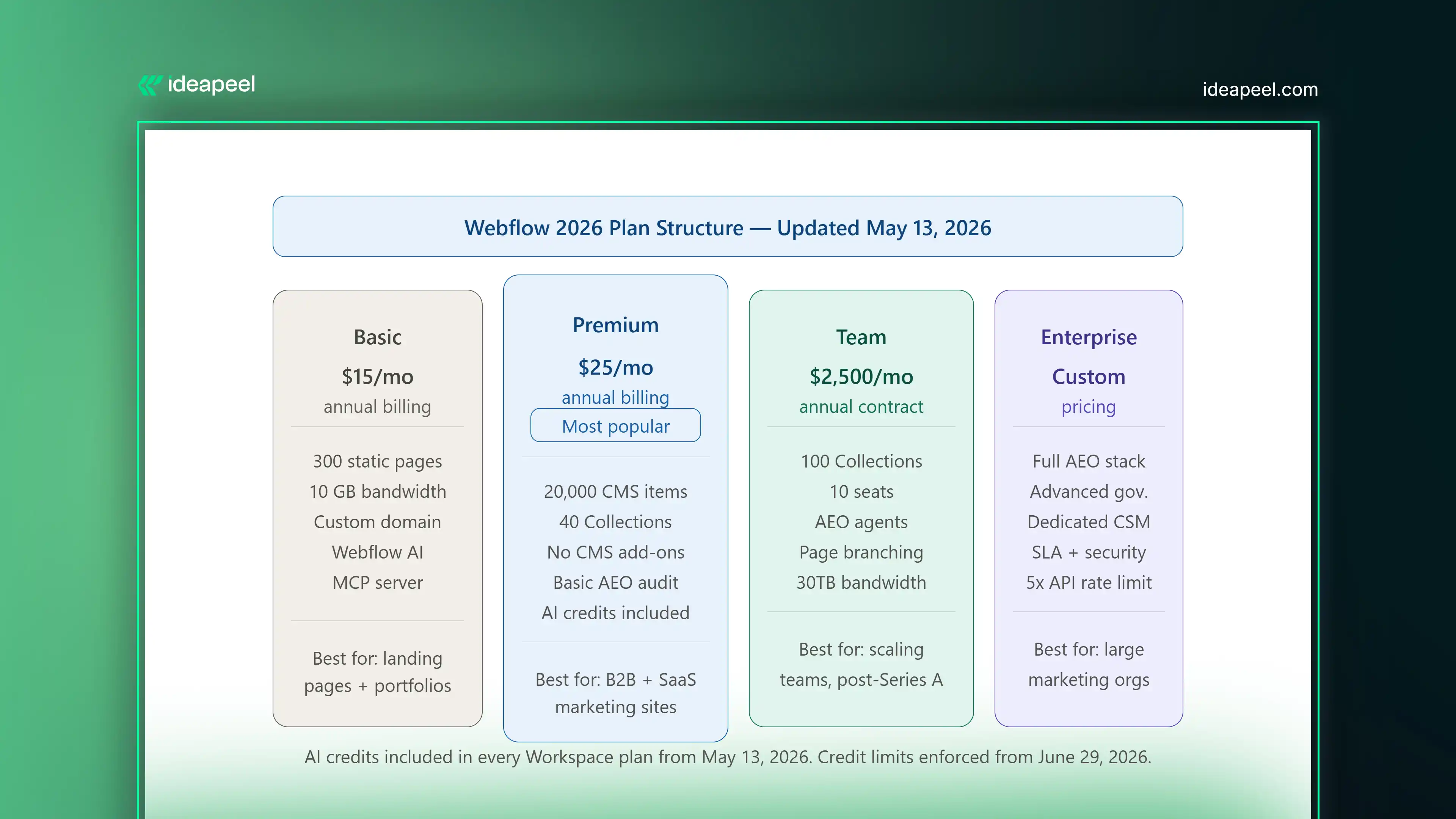
What changed in Webflow's 2026 pricing? On May 13, 2026, Webflow merged the legacy CMS and Business site plans into a single new Premium plan, introduced a new Team plan between Premium and Enterprise, and added AI credits to all Workspace plans. The changes affect new accounts immediately and existing accounts at their next renewal date.
Here is a clear breakdown of the current plan structure:
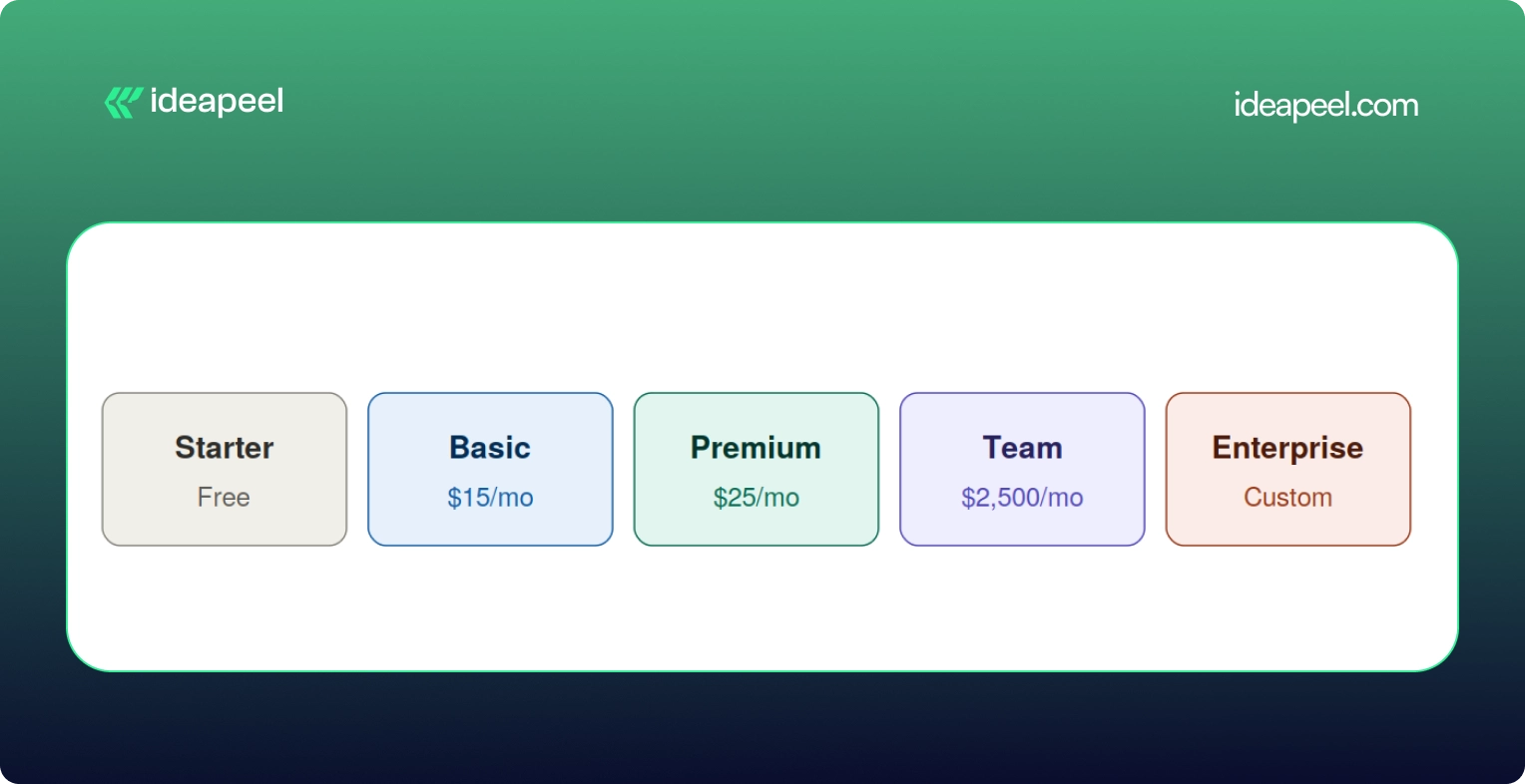
Basic Plan ($15/month, annual): For landing pages, portfolios, and sites that do not need a CMS. Includes 300 static pages, 10 GB bandwidth, custom domain, Webflow AI, and MCP server access.
Premium Plan ($25/month, annual): The main plan for content-heavy marketing sites. Includes 20,000 CMS items, 40 Collections, and removes the need for CMS add-ons entirely. This is the right starting point for most B2B marketing sites and SaaS websites.
Team Plan ($2,500/month, annual contract): A new all-in-one plan for teams that have outgrown self-serve but are not ready for Enterprise. Includes 100 CMS Collections, 10 seats, Localization, AEO agents, page branching, single-page publishing, publishing workflows, a site activity log, custom SSL certificates, security headers, and 30TB of bandwidth. Requires reaching out to Webflow directly; not available as a self-serve purchase.
What Is Webflow Optimize and Do You Need It?
Webflow Optimize is a separate add-on that starts at $299 per month and scales by page views. It adds native A/B testing, multivariate testing, and AI-driven personalization directly inside the platform.
For conversion-focused B2B and SaaS marketing sites, this matters because it removes a key reason to use a third-party testing tool. Your A/B tests run inside the same interface where you build and manage your site. Your personalization logic is connected to the same CMS that powers your content.
When do you actually need Optimize? If you are running a meaningful volume of traffic through key landing pages and you are not systematically testing variations, Optimize pays for itself quickly. For sites below 25,000 monthly page views on conversion-critical pages, the standard plan tier is the starting point.
Webflow vs. Framer in 2026: What Is the Actual Difference?
This is a question that comes up constantly, and the honest answer is that they are solving different problems.
Framer is excellent for design speed. If you want a beautiful landing page or a portfolio site built and live quickly, Framer is a strong choice. Its AI generation tools are fast, its template ecosystem is strong for visual work, and the learning curve is lower for designers who have not worked in a CMS-heavy environment.
Webflow is the right choice when your website is a business growth system rather than a design deliverable. If your site needs a real CMS architecture, deep content relationships, AEO optimization, a Claude integration, custom interactive components, team publishing workflows, or scalable data structure, Framer is not built for that in the same way.
The bottom line: Framer is a design tool with publishing capabilities. Webflow in 2026 is a growth platform with design capabilities. Which one you need depends on what problem you are actually trying to solve.
What Is a Relational Authority Hub and Why Should You Build One?
Traditional SEO advice focuses on individual pages. Rank page A for keyword A. Rank page B for keyword B. In 2026, that approach is insufficient on its own.
AI search tools do not just evaluate individual pages. They evaluate sites as entities, looking at the breadth and depth of your coverage on a topic, the relationships between your content, and whether your site reflects genuine expertise on a subject or just a collection of keyword-targeted pages.
What is a relational authority hub? A relational authority hub is a content architecture where your core topic pages, subtopic pages, supporting articles, case studies, and FAQ content are all interconnected through deliberate internal linking, shared schema vocabulary, and consistent entity references. Instead of a flat structure of individual pages, you build a web of connected content that signals depth and expertise to both human readers and AI systems.
Here is what this looks like in practice on a Webflow site:
Your main product or service page links to three or four deep-dive supporting pages on specific aspects of that service. Those supporting pages link to relevant case studies and FAQ pages. Your FAQ pages link back to relevant product pages. Your blog content links to all of the above. Every page uses consistent terminology, entity naming, and schema markup.
Webflow's Next-Gen CMS makes this architecture significantly easier to build and maintain than it was on previous versions of the platform. Three-layer nesting and 10 nested collection lists per page means you can model complex relational content without needing a custom CMS or a headless architecture to do it.
Webflow AEO Checklist: What to Do on Your Site Right Now
If you are using Webflow in 2026 and you want to improve your visibility in AI-powered search, here is a practical starting checklist:
Content Structure
- Format each major section with a question-based H2 or H3 heading, followed by a direct 40 to 80 word answer
- Add a dedicated FAQ section to every product, service, and landing page
- Write in plain, declarative language; avoid vague claims that AI models cannot extract cleanly
- Keep your most important pages updated; AI models favor recent, accurate content
Technical Signals
- Enable schema markup for FAQ, HowTo, and Article content types
- Set up your llms.txt file to direct AI crawlers to your most authoritative pages
- Check that every image has descriptive alt text; use Webflow's AI alt text generation if you have a backlog
- Run a Core Web Vitals check in Google Search Console and resolve any failing pages
CMS and Architecture
- Map your internal linking structure; make sure your most important pages receive links from multiple related content pieces
- Use Webflow's AEO audit panel to identify schema gaps and content structure issues
- If you are on the Team or Enterprise plan, run your AEO agents on key page clusters and action the priority recommendations
Monitoring
- Set up the AEO analytics dashboard to track LLM-referred traffic separately from organic search traffic
- Note which pages are receiving AI-referral visits and what content format those pages use; this tells you what is working and where to replicate it
How does Webflow compare to WordPress for SEO and AEO in 2026?
Webflow's technical SEO foundations are handled at the platform level; image optimization, CDN performance, canonical tags, and page speed are built in. WordPress requires plugin management, hosting configuration, and ongoing maintenance to achieve comparable baselines. For AEO specifically, Webflow's native AEO agents and Claude integration currently have no direct equivalent in the WordPress ecosystem. The tradeoff is that WordPress has a larger plugin and developer ecosystem; Webflow offers a tighter, more managed platform with fewer moving parts to maintain.
The Bottom Line on Webflow in 2026
Webflow's 2026 updates make it more than a website builder. With AI-powered SEO, AEO tools, Claude integration, and smarter CMS features, it's built for the future of AI search.
To stay ahead, optimize your website for both Google and AI search by improving your content structure, using llms.txt, and creating high-quality, connected content.
Need help building an AI-ready Webflow website? Explore ideapeel's Webflow Development, Webflow SEO Services, and UI/UX Design Services to create a faster, smarter, and search-optimized website that drives real business growth.
[[last-cta]]
Freqent;y Asked Queston on Webflow Conference 2026
Enter your website URL to receive a detailed website analysis report in just 5 minutes!

Is Webflow good for SEO in 2026?
Yes. Webflow's 2026 platform includes native canonical tag controls, noindex options per page, automatic WebP and AVIF image conversion, lazy loading, global CDN hosting through Fastly, automatic alt text generation, and CMS-level sitemap management.
Want to discuss your project?
Grow your project with Webflow Experts
Related Articles


If your website or product gets traffic but visitors leave without converting, the problem usually isn't your offer. It's your interface. A UI/UX audit finds exactly where users get stuck, confused, or annoyed, and gives you a clear list of what to fix first.
This guide covers what a UI/UX audit actually includes, how the process works, what it costs based on real market data, and how to pick the right UI/UX audit agency for your website or SaaS product. It's written by the team at ideapeel, a Webflow development agency for B2B, SaaS and enterprise companies that runs UI/UX audits and Webflow builds for growing teams every week.
What Is a UI/UX Audit?
A UI/UX audit is an expert review of your website, product, or app. It checks how the interface looks (UI) and how it actually works for real users (UX), then hands you a prioritized report of what's broken and what to fix first.
A good audit looks at:
- Visual design and layout
- Navigation and information architecture
- User flows and conversion paths
- Mobile experience
- Accessibility
- Page speed and technical friction
- How your site compares to competitors
Any team with live traffic, sign-ups, or users but underwhelming results is a good candidate. That includes SaaS products with high churn, websites with strong traffic but weak conversion, and apps where users drop off mid-flow. A UI/UX audit is usually the fastest, cheapest way to find out why, well before anyone commits to a full redesign.
UI audit vs UX audit. A UI audit looks only at the interface: layout, typography, color, spacing, and consistency. A UX audit looks at the full experience: navigation, flows, usability, and conversion. Most professional audit services combine both, which is why the service is usually called a UI/UX audit rather than just one or the other.
What Does a Professional UI/UX Audit Include?
This is the part that matters most when you're comparing UI/UX audit services, because it tells you exactly what you're paying for.
UI Design Review
A trained eye goes through your visual hierarchy, typography, color use, spacing, and component consistency. This catches the small inconsistencies that quietly make a site feel unpolished or untrustworthy.
UX & Usability Review
This covers navigation, information architecture, friction points, and interaction patterns. Note that a UX audit is not the same thing as usability testing. An audit is an expert review done by a UX professional; usability testing involves watching real users complete tasks on your site. Many full audits include a round of light usability testing as one part of the process, but the two are different services.
User Flow Analysis
The auditor maps your key journeys, sign-up flows, checkout paths, and navigation routes to find exactly where users drop off and why.
Conversion & CTA Review
This looks at CTA visibility, button hierarchy, form design, landing pages, and anything creating friction between a visitor and the action you want them to take.
Mobile UX Review
Since most traffic is mobile, this checks tap targets, responsive layout breakpoints, load speed, and mobile-specific usability issues that desktop testing misses.
Accessibility Review
This checks color contrast, keyboard navigation, screen reader compatibility, and general WCAG alignment. Accessibility issues are also legal and reputational risk, not just a UX nicety.
Analytics & User Behavior Analysis
If you have Hotjar, GA4, or similar tools connected, a good auditor pulls real behavior data, heatmaps, and session recordings to back up their findings with evidence instead of opinion.
Competitive UX Analysis
The auditor benchmarks your product or site against direct competitors, so recommendations are grounded in what's actually working in your market, not generic best practice.
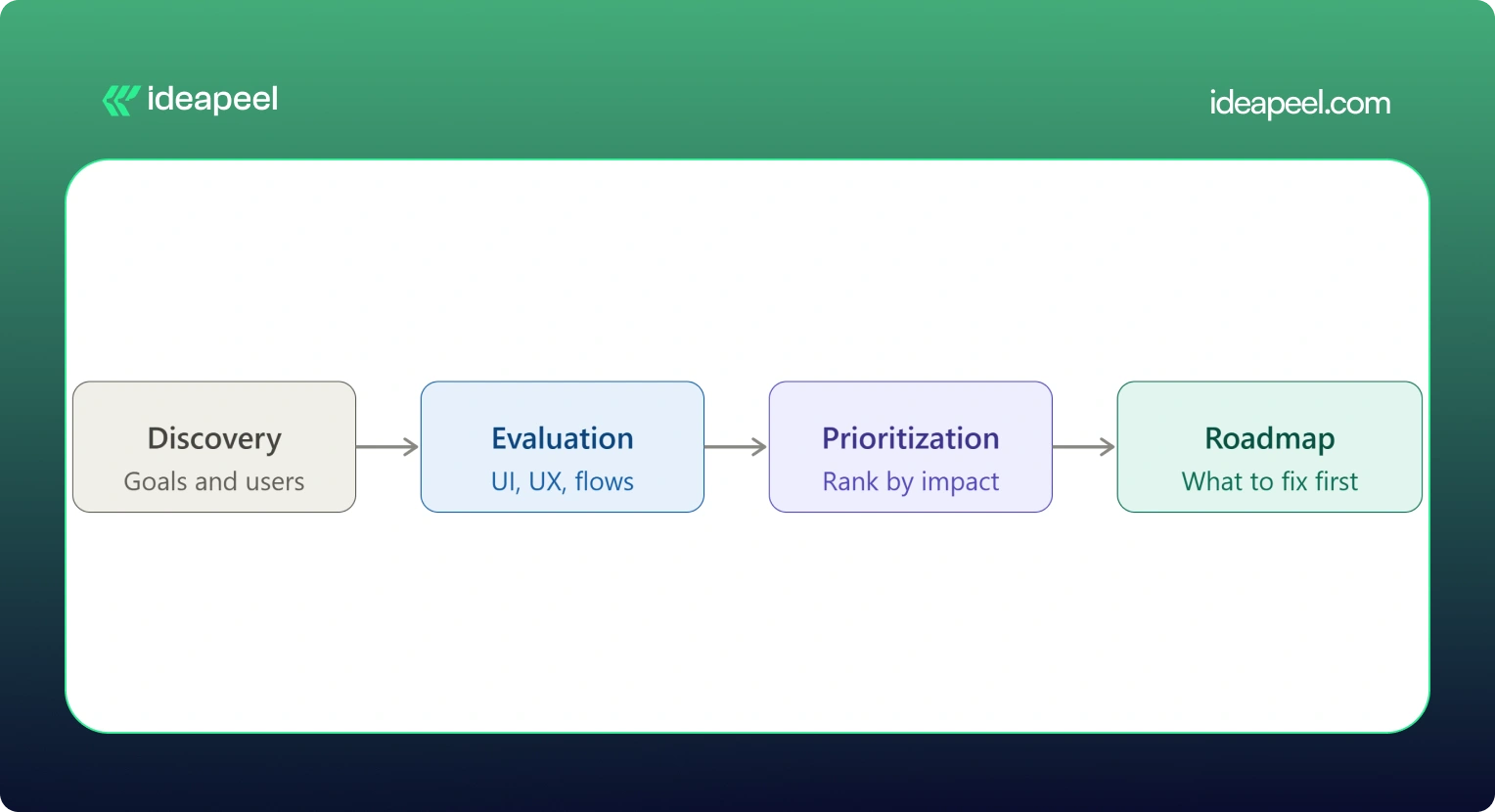
UX Audit Service Process: From Research to Action Plan
Here's what actually happens when you hire someone for a UI/UX audit, step by step:
1. Discovery & Business Goals
The auditor starts by understanding your business goals, not just your interface. What counts as success: more demos booked, higher activation, lower churn, more sign-ups?
2. User & Audience Analysis
Who actually uses your product, and what are they trying to do? This shapes everything that follows.
3. UI Evaluation
A full pass through the visual design against your goals and your users' expectations.
4. UX & Usability Evaluation
A heuristic review of navigation, structure, and usability against established UX principles.
5. User Flow Analysis
Mapping the paths users actually take, and where they abandon them.
6. Conversion Analysis
Looking specifically at where and why conversion drops off.
7. Competitive Benchmarking
Comparing your experience against direct competitors and category leaders.
8. Issue Prioritization
Every issue gets ranked by severity and business impact, not just listed in the order it was found.
9. Recommendations
Specific, actionable fixes tied to each issue, not vague advice like "improve usability."
10. UX Improvement Roadmap
A sequenced plan showing what to fix first, what can wait, and what requires bigger structural changes.
[[inner-cta]]
How Much Does a UI/UX Audit Cost?
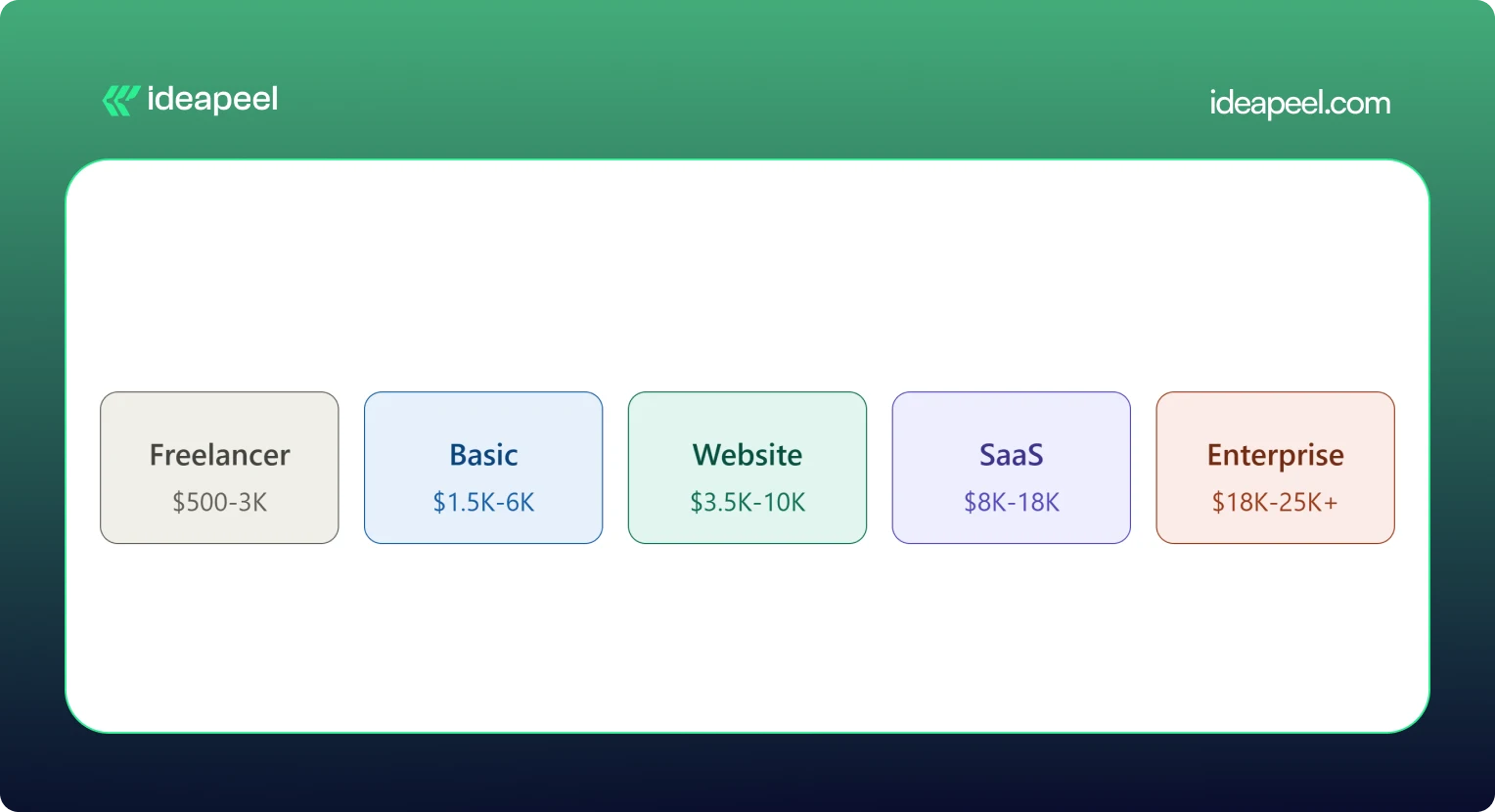
A UI/UX audit typically costs between $500 and $25,000 or more. A solo freelancer doing a single-flow review might charge as little as $500. A full enterprise audit with live user testing and multiple user roles can run $18,000 to $25,000 or higher. Most small and mid-size businesses land somewhere between $3,500 and $18,000 for a complete website or SaaS product audit.
What Factors Affect UI/UX Audit Cost?
Price moves based on:
- Website or product size
- Number of screens and pages
- Number of user flows and personas
- Product complexity (simple marketing site vs. multi-role SaaS dashboard)
- How deep the research goes
- Whether analytics review is included
- Whether live usability testing is included
- Competitive research scope
- Number of deliverables (report only vs. report plus roadmap plus redesign proposals)
Pricing data collected from agency rate cards, freelance marketplaces, and published cost guides shows a consistent pattern: cost scales with scope and testing depth, not agency size alone. A UX audit cost breakdown from Design Studio UI/UX puts full audits with heuristic review, session analysis, and real user testing at $8,000 to $18,000, with enterprise audits running $18,000 to $25,000 and up. Parallel HQ's product design cost guide lists UX audits from $3,500 to $10,000, usually delivered in two to four weeks. On the freelance side, listings on Upwork and Contra show independent UX consultants pricing single-flow or single-page audits from $500 to $3,000. On the agency side, Musemind's UX audit agency pricing starts around $10,000 with hourly rates of $50 to $99, plus subscription-style UX plans from roughly $2,600 a month, and Dribbble's UI/UX agency cost guide puts experienced US agency hourly rates at $100 to $250.
.webp)
Basic UI/UX Audit
$1,500 – $6,000. Covers a heuristic review of your core screens, a prioritized issue list, and general recommendations. Good for a quick gut check before deciding whether a bigger project is worth it.
Website UX Audit
$3,500 – $10,000. Adds user flow mapping, conversion review, and often a light round of usability testing. This is the most common package for marketing sites and lead-gen websites.
SaaS UX Audit
$8,000 – $18,000. Covers multiple user roles, onboarding, dashboard UX, and competitive benchmarking against other SaaS products in your category. Built for B2B products with more than one user type.
Comprehensive UI/UX Audit
$18,000 – $25,000+. Includes live user testing, deep analytics review, multiple personas, and a full improvement roadmap. This is the right fit for enterprise products or platforms where usability issues carry real revenue risk.
If a package price feels too broad for your situation, ask for an hourly or scoped quote instead. Most UI/UX audit companies will price a smaller, single-flow engagement if you only need to hire a UX designer for an audit of one specific part of your product.
What Do You Get From a UI/UX Audit?
This is what separates a real audit from a vague opinion document.
If a provider's audit doesn't include most of this list, ask what you're actually paying for. ideapeel's UI/UX design service builds every audit around this exact structure, so findings turn into a working plan instead of a PDF that sits unread.
When Should You Hire a UI/UX Audit Agency?
Some teams run a quick DIY checklist audit themselves first, which is a fine starting point. But a DIY review usually misses the objectivity, testing tools, and pattern recognition a professional brings from auditing dozens of other products. Here's when it's worth hiring a UI/UX audit agency or consultant:
Your Website Gets Traffic but Does Not Convert
Steady visitors, flat conversion. That gap almost always points to a UX problem, not a traffic problem.
Users Struggle With Navigation
Support tickets or feedback keep mentioning that people "can't find" something. That's a navigation and information architecture issue an audit will surface fast.
Your SaaS Onboarding Has Friction
If new users sign up and never activate, onboarding is usually the leak.
Product Adoption Is Low
Features get built but nobody uses them. Often this is a discoverability problem, not a demand problem.
You Are Planning a Website Redesign
Never redesign blind. An audit tells you what's actually broken before you rebuild it.
Paid Traffic Is Not Converting
If you're paying for clicks that don't turn into leads, the landing experience is the first place to look.
Customers Report Usability Problems
Direct feedback is a strong signal. An audit turns scattered complaints into a structured fix list.
Your Website Looks Outdated
Dated design quietly erodes trust, especially for B2B buyers comparing vendors.
You Are Launching a New SaaS Product
A pre-launch audit catches usability issues while they're still cheap to fix.
You Need an External UX Perspective
Internal teams get too close to their own product. A fresh, objective review often finds what everyone inside the company has stopped noticing. [[question-block]]
UI/UX Audit vs. Website Redesign
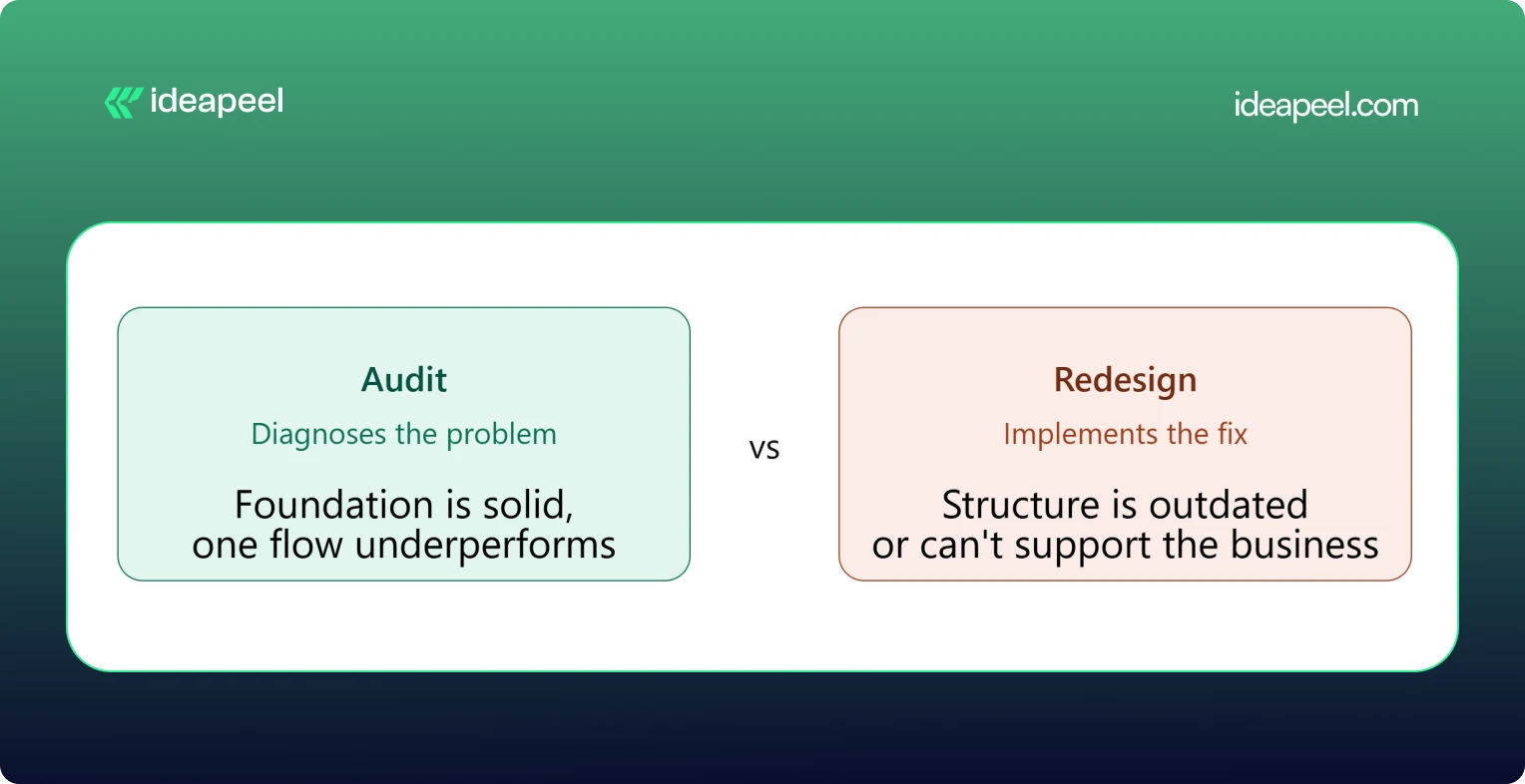
The simplest way to think about this: an audit diagnoses, a redesign implements.
When You Only Need a UI/UX Audit
Your foundation is solid but something specific is underperforming, like a checkout flow or a signup form. Fix the specific problem rather than rebuilding everything around it.
When You Need a Website Redesign
The structure itself is outdated, the brand has changed, or the site can't support what the business needs now. A patch won't fix a foundational problem.
When You Need an Audit Before a Redesign
This is the smart default for most teams. An audit tells you exactly what to change and why, so the redesign budget goes toward fixing real problems instead of guessing.
UI/UX Audit Agency vs. Freelancer
Both can do good work. The right choice depends on your product's complexity and what you need beyond the audit itself.
Neither option is universally better. A freelancer can be the right call for a single-flow review on a tight budget. An agency tends to make more sense for a multi-role SaaS product, where UI, UX, research, and implementation all need to work together.
How to Choose a UI/UX Audit Agency
This is the section that matters most once you're actually comparing providers.
Check Their UX Methodology
Ask how they structure an audit. A vague answer is a warning sign. A strong provider can walk you through their process step by step.
Review Previous Audit Work
Ask to see a sample report. This tells you more than any pitch deck about the quality and depth you'll actually get.
Look for Industry Experience
A UX audit company that's worked on B2B SaaS products understands onboarding, activation, and dashboard UX in a way a general design shop may not.
Check Their UI + UX Expertise
Some providers are strong on visuals but weak on usability, or the reverse. You want both covered.
Ask What the Deliverables Include
Compare this against the deliverables table above. Screenshots, severity ratings, and a roadmap should be standard, not an upsell.
Understand Their Pricing Model
Flat project fee, hourly rate, or retainer? Match the model to how you actually want to work and budget.
Ask How Findings Are Prioritized
A pile of 40 unranked issues isn't useful. You want to know what to fix first and why.
Check Whether They Support Implementation
Some UI/UX audit services stop at the report. Others, like ideapeel, can move straight from findings into Webflow development and design implementation, so the fixes actually ship.
UI/UX Audit for B2B SaaS
SaaS products carry extra UX complexity that a generic website audit won't catch. A dedicated SaaS UX audit should cover:
SaaS Website UX
How the marketing site sets expectations before someone ever logs in.
Product Interface
The core UI users interact with daily once they're inside the product.
Dashboard UX
Whether the dashboard surfaces the right information without overwhelming the user.
SaaS Onboarding
The first-run experience that determines whether a trial user ever becomes a paying customer.
Signup Experience
Friction in the signup form is one of the most common, and most fixable, leaks in a SaaS funnel.
Pricing UX
Whether your pricing page actually helps people choose a plan, or just confuses them.
Feature Discovery
Whether users can find the features that would make them stick around.
Navigation
How easily users move between the areas of a complex, multi-role product.
User Activation
The specific moment a new user experiences real value for the first time.
Conversion Flows
Every point where a free user is nudged toward becoming a paying one.
Teams building or scaling B2B products can see how this fits into a broader growth plan on ideapeel's SaaS design and development page.
Webflow UI/UX Audit
If your site or product runs on Webflow, a Webflow-specific UX audit adds a few extra layers on top of a standard review: CMS structure, symbol and component consistency, interaction and animation performance, responsive breakpoint behavior, and page speed inside the Webflow environment.
This matters because a Webflow UX audit doesn't just tell you what to fix, it tells you how to fix it inside the platform you're already using, without a rebuild. ideapeel runs UI/UX audits and Webflow design and development work side by side, so audit findings turn directly into shipped Webflow changes instead of a report that needs a second agency to execute.
What Makes a Good UI/UX Audit?
A strong audit should be:
- Evidence-based
- Prioritized
- Actionable
- Business-focused
- User-focused
- Specific
- Easy to implement
The real value of a UI/UX audit isn't a long list of everything that could theoretically be better. It's finding the small number of problems that are actually costing you conversions or users, and giving your team a clear, ordered path to fix them.
Ready to See What's Costing You Conversions?
A UI/UX audit is one of the fastest ways to find out why your traffic, sign-ups, or trials aren't turning into revenue. ideapeel, a Webflow development agency for B2B, SaaS & Enterprise, has delivered 170+ branding, Webflow, and UI/UX projects with a 98% client satisfaction rate and $500M+ in revenue generated and influenced for clients.
Book a free strategy call to talk through your website or product and find out what a UI/UX audit would look like for your team.
[[last-cta]]

The best B2B websites don't win because they look modern. They win because they explain a complex offer in seconds, build trust before anyone talks to sales, and give every visitor an obvious next step. That combination of clarity, credibility, and a clear path forward is what separates a good-looking B2B website from one that actually generates pipeline.
Below are 10 real B2B website design examples worth studying, each broken down the same way: what the company does, why the design works, and the one design lesson you can steal for your own site. Four are Webflow redesign projects from our own studio, ideapeel, and the rest are well-known B2B and SaaS brands chosen because their homepages are genuinely instructive, not just pretty.
What Makes a Great B2B Website?
A great B2B website clearly explains what the company does, who it's for, and why it's credible then makes the next step obvious. In practice, that usually comes down to seven things:
- A clear value proposition in the hero section, readable in under five seconds
- Simple, jargon-light messaging that doesn't assume the visitor already understands the product
- A logical information hierarchy that goes from "what is this" to "how does it work" to "why should I trust you"
- Easy navigation that doesn't force visitors to hunt for pricing, product details, or contact info
- Trust signals client logos, testimonials, case studies, certifications, or real metrics
- Product or service clarity, especially for technical or unfamiliar offerings
- Conversion-focused CTAs that match where the visitor actually is in their decision, not just "Book a Demo" on every button
B2B buying decisions usually involve multiple stakeholders and a longer sales cycle than B2C, so the website has to do more persuading before a human ever gets involved. Every example below earns its place because it handles at least one of these jobs unusually well.
10 Best B2B Website Design Examples
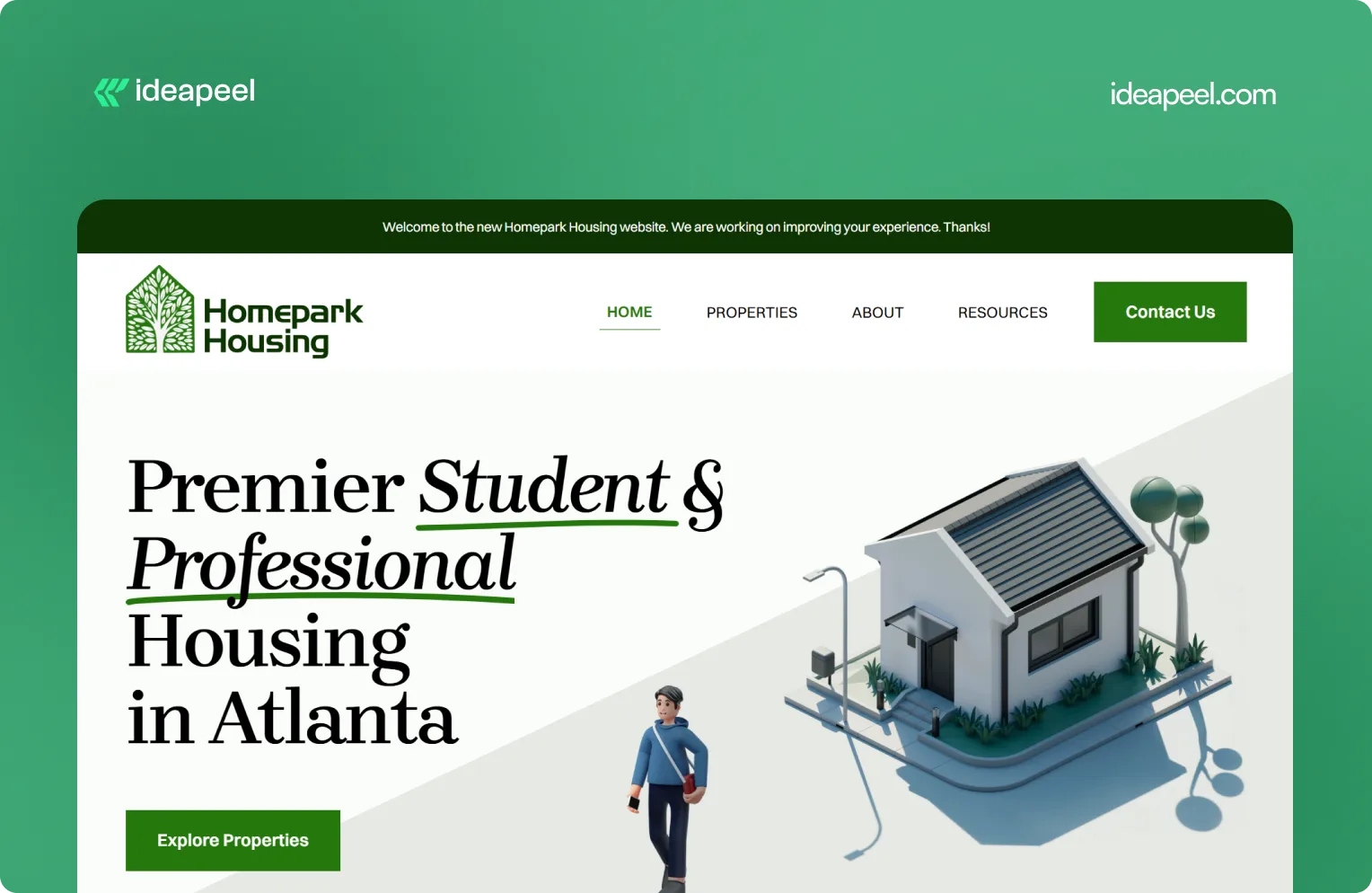
1. Homepark Housing: Comfortable Living
Industry: Real estate
What they do: Homepark Housing provides secure, modern, and strategically located housing designed around the needs of young professionals. Its offering includes affordable housing, flexible leasing options, personalized tenant support, and 24/7 maintenance.
Why the design works: Real estate is a high-consideration purchase. Visitors need to know where the properties are, whether the pricing works for them, what support is available, and whether they can trust the company to deliver a reliable living experience. Homepark's website puts those practical needs at the center of the experience instead of relying only on property imagery.
Key design lesson: When visitors are making a decision involving money, location, and long-term commitment, answer their practical questions early. Clear information about support, pricing, location, and the overall experience can build more trust than visual design alone.
View the Homepark Housing case study
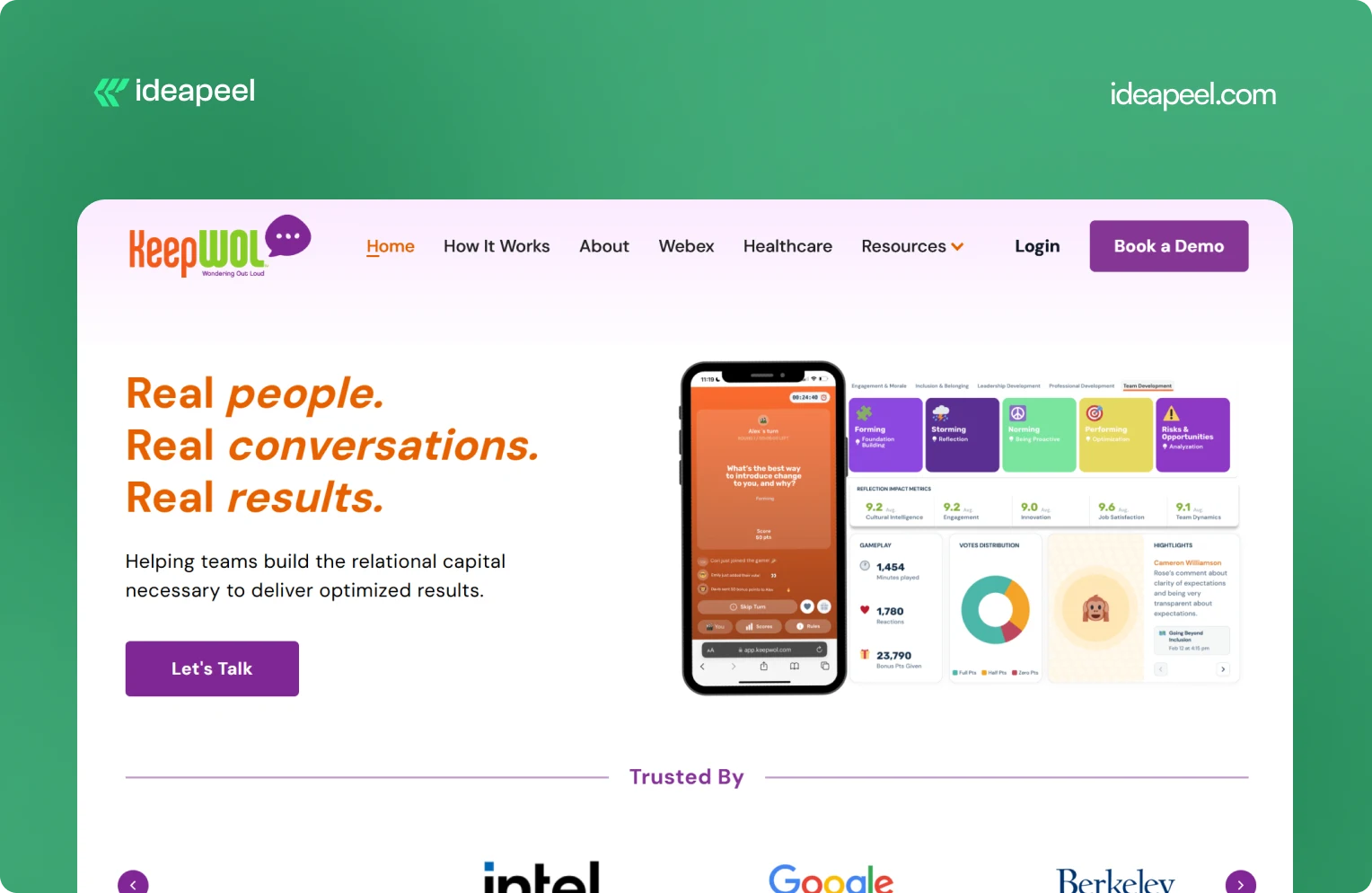
2. KeepWOL: SaaS Team Analytics Platform
Industry: SaaS, team performance, and people analytics
What they do: KeepWOL helps organizations improve team performance, relationships, engagement, and development through interactive experiences, analytics, and action plans. Its platform combines live sessions with measurable insights across areas such as team dynamics, engagement, innovation, cultural intelligence, and job satisfaction.
Why the design works: KeepWOL has a difficult product to communicate because team relationships and workplace culture aren't as visually obvious as a CRM dashboard or payment platform. The website solves this by turning abstract benefits into a structured journey: experience, reflect, and grow.
Key design lesson: If your product solves an intangible problem, make the value measurable. Show the process, outcomes, metrics, and evidence that connect your product to a business result.
View KeepWOL
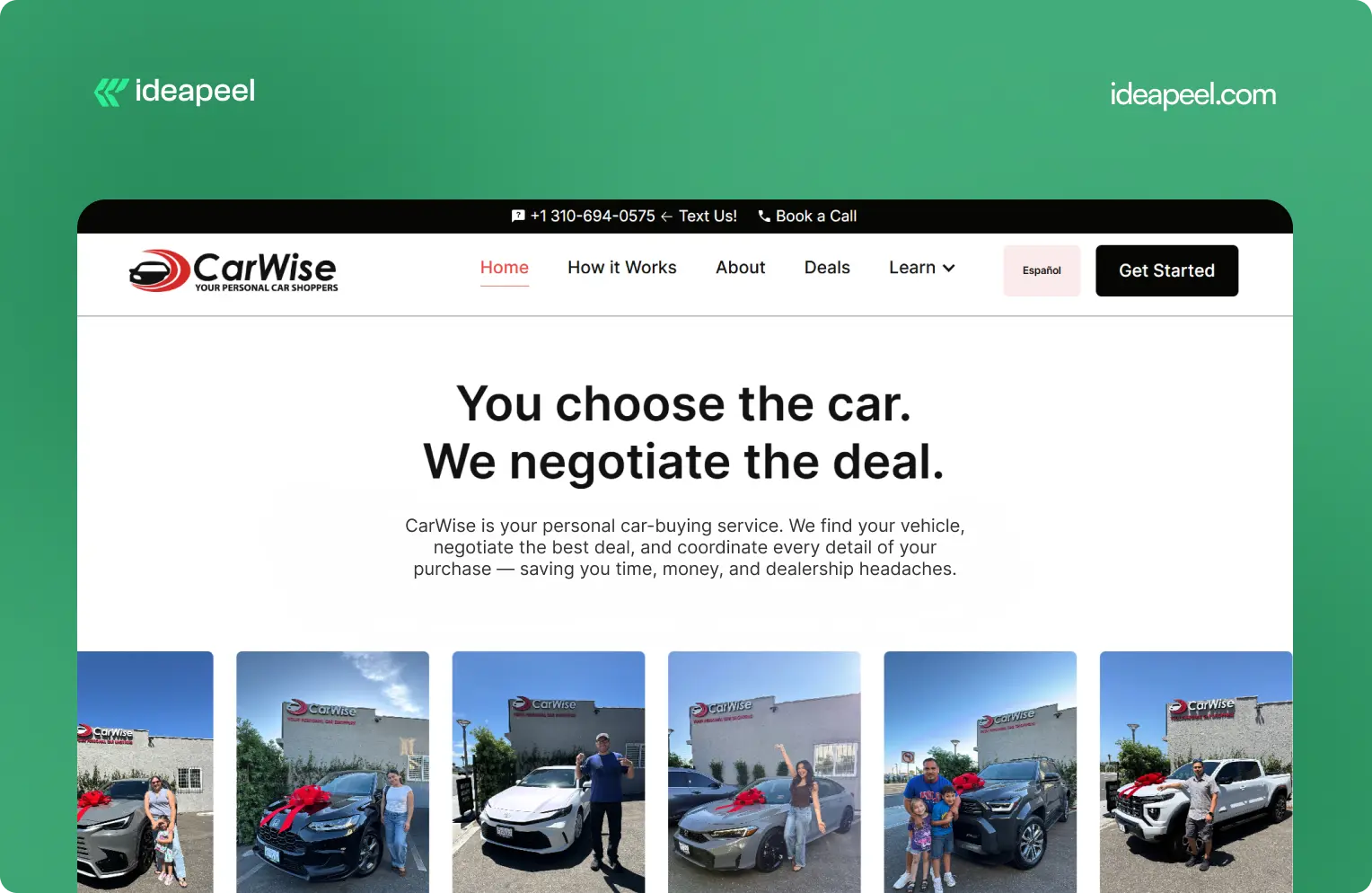
3. CarWise: AutoTech Marketplace
Industry: AutoTech and automotive services
What they do: CarWise helps people navigate the car-buying process through expert negotiation, pricing guidance, financing support, and personal assistance.
Why the design works: Buying a car involves money, uncertainty, and a lot of competing information. That makes trust one of the most important parts of the website experience.
CarWise approaches the problem by making the process easier to understand. Instead of overwhelming visitors with automotive terminology, the experience focuses on the practical journey from finding a vehicle to negotiating and completing the purchase.
Key design lesson: In industries where visitors naturally have trust concerns, transparency should be part of the design. Explain the process, show how the service works, and make the human value behind the product obvious.
View the CarWise case study
4. Glo Dollar: Fintech / Stablecoin Platform
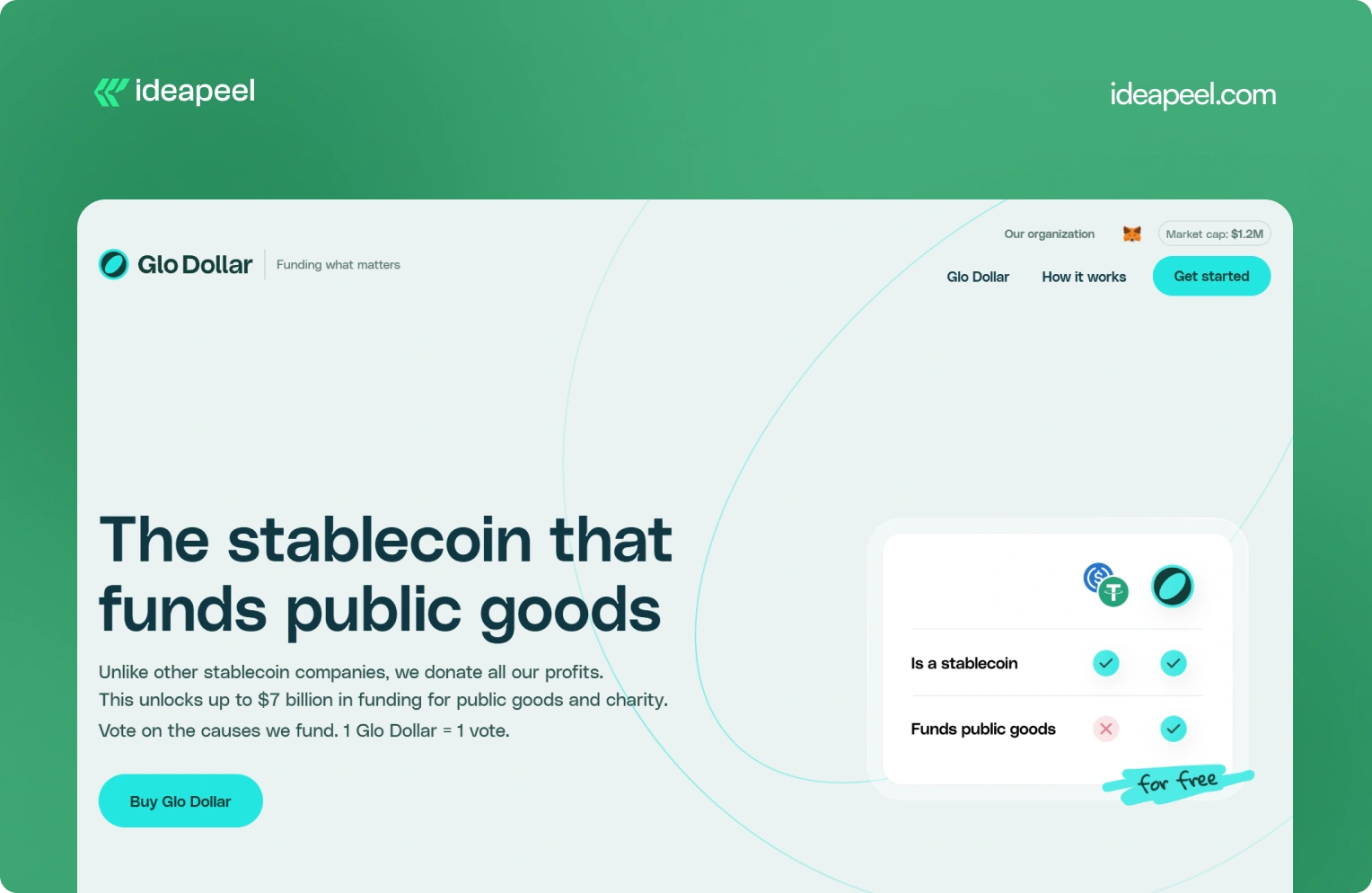
Industry: Fintech, blockchain, and stablecoins
What they do: Glo Dollar is a stablecoin designed so that profits from its reserves are donated to public goods and charitable causes. The website explains the model as a sequence: the fiat backing generates revenue, the profits are donated, and users can support causes at no additional cost.
Why the design works: Financial products are already difficult to explain. Add blockchain and philanthropy to the equation and the communication challenge becomes even bigger.
Glo Dollar handles that complexity by breaking the concept into smaller ideas. Instead of asking visitors to understand the entire financial model immediately, the website explains how the product works step by step.
Key design lesson: When your product combines several unfamiliar concepts, don't explain everything in one block of content. Sequence the information. One clear idea per section makes complicated products much easier to understand.
Visit Glo Dollar
5. BrickYard: Crafting Modern Architecture
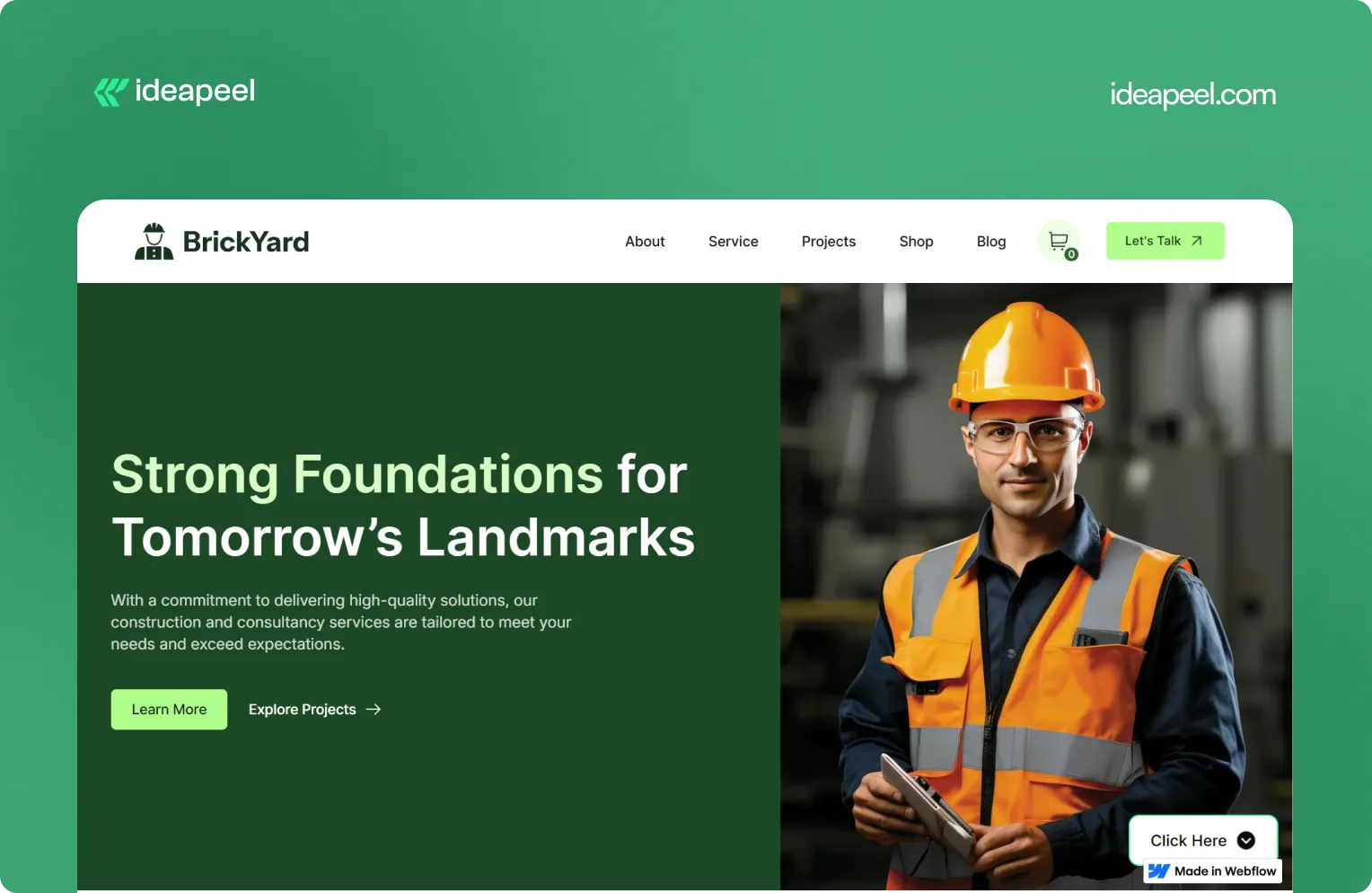
Industry: Construction, architecture, and design
What they do: BrickYard is a modern Webflow template designed for construction companies, architects, and design professionals. It focuses on showcasing services, projects, and professional work through a clean, responsive structure.
Why the design works: Construction and architecture websites need to balance two things: visual presentation and practical information. The work needs to look impressive, but potential clients also need to understand services, previous projects, capabilities, and how to get in touch.
BrickYard handles that through a minimalist visual system combined with dedicated pages for services, projects, blog content, contact information, and other business needs. The template is also designed to be customizable, responsive, SEO-focused, and CMS-ready.
That structure makes it useful beyond a single visual concept. Businesses can adapt the framework to their own services and content without rebuilding the entire site.
Key design lesson: Good website design isn't only about the homepage. Build a flexible structure that gives visitors the information they need while making it easy for the business to expand the site later.
View the live BrickYard template
6. Reliacare: Health and Wellness Website Template
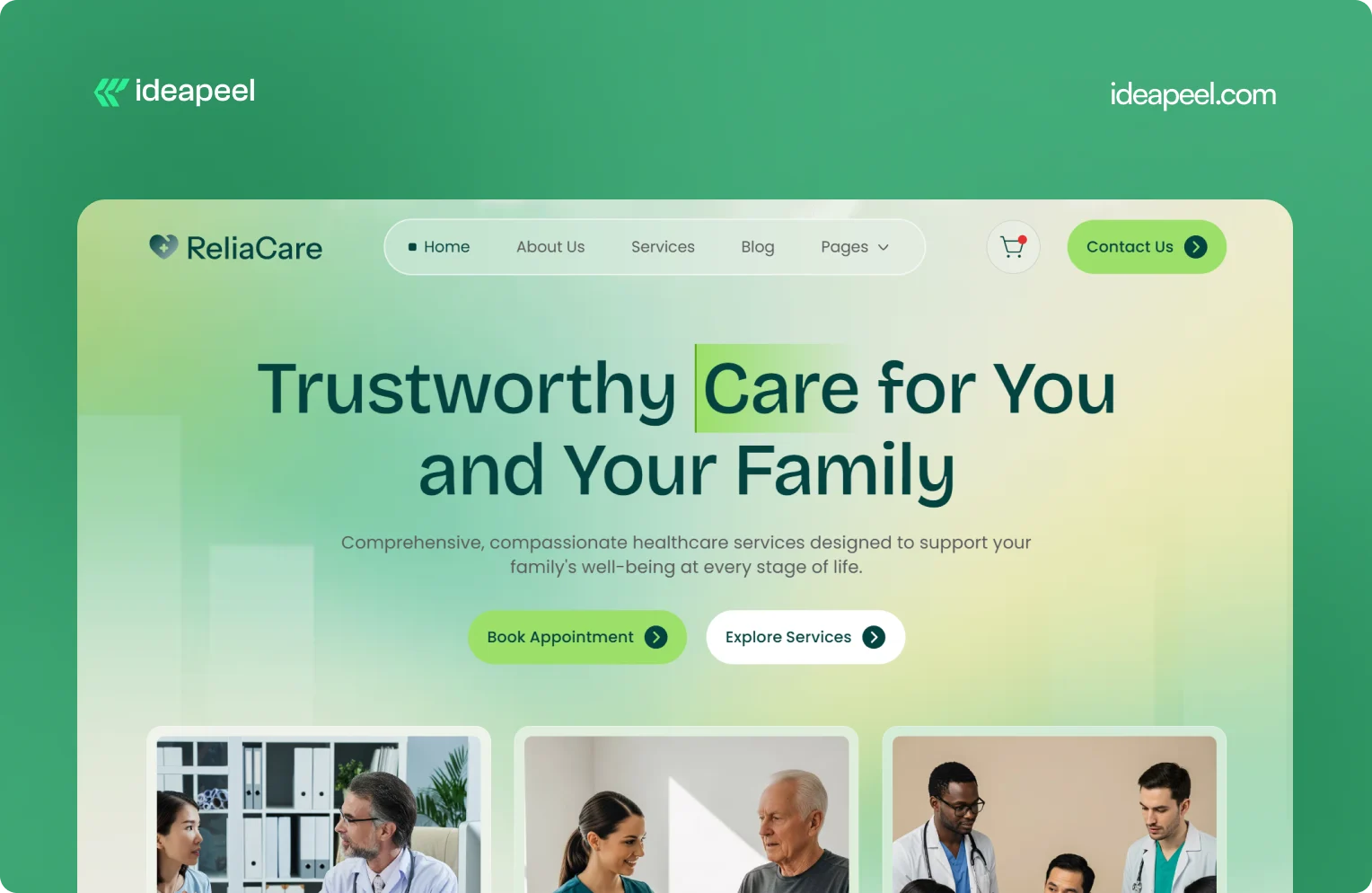
Industry: Health, wellness, and medical
What they do: Reliacare is a Webflow website template designed for health, wellness, and medical businesses that need a professional digital presence.
Why the design works: Health-related websites have a different trust challenge from many other industries. Visitors may already be uncertain, concerned, or looking for reliable information. A website that feels chaotic or overly decorative can make that uncertainty worse.
Reliacare takes a cleaner approach. The design gives services, information, and credibility room to breathe instead of filling every section with visual elements.
Key design lesson: For healthcare, wellness, and other trust-sensitive industries, restraint can be a design advantage. A clean interface with clear information often communicates confidence better than unnecessary visual complexity.
View Reliacare
7. StagePro: Events and Conference Website Template
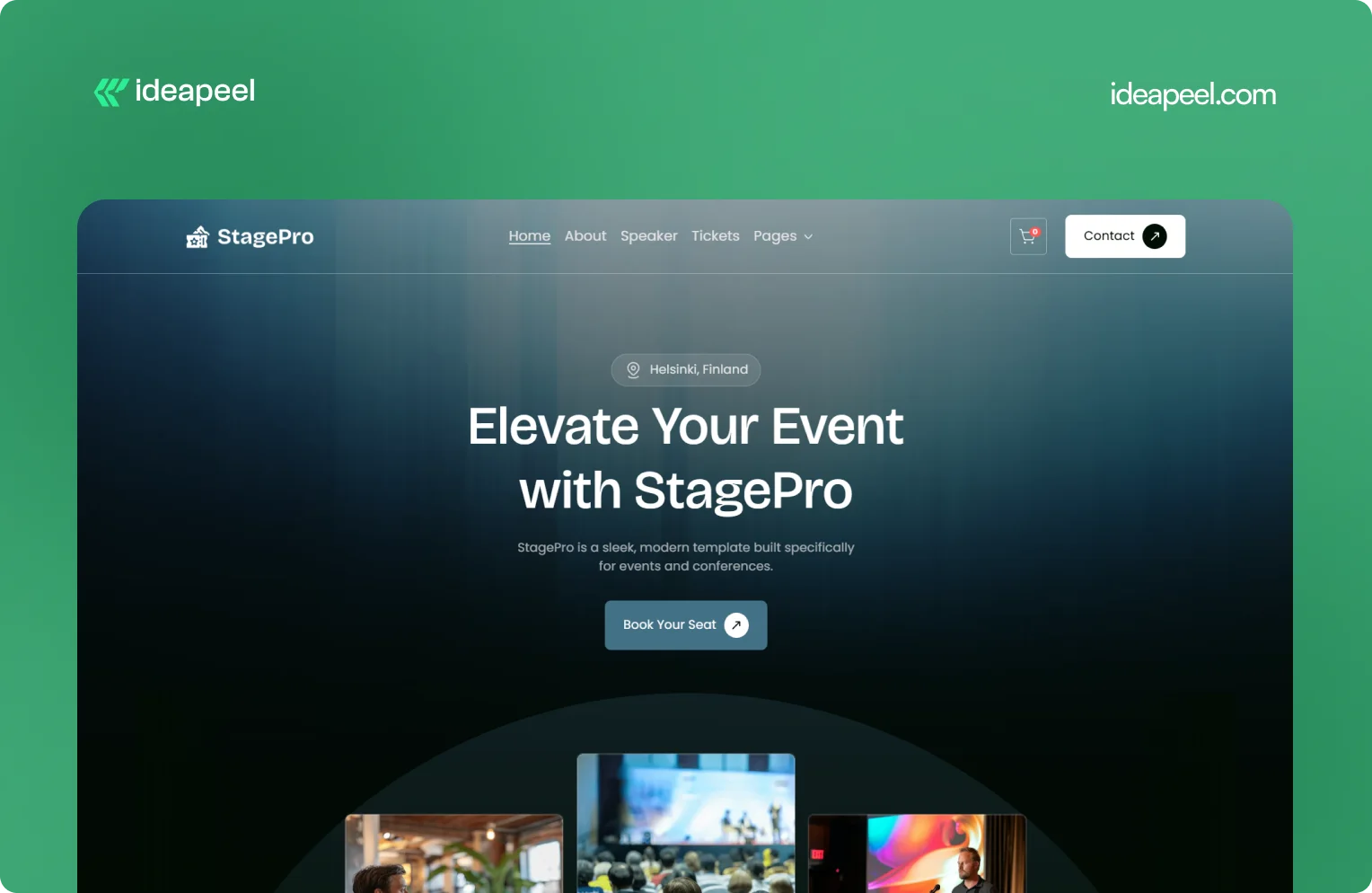
Industry: Events, conferences, summits, and workshops
What they do: StagePro is a Webflow template designed for event organizers, conference teams, summits, workshops, and other event-based businesses. It includes CMS-powered speakers, schedules, sponsors, blogs, ticket pages, and registration sections.
Why the design works: Event websites have to do several jobs at once. They need to create excitement, communicate important information, introduce speakers, explain schedules, and ultimately encourage people to register.
StagePro separates these needs into clear sections instead of trying to put everything into one message. The CMS structure also makes it easier to manage speakers, sessions, sponsors, and other event content as the website grows.
The result is a website structure that supports both the emotional side of an event and the practical information visitors need before registering.
Key design lesson: When a website has multiple conversion goals, don't mix everything together. Give each major goal a clear place in the information hierarchy.
8. Famous Tracker: Grow Fast Connection
Industry: SaaS and influencer marketing intelligence
What they do: Famous Tracker helps brands detect notable influencer purchases in real time and turn those signals into outreach opportunities. The platform provides automated detection, real-time notifications, influencer profiles, and tools for brand engagement.
Why the design works: Famous Tracker is built around a workflow that many visitors may not immediately understand. The website therefore needs to explain not just what the product is, but what happens after someone uses it.
The design makes the workflow easier to follow by connecting detection, notification, influencer information, and outreach. That helps turn an unfamiliar product category into a practical business process.
Key design lesson: If your product automates a process that visitors currently handle manually, show the workflow. Make it clear what happens before the product, what the product changes, and what the user can accomplish afterward.
View the Famous Tracker case study
[[question-block]]
9. Metrocard: Technology Website Template
Industry: Fintech and financial technology
What they do: Metrocard is a Webflow template designed for fintech, banking, investment, and financial service businesses. It uses a streamlined single-page structure with responsive design, intuitive navigation, SEO-focused structure, and customizable components.
Why the design works: Financial websites need to communicate credibility without making the experience difficult to navigate. Metrocard keeps the structure relatively focused, making it suitable for businesses that need to present a financial product or service without requiring a large multi-page website.
Its Webflow structure includes responsive navigation, CMS functionality, reusable components, forms, interactions, and responsive layouts.
Key design lesson: Not every B2B website needs dozens of pages. If the business has a focused offer, a well-structured single-page or compact website can communicate the value proposition without unnecessary complexity.
10. Moontide: Turning Dreams Into Reality
Industry: SaaS, founder funding and support
What they do: Moontide Capital connects immigrant founders with funding, legal support, and community networks to help them launch and scale startups.
Why the design works: This site has to build trust with a genuinely underserved audience while also proving credibility to investors and partners. The design keeps the process transparent from first meeting through due diligence, and leads with mission and impact before asking anything of the visitor..
[[inner-cta]]
B2B Website Design Best Practices
If you're planning a new B2B site or a redesign, these are the practices that show up consistently across the examples above:
- Lead with a specific value proposition, not a generic tagline. "We help B2B teams cut deal cycles by 40%" beats "The future of sales."
- Put your hero section to work. It's the highest-traffic real estate on the entire site. Don't waste it on abstract imagery with no message.
- Design for multiple stakeholders. B2B buying decisions often involve a technical evaluator, a budget owner, and an end user. Make sure each can find what they need.
- Use real product visuals wherever possible instead of stock photography or generic illustration; it builds more trust and helps visitors understand the actual product.
- Keep navigation goal-oriented. Organize menus around what visitors are trying to do (see pricing, understand the product, read case studies), not around internal department names.
- Add trust signals throughout the page, not just in one "logos" section testimonials and proof work best when they appear near the claim they're supporting.
- Make load speed part of the design brief. A fast, clean site reinforces credibility before a single word is read.
- Match your CTA to buyer intent. A first-time visitor and a returning, bottom-funnel visitor shouldn't see the same "Book a Demo" button in the same place.
How to Apply These Ideas to Your Own Website
You don't need to redesign everything at once. A practical way to start:
- Audit your homepage against the list above. Can a first-time visitor explain what you do after five seconds on the page?
- Identify your biggest trust gap. Is it a lack of proof, unclear pricing, or too much jargon? Fix the single biggest gap first.
- Map your navigation to buyer goals, not your internal team structure.
- Simplify one complex page at a time, following the "one idea per section" approach used by ZipID and Glo Dollar.
- Test your CTAs by funnel stage rather than repeating the same button everywhere.
Final Thoughts
The common thread across every example above isn't a specific color palette or layout trend, it's clarity. The best B2B websites make it easy to understand the offer, easy to trust the company, and easy to know what to do next. That's a strategy decision as much as a design one.
Need a B2B website that converts? If your current site isn't doing that job or you're planning a redesign and want it built around UX and conversion from the start, explore ideapeel's B2B website design work or book a strategy call to talk through your project.
Related Reading
- The UX Design Process: An Easy-to-Follow 8-Step Guide
- 10 Different Types of Websites With Examples
- Webflow Development Cost in 2026
- UI/UX Audit Checklist for B2B & SaaS
- ideapeel's UI/UX Design Services
- ideapeel's Webflow Development Services
[[last-cta]]
If you've been searching around for a straight answer on Webflow pricing, you've probably noticed something annoying: every article gives you a different number. That's because most of them mix up two totally different things: the cost of the Webflow platform itself and the cost of actually building a website on it.
Let's clear that up right away.
Webflow development cost in 2026 usually falls somewhere between a few hundred dollars for a small template based site, and $80,000 or more for a complex enterprise build. The Webflow subscription itself is separate from that. As of the platform's May 2026 pricing update, paid site plans start at $15 a month for Basic and $25 a month for Premium, both billed yearly.
That's the short version. Now let's break down where your money actually goes, because "it depends" isn't a budget.
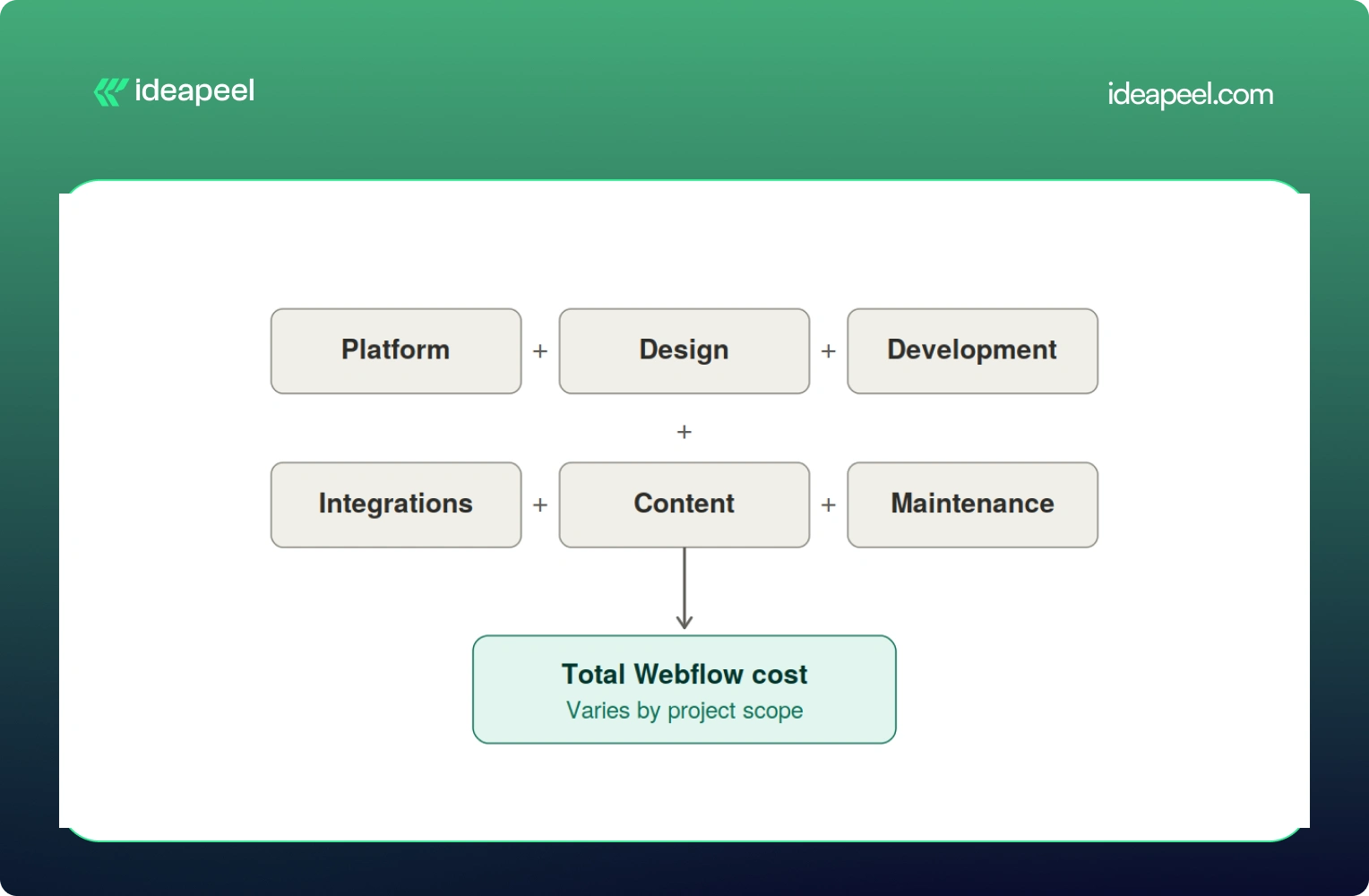
Development Cost vs Platform Cost: Two Different Bills
Here's the mental model worth keeping in your head the whole time you're reading this:
Total Webflow cost = Platform cost + Design + Development + Integrations + Content + Ongoing maintenance
The platform cost is what you pay Webflow every month to keep your site live. It's predictable and doesn't change much no matter who builds your site.
The development cost is what you pay a freelancer or agency to actually design, build, and launch the thing. This is the part that swings wildly, and it's the part most people are really asking about when they type "how much does Webflow cost" into Google.
Keeping these separate matters because a $5,000 website and a $20,000 website can run on the exact same $25 a month plan. The platform isn't what drives the price up. The scope of the work is.
Webflow Pricing in 2026 (Straight From Webflow)
Before anything else, let's get the official numbers on the table, because a lot of guides floating around still quote 2025 prices that no longer exist.
Webflow made its biggest pricing shake up in years back in May 2026. The old CMS plan and the old Business plan are both gone. They've been folded into one new plan called Premium.
A few things worth knowing about this change:
- The old Basic plan used to cost $18 a month. It's now $15 a month, and the page limit doubled from 150 to 300 static pages.
- The old CMS plan ($29/mo) and Business plan ($49/mo) are both retired. Premium replaces both at $25/mo and now comes with 20,000 CMS items included by default.
- If you already have an active site, none of this hits you immediately. Pricing changes apply at your next renewal or billable change on or after June 29, 2026.
On top of the Site Plan, there's a Workspace Plan, which is a separate bill many people forget about entirely.
And if more than one person needs to log in and edit the site, you'll pay per seat too, $39 a month for a full seat, $15 for a limited seat, and $0 for someone who just leaves comments.
So for a small marketing team with two editors, a realistic all in monthly number looks more like $70 to $95 a month once you add the Premium Site Plan, a Workspace plan, and an extra seat. Not $25. That's the number people get burned by when they only look at the homepage pricing.
[[inner-cta]]
Does Webflow Development Cost Include the Webflow Subscription?
No, and this trips up a lot of first time buyers. Development is a one time (or project based) cost that covers strategy, design, building the site, setting up the CMS, integrations, and getting it live. The Webflow subscription is what keeps that site running month to month, forever, whether you built it yourself or paid an agency $40,000 for it.
Think of it like buying a house versus paying your utility bill. Very different expenses, and mixing them up is how budgets go sideways.
How Much Does Webflow Development Cost by Website Type?
This is the question most people actually want answered, so let's get specific.
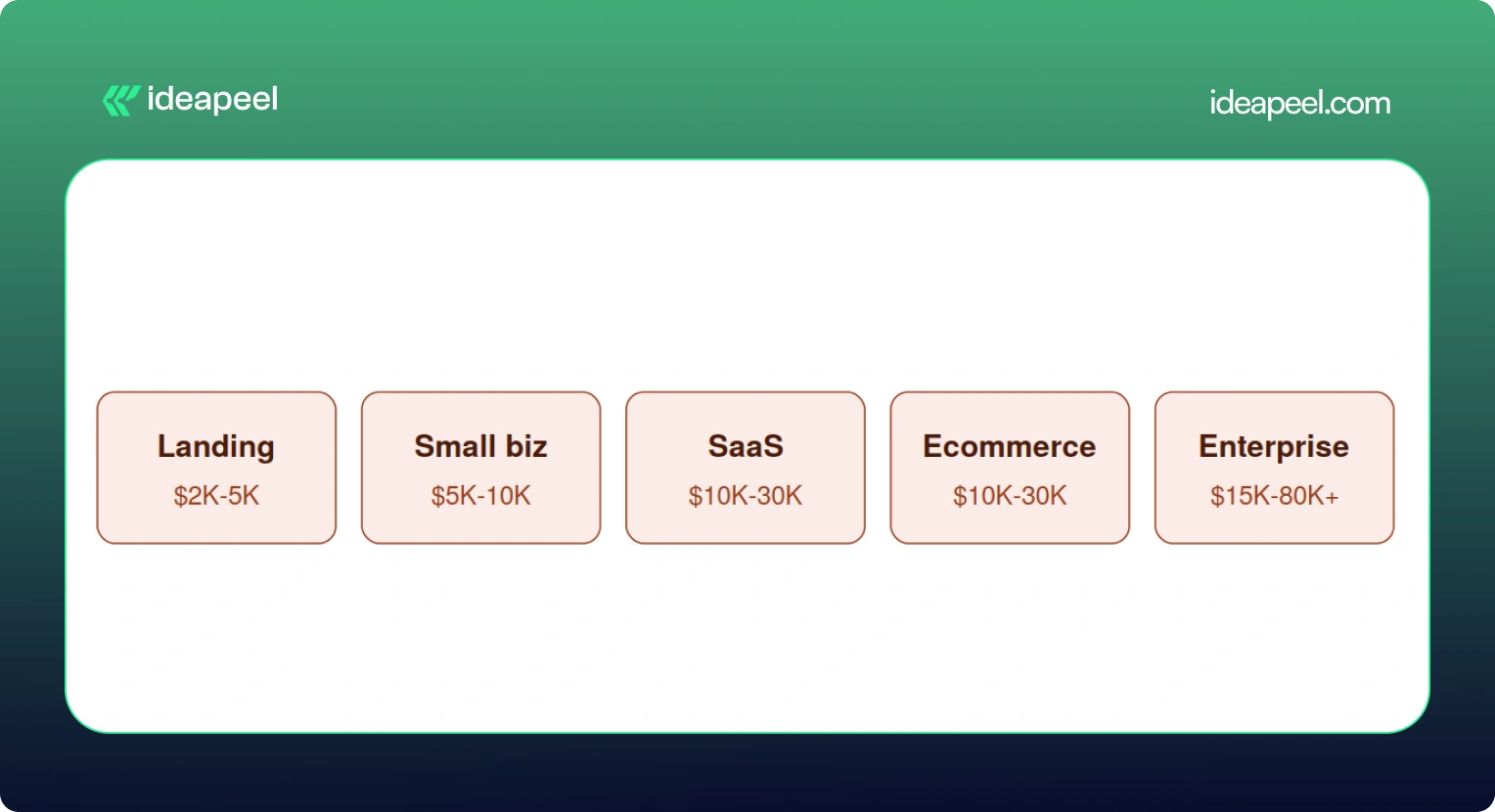
Keep in mind these are planning ranges pulled from what's actually happening in the market right now, not official Webflow numbers. A DIY project using a $49 to $149 premium template can bring the low end down to a few hundred dollars if you're comfortable doing the work yourself.
Landing Page
A single page or a small handful of pages, usually built to support a launch, a fundraise, or a campaign. Costs stay low here because there's less to design and fewer moving parts. Expect a template or lightly customized design, basic forms, and light SEO setup.
Small Business Website
Usually five to fifteen pages, with a blog or basic CMS, custom sections, and a handful of integrations like a contact form or email tool. This is the sweet spot for most local businesses and service providers.
SaaS Website
This is where things get more involved. A proper SaaS site needs a homepage that actually explains what you do, product and feature pages, a pricing page that converts, a CMS for the blog and case studies, and enough SEO and content structure to bring in organic traffic. Expect this to run $10,000 and up, and often well past $20,000 once you factor in conversion focused design.
Ecommerce Website
Product pages, collections, a working checkout, payment integration, and filtering all add real development hours. A store with 45 products and a few third party integrations (think Klaviyo or ShipStation) commonly lands in the $20,000 to $30,000 range.
Enterprise Website
Big CMS structures, multiple templates, localization for different markets, complex integrations with sales and marketing tools, accessibility requirements, and heavier governance and security needs. These projects regularly cross $30,000 and can go past $80,000 depending on scope.
[[question-block]]
What Actually Drives the Price Up
Here's a mistake a lot of people make: assuming more pages automatically means more money. That's not quite right.
Unique page designs and complexity matter far more than raw page count. A 40 page site built from five repeatable templates can be cheaper than a 10 page site where every single page has its own custom layout.
A few specific numbers worth knowing:
- Custom animations or GSAP heavy interactions typically add $1,000 to $5,000.
- Each third party integration (HubSpot, Salesforce, Zapier, a payment processor) runs $500 to $2,000, with complex ones like custom auth or dashboards going up to $10,000.
- Multi language sites using Webflow's localization tools add another $2,000 to $8,000 depending on how many locales you need.
- Migrating content from WordPress or another CMS adds $1,000 to $5,000 depending on how messy the existing data is.
What's Actually Included in a Webflow Website Development Project?
If you've never gone through this process before, here's roughly what you're paying for when you hire someone to build a Webflow site.
Strategy: discovery calls, sitemap planning, competitor research, figuring out what actually needs to be on the site
Design: wireframes, UI design (often in Figma first), responsive layouts for desktop and mobile, building out a reusable design system
Development: the actual Webflow build, CMS collections, interactions and animations, reusable components, responsive behavior
Technical work: forms, analytics setup, third party integrations, redirects, technical SEO, schema markup, accessibility, page speed
Launch: QA across browsers and devices, mobile testing, redirect mapping, checking indexing, confirming analytics are firing correctly
Skipping any of these steps is usually how projects end up needing expensive rework a few months later.
Does SEO Increase Webflow Development Cost?
Yes, a bit, and it's worth it. A properly done technical SEO setup, meta tags, schema, sitemap, clean URL structure, image optimization, internal linking, page speed, usually adds somewhere between $500 and $3,000 depending on site size. Given that a large majority of buying journeys still start with a search engine, this isn't a line item to cut to save a few hundred dollars.
Does AEO or GEO Change What You Pay?
This is newer territory, and it's genuinely one of the more useful things to understand right now if your site needs to show up in AI-ge answers, not just Google's blue links.
AEO (Answer Engine Optimization) is about nerated structuring your content so tools like ChatGPT, Perplexity, and Google's AI Overviews can pull a clear answer straight out of your page. That usually means adding question-based content, clearer CMS field structure, and schema that spells out exactly what your business does.
GEO (Generative Engine Optimization) goes a step further. It's about making your brand something AI systems actually want to cite as a source, through comparison pages, case studies, clear author information, evidence-backed claims, and content that other sites and AI tools can confidently reference.
Neither of these replaces SEO. They sit on top of it. And yes, they can add scope, usually in the form of extra content architecture and structured data work, which might add anywhere from a few hundred to a couple thousand dollars depending on how deep you go. But for businesses trying to stay visible as more searches shift toward AI tools, it's quickly becoming table stakes rather than a nice to have.
Real World Examples
Numbers on a chart only tell you so much, so here's what actual projects have looked like.
Startup landing page, $3,500. A pre-seed SaaS company needed three pages (homepage, features, pricing) to support a fundraising push. A mid-level freelancer delivered it in about 10 days, including a basic blog CMS and HubSpot form integration.
Professional services site, $12,000. A 50-person consulting firm needed a 20 page site with team bios, case studies, a blog, and a contact system. A Webflow specialized agency delivered it in six weeks, covering discovery, custom design, development, CMS setup, and SEO.
Ecommerce brand, $22,000. A direct-to-consumer skincare company needed 45 products, a content hub, and integrations with Klaviyo and their inventory system. This included brand identity work, full ecommerce build, and product photography direction.
Enterprise migration, $45,000. A Series C fintech company moved an 80-page site from WordPress to Webflow over 12 weeks with a three-person team. The budget covered a full content audit, a new design system, CMS architecture, redirect mapping, and integrations with HubSpot, Salesforce, and Segment.
Webflow vs WordPress: Which Actually Costs More?
On paper, the build costs look similar, both platforms range from roughly $2,000 to $60,000 depending on scope. The real difference shows up after launch.
WordPress can still make sense for content-heavy sites that lean hard on a specific plugin ecosystem. But for most marketing and SaaS teams who want to move fast without filing a developer ticket every time they need a small change, Webflow tends to come out ahead once you look at total cost over two or three years.
Additional Costs People Forget to Budget For
A handful of expenses regularly catch people off guard:
- Stock photography, usually $10 to $500 per image, with most sites needing 20 to 50 images
- Custom fonts, $50 to $500 for a commercial web license if Google Fonts won't cut it
- Copywriting, $100 to $300 per page, so a 20-page site can mean $2,000 to $6,000 just for the words
- Domain registration, $10 to $50 a year
- A maintenance retainer, $300 to $2,000 a month if you want someone on call for updates
- Add-ons like Optimize (A/B testing), which starts at $299 a month and isn't bundled into any standard plan
None of these are dealbreakers on their own, but stacked together they can add 15 to 20% to a project you thought you'd already priced out.
How to Get an Accurate Webflow Quote
A few things that consistently lead to a tighter, more honest quote:
- Have your content ready before you start. Delays in copy and images are one of the most common reasons projects run over budget and over timeline.
- Write down your scope clearly. A sitemap, a feature list, and a rough page count prevent the slow creep of "just one more page" that inflates every project.
- Decide your must haves versus nice to haves. Do you actually need multi language support on day one, or can that wait for phase two?
- Ask providers for a phase by phase breakdown, not just one lump number. It makes it much easier to see where your money is actually going.
- Consider launching an MVP first. Getting a smaller version live and adding features later based on real user behavior often costs less overall than trying to build everything up front.
Is Webflow Worth the Cost in 2026?
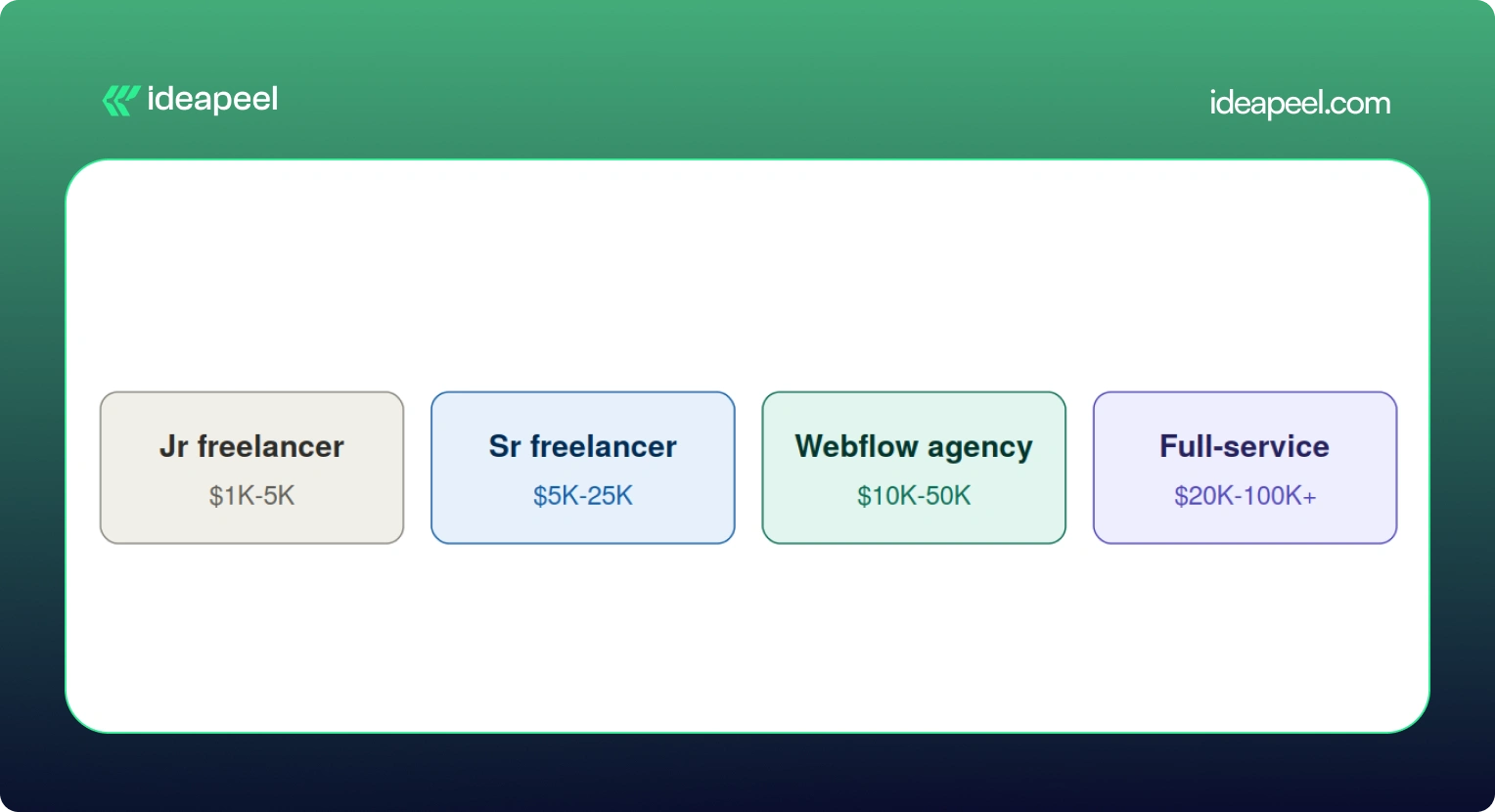
For most growing businesses, yes. A well-built website isn't really an expense; it's closer to a sales tool that works around the clock. Reports on website redesigns consistently show meaningful jumps in lead generation and conversion rate within the first year after a proper rebuild, and even a modest improvement in conversion rate can pay back a five-figure project within months.
That said, not every business needs a $30,000 site. If you're testing an idea or need something up fast, a $2,000 to $5,000 build on a solid template is a completely reasonable place to start. The bigger point is this: the cheapest option isn't automatically the smartest one. What actually matters is whether the site can bring in traffic, support your team, convert visitors, and grow with you instead of needing a full rebuild in a year.
Webflow itself, as a platform, is fairly predictable and easy to budget for. The real variable is always the scope of the work you're asking someone to do on top of it.
Final Thoughts
The Webflow website cost in 2026 depends on your project, design complexity, development time, and customization. A simple Webflow template can keep the build cost low, while custom Webflow development can increase the overall cost.
When budgeting for a Webflow website, consider the full cost of ownership, including the Webflow site plan, Webflow Workspace, development, maintenance, and SEO.
Hiring a Webflow developer is not only about comparing developer rates. An experienced Webflow expert can make better design decisions, create a responsive design system, and reduce rework. The right development partner can help with Webflow development and website design.
For SaaS and growing businesses, the goal is not simply to cost less. It is to build a professional website that balances quality, performance, budget, and long-term growth.
If you need professional design and development for a high-performing Webflow website, ideapeel can help turn your goals into a scalable Webflow build.
[[last-cta]]