Claude vs ChatGPT for Webflow: Which AI Actually Works Better in 2026?
.webp)


Summarize with Ai





Key Takeaways
- Compare Claude and ChatGPT for Webflow
- Learn Which AI Generates Better Code
- Discover the Best AI for Webflow SEO
- Understand AI-Powered CMS Planning
- Improve Design and Development Workflows
- Choose the Right AI for Your Needs
Artificial intelligence has become a core part of modern Webflow workflows. From planning site architecture and writing landing page copy to generating custom code and improving SEO, AI assistants are helping designers and developers work faster than ever before.
Among the many AI tools available today, two names consistently stand out: Claude and ChatGPT. Both can assist with Webflow projects, but they excel in different areas. Choosing the right one depends on whether your priority is coding, content creation, documentation, CMS planning, or agency productivity.
In this guide, we'll compare Claude vs ChatGPT for Webflow across real-world tasks, including website planning, custom code generation, CMS architecture, SEO optimization, client documentation, and day-to-day development workflows. By the end, you'll have a clear understanding of which AI is the better fit for your projects in 2026.
Quick Answer: Which AI Is Better for Webflow?
For most Webflow professionals, ChatGPT is the stronger all-around choice. It combines coding assistance, SEO support, content creation, design brainstorming, workflow automation, and image generation in a single platform. Claude performs exceptionally well when working with large documents, comprehensive audits, and long-form project planning.
If you're a freelancer or agency building and optimizing Webflow websites every day, ChatGPT typically offers the most complete workflow. If your work involves analyzing extensive documentation or creating detailed reports, Claude is an excellent complementary tool.
Why Webflow Professionals Are Using AI in 2026
The demand for faster website delivery and higher-quality digital experiences has pushed AI into the center of Webflow development.
Teams now use AI to:
- Generate HTML, CSS, and JavaScript snippets.
- Plan CMS collections and dynamic content structures.
- Create SEO-friendly blog posts and landing pages.
- Brainstorm layouts and UX improvements.
- Produce client proposals and project documentation.
- Debug custom code and streamline development workflows.
Rather than replacing designers and developers, AI accelerates repetitive tasks so professionals can focus on strategy, creativity, and user experience.
Understanding Claude and ChatGPT
What Is Claude?
Claude is an AI assistant known for its ability to process lengthy documents and provide structured, thoughtful responses. It performs particularly well when reviewing design systems, technical documentation, project briefs, and large content libraries.
For Webflow teams managing enterprise projects or extensive client documentation, Claude can help organize information and produce detailed analyses without losing context.
What Is ChatGPT?
ChatGPT is a versatile AI assistant that supports coding, writing, brainstorming, SEO, automation, and image generation within one ecosystem. It is widely used by Webflow developers and designers to create custom code embeds, improve site content, plan CMS structures, and speed up production workflows.
Its combination of technical capabilities and creative assistance makes it especially useful for agencies and freelancers handling multiple client projects.
What Makes an AI Useful for Webflow?
Not every AI assistant delivers the same value for Webflow projects. The best tools typically excel in five areas.
Design Assistance
Strong AI tools can suggest landing page structures, user flows, style guides, accessibility improvements, and conversion-focused layouts before development begins.
Development Support
Developers often rely on AI for:
- HTML generation
- CSS optimization
- JavaScript snippets
- Custom embed code
- Responsive fixes
- API integration guidance
CMS Planning
For content-heavy websites, AI can simplify:
- Collection planning
- Multi-reference fields
- Dynamic content structures
- Blog architecture
- Scalable information models
SEO Optimization
AI can also assist with:
- Keyword-focused outlines
- Meta titles and descriptions
- Schema suggestions
- Internal linking ideas
- Content briefs
- Search optimization strategies
Client Workflow
Beyond design and development, AI improves productivity by helping create proposals, technical documentation, onboarding materials, meeting summaries, and project plans.
Claude vs ChatGPT: Quick Comparison
ChatGPT for Webflow Development
Better Front-End Development Support
ChatGPT consistently performs well when generating custom CSS, JavaScript interactions, responsive layouts, animation logic, and Webflow embed code. Developers can iterate quickly by refining prompts and debugging snippets within the same conversation.
Strong SEO Workflows
Webflow agencies frequently use ChatGPT to create:
- Blog outlines
- SEO briefs
- Meta descriptions
- Structured content
- Schema recommendations
- Internal linking ideas
Because it combines technical understanding with marketing knowledge, it is especially valuable for SEO-driven websites.
Design Brainstorming
During planning stages, ChatGPT can suggest:
- SaaS landing page structures
- Homepage layouts
- UX improvements
- Conversion-focused sections
- Content hierarchy
- Navigation ideas
These recommendations help teams move from concept to execution more efficiently.
Visual Content Creation
One notable advantage is built-in image generation, allowing designers to rapidly create hero concepts, marketing visuals, illustrations, and creative inspiration without switching tools.
Claude for Webflow Development
Long-Form Analysis
Claude shines when processing extensive design documentation, content inventories, project requirements, and large website audits. It maintains context across long inputs and produces organized outputs that are easy to review.
Documentation and Reporting
Many agencies use Claude to create:
- Technical specifications
- Standard operating procedures
- Client reports
- Design documentation
- Project summaries
Its structured writing style makes it particularly effective for collaborative environments.
Strategic Planning
When planning CMS architecture or information hierarchy, Claude often produces detailed explanations and methodical reasoning that can help teams make informed implementation decisions.
Real-World Webflow Testing
Building a CMS Structure
ChatGPT
- Faster recommendations
- Practical examples
- Scalable collection planning
Claude
- Thorough documentation
- Logical organization
- Detailed planning
Winner: Tie
Writing Custom JavaScript
ChatGPT
- Faster iteration
- Strong debugging
- Practical implementation
Claude
- Clear explanations
- Conservative coding style
Winner: ChatGPT
Creating SEO Content
ChatGPT
- Better keyword optimization
- Conversion-focused writing
- Marketing-oriented structure
Claude
- Natural language
- Strong readability
Winner: ChatGPT
Website Audits
ChatGPT
- Actionable recommendations
- Fast technical insights
Claude
- More comprehensive reviews
- Better handling of lengthy reports
Winner: Claude
Which AI Is Best for Different Webflow Users?
Freelance Designers
Best Choice: ChatGPT
Freelancers benefit from faster coding assistance, content creation, design ideation, and client communication within one platform.
Webflow Agencies
Best Choice: ChatGPT + Claude
Many agencies use ChatGPT for production tasks while relying on Claude for audits, documentation, and large-scale planning.
Developers
Best Choice: ChatGPT
Its strengths in JavaScript, HTML, CSS, debugging, and API guidance make it an effective coding assistant.
Content Teams
Best Choice: Claude
Its long-context capabilities and structured writing style make it valuable for documentation-heavy workflows and extensive content reviews.
Final Verdict
For most Webflow professionals in 2026, ChatGPT provides the most complete end-to-end experience. It supports coding, SEO, design ideation, automation, research, and content creation within a single workflow, reducing the need to jump between multiple tools.
Claude remains an outstanding option for documentation, enterprise-scale planning, and large project analysis. Teams handling complex requirements or extensive audits can benefit significantly from its strengths.
The best choice ultimately depends on your workflow, but many agencies find that combining ChatGPT for execution with Claude for analysis delivers the highest productivity and quality.
Frequently Asked Question
Enter your website URL to receive a detailed website analysis report in just 5 minutes!

Can AI build a complete Webflow website?
AI can significantly accelerate planning, content creation, code generation, and SEO optimization. However, successful Webflow projects still benefit from human expertise in branding, UX, accessibility, and final implementation.
Want to discuss your project?
Grow your project with Webflow Experts
Related Articles



The best B2B websites don't win because they look modern. They win because they explain a complex offer in seconds, build trust before anyone talks to sales, and give every visitor an obvious next step. That combination of clarity, credibility, and a clear path forward is what separates a good-looking B2B website from one that actually generates pipeline.
Below are 10 real B2B website design examples worth studying, each broken down the same way: what the company does, why the design works, and the one design lesson you can steal for your own site. Four are Webflow redesign projects from our own studio, ideapeel, and the rest are well-known B2B and SaaS brands chosen because their homepages are genuinely instructive, not just pretty.
What Makes a Great B2B Website?
A great B2B website clearly explains what the company does, who it's for, and why it's credible then makes the next step obvious. In practice, that usually comes down to seven things:
- A clear value proposition in the hero section, readable in under five seconds
- Simple, jargon-light messaging that doesn't assume the visitor already understands the product
- A logical information hierarchy that goes from "what is this" to "how does it work" to "why should I trust you"
- Easy navigation that doesn't force visitors to hunt for pricing, product details, or contact info
- Trust signals client logos, testimonials, case studies, certifications, or real metrics
- Product or service clarity, especially for technical or unfamiliar offerings
- Conversion-focused CTAs that match where the visitor actually is in their decision, not just "Book a Demo" on every button
B2B buying decisions usually involve multiple stakeholders and a longer sales cycle than B2C, so the website has to do more persuading before a human ever gets involved. Every example below earns its place because it handles at least one of these jobs unusually well.
10 Best B2B Website Design Examples
1. Homepark Housing: Comfortable Living
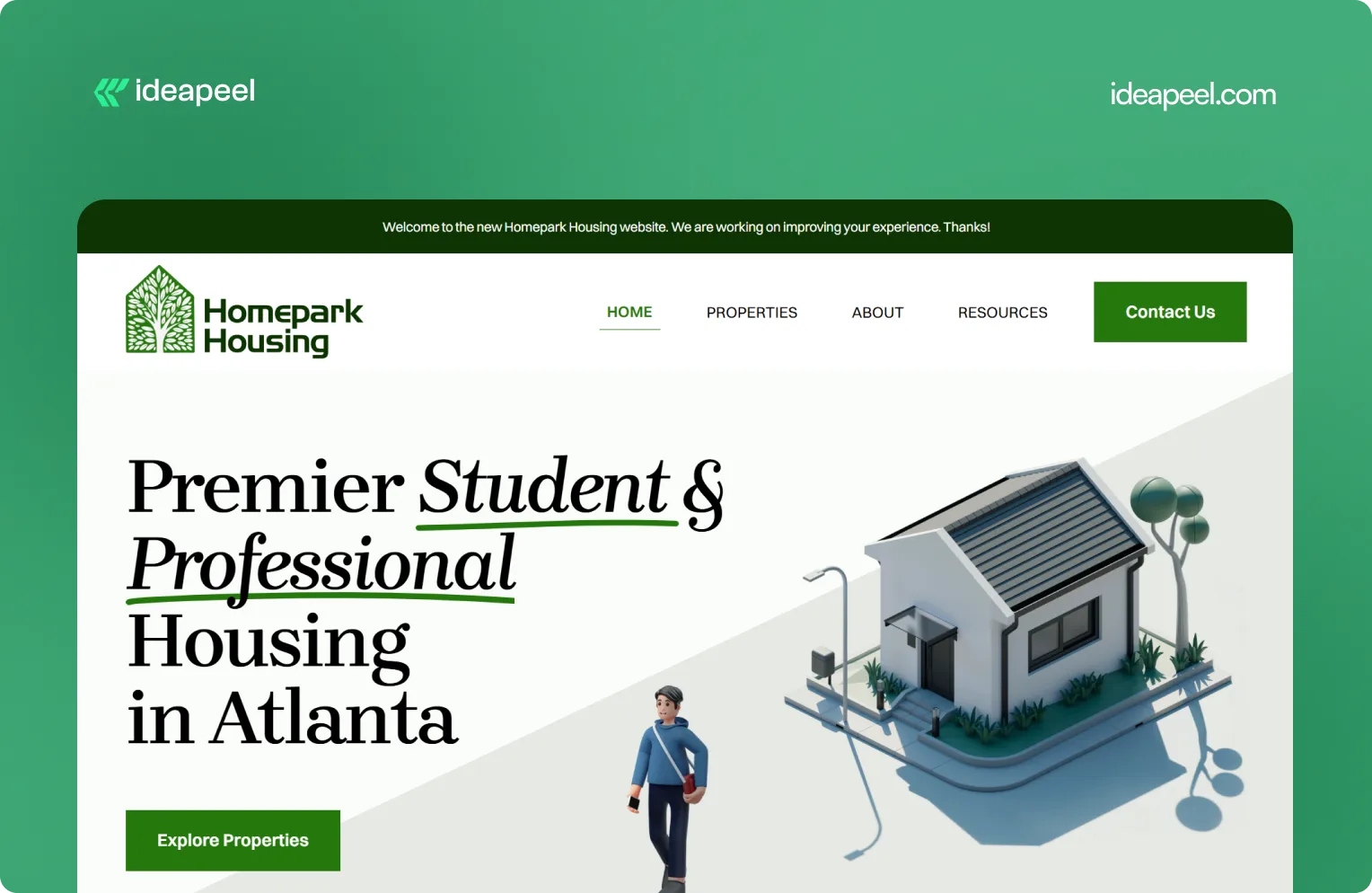
Industry: Real estate
What they do: Homepark Housing provides secure, modern, and strategically located housing designed around the needs of young professionals. Its offering includes affordable housing, flexible leasing options, personalized tenant support, and 24/7 maintenance.
Why the design works: Real estate is a high-consideration purchase. Visitors need to know where the properties are, whether the pricing works for them, what support is available, and whether they can trust the company to deliver a reliable living experience. Homepark's website puts those practical needs at the center of the experience instead of relying only on property imagery.
Key design lesson: When visitors are making a decision involving money, location, and long-term commitment, answer their practical questions early. Clear information about support, pricing, location, and the overall experience can build more trust than visual design alone.
View the Homepark Housing case study
2. KeepWOL: SaaS Team Analytics Platform
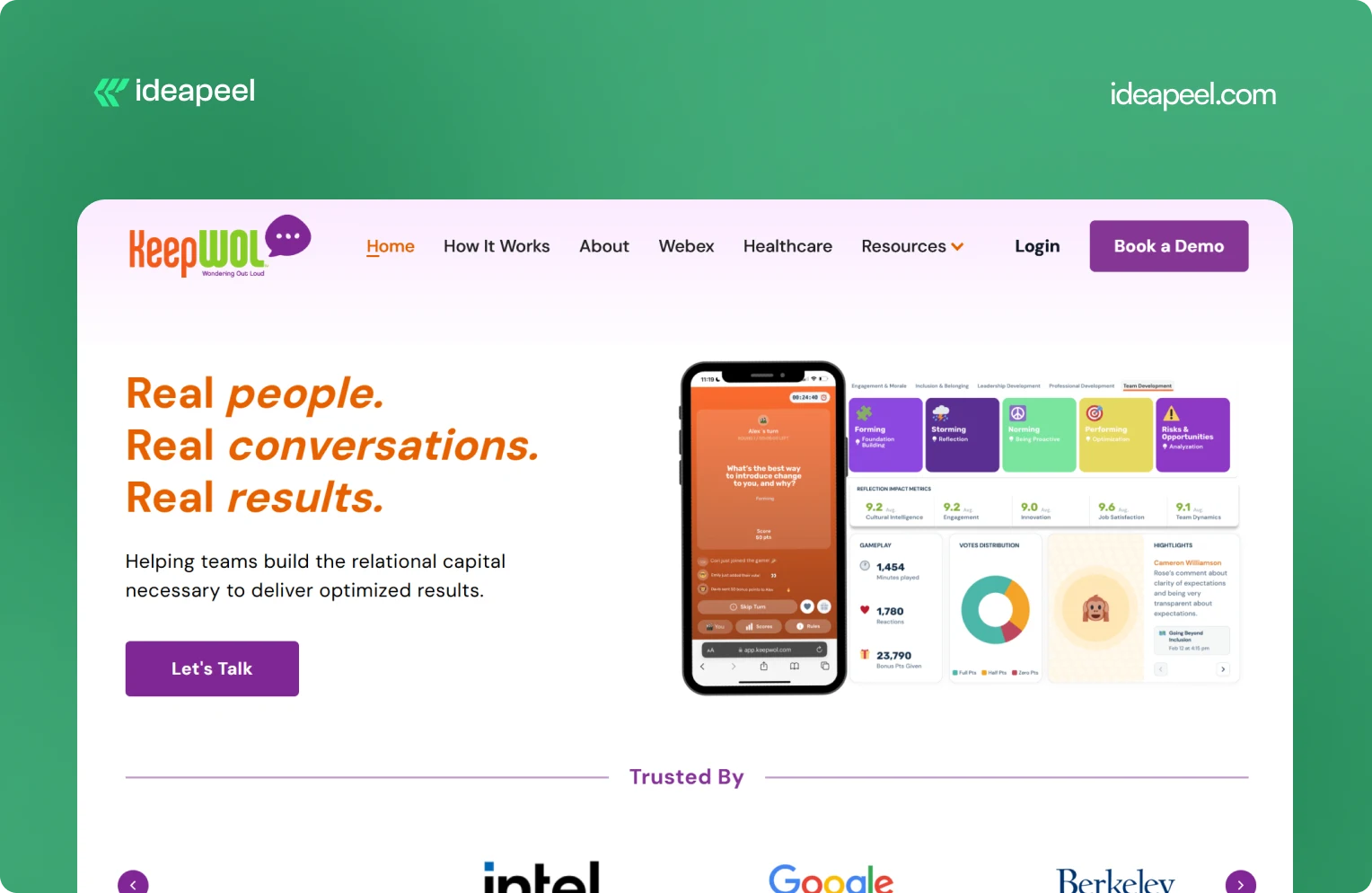
Industry: SaaS, team performance, and people analytics
What they do: KeepWOL helps organizations improve team performance, relationships, engagement, and development through interactive experiences, analytics, and action plans. Its platform combines live sessions with measurable insights across areas such as team dynamics, engagement, innovation, cultural intelligence, and job satisfaction.
Why the design works: KeepWOL has a difficult product to communicate because team relationships and workplace culture aren't as visually obvious as a CRM dashboard or payment platform. The website solves this by turning abstract benefits into a structured journey: experience, reflect, and grow.
Key design lesson: If your product solves an intangible problem, make the value measurable. Show the process, outcomes, metrics, and evidence that connect your product to a business result.
View KeepWOL
3. CarWise: AutoTech Marketplace
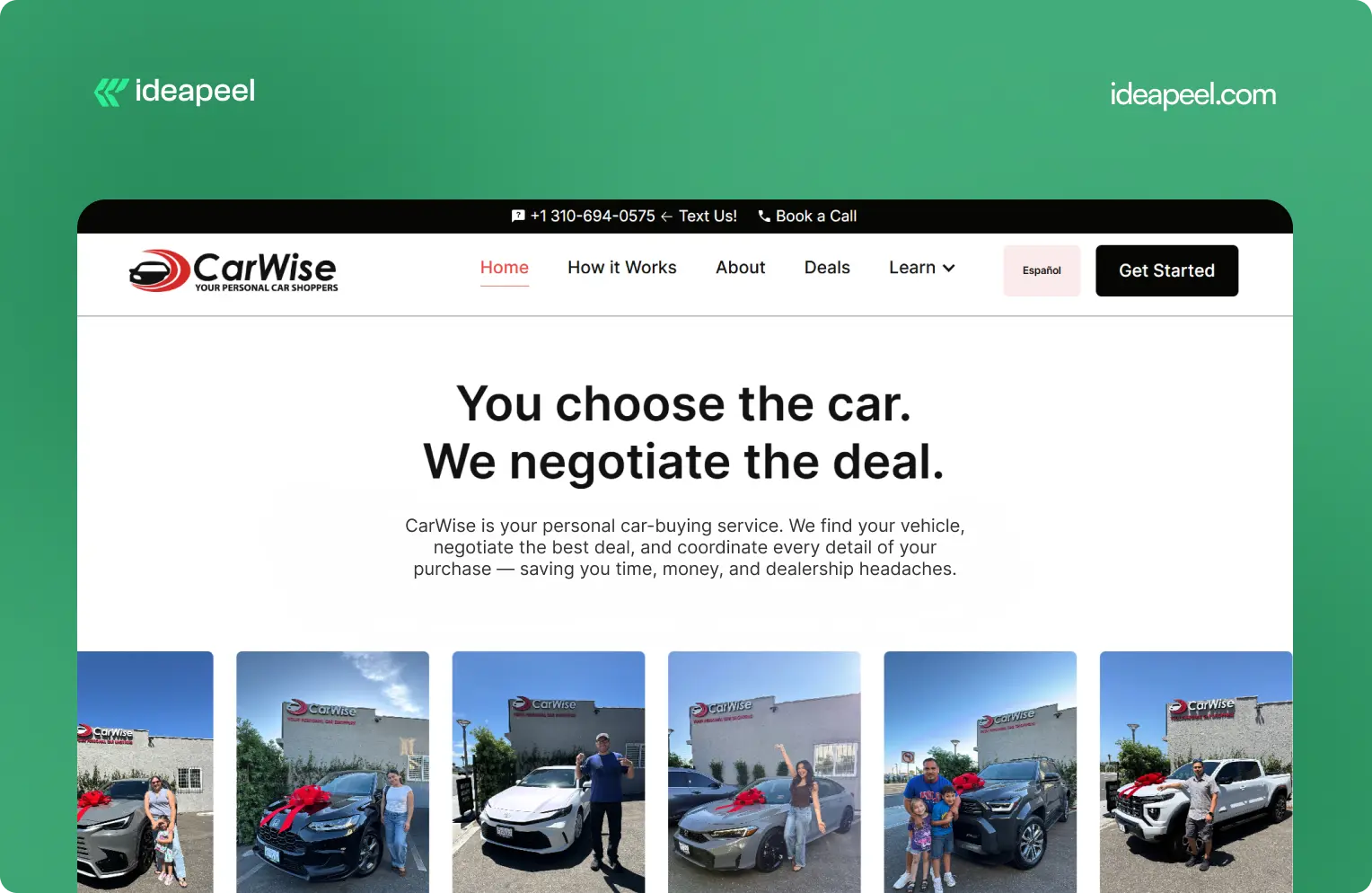
Industry: AutoTech and automotive services
What they do: CarWise helps people navigate the car-buying process through expert negotiation, pricing guidance, financing support, and personal assistance.
Why the design works: Buying a car involves money, uncertainty, and a lot of competing information. That makes trust one of the most important parts of the website experience.
CarWise approaches the problem by making the process easier to understand. Instead of overwhelming visitors with automotive terminology, the experience focuses on the practical journey from finding a vehicle to negotiating and completing the purchase.
Key design lesson: In industries where visitors naturally have trust concerns, transparency should be part of the design. Explain the process, show how the service works, and make the human value behind the product obvious.
View the CarWise case study
4. Glo Dollar: Fintech / Stablecoin Platform
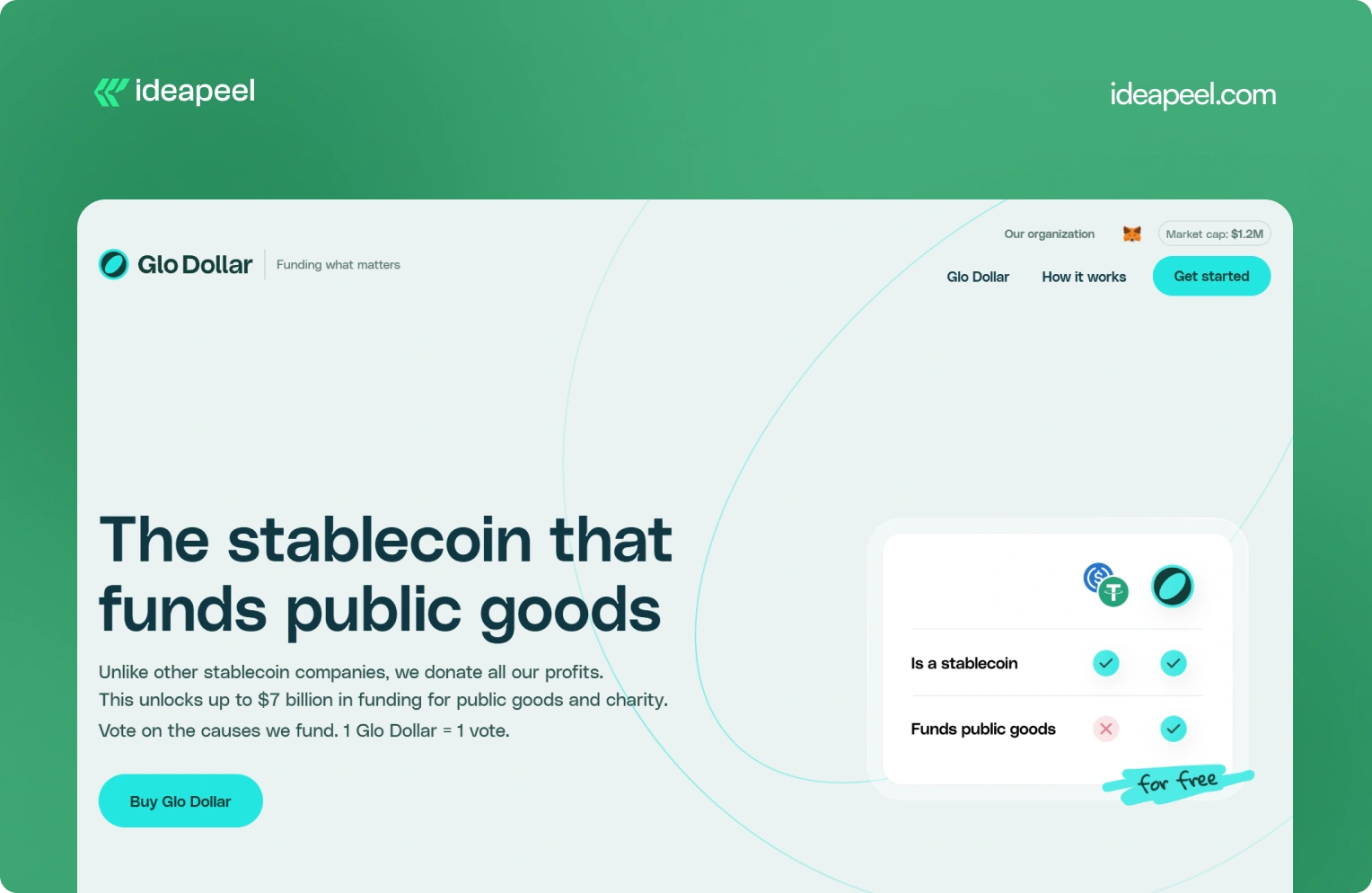
Industry: Fintech, blockchain, and stablecoins
What they do: Glo Dollar is a stablecoin designed so that profits from its reserves are donated to public goods and charitable causes. The website explains the model as a sequence: the fiat backing generates revenue, the profits are donated, and users can support causes at no additional cost.
Why the design works: Financial products are already difficult to explain. Add blockchain and philanthropy to the equation and the communication challenge becomes even bigger.
Glo Dollar handles that complexity by breaking the concept into smaller ideas. Instead of asking visitors to understand the entire financial model immediately, the website explains how the product works step by step.
Key design lesson: When your product combines several unfamiliar concepts, don't explain everything in one block of content. Sequence the information. One clear idea per section makes complicated products much easier to understand.
Visit Glo Dollar
5. BrickYard: Crafting Modern Architecture
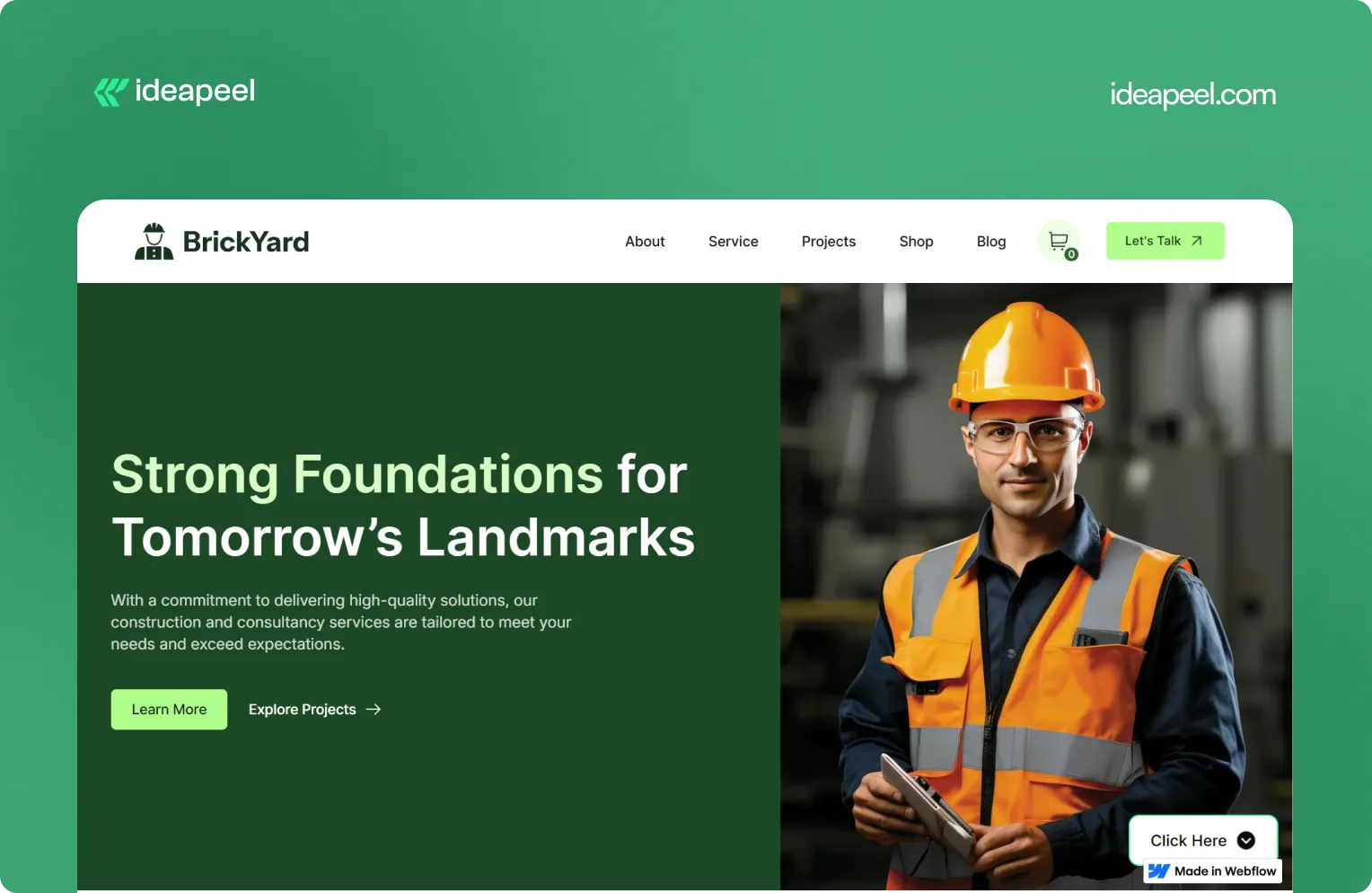
Industry: Construction, architecture, and design
What they do: BrickYard is a modern Webflow template designed for construction companies, architects, and design professionals. It focuses on showcasing services, projects, and professional work through a clean, responsive structure.
Why the design works: Construction and architecture websites need to balance two things: visual presentation and practical information. The work needs to look impressive, but potential clients also need to understand services, previous projects, capabilities, and how to get in touch.
BrickYard handles that through a minimalist visual system combined with dedicated pages for services, projects, blog content, contact information, and other business needs. The template is also designed to be customizable, responsive, SEO-focused, and CMS-ready.
That structure makes it useful beyond a single visual concept. Businesses can adapt the framework to their own services and content without rebuilding the entire site.
Key design lesson: Good website design isn't only about the homepage. Build a flexible structure that gives visitors the information they need while making it easy for the business to expand the site later.
View the live BrickYard template
6. Reliacare: Health and Wellness Website Template
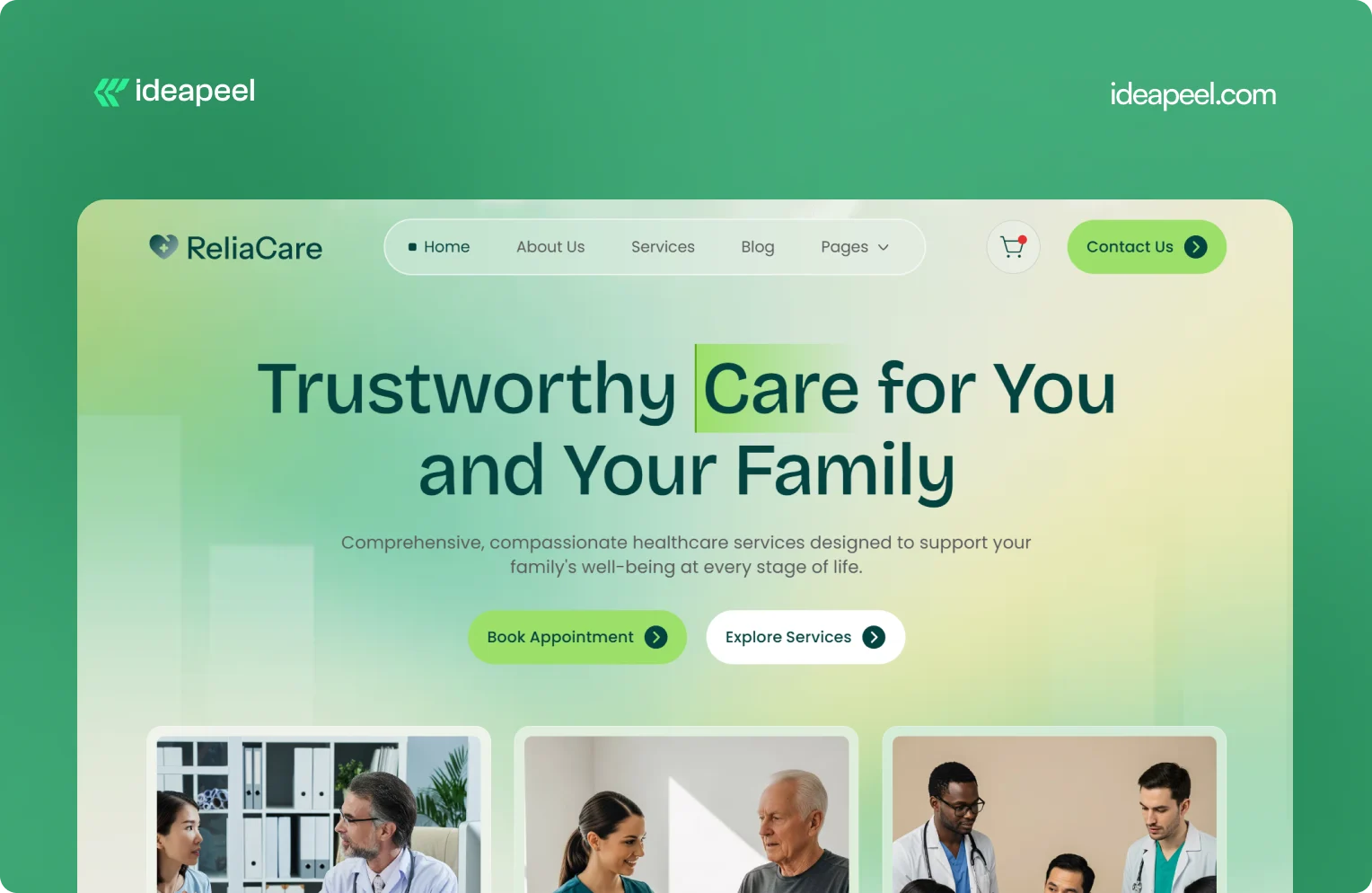
Industry: Health, wellness, and medical
What they do: Reliacare is a Webflow website template designed for health, wellness, and medical businesses that need a professional digital presence.
Why the design works: Health-related websites have a different trust challenge from many other industries. Visitors may already be uncertain, concerned, or looking for reliable information. A website that feels chaotic or overly decorative can make that uncertainty worse.
Reliacare takes a cleaner approach. The design gives services, information, and credibility room to breathe instead of filling every section with visual elements.
Key design lesson: For healthcare, wellness, and other trust-sensitive industries, restraint can be a design advantage. A clean interface with clear information often communicates confidence better than unnecessary visual complexity.
View Reliacare
7. StagePro: Events and Conference Website Template
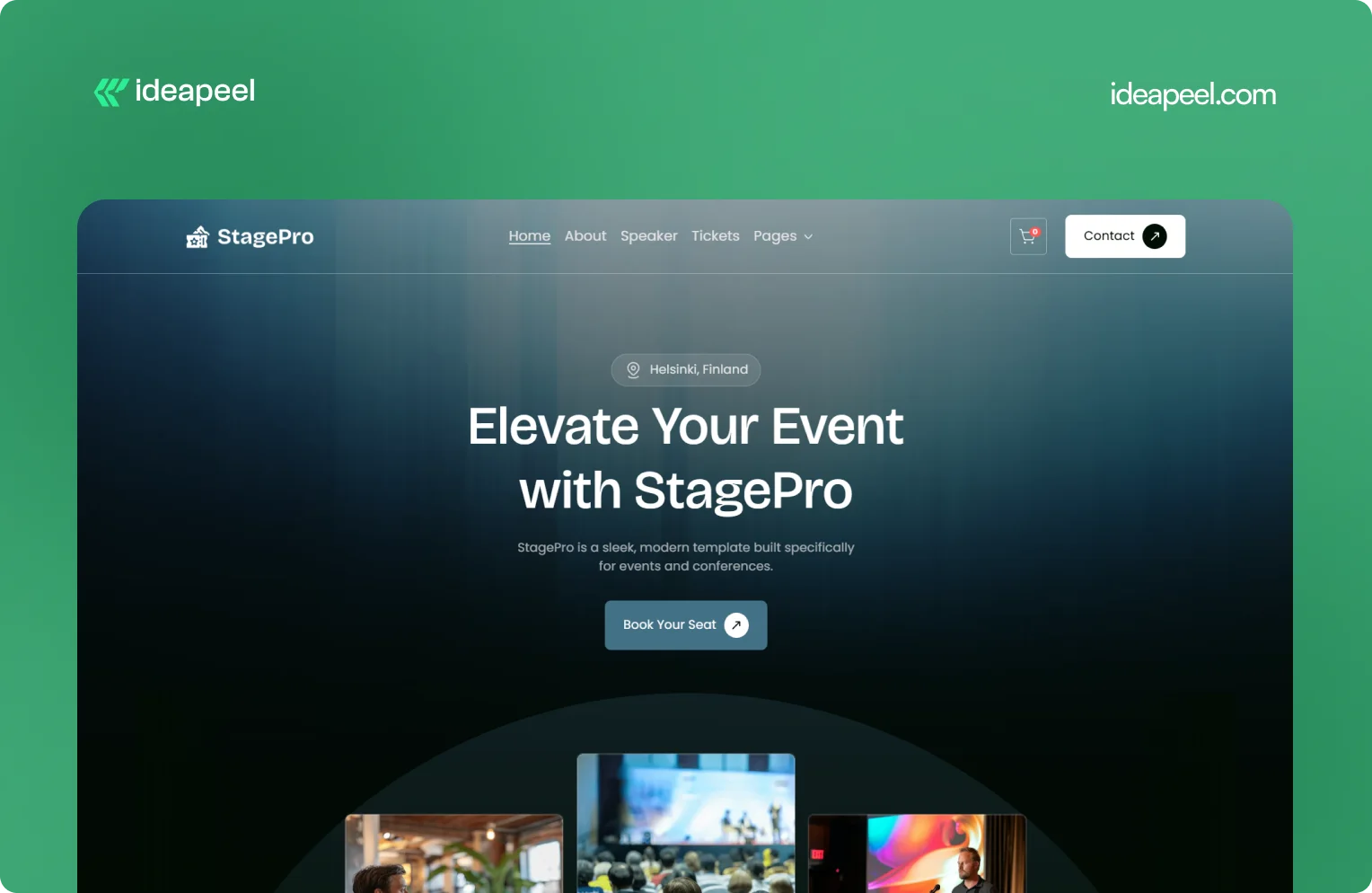
Industry: Events, conferences, summits, and workshops
What they do: StagePro is a Webflow template designed for event organizers, conference teams, summits, workshops, and other event-based businesses. It includes CMS-powered speakers, schedules, sponsors, blogs, ticket pages, and registration sections.
Why the design works: Event websites have to do several jobs at once. They need to create excitement, communicate important information, introduce speakers, explain schedules, and ultimately encourage people to register.
StagePro separates these needs into clear sections instead of trying to put everything into one message. The CMS structure also makes it easier to manage speakers, sessions, sponsors, and other event content as the website grows.
The result is a website structure that supports both the emotional side of an event and the practical information visitors need before registering.
Key design lesson: When a website has multiple conversion goals, don't mix everything together. Give each major goal a clear place in the information hierarchy.
8. Famous Tracker: Grow Fast Connection
Industry: SaaS and influencer marketing intelligence
What they do: Famous Tracker helps brands detect notable influencer purchases in real time and turn those signals into outreach opportunities. The platform provides automated detection, real-time notifications, influencer profiles, and tools for brand engagement.
Why the design works: Famous Tracker is built around a workflow that many visitors may not immediately understand. The website therefore needs to explain not just what the product is, but what happens after someone uses it.
The design makes the workflow easier to follow by connecting detection, notification, influencer information, and outreach. That helps turn an unfamiliar product category into a practical business process.
Key design lesson: If your product automates a process that visitors currently handle manually, show the workflow. Make it clear what happens before the product, what the product changes, and what the user can accomplish afterward.
View the Famous Tracker case study
[[question-block]]
9. Metrocard: Technology Website Template
Industry: Fintech and financial technology
What they do: Metrocard is a Webflow template designed for fintech, banking, investment, and financial service businesses. It uses a streamlined single-page structure with responsive design, intuitive navigation, SEO-focused structure, and customizable components.
Why the design works: Financial websites need to communicate credibility without making the experience difficult to navigate. Metrocard keeps the structure relatively focused, making it suitable for businesses that need to present a financial product or service without requiring a large multi-page website.
Its Webflow structure includes responsive navigation, CMS functionality, reusable components, forms, interactions, and responsive layouts.
Key design lesson: Not every B2B website needs dozens of pages. If the business has a focused offer, a well-structured single-page or compact website can communicate the value proposition without unnecessary complexity.
10. Moontide: Turning Dreams Into Reality
Industry: SaaS, founder funding and support
What they do: Moontide Capital connects immigrant founders with funding, legal support, and community networks to help them launch and scale startups.
Why the design works: This site has to build trust with a genuinely underserved audience while also proving credibility to investors and partners. The design keeps the process transparent from first meeting through due diligence, and leads with mission and impact before asking anything of the visitor..
[[inner-cta]]
B2B Website Design Best Practices
If you're planning a new B2B site or a redesign, these are the practices that show up consistently across the examples above:
- Lead with a specific value proposition, not a generic tagline. "We help B2B teams cut deal cycles by 40%" beats "The future of sales."
- Put your hero section to work. It's the highest-traffic real estate on the entire site. Don't waste it on abstract imagery with no message.
- Design for multiple stakeholders. B2B buying decisions often involve a technical evaluator, a budget owner, and an end user. Make sure each can find what they need.
- Use real product visuals wherever possible instead of stock photography or generic illustration; it builds more trust and helps visitors understand the actual product.
- Keep navigation goal-oriented. Organize menus around what visitors are trying to do (see pricing, understand the product, read case studies), not around internal department names.
- Add trust signals throughout the page, not just in one "logos" section testimonials and proof work best when they appear near the claim they're supporting.
- Make load speed part of the design brief. A fast, clean site reinforces credibility before a single word is read.
- Match your CTA to buyer intent. A first-time visitor and a returning, bottom-funnel visitor shouldn't see the same "Book a Demo" button in the same place.
How to Apply These Ideas to Your Own Website
You don't need to redesign everything at once. A practical way to start:
- Audit your homepage against the list above. Can a first-time visitor explain what you do after five seconds on the page?
- Identify your biggest trust gap. Is it a lack of proof, unclear pricing, or too much jargon? Fix the single biggest gap first.
- Map your navigation to buyer goals, not your internal team structure.
- Simplify one complex page at a time, following the "one idea per section" approach used by ZipID and Glo Dollar.
- Test your CTAs by funnel stage rather than repeating the same button everywhere.
Final Thoughts
The common thread across every example above isn't a specific color palette or layout trend, it's clarity. The best B2B websites make it easy to understand the offer, easy to trust the company, and easy to know what to do next. That's a strategy decision as much as a design one.
Need a B2B website that converts? If your current site isn't doing that job or you're planning a redesign and want it built around UX and conversion from the start, explore ideapeel's B2B website design work or book a strategy call to talk through your project.
Related Reading
- The UX Design Process: An Easy-to-Follow 8-Step Guide
- 10 Different Types of Websites With Examples
- Webflow Development Cost in 2026
- UI/UX Audit Checklist for B2B & SaaS
- ideapeel's UI/UX Design Services
- ideapeel's Webflow Development Services
[[last-cta]]
If you've been searching around for a straight answer on Webflow pricing, you've probably noticed something annoying: every article gives you a different number. That's because most of them mix up two totally different things: the cost of the Webflow platform itself and the cost of actually building a website on it.
Let's clear that up right away.
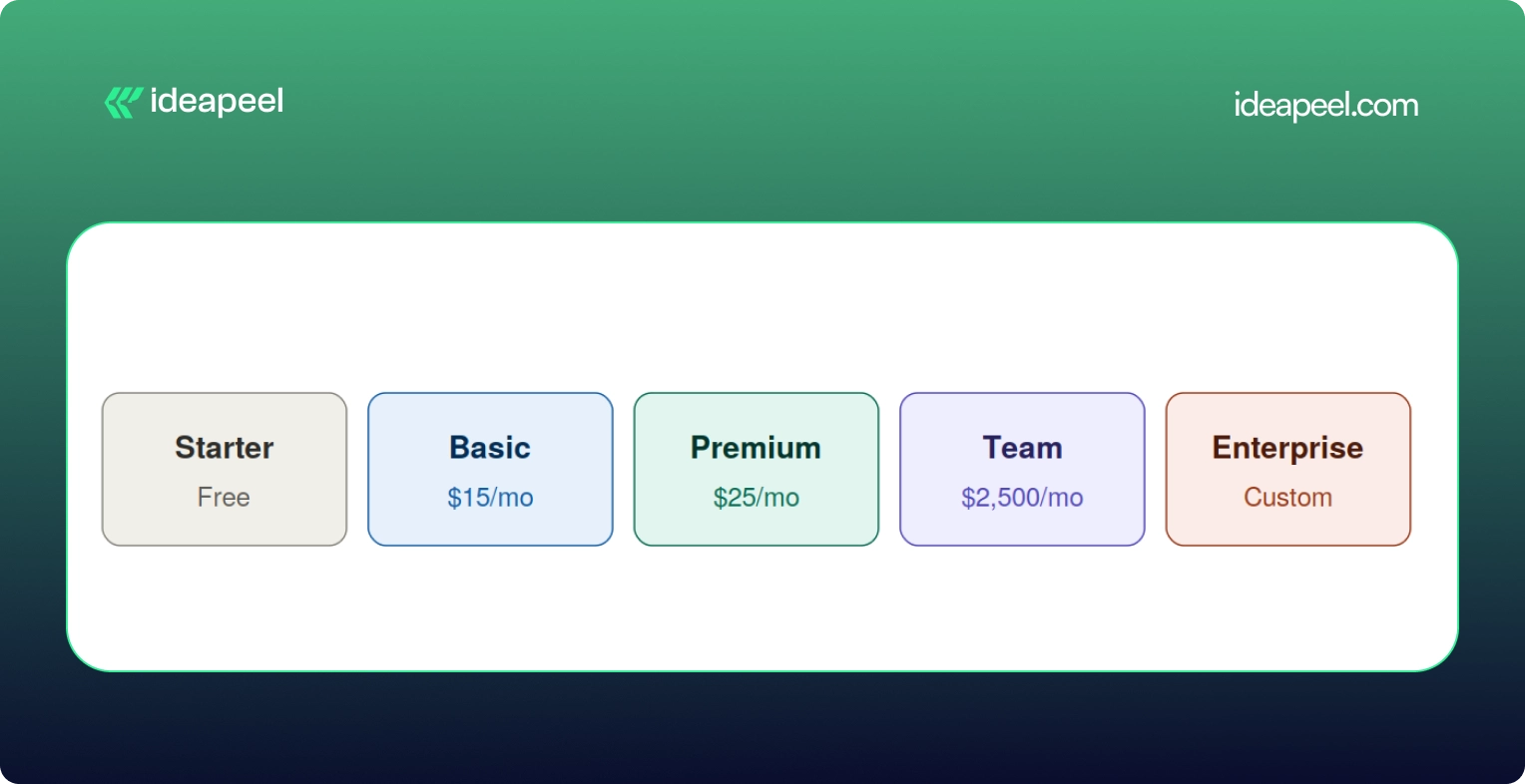
Webflow development cost in 2026 usually falls somewhere between a few hundred dollars for a small template based site, and $80,000 or more for a complex enterprise build. The Webflow subscription itself is separate from that. As of the platform's May 2026 pricing update, paid site plans start at $15 a month for Basic and $25 a month for Premium, both billed yearly.
That's the short version. Now let's break down where your money actually goes, because "it depends" isn't a budget.
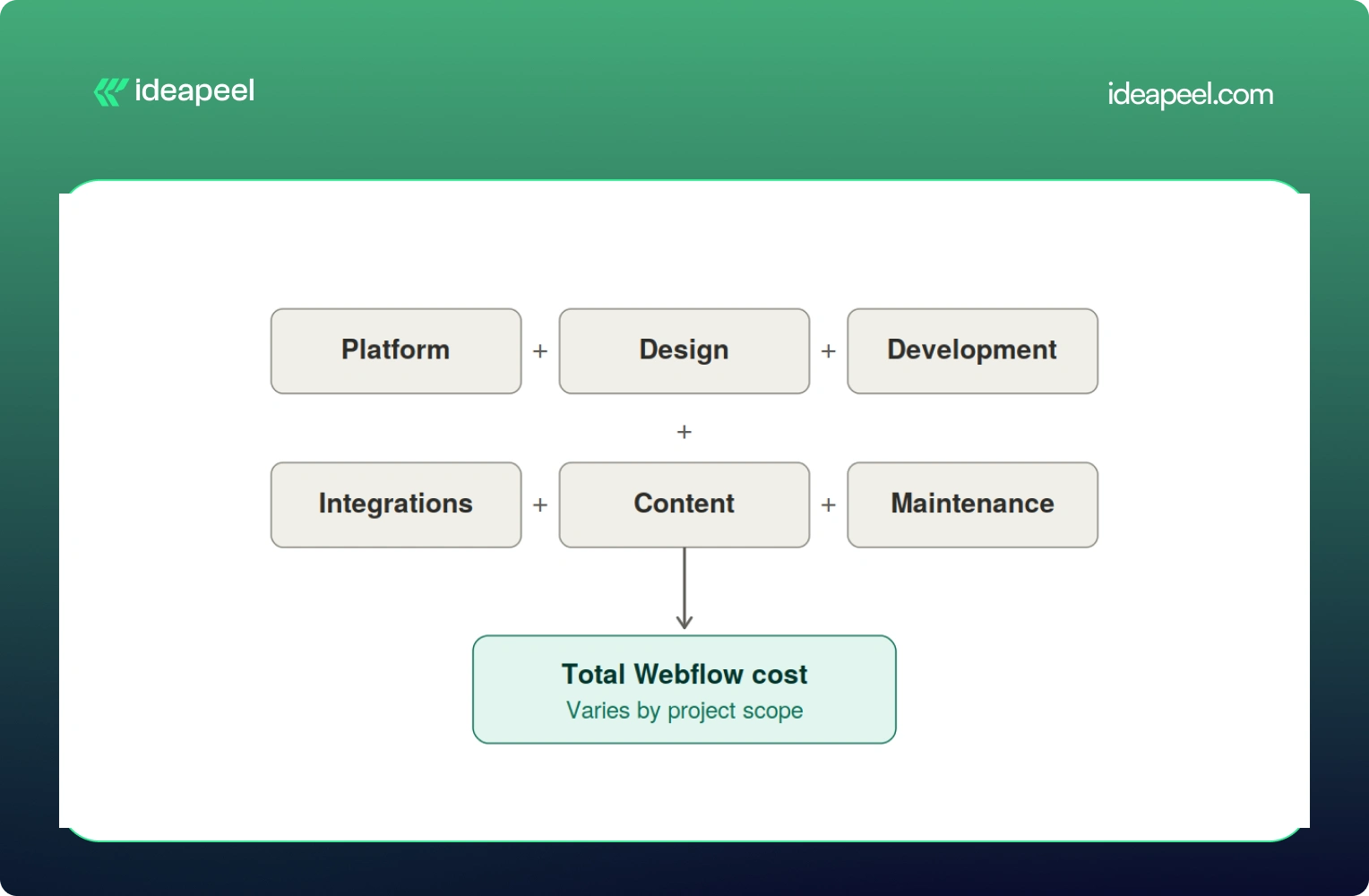
Development Cost vs Platform Cost: Two Different Bills
Here's the mental model worth keeping in your head the whole time you're reading this:
Total Webflow cost = Platform cost + Design + Development + Integrations + Content + Ongoing maintenance
The platform cost is what you pay Webflow every month to keep your site live. It's predictable and doesn't change much no matter who builds your site.
The development cost is what you pay a freelancer or agency to actually design, build, and launch the thing. This is the part that swings wildly, and it's the part most people are really asking about when they type "how much does Webflow cost" into Google.
Keeping these separate matters because a $5,000 website and a $20,000 website can run on the exact same $25 a month plan. The platform isn't what drives the price up. The scope of the work is.
Webflow Pricing in 2026 (Straight From Webflow)
Before anything else, let's get the official numbers on the table, because a lot of guides floating around still quote 2025 prices that no longer exist.
Webflow made its biggest pricing shake up in years back in May 2026. The old CMS plan and the old Business plan are both gone. They've been folded into one new plan called Premium.
A few things worth knowing about this change:
- The old Basic plan used to cost $18 a month. It's now $15 a month, and the page limit doubled from 150 to 300 static pages.
- The old CMS plan ($29/mo) and Business plan ($49/mo) are both retired. Premium replaces both at $25/mo and now comes with 20,000 CMS items included by default.
- If you already have an active site, none of this hits you immediately. Pricing changes apply at your next renewal or billable change on or after June 29, 2026.
On top of the Site Plan, there's a Workspace Plan, which is a separate bill many people forget about entirely.
And if more than one person needs to log in and edit the site, you'll pay per seat too, $39 a month for a full seat, $15 for a limited seat, and $0 for someone who just leaves comments.
So for a small marketing team with two editors, a realistic all in monthly number looks more like $70 to $95 a month once you add the Premium Site Plan, a Workspace plan, and an extra seat. Not $25. That's the number people get burned by when they only look at the homepage pricing.
[[inner-cta]]
Does Webflow Development Cost Include the Webflow Subscription?
No, and this trips up a lot of first time buyers. Development is a one time (or project based) cost that covers strategy, design, building the site, setting up the CMS, integrations, and getting it live. The Webflow subscription is what keeps that site running month to month, forever, whether you built it yourself or paid an agency $40,000 for it.
Think of it like buying a house versus paying your utility bill. Very different expenses, and mixing them up is how budgets go sideways.
How Much Does Webflow Development Cost by Website Type?
This is the question most people actually want answered, so let's get specific.
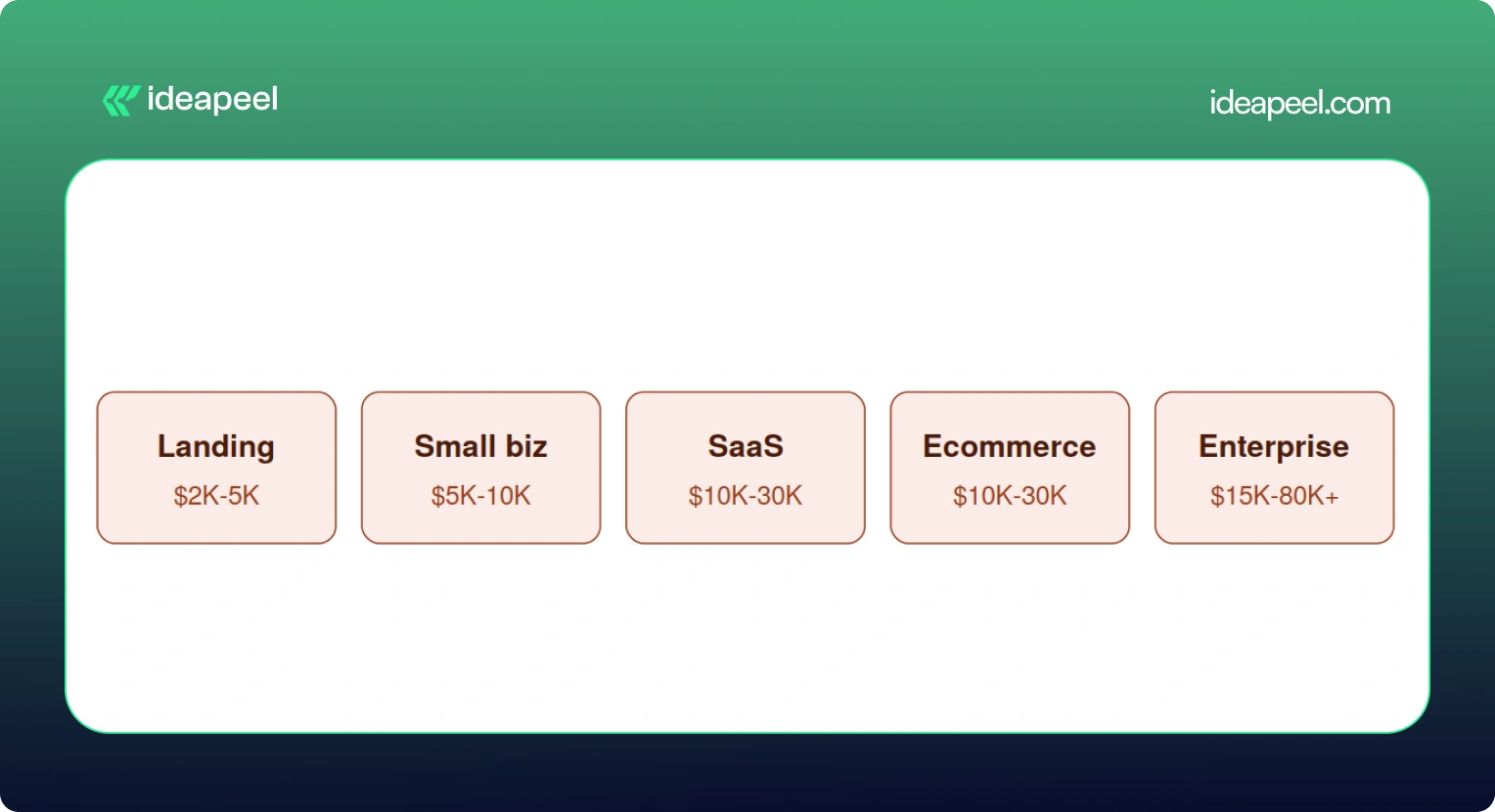
Keep in mind these are planning ranges pulled from what's actually happening in the market right now, not official Webflow numbers. A DIY project using a $49 to $149 premium template can bring the low end down to a few hundred dollars if you're comfortable doing the work yourself.
Landing Page
A single page or a small handful of pages, usually built to support a launch, a fundraise, or a campaign. Costs stay low here because there's less to design and fewer moving parts. Expect a template or lightly customized design, basic forms, and light SEO setup.
Small Business Website
Usually five to fifteen pages, with a blog or basic CMS, custom sections, and a handful of integrations like a contact form or email tool. This is the sweet spot for most local businesses and service providers.
SaaS Website
This is where things get more involved. A proper SaaS site needs a homepage that actually explains what you do, product and feature pages, a pricing page that converts, a CMS for the blog and case studies, and enough SEO and content structure to bring in organic traffic. Expect this to run $10,000 and up, and often well past $20,000 once you factor in conversion focused design.
Ecommerce Website
Product pages, collections, a working checkout, payment integration, and filtering all add real development hours. A store with 45 products and a few third party integrations (think Klaviyo or ShipStation) commonly lands in the $20,000 to $30,000 range.
Enterprise Website
Big CMS structures, multiple templates, localization for different markets, complex integrations with sales and marketing tools, accessibility requirements, and heavier governance and security needs. These projects regularly cross $30,000 and can go past $80,000 depending on scope.
[[question-block]]
What Actually Drives the Price Up
Here's a mistake a lot of people make: assuming more pages automatically means more money. That's not quite right.
Unique page designs and complexity matter far more than raw page count. A 40 page site built from five repeatable templates can be cheaper than a 10 page site where every single page has its own custom layout.
A few specific numbers worth knowing:
- Custom animations or GSAP heavy interactions typically add $1,000 to $5,000.
- Each third party integration (HubSpot, Salesforce, Zapier, a payment processor) runs $500 to $2,000, with complex ones like custom auth or dashboards going up to $10,000.
- Multi language sites using Webflow's localization tools add another $2,000 to $8,000 depending on how many locales you need.
- Migrating content from WordPress or another CMS adds $1,000 to $5,000 depending on how messy the existing data is.
What's Actually Included in a Webflow Website Development Project?
If you've never gone through this process before, here's roughly what you're paying for when you hire someone to build a Webflow site.
Strategy: discovery calls, sitemap planning, competitor research, figuring out what actually needs to be on the site
Design: wireframes, UI design (often in Figma first), responsive layouts for desktop and mobile, building out a reusable design system
Development: the actual Webflow build, CMS collections, interactions and animations, reusable components, responsive behavior
Technical work: forms, analytics setup, third party integrations, redirects, technical SEO, schema markup, accessibility, page speed
Launch: QA across browsers and devices, mobile testing, redirect mapping, checking indexing, confirming analytics are firing correctly
Skipping any of these steps is usually how projects end up needing expensive rework a few months later.
Does SEO Increase Webflow Development Cost?
Yes, a bit, and it's worth it. A properly done technical SEO setup, meta tags, schema, sitemap, clean URL structure, image optimization, internal linking, page speed, usually adds somewhere between $500 and $3,000 depending on site size. Given that a large majority of buying journeys still start with a search engine, this isn't a line item to cut to save a few hundred dollars.
Does AEO or GEO Change What You Pay?
This is newer territory, and it's genuinely one of the more useful things to understand right now if your site needs to show up in AI-ge answers, not just Google's blue links.
AEO (Answer Engine Optimization) is about nerated structuring your content so tools like ChatGPT, Perplexity, and Google's AI Overviews can pull a clear answer straight out of your page. That usually means adding question-based content, clearer CMS field structure, and schema that spells out exactly what your business does.
GEO (Generative Engine Optimization) goes a step further. It's about making your brand something AI systems actually want to cite as a source, through comparison pages, case studies, clear author information, evidence-backed claims, and content that other sites and AI tools can confidently reference.
Neither of these replaces SEO. They sit on top of it. And yes, they can add scope, usually in the form of extra content architecture and structured data work, which might add anywhere from a few hundred to a couple thousand dollars depending on how deep you go. But for businesses trying to stay visible as more searches shift toward AI tools, it's quickly becoming table stakes rather than a nice to have.
Real World Examples
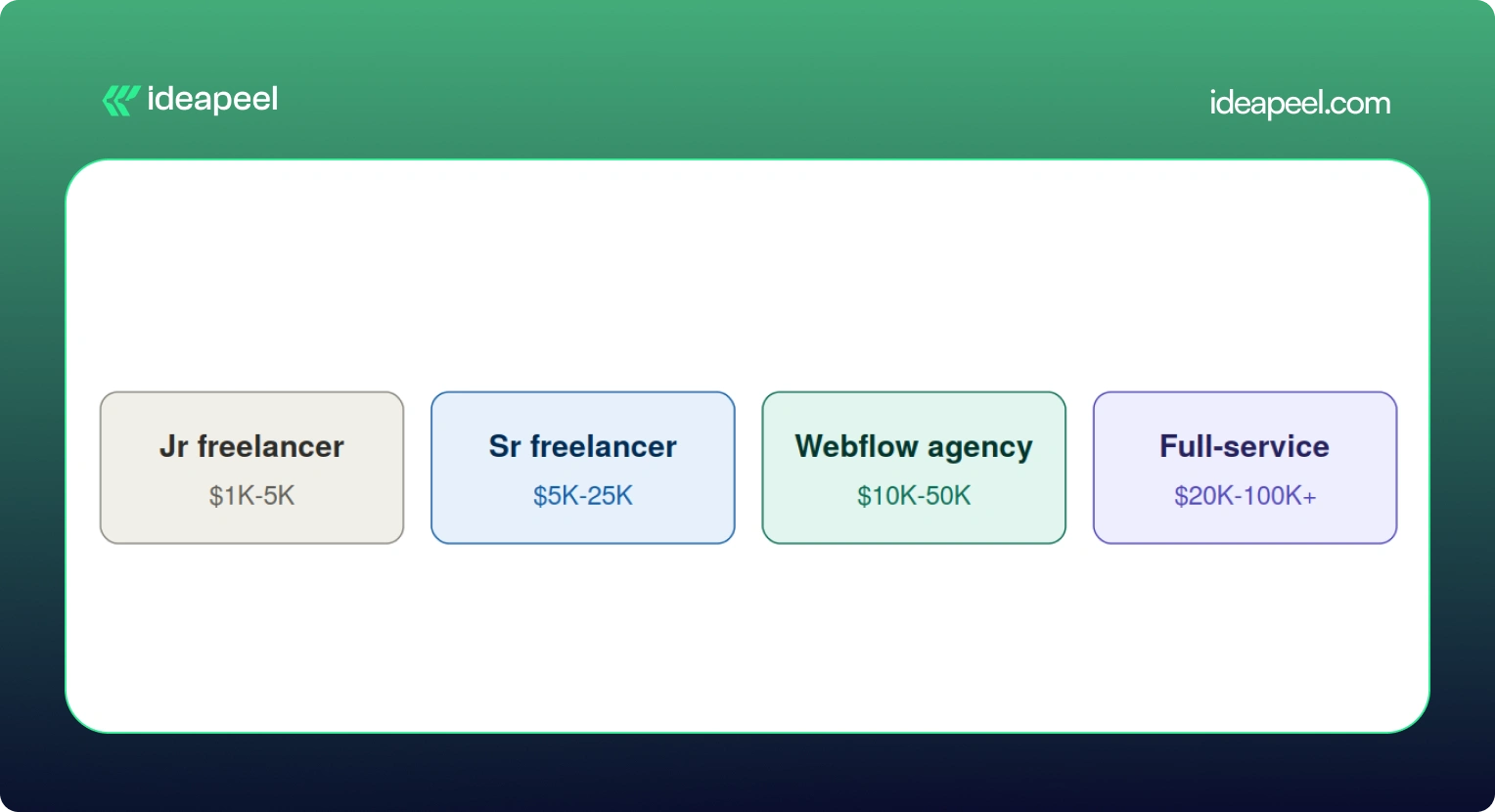
Numbers on a chart only tell you so much, so here's what actual projects have looked like.
Startup landing page, $3,500. A pre-seed SaaS company needed three pages (homepage, features, pricing) to support a fundraising push. A mid-level freelancer delivered it in about 10 days, including a basic blog CMS and HubSpot form integration.
Professional services site, $12,000. A 50-person consulting firm needed a 20 page site with team bios, case studies, a blog, and a contact system. A Webflow specialized agency delivered it in six weeks, covering discovery, custom design, development, CMS setup, and SEO.
Ecommerce brand, $22,000. A direct-to-consumer skincare company needed 45 products, a content hub, and integrations with Klaviyo and their inventory system. This included brand identity work, full ecommerce build, and product photography direction.
Enterprise migration, $45,000. A Series C fintech company moved an 80-page site from WordPress to Webflow over 12 weeks with a three-person team. The budget covered a full content audit, a new design system, CMS architecture, redirect mapping, and integrations with HubSpot, Salesforce, and Segment.
Webflow vs WordPress: Which Actually Costs More?
On paper, the build costs look similar, both platforms range from roughly $2,000 to $60,000 depending on scope. The real difference shows up after launch.
WordPress can still make sense for content-heavy sites that lean hard on a specific plugin ecosystem. But for most marketing and SaaS teams who want to move fast without filing a developer ticket every time they need a small change, Webflow tends to come out ahead once you look at total cost over two or three years.
Additional Costs People Forget to Budget For
A handful of expenses regularly catch people off guard:
- Stock photography, usually $10 to $500 per image, with most sites needing 20 to 50 images
- Custom fonts, $50 to $500 for a commercial web license if Google Fonts won't cut it
- Copywriting, $100 to $300 per page, so a 20-page site can mean $2,000 to $6,000 just for the words
- Domain registration, $10 to $50 a year
- A maintenance retainer, $300 to $2,000 a month if you want someone on call for updates
- Add-ons like Optimize (A/B testing), which starts at $299 a month and isn't bundled into any standard plan
None of these are dealbreakers on their own, but stacked together they can add 15 to 20% to a project you thought you'd already priced out.
How to Get an Accurate Webflow Quote
A few things that consistently lead to a tighter, more honest quote:
- Have your content ready before you start. Delays in copy and images are one of the most common reasons projects run over budget and over timeline.
- Write down your scope clearly. A sitemap, a feature list, and a rough page count prevent the slow creep of "just one more page" that inflates every project.
- Decide your must haves versus nice to haves. Do you actually need multi language support on day one, or can that wait for phase two?
- Ask providers for a phase by phase breakdown, not just one lump number. It makes it much easier to see where your money is actually going.
- Consider launching an MVP first. Getting a smaller version live and adding features later based on real user behavior often costs less overall than trying to build everything up front.
Is Webflow Worth the Cost in 2026?
For most growing businesses, yes. A well-built website isn't really an expense; it's closer to a sales tool that works around the clock. Reports on website redesigns consistently show meaningful jumps in lead generation and conversion rate within the first year after a proper rebuild, and even a modest improvement in conversion rate can pay back a five-figure project within months.
That said, not every business needs a $30,000 site. If you're testing an idea or need something up fast, a $2,000 to $5,000 build on a solid template is a completely reasonable place to start. The bigger point is this: the cheapest option isn't automatically the smartest one. What actually matters is whether the site can bring in traffic, support your team, convert visitors, and grow with you instead of needing a full rebuild in a year.
Webflow itself, as a platform, is fairly predictable and easy to budget for. The real variable is always the scope of the work you're asking someone to do on top of it.
Final Thoughts
The Webflow website cost in 2026 depends on your project, design complexity, development time, and customization. A simple Webflow template can keep the build cost low, while custom Webflow development can increase the overall cost.
When budgeting for a Webflow website, consider the full cost of ownership, including the Webflow site plan, Webflow Workspace, development, maintenance, and SEO.
Hiring a Webflow developer is not only about comparing developer rates. An experienced Webflow expert can make better design decisions, create a responsive design system, and reduce rework. The right development partner can help with Webflow development and website design.
For SaaS and growing businesses, the goal is not simply to cost less. It is to build a professional website that balances quality, performance, budget, and long-term growth.
If you need professional design and development for a high-performing Webflow website, ideapeel can help turn your goals into a scalable Webflow build.
[[last-cta]]
Search is changing. More people now ask ChatGPT, Perplexity, Gemini, or Google's AI Overviews a question instead of typing keywords into a search box. If your website isn't easy for these AI systems to read, you become invisible in that conversation, even if your content is great.
This guide explains, in plain words, what makes a website "LLM-friendly," and gives you a clear, honest framework to follow. We'll also flag where common advice online overstates what actually helps, based on what Google and OpenAI have publicly confirmed.
If you want a hand implementing any of this, ideapeel's web development team builds sites with this exact architecture in mind.
What Is an LLM-Friendly Website?
An LLM-friendly website is one where crawlers and AI retrieval systems can easily reach, read, and understand your important content, and where that content is written clearly enough to be pulled into an AI-generated answer.
It's not one trick. It's a chain of small things working together: a crawler must be able to reach the page, get the real content (not a blank JavaScript shell), understand what each part means, and trust it enough to quote it.
How Do AI Search Systems Actually Read a Website?
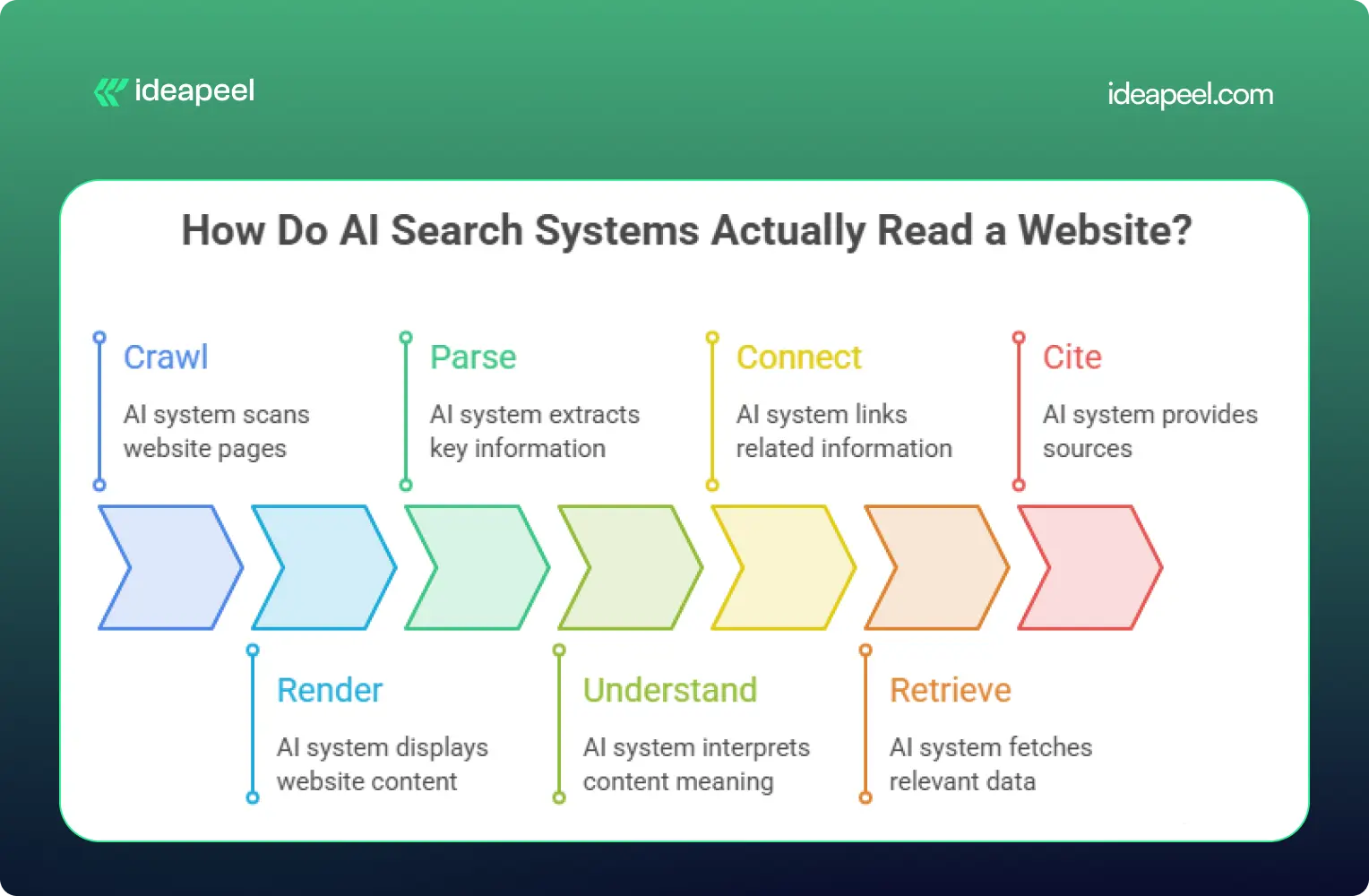
Most AI systems follow a simple path: crawl → render → parse → understand → connect → retrieve → cite.
- Crawl: the bot requests your page.
- Render: it tries to get the actual content (many AI bots skip JavaScript entirely).
- Parse: it reads the HTML structure to find headings, lists, and text.
- Understand: it works out what each section means.
- Connect: it links your content to entities and concepts it already knows.
- Retrieve: it pulls the relevant passage when someone asks a related question.
- Cite: it quotes or references your page in its answer.
Most articles online only talk about step 3 (structure). The real opportunity is making sure your site works at every step in this chain. That's the core idea behind ideapeel's GEO strategy work.
Does Semantic HTML Help AI Search?
Semantic HTML helps AI systems understand your content faster and more accurately, but it is not a confirmed ranking factor on its own.
Google has stated there are no special technical requirements beyond normal indexing and Search eligibility for a page to appear in AI Overviews or AI Mode. Semantic HTML is recommended mainly because it improves accessibility and human readability, and that clarity happens to help machines too.
So use semantic HTML because it's good practice, not because it's a magic switch.
A weak example:
<div class="title">What Is GEO?</div>
<div class="text">GEO means optimizing content for AI search...</div>
A strong example:
<article>
<header>
<h1>What Is Generative Engine Optimization?</h1>
</header>
<section>
<h2>What Is GEO?</h2>
<p>GEO is the practice of structuring content so AI search tools can find, understand, and cite it.</p>
</section>
</article>
The second version tells a crawler exactly what's a heading, what's an article, and what's a self-contained section.
Semantic HTML Elements Every Site Should Use
Keep headings in logical order (H1 → H2 → H3). Skipping levels or using headings purely for visual styling confuses both AI parsers and screen readers.
How Clean Code Improves AI Accessibility
"Clean code helps AI" is vague advice. Here's what it actually means in practice:
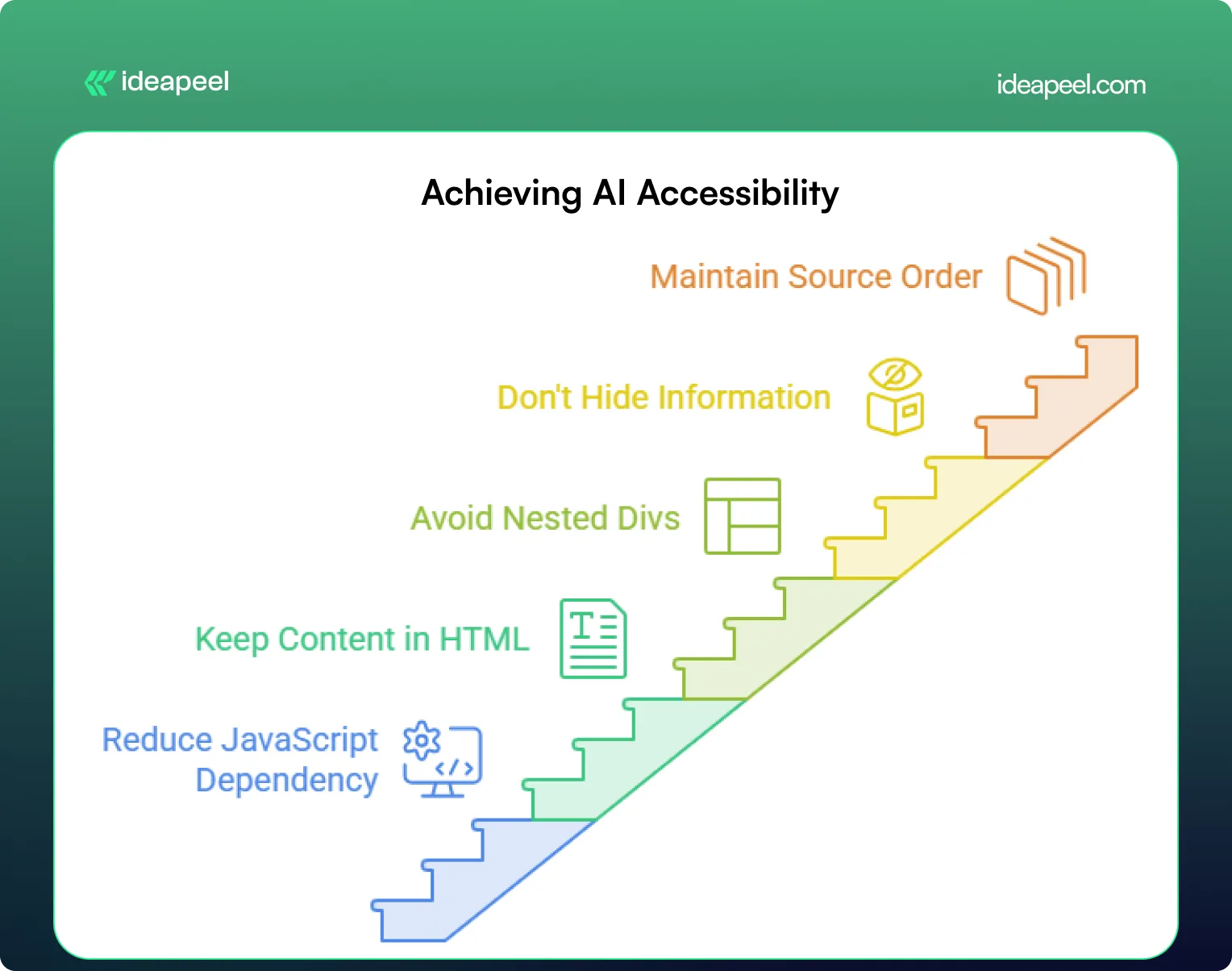
- Reduce JavaScript dependency. Many AI crawlers don't execute JavaScript at all. If your key content only appears after a script runs, it may be invisible to them. Server-side rendering (SSR) or static generation puts real content directly in the HTML.
- Keep primary content in the HTML source. Your headline, intro, headings, and body text should be visible without any interaction.
- Avoid deeply nested <div> soup. Flat, logical markup is easier to parse and easier for your own team to maintain.
- Don't hide key information behind tabs or accordions unless there's a real usability reason; crawlers usually won't click.
- Maintain a sensible source order. The HTML should read logically top to bottom, even before CSS repositions anything visually. MDN's accessibility guidelines cover this well.
A simple test: turn off JavaScript in your browser and reload your most important page. Whatever's still visible is roughly what many AI crawlers see.
[[inner-cta]]
How to Structure Content for LLM Retrieval
AI systems tend to pull short, self-contained passages rather than reading an entire page in context. Structure your content so each section can stand on its own.
- Answer first. Put the direct answer to the heading's question in the first sentence or two, then explain further.
- One idea per paragraph. Keep paragraphs short, two to four sentences.
- Define terms as you use them. Don't assume the reader (or the AI) already knows what a term means.
- Use tables for comparisons. Tables are easy for AI systems to extract and quote cleanly.
- Add FAQs and summaries. These are naturally structured for extraction.
Build an Entity-First Content Architecture
Beyond individual pages, AI systems build an internal map of how topics and organizations relate to each other. Writing clearly about these relationships helps.
Weaker: "ideapeel builds websites. It also does Webflow work. The company works with SaaS brands."
Stronger: "ideapeel is a Webflow development agency that designs and builds websites for B2B SaaS companies."
The second sentence makes the relationships explicit:
- ideapeel → is a → Webflow agency
- ideapeel → serves → B2B SaaS companies
Apply the same idea to your whole site by grouping related content into a clear cluster, connected with internal links:
- Pillar page: What Is GEO?
- Supporting page: GEO vs SEO
- Supporting page: AI-Readable Website Checklist
- Commercial page: Webflow Development Services
Linking a pillar page to its subtopics, and back again, gives both readers and AI systems a clear map of how your content connects.
Technical SEO Requirements for AI Search
Does Google require special HTML for AI search? No. Google has confirmed there are no additional technical requirements for appearing in AI Overviews or AI Mode beyond meeting normal Search requirements and being eligible for a standard snippet.
That means the basics still matter most:
- Crawlability: nothing important is blocked in robots.txt
- Indexability: pages aren't accidentally set to noindex
- A clean XML sitemap: listing only real, indexable pages
- Canonical tags: one clear version per piece of content
- Fast load times: a slow, heavy page can fail before it's even read
Does Schema Markup Help AI Search?
Schema markup helps search engines and AI systems understand what your page is about and can make it eligible for rich results, but it doesn't guarantee an AI citation on its own.
Add schema where it genuinely matches your visible content:
- Article or BlogPosting for guides and posts
- Organization for your homepage
- FAQPage for pages with real Q&A content
- BreadcrumbList for site navigation
- Product or Service for commercial pages
Test your markup with Google's Rich Results Test before publishing.
Does llms.txt Improve AI Visibility?
This is one of the most debated points in AI search advice right now, and it deserves an honest answer instead of a confident one.
llms.txt is a proposed (not official) plain-text file placed at your site's root that summarizes your most important pages for AI systems, similar in spirit to a sitemap. Google has stated plainly that it does not require llms.txt and that Google Search ignores it for generative AI features. Independent log analysis from several agencies has also found little to no crawl activity from major AI bots on llms.txt files specifically.
The honest takeaway: llms.txt is low-effort and probably harmless to add, but it should never replace real technical SEO and content structure. Treat it as a small experiment, not a strategy.
How to Make Your Site Accessible to ChatGPT Search
OpenAI has said that sites that want their content discoverable and cited in ChatGPT Search should avoid blocking its search-related crawler in robots.txt. If you want visibility there, check that:
- OAI-SearchBot isn't blocked
- Your key pages return real HTML content on first load (not just after JavaScript runs)
- Internal links use standard <a href> tags, not JavaScript-only navigation
LLM-Friendly Website: Before and After
Before: Content loads via a JavaScript framework after the initial page request. Headings are styled <div> tags. Key answers are buried in paragraph eight. No internal links connect related topics.
After: Content is server-rendered and present in the raw HTML. Headings use proper <h1>–<h3> tags in order. Each section opens with a direct answer. Related pages link to each other with descriptive anchor text, not "click here."
The difference isn't a redesign; it's making sure the right things are already true in your source code.
[[question-block]]
Beyond the Basics: What Actually Builds Trust for AI Citation
Most guides stop at structure and code. But structure only gets you understood; it doesn't get you trusted. Two things matter more than most checklists admit:
- Third-party corroboration. AI systems tend to weigh independent sources (reviews, comparison articles, forum discussions, Wikipedia) more heavily than a company's own claims about itself. Being mentioned accurately elsewhere on the web matters as much as your own pages.
- Original data. A specific, original stat or finding is far more likely to be quoted than recycled general advice, simply because no one else has it.
If citation share matters to your business, these two levers are worth as much attention as the technical checklist.
LLM-Friendly Website Audit Checklist
- [ ] Key content is visible in raw HTML (test with JavaScript disabled)
- [ ] Headings follow a logical H1–H4 order
- [ ] Each section opens with a direct answer
- [ ] Important pages are within 3 clicks of the homepage
- [ ] Internal links use descriptive anchor text
- [ ] Robots.txt doesn't accidentally block useful AI bots
- [ ] XML sitemap is accurate and up to date
- [ ] Canonical tags are set correctly
- [ ] Relevant schema markup is added and validated
- [ ] Site loads quickly with minimal render-blocking scripts
Make Your Website Ready for AI Search With ideapeel
Building an LLM-friendly website is no longer just about making a page accessible to search engines. As AI changes how people discover businesses, your website needs a strong technical and content foundation that helps both traditional search and AI systems understand what you offer.
That starts with clean HTML, logical semantic HTML, and a clear content structure. Proper H1 and H2 headings, descriptive URLs, accurate metadata, accessible navigation, and relevant structured data markup help crawlers understand how your pages are organized. At the same time, important content should not depend entirely on JavaScript, CSS, or complex framework behavior that can make it harder for a crawler to access and parse.
But technical optimization is only one piece of the process.
Connect SEO, AEO, GEO, and LLM Optimization
An AI-ready website brings multiple disciplines together. SEO helps search engines discover and index your pages. Semantic HTML and accessibility make the information easier to interpret. Structured data gives additional context about your content. And LLM optimization focuses on making your information clear enough for AI systems to understand, retrieve, and potentially reference.
This requires a consistent workflow across your website:
Crawl → Parse → Understand → Connect → Retrieve → Answer
Your HTML structure, content architecture, internal links, metadata, APIs, and CMS should all support that workflow.
For businesses building on Webflow, this is where a technically strong development partner can make a difference.
How ideapeel Builds AI-Ready Websites
ideapeel combines web development, SEO, content architecture, and AI-search thinking to help SaaS and technology companies build websites that are designed for both people and machines.
Our approach can include:
- Semantic HTML and accessible website structures
- SEO-friendly headings, metadata, and URLs
- Clean Webflow development and CMS architecture
- LLM-friendly content and page structures
- Structured data and relevant schema markup
- Technical SEO and indexing best practices
- Internal linking and topic-cluster architecture
- Content structures designed for AI search and answer engines
- Performance-focused development with unnecessary JavaScript dependencies reduced where appropriate
If you're building a new website, redesigning an existing one, or trying to improve your AI search visibility, these elements should be considered from the beginning rather than added after development.
Explore ideapeel's Web Development Services to see how we approach modern website architecture, or learn more about GEO for AI search and Webflow development.
Your Website Should Be Easy for AI to Understand
The future of search is not only about ranking a URL. It is increasingly about whether your website can be found, understood, connected, and referenced when someone asks an AI system a question.
You do not need to rebuild everything around AI or add every new technology. Start with the fundamentals: clean HTML, semantic structure, accessible content, logical headings, strong SEO, reliable indexing, useful structured data, and a content architecture that clearly communicates what your business does.
Then build on that foundation with AEO and GEO.
If your website is difficult for a crawler to access, difficult for a search engine to index, or difficult for an LLM to parse and understand, great content may never reach the people searching for it.
ideapeel helps SaaS and technology brands turn their websites into clearer, faster, search-ready digital experiences built for the next generation of AI-powered search.
Ready to make your website AI-ready? Talk to the ideapeel team for an AI search, SEO, and website architecture assessment.
[[last-cta]]