Webflow vs Weebly: 2025 Comparison



Summarize with Ai





Key Takeaways
In today's fast-paced digital world, creating a visually stunning and functional website is essential for enhancing your online presence.
With so many website builders available, choosing the right one can be overwhelming. Two popular options are Weebly and Webflow—but which one is the best fit for you?
Look no further!
In this comparison guide, we'll break down the features, pros, and cons of Weebly vs. Webflow, helping you determine which platform best matches your needs in 2025.
Webflow: An Overview

Webflow is a no-code website builder featuring responsive and SEO-friendly website design without the hassle of complex code.
This platform is popular among web designers, developers, and large business owners who need more advanced design, customization, functionality, and premium features to scale their business anytime.
With Webflow, you may have to consider only the learning curve, but you won't regret choosing Webflow over other platforms!
Weebly: An overview

Weebly features a simple and user-friendly website that is accessible to any non-tech-savvy user. Its drag-and-drop editor allows you to create a generic website for small businesses or online stores.
Whether you want to start a basic ecommerce platform or start a small business, going with Weebly is a wise decision, as it offers basic hosting plans and features with a free plan.
Its popularity continues due to affordable solutions and quick setup for small to medium-sized businesses and e-commerce.
Webflow vs Weebly: Quick Comparison Chart
Webflow vs Weebly: Detailed Key Differences
1. Design flexibility
Webflow offers more customized design and functionality than Weebly.
Weebly has a visual drag-and-drop editor, which allows you to design a more straightforward website!
Though it's a more beginner-friendly platform for those with zero coding or development knowledge, its advantages stop here with limited customization options.
Using Webflow, you can create highly customized designs with control over every element—layout, typography, visual elements, animation, and interaction.
This website builder has freedom of design with an advanced visual editor and custom code flexibility, allowing you to create pixel-perfect platforms.
2. Templates and customization
Webflow has a wide selection of custom templates compared to Weebly.
Weebly provides pre-designed templates to help you design websites quickly, making it ideal for beginners.
However, the templates can't be customized for complex layouts or unique designs. You can only change colours, fonts, and some structural elements.
Unlike Weebly, Webflow offers a variety of templates that can be customized and tailored to brand identity. So, your website doesn't look like a typical template website.
3. Ease of use
Weebly is a more beginner-friendly website builder than Webflow.
In Weebly, a more straightforward interface and drag-and-drop functionality let you create a website with minimal effort.
However, the Webflow website presents a more challenging learning curve because of its customizable design options.
Therefore, Webflow is ideal for users who have coding knowledge and can experiment with custom code in web design.
4. E-commerce functionality
Weebly is a built-in e-commerce tool that shines more than Webflow.
Weebly is ideal for users searching for basic e-commerce features with a quick setup. You can create a simple e-commerce store with a shopping cart, product catalogs, and payment processing on the Weebly platform.
Meanwhile, Webflow offers robust e-commerce features that customize store designs. However, third-party integration is required to manage payment processing.
Webflow is only suitable for creating a highly customized platform tailored to specific business needs.
5. CMS features
Webflow's content management system is more powerful and maintains a complex content structure.
In contrast, Weebly includes a basic CMS system that supports standard blog posts and simple content structure.
So, Webflow is a better option for large enterprises to maintain dynamic content.
Weebly is beneficial for small to midsize businesses to ensure an essential online presence.
6. SEO control and integration
Webflow offers advanced SEO control and flexible integration options compared to Weebly.
Weebly includes basic SEO features and third-party integration to enhance the user experience. However, using Weebly, you are limited to detailed SEO settings like structured data or advanced meta tag management.
Meanwhile, Webflow controls meta tags, URL structure, and sitemaps. This website building also integrates with advanced SEO tools to enhance online presence effectively.
7. Hosting and performance
Considering faster loading speed and reliable hosting, Webflow is a far better option than Weebly.
Webflow offers faster website performance due to optimized and cleaner code. Webflow hosting is built on AWS and CDN integration, which ensures faster and more secure hosting.
While Weebly offers dependable hosting, it lacks advanced features such as Webflow. Weebly might also suffer from slower speeds due to bloated codes.
8. Customer support
Weebly offers extensive customer support through live chat, 24/7 email, and phone support.
Like Weebly, Webflow offers live chat support but responds within 24-48 business hours.
Wait! Webflow can exceed your expectations with a stronger community support platform than other website builders.
Webflow has a strong community platform where users get technical help from fellow members. Again, Webflow University offers webinars and e-courses for advanced technical resources.
Check out comparisons of popular website builders' platforms:
Webflow vs Weebly: Pricing
Webflow
Webflow offers a free starter plan for building and designing a website. However, a paid plan is required to get a hosting service.
Well, here's a list of Webflow pricing:
Webflow Site plans
Basic: $18/mo (billed monthly), $14/mo (billed yearly)
CMS: $23/mo (billed monthly), $29/mo (billed yearly)
Business: $49/mo (monthly), $39/mo (billed yearly)
Webflow ecommerce plans
Standard: $42/mo (billed monthly), $29/mo (billed yearly)
Plus: $84/mo ( billed monthly), $74/mo (billed yearly)
Advanced: $235/mo (billed monthly), $212/mo (billed yearly)
Weebly:
Like Webflow, Weebly also offers a free plan, and this version includes a hosting plan—which Webflow lacks.
Webflow pricing plans are primarily expensive compared to Weebly. One thing to note: Webflow's pricing is worth it for large businesses with advanced features and faster hosting plans.
Weebly Site plans
Personal: $13/mo (billed monthly), $10/mo (billed yearly)
Professional: $16/mo (billed monthly), $12/mo (billed yearly)
Performance: $29/mo (billed monthly), $26/mo (billed yearly)
Webflow vs Weebly: Choose the Best Website Builder
Choosing between Weebly and Webflow is quite a tough decision. Let's simplify it by considering website builders' specific features that align with your business needs.
Picking up Webflow is a worthy decision for the following reasons:
- Complete control over design and layout
- Advanced SEO features to improve site performance
- Premium e-commerce features—customizable product pages, rich snippets, and seamless integration with payment systems like Stripe.
- Responsive and mobile-first design.
- Suitable for large and scalable websites.
- Comfortable with a learning curve and expensive plans.
Go with Weebly if you need more straightforward features like:
- Simple and user-friendly interface.
- It is an affordable solution with basic ecommerce features.
- Running a small online store doesn't need any advanced SEO performance or customization.
- Start a small business website with free plans and hosting.
- A quick setup with minimal effort.
Partner with ideapeel to elevate your business using Webflow:

Are you looking for a digital transformation solution with Webflow?
At ideapeel, we deliver customized Webflow solutions tailored to your unique business needs and vision.
Share your goals and requirements with us for a complimentary strategic approach. Step ahead of your competitors and unlock profitable growth with ideapeel.
FAQs:
What is the best website builder?
It depends on your business objectives and needs. Overall, Webflow is the best website builder compared to Weebly. Webflow stands out for its advanced custom design capabilities, massive collection of templates, dynamic CMS, faster-hosting performance, and scalable solutions to help you grow your business without hassle.
Is Weebly 100% free?
No. Weebly has a free plan, which includes basic features and hosting plans to start a new business without cost. However, you have limited features that this free site plan offers.
Is Webflow good for SEO?
Webflow has optimized and clean code that allows for faster load speed, which ensures better SEO ranking. Again, Webflow has better control over SEO settings, including meta tags, structured data, and 301 redirects.
Wrapping Up
There's ultimately no king on the top of a long website builder list. Both Webflow and Weebly offer unique features that cater to different user needs.
Whether you want a more straightforward website, a user-friendly interface, or a quick setup to fulfill the basic needs of your startup business, Weebly will win.
Again, choosing Webflow will be an excellent decision for larger enterprises, making your online presence stand out from competitors!
So, what have you decided to go with? If it sounds like Webflow, consider ideapeel to build and launch a stunning, custom website that elevates your brand and sets you apart from the competitors.
Enter your website URL to receive a detailed website analysis report in just 5 minutes!

Want to discuss your project?
Grow your project with Webflow Experts
Related Articles


If your website or product gets traffic but visitors leave without converting, the problem usually isn't your offer. It's your interface. A UI/UX audit finds exactly where users get stuck, confused, or annoyed, and gives you a clear list of what to fix first.
This guide covers what a UI/UX audit actually includes, how the process works, what it costs based on real market data, and how to pick the right UI/UX audit agency for your website or SaaS product. It's written by the team at ideapeel, a Webflow development agency for B2B, SaaS and enterprise companies that runs UI/UX audits and Webflow builds for growing teams every week.
What Is a UI/UX Audit?
A UI/UX audit is an expert review of your website, product, or app. It checks how the interface looks (UI) and how it actually works for real users (UX), then hands you a prioritized report of what's broken and what to fix first.
A good audit looks at:
- Visual design and layout
- Navigation and information architecture
- User flows and conversion paths
- Mobile experience
- Accessibility
- Page speed and technical friction
- How your site compares to competitors
Any team with live traffic, sign-ups, or users but underwhelming results is a good candidate. That includes SaaS products with high churn, websites with strong traffic but weak conversion, and apps where users drop off mid-flow. A UI/UX audit is usually the fastest, cheapest way to find out why, well before anyone commits to a full redesign.
UI audit vs UX audit. A UI audit looks only at the interface: layout, typography, color, spacing, and consistency. A UX audit looks at the full experience: navigation, flows, usability, and conversion. Most professional audit services combine both, which is why the service is usually called a UI/UX audit rather than just one or the other.
What Does a Professional UI/UX Audit Include?
This is the part that matters most when you're comparing UI/UX audit services, because it tells you exactly what you're paying for.
UI Design Review
A trained eye goes through your visual hierarchy, typography, color use, spacing, and component consistency. This catches the small inconsistencies that quietly make a site feel unpolished or untrustworthy.
UX & Usability Review
This covers navigation, information architecture, friction points, and interaction patterns. Note that a UX audit is not the same thing as usability testing. An audit is an expert review done by a UX professional; usability testing involves watching real users complete tasks on your site. Many full audits include a round of light usability testing as one part of the process, but the two are different services.
User Flow Analysis
The auditor maps your key journeys, sign-up flows, checkout paths, and navigation routes to find exactly where users drop off and why.
Conversion & CTA Review
This looks at CTA visibility, button hierarchy, form design, landing pages, and anything creating friction between a visitor and the action you want them to take.
Mobile UX Review
Since most traffic is mobile, this checks tap targets, responsive layout breakpoints, load speed, and mobile-specific usability issues that desktop testing misses.
Accessibility Review
This checks color contrast, keyboard navigation, screen reader compatibility, and general WCAG alignment. Accessibility issues are also legal and reputational risk, not just a UX nicety.
Analytics & User Behavior Analysis
If you have Hotjar, GA4, or similar tools connected, a good auditor pulls real behavior data, heatmaps, and session recordings to back up their findings with evidence instead of opinion.
Competitive UX Analysis
The auditor benchmarks your product or site against direct competitors, so recommendations are grounded in what's actually working in your market, not generic best practice.
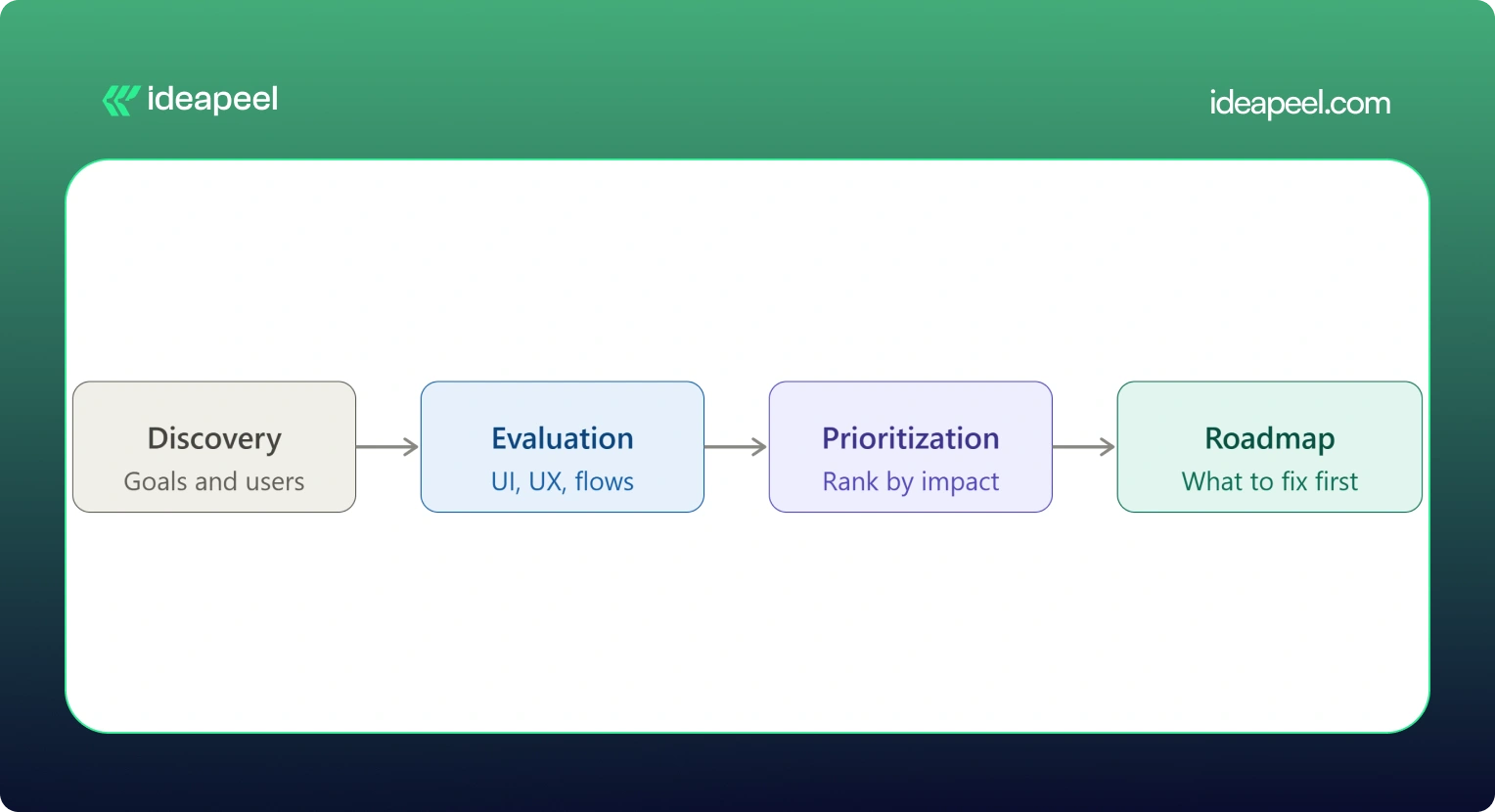
UX Audit Service Process: From Research to Action Plan
Here's what actually happens when you hire someone for a UI/UX audit, step by step:
1. Discovery & Business Goals
The auditor starts by understanding your business goals, not just your interface. What counts as success: more demos booked, higher activation, lower churn, more sign-ups?
2. User & Audience Analysis
Who actually uses your product, and what are they trying to do? This shapes everything that follows.
3. UI Evaluation
A full pass through the visual design against your goals and your users' expectations.
4. UX & Usability Evaluation
A heuristic review of navigation, structure, and usability against established UX principles.
5. User Flow Analysis
Mapping the paths users actually take, and where they abandon them.
6. Conversion Analysis
Looking specifically at where and why conversion drops off.
7. Competitive Benchmarking
Comparing your experience against direct competitors and category leaders.
8. Issue Prioritization
Every issue gets ranked by severity and business impact, not just listed in the order it was found.
9. Recommendations
Specific, actionable fixes tied to each issue, not vague advice like "improve usability."
10. UX Improvement Roadmap
A sequenced plan showing what to fix first, what can wait, and what requires bigger structural changes.
[[inner-cta]]
How Much Does a UI/UX Audit Cost?
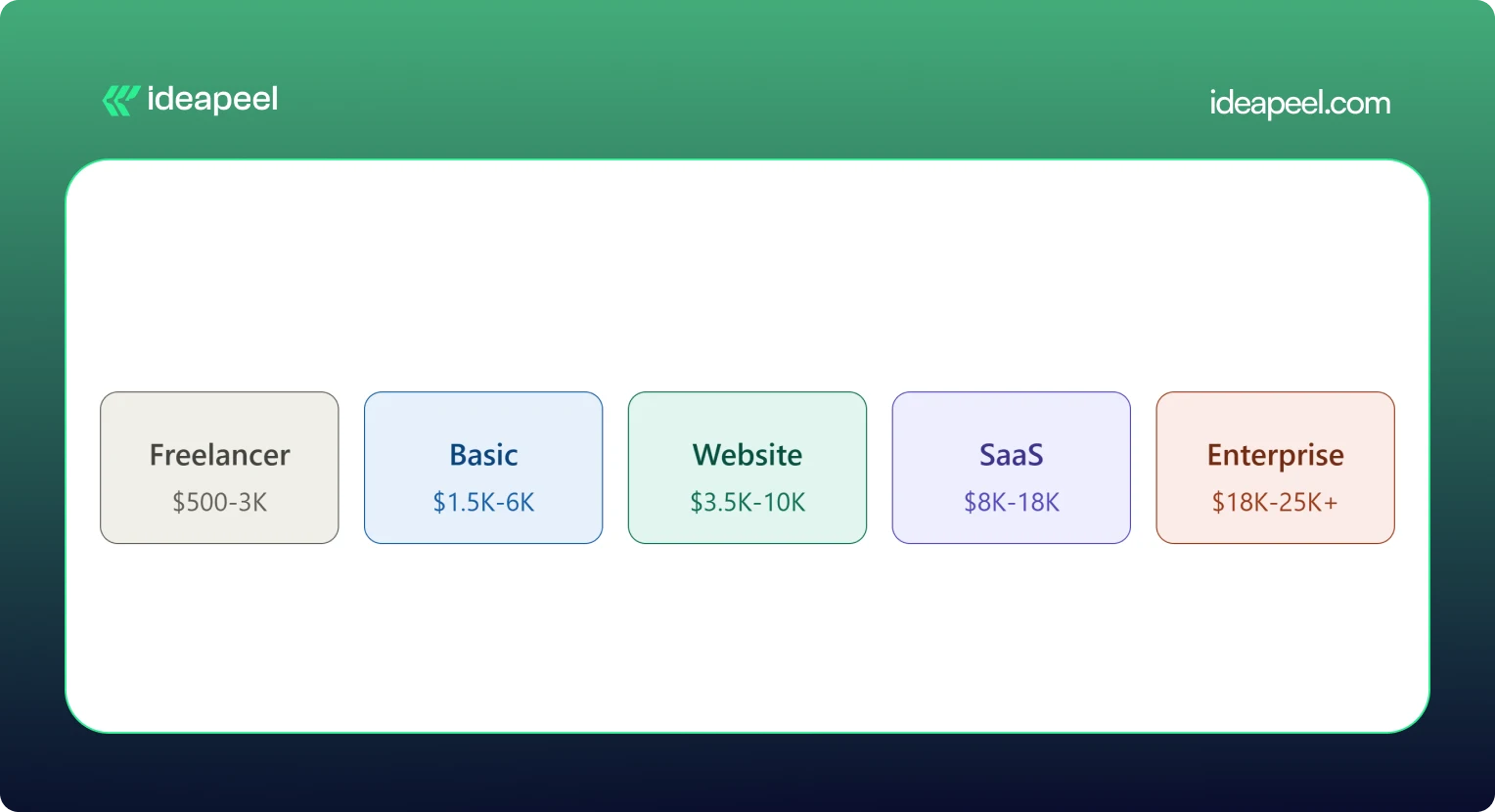
A UI/UX audit typically costs between $500 and $25,000 or more. A solo freelancer doing a single-flow review might charge as little as $500. A full enterprise audit with live user testing and multiple user roles can run $18,000 to $25,000 or higher. Most small and mid-size businesses land somewhere between $3,500 and $18,000 for a complete website or SaaS product audit.
What Factors Affect UI/UX Audit Cost?
Price moves based on:
- Website or product size
- Number of screens and pages
- Number of user flows and personas
- Product complexity (simple marketing site vs. multi-role SaaS dashboard)
- How deep the research goes
- Whether analytics review is included
- Whether live usability testing is included
- Competitive research scope
- Number of deliverables (report only vs. report plus roadmap plus redesign proposals)
Pricing data collected from agency rate cards, freelance marketplaces, and published cost guides shows a consistent pattern: cost scales with scope and testing depth, not agency size alone. A UX audit cost breakdown from Design Studio UI/UX puts full audits with heuristic review, session analysis, and real user testing at $8,000 to $18,000, with enterprise audits running $18,000 to $25,000 and up. Parallel HQ's product design cost guide lists UX audits from $3,500 to $10,000, usually delivered in two to four weeks. On the freelance side, listings on Upwork and Contra show independent UX consultants pricing single-flow or single-page audits from $500 to $3,000. On the agency side, Musemind's UX audit agency pricing starts around $10,000 with hourly rates of $50 to $99, plus subscription-style UX plans from roughly $2,600 a month, and Dribbble's UI/UX agency cost guide puts experienced US agency hourly rates at $100 to $250.
.webp)
Basic UI/UX Audit
$1,500 – $6,000. Covers a heuristic review of your core screens, a prioritized issue list, and general recommendations. Good for a quick gut check before deciding whether a bigger project is worth it.
Website UX Audit
$3,500 – $10,000. Adds user flow mapping, conversion review, and often a light round of usability testing. This is the most common package for marketing sites and lead-gen websites.
SaaS UX Audit
$8,000 – $18,000. Covers multiple user roles, onboarding, dashboard UX, and competitive benchmarking against other SaaS products in your category. Built for B2B products with more than one user type.
Comprehensive UI/UX Audit
$18,000 – $25,000+. Includes live user testing, deep analytics review, multiple personas, and a full improvement roadmap. This is the right fit for enterprise products or platforms where usability issues carry real revenue risk.
If a package price feels too broad for your situation, ask for an hourly or scoped quote instead. Most UI/UX audit companies will price a smaller, single-flow engagement if you only need to hire a UX designer for an audit of one specific part of your product.
What Do You Get From a UI/UX Audit?
This is what separates a real audit from a vague opinion document.
If a provider's audit doesn't include most of this list, ask what you're actually paying for. ideapeel's UI/UX design service builds every audit around this exact structure, so findings turn into a working plan instead of a PDF that sits unread.
When Should You Hire a UI/UX Audit Agency?
Some teams run a quick DIY checklist audit themselves first, which is a fine starting point. But a DIY review usually misses the objectivity, testing tools, and pattern recognition a professional brings from auditing dozens of other products. Here's when it's worth hiring a UI/UX audit agency or consultant:
Your Website Gets Traffic but Does Not Convert
Steady visitors, flat conversion. That gap almost always points to a UX problem, not a traffic problem.
Users Struggle With Navigation
Support tickets or feedback keep mentioning that people "can't find" something. That's a navigation and information architecture issue an audit will surface fast.
Your SaaS Onboarding Has Friction
If new users sign up and never activate, onboarding is usually the leak.
Product Adoption Is Low
Features get built but nobody uses them. Often this is a discoverability problem, not a demand problem.
You Are Planning a Website Redesign
Never redesign blind. An audit tells you what's actually broken before you rebuild it.
Paid Traffic Is Not Converting
If you're paying for clicks that don't turn into leads, the landing experience is the first place to look.
Customers Report Usability Problems
Direct feedback is a strong signal. An audit turns scattered complaints into a structured fix list.
Your Website Looks Outdated
Dated design quietly erodes trust, especially for B2B buyers comparing vendors.
You Are Launching a New SaaS Product
A pre-launch audit catches usability issues while they're still cheap to fix.
You Need an External UX Perspective
Internal teams get too close to their own product. A fresh, objective review often finds what everyone inside the company has stopped noticing. [[question-block]]
UI/UX Audit vs. Website Redesign
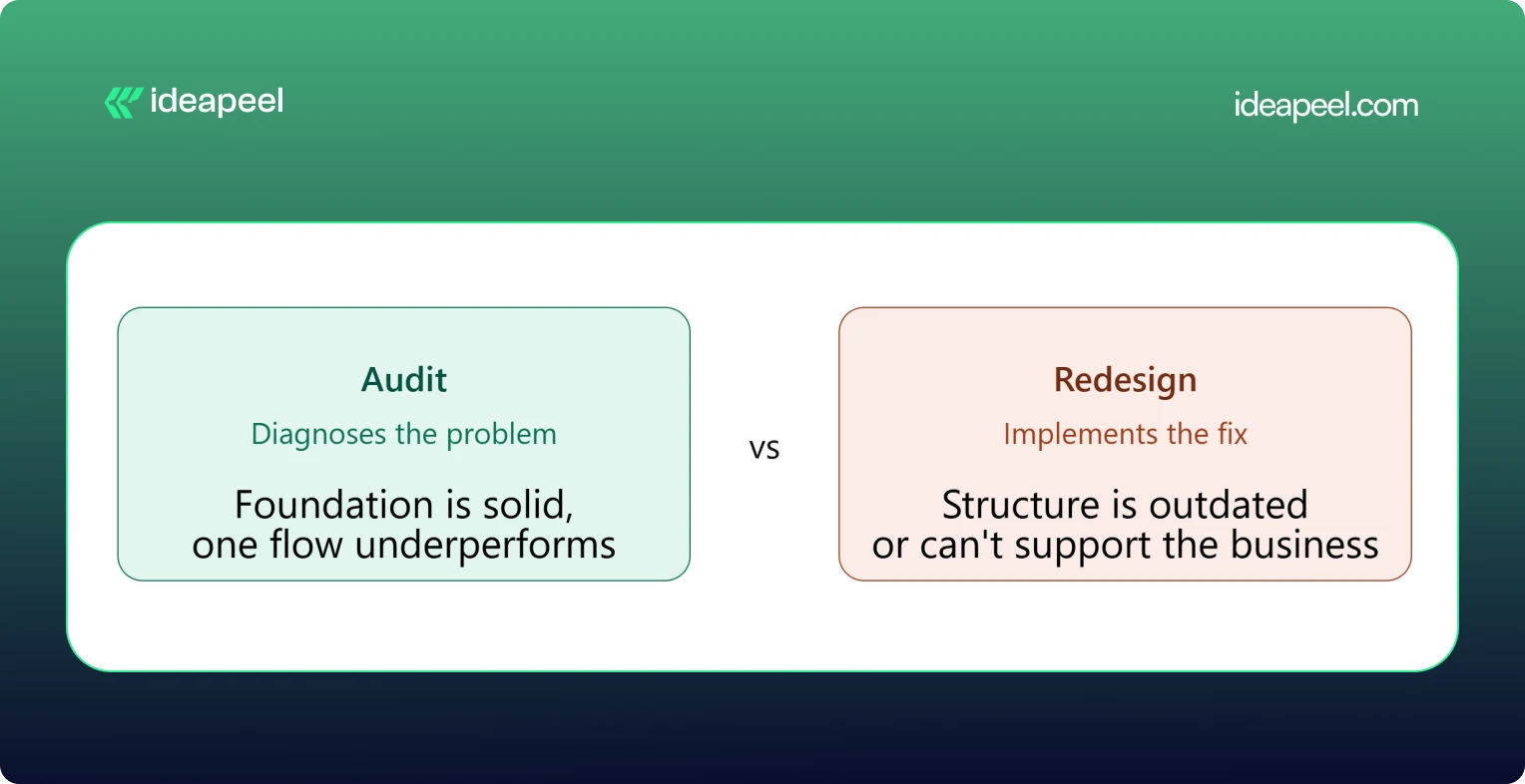
The simplest way to think about this: an audit diagnoses, a redesign implements.
When You Only Need a UI/UX Audit
Your foundation is solid but something specific is underperforming, like a checkout flow or a signup form. Fix the specific problem rather than rebuilding everything around it.
When You Need a Website Redesign
The structure itself is outdated, the brand has changed, or the site can't support what the business needs now. A patch won't fix a foundational problem.
When You Need an Audit Before a Redesign
This is the smart default for most teams. An audit tells you exactly what to change and why, so the redesign budget goes toward fixing real problems instead of guessing.
UI/UX Audit Agency vs. Freelancer
Both can do good work. The right choice depends on your product's complexity and what you need beyond the audit itself.
Neither option is universally better. A freelancer can be the right call for a single-flow review on a tight budget. An agency tends to make more sense for a multi-role SaaS product, where UI, UX, research, and implementation all need to work together.
How to Choose a UI/UX Audit Agency
This is the section that matters most once you're actually comparing providers.
Check Their UX Methodology
Ask how they structure an audit. A vague answer is a warning sign. A strong provider can walk you through their process step by step.
Review Previous Audit Work
Ask to see a sample report. This tells you more than any pitch deck about the quality and depth you'll actually get.
Look for Industry Experience
A UX audit company that's worked on B2B SaaS products understands onboarding, activation, and dashboard UX in a way a general design shop may not.
Check Their UI + UX Expertise
Some providers are strong on visuals but weak on usability, or the reverse. You want both covered.
Ask What the Deliverables Include
Compare this against the deliverables table above. Screenshots, severity ratings, and a roadmap should be standard, not an upsell.
Understand Their Pricing Model
Flat project fee, hourly rate, or retainer? Match the model to how you actually want to work and budget.
Ask How Findings Are Prioritized
A pile of 40 unranked issues isn't useful. You want to know what to fix first and why.
Check Whether They Support Implementation
Some UI/UX audit services stop at the report. Others, like ideapeel, can move straight from findings into Webflow development and design implementation, so the fixes actually ship.
UI/UX Audit for B2B SaaS
SaaS products carry extra UX complexity that a generic website audit won't catch. A dedicated SaaS UX audit should cover:
SaaS Website UX
How the marketing site sets expectations before someone ever logs in.
Product Interface
The core UI users interact with daily once they're inside the product.
Dashboard UX
Whether the dashboard surfaces the right information without overwhelming the user.
SaaS Onboarding
The first-run experience that determines whether a trial user ever becomes a paying customer.
Signup Experience
Friction in the signup form is one of the most common, and most fixable, leaks in a SaaS funnel.
Pricing UX
Whether your pricing page actually helps people choose a plan, or just confuses them.
Feature Discovery
Whether users can find the features that would make them stick around.
Navigation
How easily users move between the areas of a complex, multi-role product.
User Activation
The specific moment a new user experiences real value for the first time.
Conversion Flows
Every point where a free user is nudged toward becoming a paying one.
Teams building or scaling B2B products can see how this fits into a broader growth plan on ideapeel's SaaS design and development page.
Webflow UI/UX Audit
If your site or product runs on Webflow, a Webflow-specific UX audit adds a few extra layers on top of a standard review: CMS structure, symbol and component consistency, interaction and animation performance, responsive breakpoint behavior, and page speed inside the Webflow environment.
This matters because a Webflow UX audit doesn't just tell you what to fix, it tells you how to fix it inside the platform you're already using, without a rebuild. ideapeel runs UI/UX audits and Webflow design and development work side by side, so audit findings turn directly into shipped Webflow changes instead of a report that needs a second agency to execute.
What Makes a Good UI/UX Audit?
A strong audit should be:
- Evidence-based
- Prioritized
- Actionable
- Business-focused
- User-focused
- Specific
- Easy to implement
The real value of a UI/UX audit isn't a long list of everything that could theoretically be better. It's finding the small number of problems that are actually costing you conversions or users, and giving your team a clear, ordered path to fix them.
Ready to See What's Costing You Conversions?
A UI/UX audit is one of the fastest ways to find out why your traffic, sign-ups, or trials aren't turning into revenue. ideapeel, a Webflow development agency for B2B, SaaS & Enterprise, has delivered 170+ branding, Webflow, and UI/UX projects with a 98% client satisfaction rate and $500M+ in revenue generated and influenced for clients.
Book a free strategy call to talk through your website or product and find out what a UI/UX audit would look like for your team.
[[last-cta]]

The best B2B websites don't win because they look modern. They win because they explain a complex offer in seconds, build trust before anyone talks to sales, and give every visitor an obvious next step. That combination of clarity, credibility, and a clear path forward is what separates a good-looking B2B website from one that actually generates pipeline.
Below are 10 real B2B website design examples worth studying, each broken down the same way: what the company does, why the design works, and the one design lesson you can steal for your own site. Four are Webflow redesign projects from our own studio, ideapeel, and the rest are well-known B2B and SaaS brands chosen because their homepages are genuinely instructive, not just pretty.
What Makes a Great B2B Website?
A great B2B website clearly explains what the company does, who it's for, and why it's credible then makes the next step obvious. In practice, that usually comes down to seven things:
- A clear value proposition in the hero section, readable in under five seconds
- Simple, jargon-light messaging that doesn't assume the visitor already understands the product
- A logical information hierarchy that goes from "what is this" to "how does it work" to "why should I trust you"
- Easy navigation that doesn't force visitors to hunt for pricing, product details, or contact info
- Trust signals client logos, testimonials, case studies, certifications, or real metrics
- Product or service clarity, especially for technical or unfamiliar offerings
- Conversion-focused CTAs that match where the visitor actually is in their decision, not just "Book a Demo" on every button
B2B buying decisions usually involve multiple stakeholders and a longer sales cycle than B2C, so the website has to do more persuading before a human ever gets involved. Every example below earns its place because it handles at least one of these jobs unusually well.
10 Best B2B Website Design Examples
1. Homepark Housing: Comfortable Living
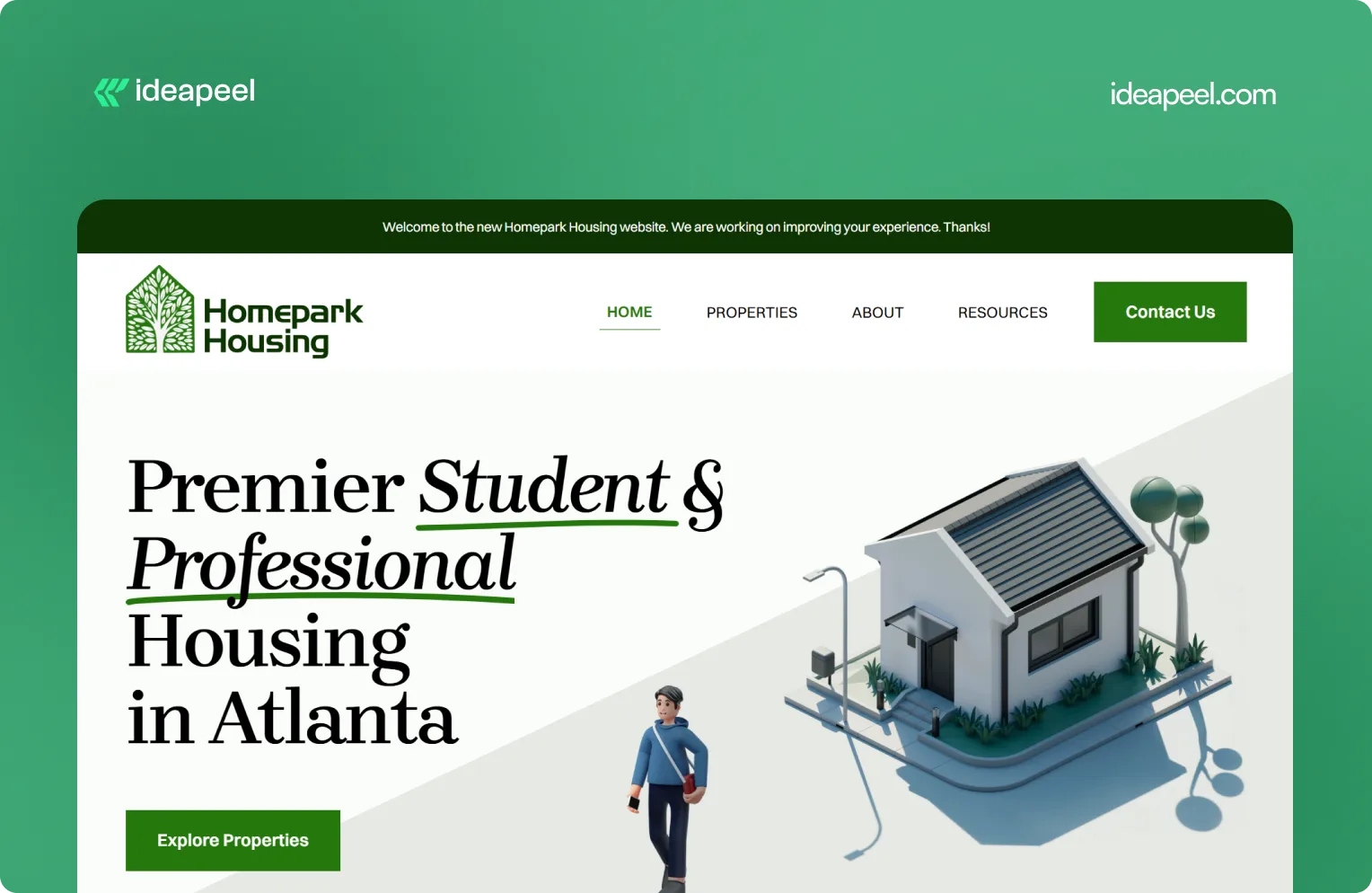
Industry: Real estate
What they do: Homepark Housing provides secure, modern, and strategically located housing designed around the needs of young professionals. Its offering includes affordable housing, flexible leasing options, personalized tenant support, and 24/7 maintenance.
Why the design works: Real estate is a high-consideration purchase. Visitors need to know where the properties are, whether the pricing works for them, what support is available, and whether they can trust the company to deliver a reliable living experience. Homepark's website puts those practical needs at the center of the experience instead of relying only on property imagery.
Key design lesson: When visitors are making a decision involving money, location, and long-term commitment, answer their practical questions early. Clear information about support, pricing, location, and the overall experience can build more trust than visual design alone.
View the Homepark Housing case study
2. KeepWOL: SaaS Team Analytics Platform
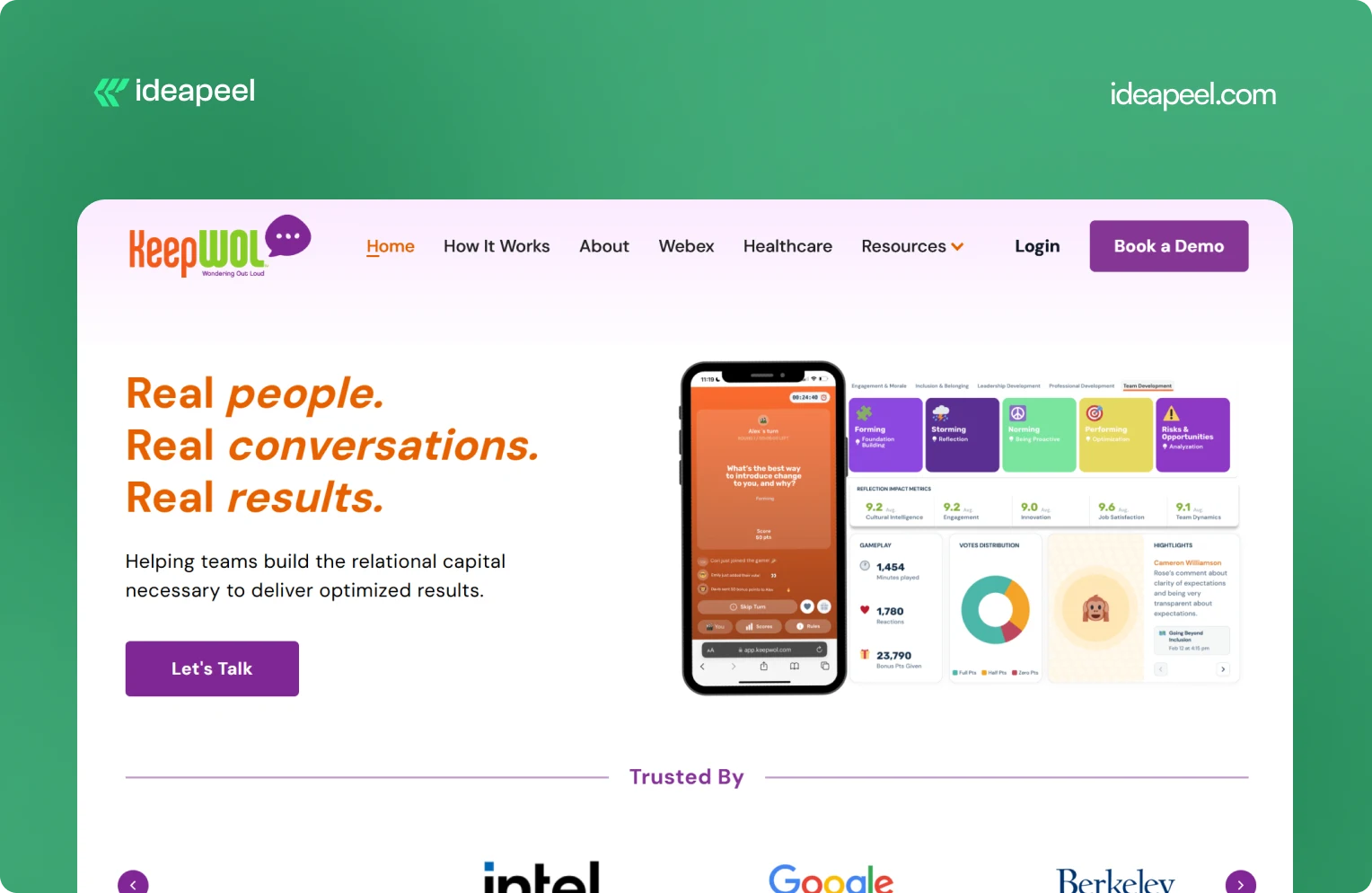
Industry: SaaS, team performance, and people analytics
What they do: KeepWOL helps organizations improve team performance, relationships, engagement, and development through interactive experiences, analytics, and action plans. Its platform combines live sessions with measurable insights across areas such as team dynamics, engagement, innovation, cultural intelligence, and job satisfaction.
Why the design works: KeepWOL has a difficult product to communicate because team relationships and workplace culture aren't as visually obvious as a CRM dashboard or payment platform. The website solves this by turning abstract benefits into a structured journey: experience, reflect, and grow.
Key design lesson: If your product solves an intangible problem, make the value measurable. Show the process, outcomes, metrics, and evidence that connect your product to a business result.
View KeepWOL
3. CarWise: AutoTech Marketplace
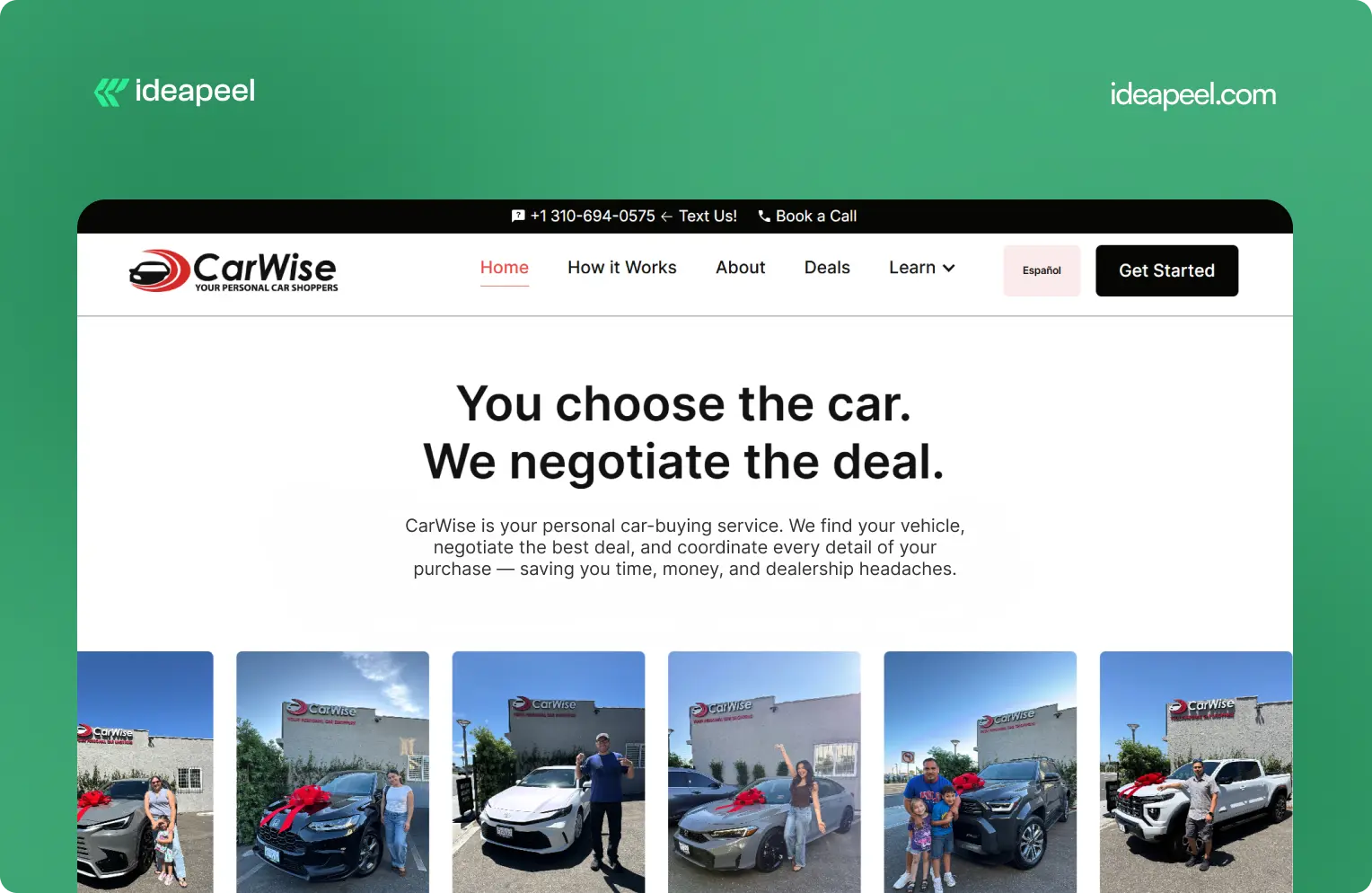
Industry: AutoTech and automotive services
What they do: CarWise helps people navigate the car-buying process through expert negotiation, pricing guidance, financing support, and personal assistance.
Why the design works: Buying a car involves money, uncertainty, and a lot of competing information. That makes trust one of the most important parts of the website experience.
CarWise approaches the problem by making the process easier to understand. Instead of overwhelming visitors with automotive terminology, the experience focuses on the practical journey from finding a vehicle to negotiating and completing the purchase.
Key design lesson: In industries where visitors naturally have trust concerns, transparency should be part of the design. Explain the process, show how the service works, and make the human value behind the product obvious.
View the CarWise case study
4. Glo Dollar: Fintech / Stablecoin Platform
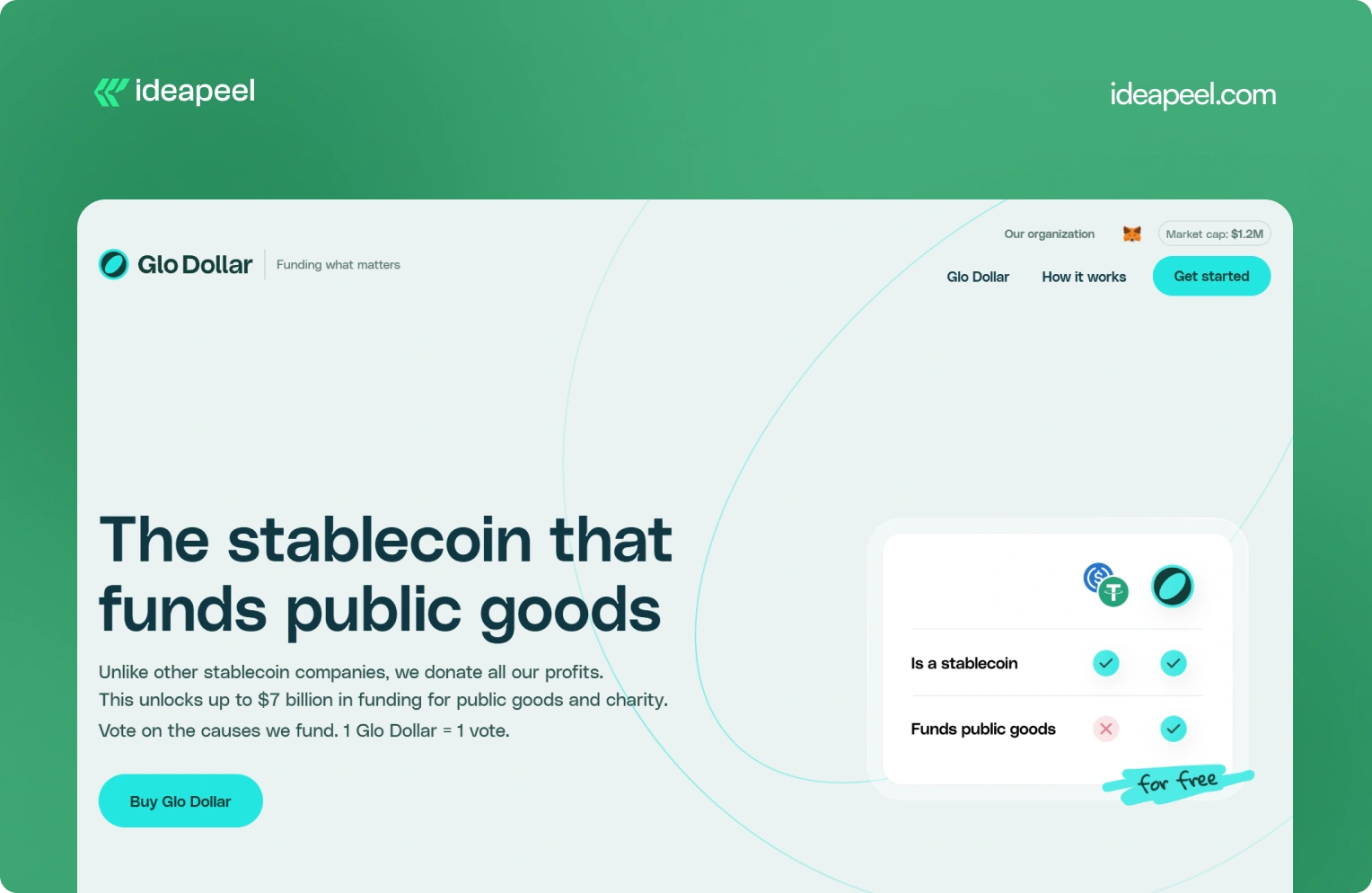
Industry: Fintech, blockchain, and stablecoins
What they do: Glo Dollar is a stablecoin designed so that profits from its reserves are donated to public goods and charitable causes. The website explains the model as a sequence: the fiat backing generates revenue, the profits are donated, and users can support causes at no additional cost.
Why the design works: Financial products are already difficult to explain. Add blockchain and philanthropy to the equation and the communication challenge becomes even bigger.
Glo Dollar handles that complexity by breaking the concept into smaller ideas. Instead of asking visitors to understand the entire financial model immediately, the website explains how the product works step by step.
Key design lesson: When your product combines several unfamiliar concepts, don't explain everything in one block of content. Sequence the information. One clear idea per section makes complicated products much easier to understand.
Visit Glo Dollar
5. BrickYard: Crafting Modern Architecture
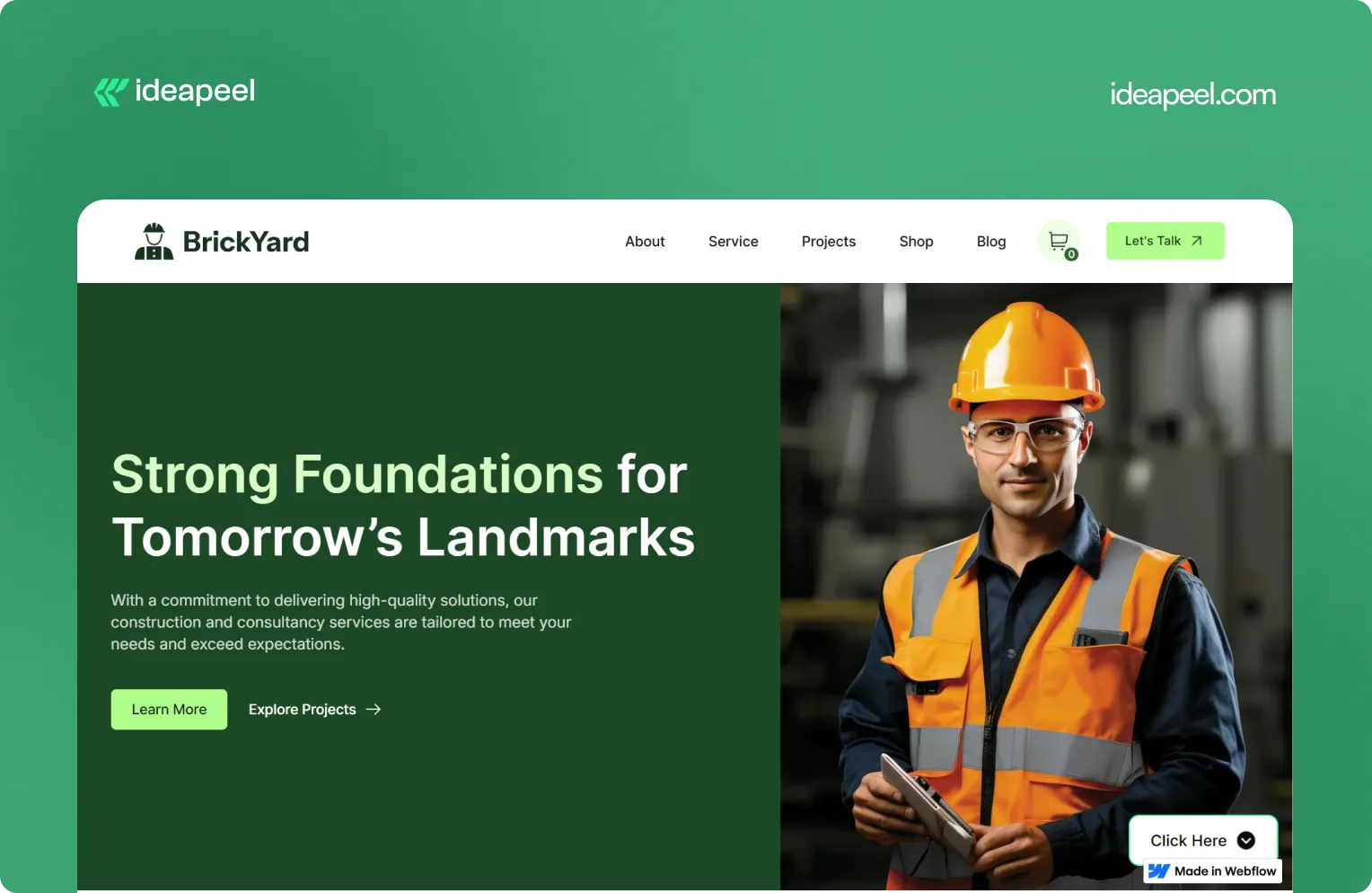
Industry: Construction, architecture, and design
What they do: BrickYard is a modern Webflow template designed for construction companies, architects, and design professionals. It focuses on showcasing services, projects, and professional work through a clean, responsive structure.
Why the design works: Construction and architecture websites need to balance two things: visual presentation and practical information. The work needs to look impressive, but potential clients also need to understand services, previous projects, capabilities, and how to get in touch.
BrickYard handles that through a minimalist visual system combined with dedicated pages for services, projects, blog content, contact information, and other business needs. The template is also designed to be customizable, responsive, SEO-focused, and CMS-ready.
That structure makes it useful beyond a single visual concept. Businesses can adapt the framework to their own services and content without rebuilding the entire site.
Key design lesson: Good website design isn't only about the homepage. Build a flexible structure that gives visitors the information they need while making it easy for the business to expand the site later.
View the live BrickYard template
6. Reliacare: Health and Wellness Website Template
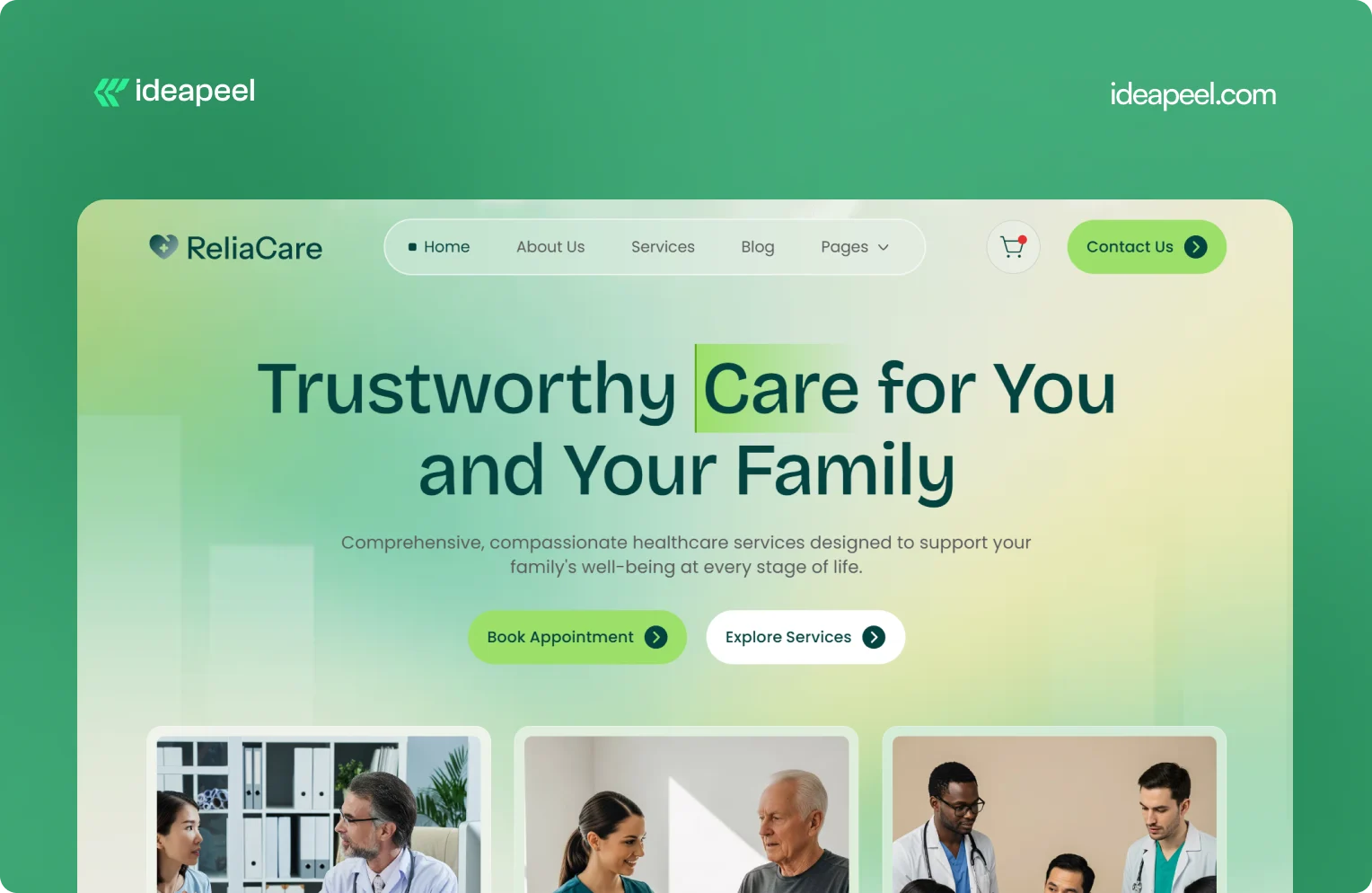
Industry: Health, wellness, and medical
What they do: Reliacare is a Webflow website template designed for health, wellness, and medical businesses that need a professional digital presence.
Why the design works: Health-related websites have a different trust challenge from many other industries. Visitors may already be uncertain, concerned, or looking for reliable information. A website that feels chaotic or overly decorative can make that uncertainty worse.
Reliacare takes a cleaner approach. The design gives services, information, and credibility room to breathe instead of filling every section with visual elements.
Key design lesson: For healthcare, wellness, and other trust-sensitive industries, restraint can be a design advantage. A clean interface with clear information often communicates confidence better than unnecessary visual complexity.
View Reliacare
7. StagePro: Events and Conference Website Template
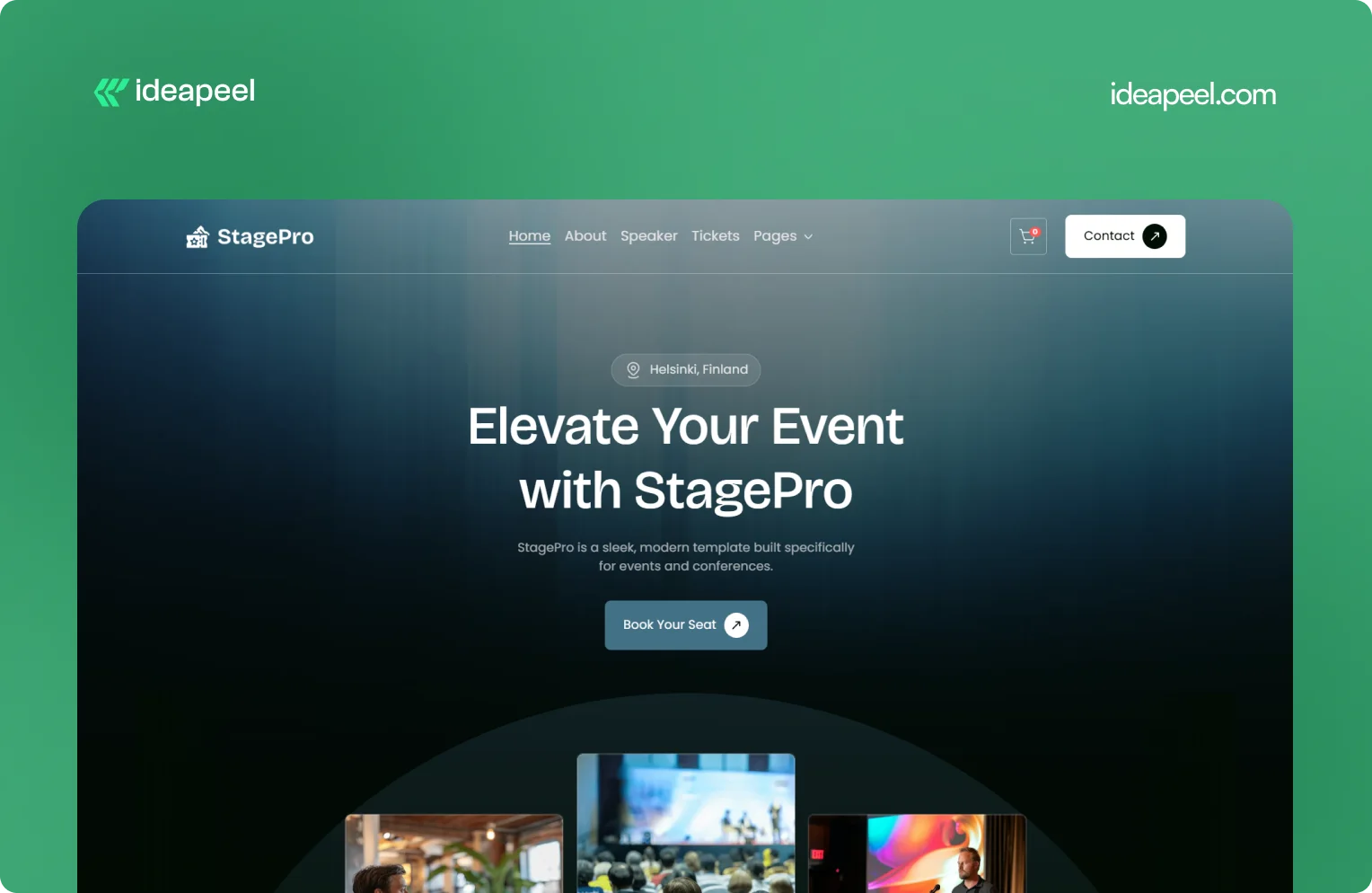
Industry: Events, conferences, summits, and workshops
What they do: StagePro is a Webflow template designed for event organizers, conference teams, summits, workshops, and other event-based businesses. It includes CMS-powered speakers, schedules, sponsors, blogs, ticket pages, and registration sections.
Why the design works: Event websites have to do several jobs at once. They need to create excitement, communicate important information, introduce speakers, explain schedules, and ultimately encourage people to register.
StagePro separates these needs into clear sections instead of trying to put everything into one message. The CMS structure also makes it easier to manage speakers, sessions, sponsors, and other event content as the website grows.
The result is a website structure that supports both the emotional side of an event and the practical information visitors need before registering.
Key design lesson: When a website has multiple conversion goals, don't mix everything together. Give each major goal a clear place in the information hierarchy.
8. Famous Tracker: Grow Fast Connection
Industry: SaaS and influencer marketing intelligence
What they do: Famous Tracker helps brands detect notable influencer purchases in real time and turn those signals into outreach opportunities. The platform provides automated detection, real-time notifications, influencer profiles, and tools for brand engagement.
Why the design works: Famous Tracker is built around a workflow that many visitors may not immediately understand. The website therefore needs to explain not just what the product is, but what happens after someone uses it.
The design makes the workflow easier to follow by connecting detection, notification, influencer information, and outreach. That helps turn an unfamiliar product category into a practical business process.
Key design lesson: If your product automates a process that visitors currently handle manually, show the workflow. Make it clear what happens before the product, what the product changes, and what the user can accomplish afterward.
View the Famous Tracker case study
[[question-block]]
9. Metrocard: Technology Website Template
Industry: Fintech and financial technology
What they do: Metrocard is a Webflow template designed for fintech, banking, investment, and financial service businesses. It uses a streamlined single-page structure with responsive design, intuitive navigation, SEO-focused structure, and customizable components.
Why the design works: Financial websites need to communicate credibility without making the experience difficult to navigate. Metrocard keeps the structure relatively focused, making it suitable for businesses that need to present a financial product or service without requiring a large multi-page website.
Its Webflow structure includes responsive navigation, CMS functionality, reusable components, forms, interactions, and responsive layouts.
Key design lesson: Not every B2B website needs dozens of pages. If the business has a focused offer, a well-structured single-page or compact website can communicate the value proposition without unnecessary complexity.
10. Moontide: Turning Dreams Into Reality
Industry: SaaS, founder funding and support
What they do: Moontide Capital connects immigrant founders with funding, legal support, and community networks to help them launch and scale startups.
Why the design works: This site has to build trust with a genuinely underserved audience while also proving credibility to investors and partners. The design keeps the process transparent from first meeting through due diligence, and leads with mission and impact before asking anything of the visitor..
[[inner-cta]]
B2B Website Design Best Practices
If you're planning a new B2B site or a redesign, these are the practices that show up consistently across the examples above:
- Lead with a specific value proposition, not a generic tagline. "We help B2B teams cut deal cycles by 40%" beats "The future of sales."
- Put your hero section to work. It's the highest-traffic real estate on the entire site. Don't waste it on abstract imagery with no message.
- Design for multiple stakeholders. B2B buying decisions often involve a technical evaluator, a budget owner, and an end user. Make sure each can find what they need.
- Use real product visuals wherever possible instead of stock photography or generic illustration; it builds more trust and helps visitors understand the actual product.
- Keep navigation goal-oriented. Organize menus around what visitors are trying to do (see pricing, understand the product, read case studies), not around internal department names.
- Add trust signals throughout the page, not just in one "logos" section testimonials and proof work best when they appear near the claim they're supporting.
- Make load speed part of the design brief. A fast, clean site reinforces credibility before a single word is read.
- Match your CTA to buyer intent. A first-time visitor and a returning, bottom-funnel visitor shouldn't see the same "Book a Demo" button in the same place.
How to Apply These Ideas to Your Own Website
You don't need to redesign everything at once. A practical way to start:
- Audit your homepage against the list above. Can a first-time visitor explain what you do after five seconds on the page?
- Identify your biggest trust gap. Is it a lack of proof, unclear pricing, or too much jargon? Fix the single biggest gap first.
- Map your navigation to buyer goals, not your internal team structure.
- Simplify one complex page at a time, following the "one idea per section" approach used by ZipID and Glo Dollar.
- Test your CTAs by funnel stage rather than repeating the same button everywhere.
Final Thoughts
The common thread across every example above isn't a specific color palette or layout trend, it's clarity. The best B2B websites make it easy to understand the offer, easy to trust the company, and easy to know what to do next. That's a strategy decision as much as a design one.
Need a B2B website that converts? If your current site isn't doing that job or you're planning a redesign and want it built around UX and conversion from the start, explore ideapeel's B2B website design work or book a strategy call to talk through your project.
Related Reading
- The UX Design Process: An Easy-to-Follow 8-Step Guide
- 10 Different Types of Websites With Examples
- Webflow Development Cost in 2026
- UI/UX Audit Checklist for B2B & SaaS
- ideapeel's UI/UX Design Services
- ideapeel's Webflow Development Services
[[last-cta]]
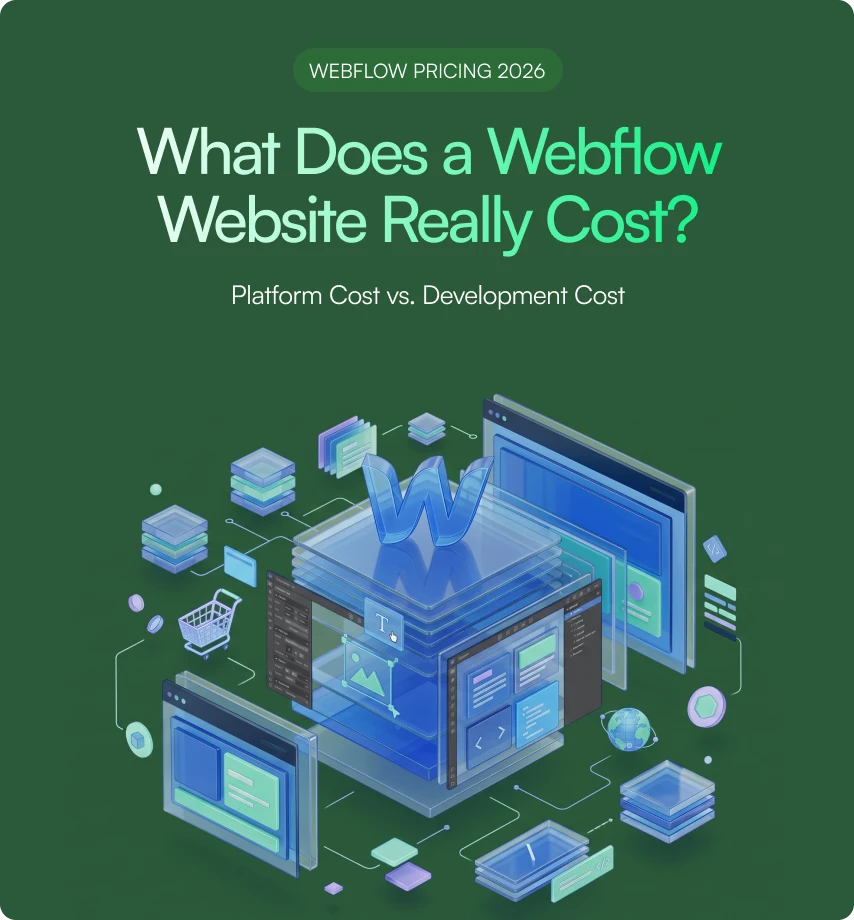
If you've been searching around for a straight answer on Webflow pricing, you've probably noticed something annoying: every article gives you a different number. That's because most of them mix up two totally different things: the cost of the Webflow platform itself and the cost of actually building a website on it.
Let's clear that up right away.
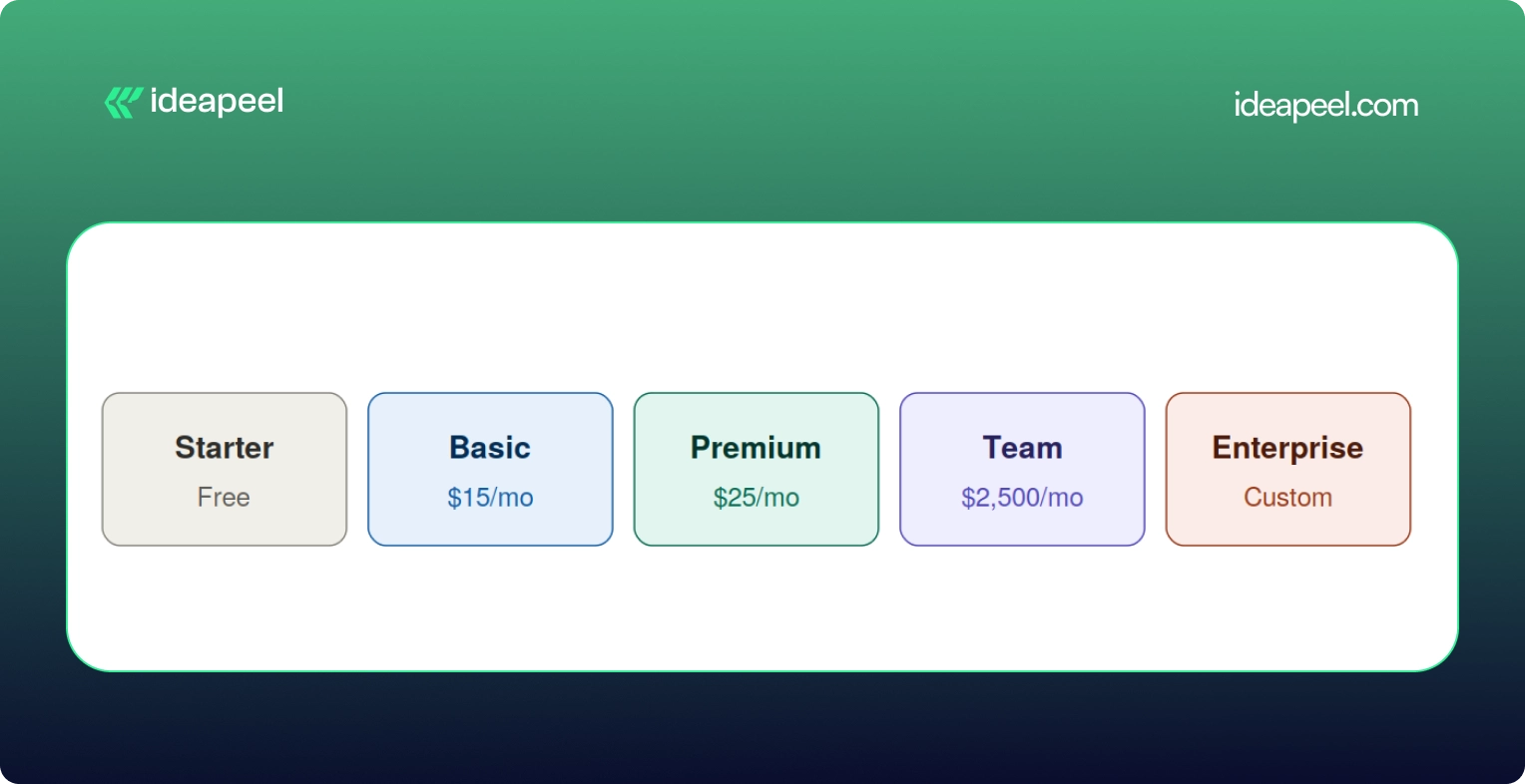
Webflow development cost in 2026 usually falls somewhere between a few hundred dollars for a small template based site, and $80,000 or more for a complex enterprise build. The Webflow subscription itself is separate from that. As of the platform's May 2026 pricing update, paid site plans start at $15 a month for Basic and $25 a month for Premium, both billed yearly.
That's the short version. Now let's break down where your money actually goes, because "it depends" isn't a budget.
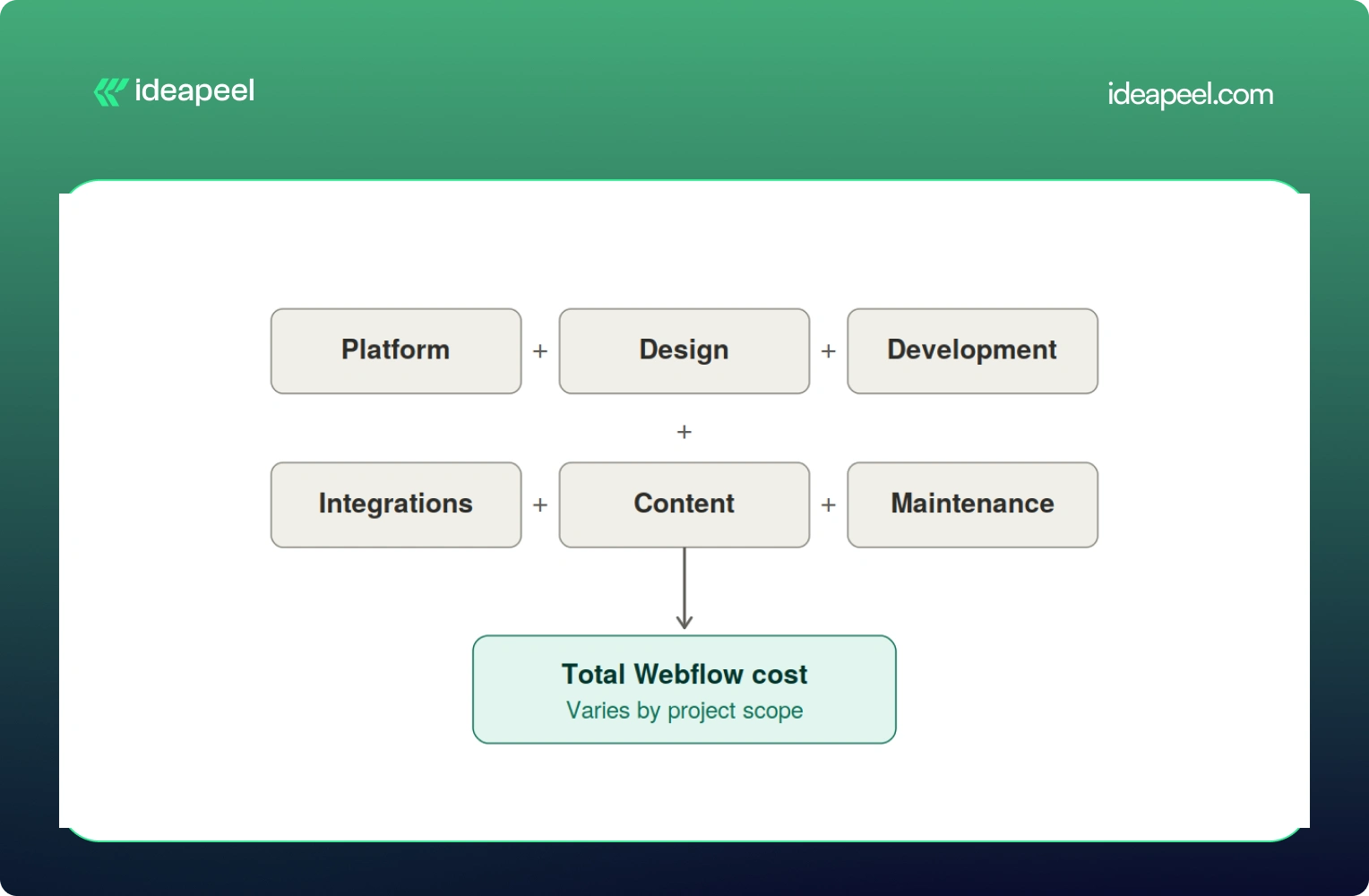
Development Cost vs Platform Cost: Two Different Bills
Here's the mental model worth keeping in your head the whole time you're reading this:
Total Webflow cost = Platform cost + Design + Development + Integrations + Content + Ongoing maintenance
The platform cost is what you pay Webflow every month to keep your site live. It's predictable and doesn't change much no matter who builds your site.
The development cost is what you pay a freelancer or agency to actually design, build, and launch the thing. This is the part that swings wildly, and it's the part most people are really asking about when they type "how much does Webflow cost" into Google.
Keeping these separate matters because a $5,000 website and a $20,000 website can run on the exact same $25 a month plan. The platform isn't what drives the price up. The scope of the work is.
Webflow Pricing in 2026 (Straight From Webflow)
Before anything else, let's get the official numbers on the table, because a lot of guides floating around still quote 2025 prices that no longer exist.
Webflow made its biggest pricing shake up in years back in May 2026. The old CMS plan and the old Business plan are both gone. They've been folded into one new plan called Premium.
A few things worth knowing about this change:
- The old Basic plan used to cost $18 a month. It's now $15 a month, and the page limit doubled from 150 to 300 static pages.
- The old CMS plan ($29/mo) and Business plan ($49/mo) are both retired. Premium replaces both at $25/mo and now comes with 20,000 CMS items included by default.
- If you already have an active site, none of this hits you immediately. Pricing changes apply at your next renewal or billable change on or after June 29, 2026.
On top of the Site Plan, there's a Workspace Plan, which is a separate bill many people forget about entirely.
And if more than one person needs to log in and edit the site, you'll pay per seat too, $39 a month for a full seat, $15 for a limited seat, and $0 for someone who just leaves comments.
So for a small marketing team with two editors, a realistic all in monthly number looks more like $70 to $95 a month once you add the Premium Site Plan, a Workspace plan, and an extra seat. Not $25. That's the number people get burned by when they only look at the homepage pricing.
[[inner-cta]]
Does Webflow Development Cost Include the Webflow Subscription?
No, and this trips up a lot of first time buyers. Development is a one time (or project based) cost that covers strategy, design, building the site, setting up the CMS, integrations, and getting it live. The Webflow subscription is what keeps that site running month to month, forever, whether you built it yourself or paid an agency $40,000 for it.
Think of it like buying a house versus paying your utility bill. Very different expenses, and mixing them up is how budgets go sideways.
How Much Does Webflow Development Cost by Website Type?
This is the question most people actually want answered, so let's get specific.
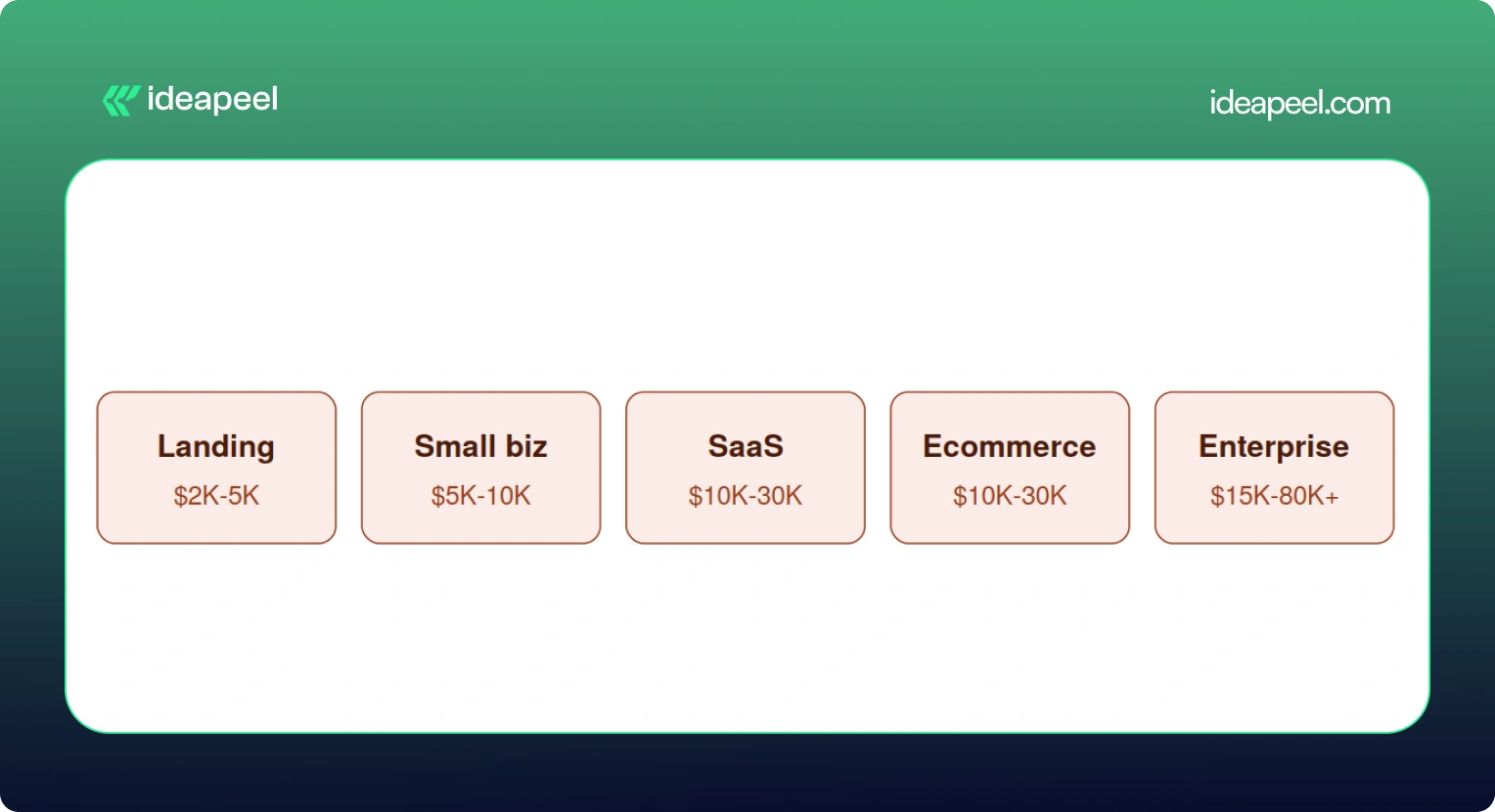
Keep in mind these are planning ranges pulled from what's actually happening in the market right now, not official Webflow numbers. A DIY project using a $49 to $149 premium template can bring the low end down to a few hundred dollars if you're comfortable doing the work yourself.
Landing Page
A single page or a small handful of pages, usually built to support a launch, a fundraise, or a campaign. Costs stay low here because there's less to design and fewer moving parts. Expect a template or lightly customized design, basic forms, and light SEO setup.
Small Business Website
Usually five to fifteen pages, with a blog or basic CMS, custom sections, and a handful of integrations like a contact form or email tool. This is the sweet spot for most local businesses and service providers.
SaaS Website
This is where things get more involved. A proper SaaS site needs a homepage that actually explains what you do, product and feature pages, a pricing page that converts, a CMS for the blog and case studies, and enough SEO and content structure to bring in organic traffic. Expect this to run $10,000 and up, and often well past $20,000 once you factor in conversion focused design.
Ecommerce Website
Product pages, collections, a working checkout, payment integration, and filtering all add real development hours. A store with 45 products and a few third party integrations (think Klaviyo or ShipStation) commonly lands in the $20,000 to $30,000 range.
Enterprise Website
Big CMS structures, multiple templates, localization for different markets, complex integrations with sales and marketing tools, accessibility requirements, and heavier governance and security needs. These projects regularly cross $30,000 and can go past $80,000 depending on scope.
[[question-block]]
What Actually Drives the Price Up
Here's a mistake a lot of people make: assuming more pages automatically means more money. That's not quite right.
Unique page designs and complexity matter far more than raw page count. A 40 page site built from five repeatable templates can be cheaper than a 10 page site where every single page has its own custom layout.
A few specific numbers worth knowing:
- Custom animations or GSAP heavy interactions typically add $1,000 to $5,000.
- Each third party integration (HubSpot, Salesforce, Zapier, a payment processor) runs $500 to $2,000, with complex ones like custom auth or dashboards going up to $10,000.
- Multi language sites using Webflow's localization tools add another $2,000 to $8,000 depending on how many locales you need.
- Migrating content from WordPress or another CMS adds $1,000 to $5,000 depending on how messy the existing data is.
What's Actually Included in a Webflow Website Development Project?
If you've never gone through this process before, here's roughly what you're paying for when you hire someone to build a Webflow site.
Strategy: discovery calls, sitemap planning, competitor research, figuring out what actually needs to be on the site
Design: wireframes, UI design (often in Figma first), responsive layouts for desktop and mobile, building out a reusable design system
Development: the actual Webflow build, CMS collections, interactions and animations, reusable components, responsive behavior
Technical work: forms, analytics setup, third party integrations, redirects, technical SEO, schema markup, accessibility, page speed
Launch: QA across browsers and devices, mobile testing, redirect mapping, checking indexing, confirming analytics are firing correctly
Skipping any of these steps is usually how projects end up needing expensive rework a few months later.
Does SEO Increase Webflow Development Cost?
Yes, a bit, and it's worth it. A properly done technical SEO setup, meta tags, schema, sitemap, clean URL structure, image optimization, internal linking, page speed, usually adds somewhere between $500 and $3,000 depending on site size. Given that a large majority of buying journeys still start with a search engine, this isn't a line item to cut to save a few hundred dollars.
Does AEO or GEO Change What You Pay?
This is newer territory, and it's genuinely one of the more useful things to understand right now if your site needs to show up in AI-ge answers, not just Google's blue links.
AEO (Answer Engine Optimization) is about nerated structuring your content so tools like ChatGPT, Perplexity, and Google's AI Overviews can pull a clear answer straight out of your page. That usually means adding question-based content, clearer CMS field structure, and schema that spells out exactly what your business does.
GEO (Generative Engine Optimization) goes a step further. It's about making your brand something AI systems actually want to cite as a source, through comparison pages, case studies, clear author information, evidence-backed claims, and content that other sites and AI tools can confidently reference.
Neither of these replaces SEO. They sit on top of it. And yes, they can add scope, usually in the form of extra content architecture and structured data work, which might add anywhere from a few hundred to a couple thousand dollars depending on how deep you go. But for businesses trying to stay visible as more searches shift toward AI tools, it's quickly becoming table stakes rather than a nice to have.
Real World Examples
Numbers on a chart only tell you so much, so here's what actual projects have looked like.
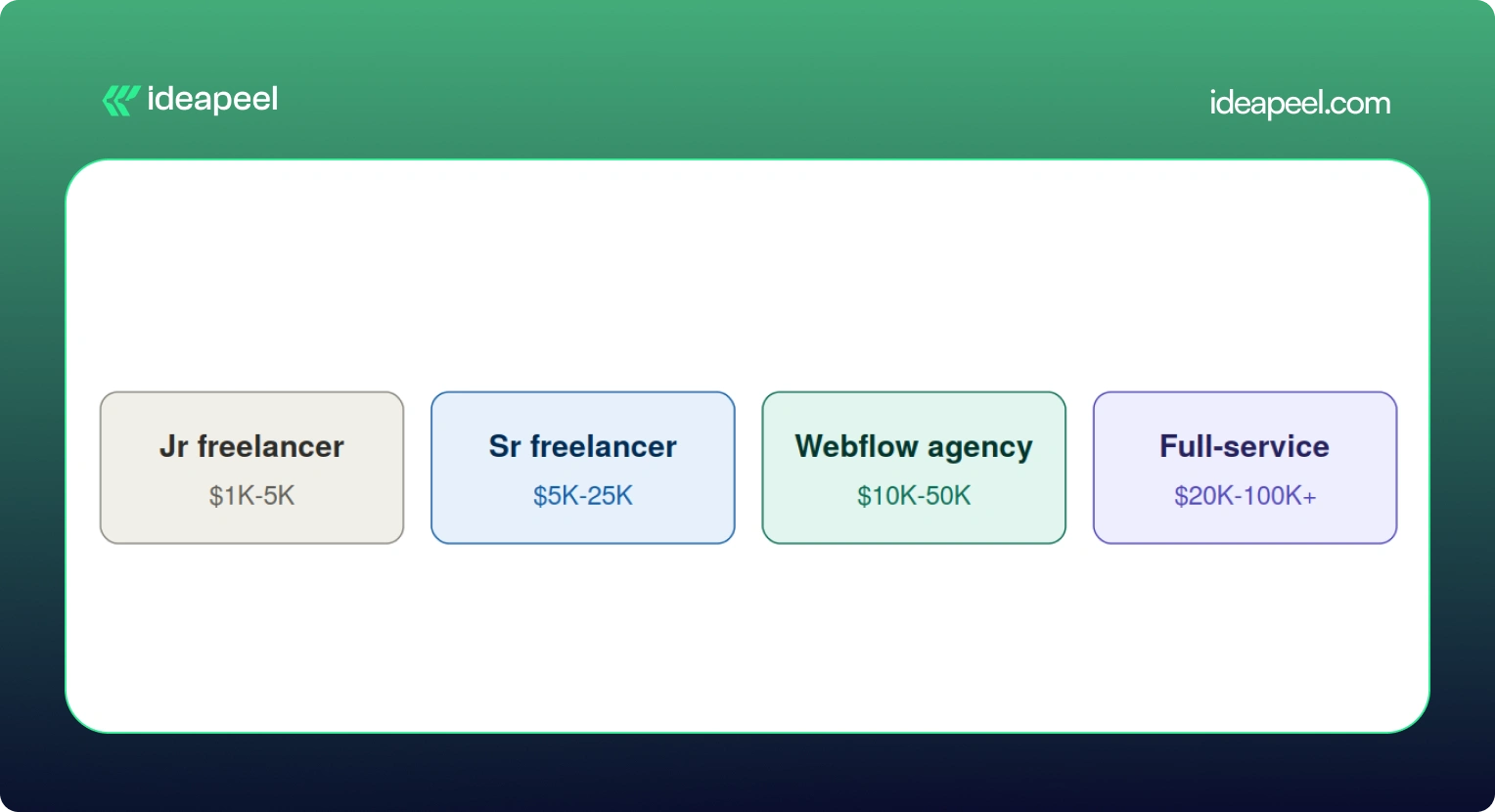
Startup landing page, $3,500. A pre-seed SaaS company needed three pages (homepage, features, pricing) to support a fundraising push. A mid-level freelancer delivered it in about 10 days, including a basic blog CMS and HubSpot form integration.
Professional services site, $12,000. A 50-person consulting firm needed a 20 page site with team bios, case studies, a blog, and a contact system. A Webflow specialized agency delivered it in six weeks, covering discovery, custom design, development, CMS setup, and SEO.
Ecommerce brand, $22,000. A direct-to-consumer skincare company needed 45 products, a content hub, and integrations with Klaviyo and their inventory system. This included brand identity work, full ecommerce build, and product photography direction.
Enterprise migration, $45,000. A Series C fintech company moved an 80-page site from WordPress to Webflow over 12 weeks with a three-person team. The budget covered a full content audit, a new design system, CMS architecture, redirect mapping, and integrations with HubSpot, Salesforce, and Segment.
Webflow vs WordPress: Which Actually Costs More?
On paper, the build costs look similar, both platforms range from roughly $2,000 to $60,000 depending on scope. The real difference shows up after launch.
WordPress can still make sense for content-heavy sites that lean hard on a specific plugin ecosystem. But for most marketing and SaaS teams who want to move fast without filing a developer ticket every time they need a small change, Webflow tends to come out ahead once you look at total cost over two or three years.
Additional Costs People Forget to Budget For
A handful of expenses regularly catch people off guard:
- Stock photography, usually $10 to $500 per image, with most sites needing 20 to 50 images
- Custom fonts, $50 to $500 for a commercial web license if Google Fonts won't cut it
- Copywriting, $100 to $300 per page, so a 20-page site can mean $2,000 to $6,000 just for the words
- Domain registration, $10 to $50 a year
- A maintenance retainer, $300 to $2,000 a month if you want someone on call for updates
- Add-ons like Optimize (A/B testing), which starts at $299 a month and isn't bundled into any standard plan
None of these are dealbreakers on their own, but stacked together they can add 15 to 20% to a project you thought you'd already priced out.
How to Get an Accurate Webflow Quote
A few things that consistently lead to a tighter, more honest quote:
- Have your content ready before you start. Delays in copy and images are one of the most common reasons projects run over budget and over timeline.
- Write down your scope clearly. A sitemap, a feature list, and a rough page count prevent the slow creep of "just one more page" that inflates every project.
- Decide your must haves versus nice to haves. Do you actually need multi language support on day one, or can that wait for phase two?
- Ask providers for a phase by phase breakdown, not just one lump number. It makes it much easier to see where your money is actually going.
- Consider launching an MVP first. Getting a smaller version live and adding features later based on real user behavior often costs less overall than trying to build everything up front.
Is Webflow Worth the Cost in 2026?
For most growing businesses, yes. A well-built website isn't really an expense; it's closer to a sales tool that works around the clock. Reports on website redesigns consistently show meaningful jumps in lead generation and conversion rate within the first year after a proper rebuild, and even a modest improvement in conversion rate can pay back a five-figure project within months.
That said, not every business needs a $30,000 site. If you're testing an idea or need something up fast, a $2,000 to $5,000 build on a solid template is a completely reasonable place to start. The bigger point is this: the cheapest option isn't automatically the smartest one. What actually matters is whether the site can bring in traffic, support your team, convert visitors, and grow with you instead of needing a full rebuild in a year.
Webflow itself, as a platform, is fairly predictable and easy to budget for. The real variable is always the scope of the work you're asking someone to do on top of it.
Final Thoughts
The Webflow website cost in 2026 depends on your project, design complexity, development time, and customization. A simple Webflow template can keep the build cost low, while custom Webflow development can increase the overall cost.
When budgeting for a Webflow website, consider the full cost of ownership, including the Webflow site plan, Webflow Workspace, development, maintenance, and SEO.
Hiring a Webflow developer is not only about comparing developer rates. An experienced Webflow expert can make better design decisions, create a responsive design system, and reduce rework. The right development partner can help with Webflow development and website design.
For SaaS and growing businesses, the goal is not simply to cost less. It is to build a professional website that balances quality, performance, budget, and long-term growth.
If you need professional design and development for a high-performing Webflow website, ideapeel can help turn your goals into a scalable Webflow build.
[[last-cta]]