Website Redesign SEO Checklist: How to Protect Rankings and Organic Visibility Before and After Launch


Summarize with Ai





Key Takeaways
A new website should bring you more customers. But a redesign done without an SEO plan can do the opposite. Pages move, links break, content gets trimmed, and one day your organic traffic is half of what it was.
The good news is that this is mostly avoidable. Search engines rank pages, not designs. If you keep the pages, content and links that earn your rankings, and you move everything else carefully, you can launch a better looking site without losing visibility.
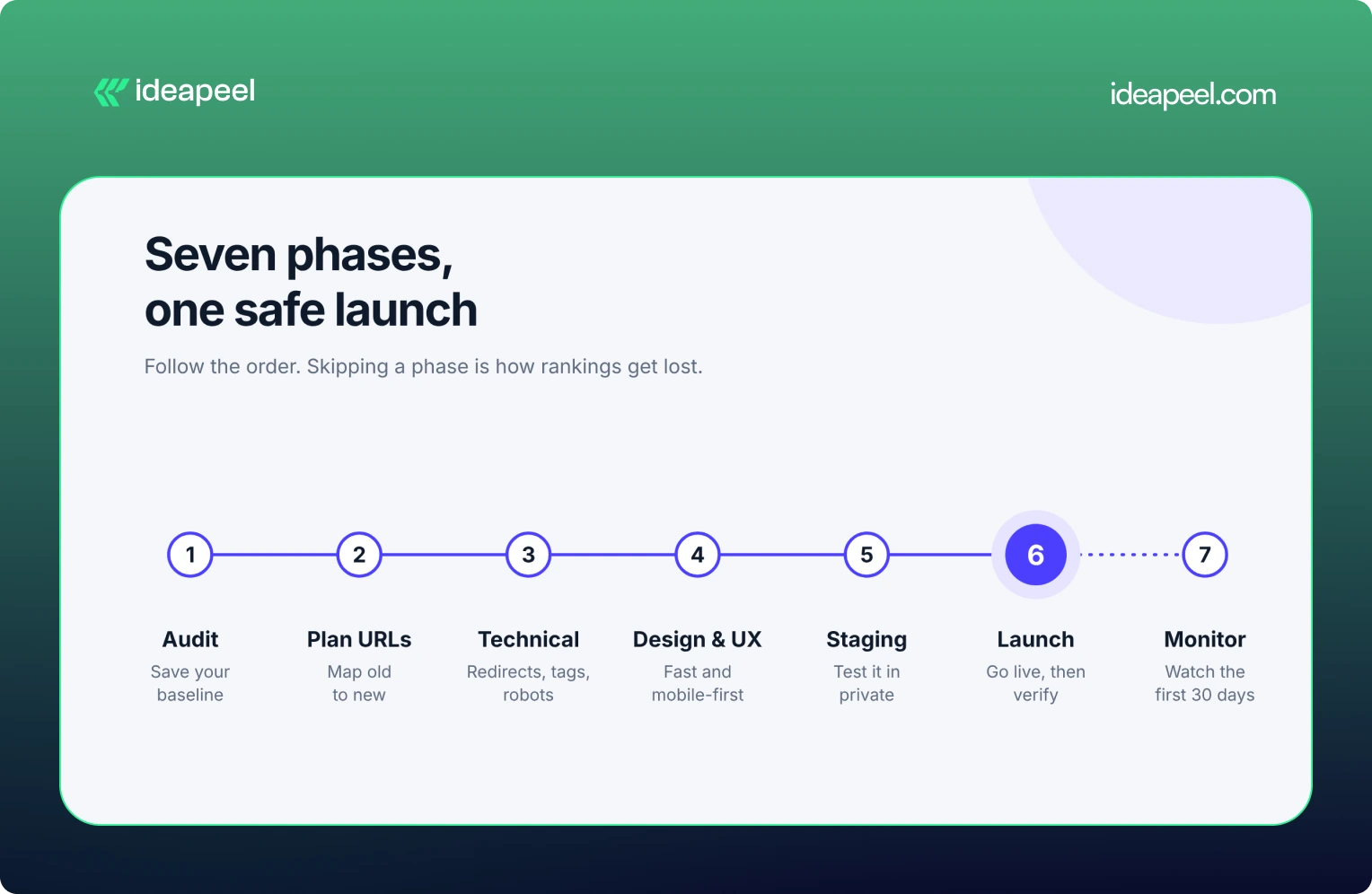
This website redesign SEO checklist walks you through the full process in order: audit, planning, build, staging, launch and monitoring. You can follow it whether you are a SaaS founder, a business owner, a marketing manager or part of a design team.
Quick answer: how do you redesign a website without losing SEO?
To redesign a website without losing rankings, do these seven things:
- Record your current traffic, rankings, backlinks and top pages before you change anything.
- Keep URLs the same wherever you can.
- Map every old URL that changes to the closest new page with a 301 redirect.
- Keep your best content, titles, headings and internal links.
- Test everything on a staging site that search engines cannot see.
- On launch day, remove staging blocks, check redirects and submit your sitemap.
- Watch Google Search Console closely for at least 30 days and fix problems fast.
The rest of this guide explains each step in plain words.
Why SEO matters during a website redesign
Search engines rank each URL on its own. A page earns its position from three things: the content on it, the links pointing to it, and how it fits into the rest of your site.
A redesign can change all three at once.
- URLs change. If a ranking page moves and the old address has no redirect, visitors and Google land on a 404 error. The value that page built up does not follow it.
- Content shrinks. Long copy gets cut to "make the page cleaner." The page then stops answering the searches it used to win.
- Links disappear. A new menu leaves out an important service page. That page loses internal links and slowly loses importance.
- Technical settings break. Staging rules like no index tags sometimes go live by mistake and tell Google to ignore the new site.
Each of these looks small. Together they can cause a sharp drop in organic traffic.
Design and SEO also depend on each other. Good user experience helps people stay, read and enquire. Good SEO helps the right people find the page in the first place. Treat them as one project, not two. If you want a team that plans both together, our web design services and UI/UX design services are built around that idea.
Will a redesign always hurt SEO? No. If you protect URLs, content and links, rankings can stay steady and often improve, thanks to better speed and clearer pages. Some short-term movement is normal while Google recrawls your site.
Phase 1: Pre-redesign SEO audit checklist
This is the most skipped step and the most valuable one. You cannot protect what you have not measured.
Analyze your current website performance
Export this data and save it with today's date:
- Google Search Console: clicks, impressions, average position and top queries for your key pages.
- Google Analytics: organic sessions, top landing pages and conversions such as form fills, calls and sign-ups.
- Conversion pages: the pages that bring leads or sales, not only the pages with the most visits. A page with low traffic but high sales is gold.
This baseline is how you will prove, a month from now, whether the new site is doing better or worse.
Run a technical SEO audit
Crawl your current site with a tool such as Screaming Frog SEO Spider. Export:
- Every URL and its status code (200, 301, 404 and so on)
- Page titles and meta descriptions
- H1 and other headings
- Canonical tags
- Indexability (which pages are blocked or set to noindex)
- Internal links in and out of each page
Also review your XML sitemap and note any broken links or crawl errors you already have. It is much better to fix old problems now than to carry them into the new site.
Build a complete URL inventory
Do not rely on your menu. It misses a lot. Combine these sources, because each one finds pages the others miss:
- Your XML sitemap
- A full site crawl
- The Pages report in Google Search Console
- Landing pages from your analytics
- Backlink tools, for old URLs that other websites still link to
Include PDFs, images and old blog posts that still get visits.
Find the pages and keywords to protect
Mark every URL that brings organic traffic, conversions or backlinks. Next to each one, write the main keyword it ranks for. These are your protected pages. Keep their content, keep their URLs if possible, and redirect them with great care if you cannot.
Decide what happens to every page
Give each URL one clear outcome:
Pages that rank and convert should rarely be cut down just to look tidy.
Phase 2: Website architecture and URL planning
Plan the new site structure
Build the navigation around how customers choose, not around your internal departments. Keep the structure of important sections stable. Make sure every key service, product or category page can be reached in a few clicks from the homepage.
Create a URL mapping strategy
The best redirect is the one you never need. If an address works and makes sense, keep it, even when the design around it changes completely.
When a URL must change, write it down in a spreadsheet with three columns: old URL, new URL, and the reason. Change URLs only for a clear benefit, such as fixing a confusing structure. Do not change them just for taste.
Avoid changing your domain, platform, URL structure and content all at the same time. If traffic drops, you will not know which change caused it.
Protect your internal linking
Internal links tell Google which pages matter and how your topics connect. A redesign often breaks them without anyone noticing.
- Record which pages your menus, footer and in-content links point to.
- Keep contextual links inside blog posts and service pages.
- Link supporting articles to their main pillar page with descriptive anchor text.
- Avoid orphan pages, which are pages with no internal links pointing to them.
- After launch, update links so they point straight to new URLs, not through redirects.
Phase 3: Technical SEO checklist before development
Plan your 301 redirects
If any URL changes, use a permanent server-side redirect from the old URL to its new equivalent. Google's site move guidance recommends permanent redirects such as 301 or 308, says they do not cause a loss in PageRank, and advises keeping them in place for as long as possible, generally at least a year. You can read more in Google's guide to redirects and Google Search.
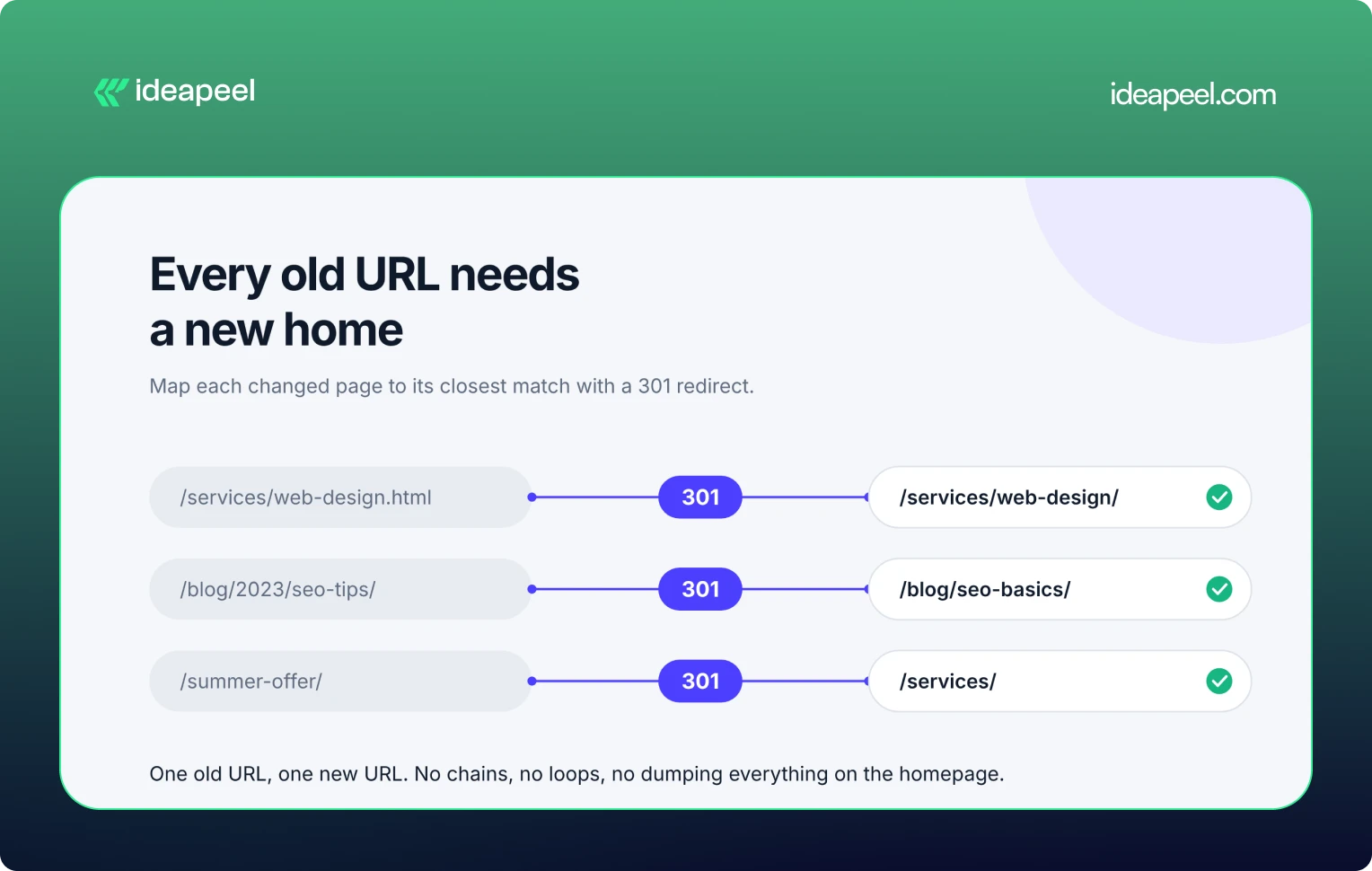
Here is what a good redirect map looks like:
Follow these rules:
- Map each old URL to the most relevant new page. Do not send everything to the homepage. That tells neither visitors nor Google where the content went.
- Redirect straight to the final page. No chains where one redirect leads to another.
- Avoid loops and broken destinations.
- If a page truly has no equivalent, let it return a 404 or 410 instead of forcing a poor match.
- Test the map on staging, then again after launch.
Check canonical tags
A canonical tag tells Google which version of a page is the main one. Confirm that every page points to its own live address, not to the staging site or to an old URL. Read Google's guide on consolidating duplicate URLs if you need a refresher.
Review indexing and robots rules
- Find every noindex tag in the new templates and write down which ones are meant to stay.
- Review robots.txt so it does not block important folders.
- Make sure the staging site is hidden from search, and make a note of how, so you can reverse it on launch day.
Carry over on-page SEO
For each important page, confirm the new version has:
- A unique, descriptive page title
- A unique meta description
- One H1, with logical H2 and H3 headings below it
- Descriptive image alt text
- Working internal links
- Structured data carried over and valid on the new templates
Page builders and templates can quietly change heading levels, so check the rendered page, not just the editor.
Phase 4: Website design, UX and performance
Keep mobile and desktop content equal
Google uses the mobile version of your site for indexing. Google's mobile-first indexing guidance says to keep the same primary content, titles and meta descriptions on both versions. You can change the layout on mobile, for example by using tabs or accordions, as long as the content is equivalent.
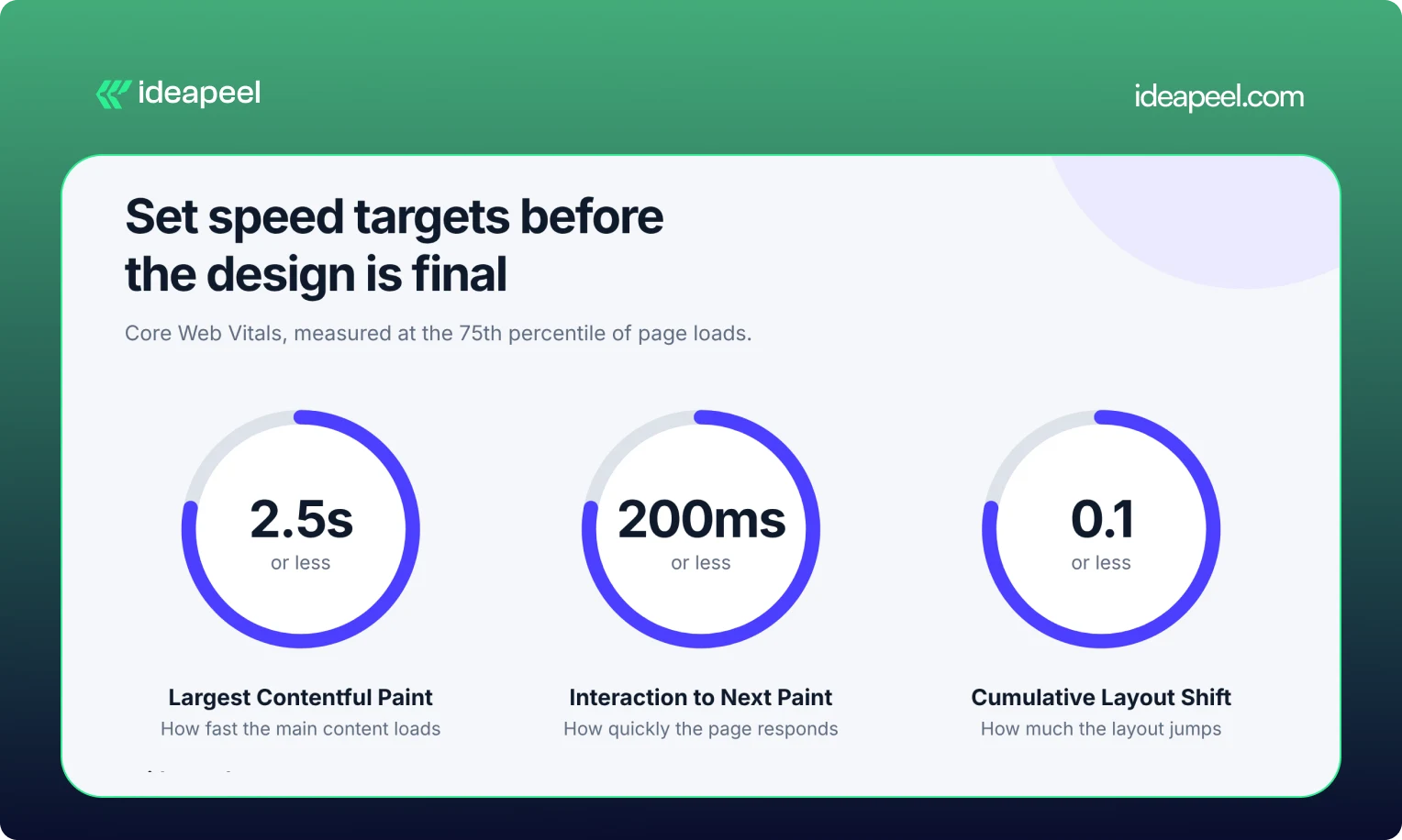
Set Core Web Vitals targets before the design is final
Heavy sliders, autoplay video and large images are the most common reasons a pretty redesign loads slowly. Core Web Vitals give you clear goals, measured at the 75th percentile of page loads:
Compress images, limit heavy scripts and fonts, and test on a real phone, not only on a fast office computer.
Keep the experience clear
- Use clear, simple navigation and a logical page hierarchy.
- Keep the call to action easy to find on every key page.
- Do not hide important copy inside elements that Google may not read the same way.
- Check accessibility basics such as contrast, alt text and keyboard use.
A site that is faster, clearer and easier to use usually earns more enquiries from the same traffic. That is the real goal of a redesign.
Phase 5: Staging website SEO checklist
Staging is your safe test space. Use it to catch mistakes before Google sees them.
- Keep the staging site private with a password or a noindex rule.
- Crawl the staging site and compare it with your crawl of the old site.
- Check titles, meta descriptions and headings on key pages.
- Test internal and external links.
- Review canonical tags and robots settings.
- Test mobile layouts and page speed.
- Test every redirect from your map.
- Test forms, phone links, booking tools and analytics tags end to end.
- Compare word counts on important pages, to be sure no copy was lost.
Phase 6: Website launch day SEO checklist
Launch day is when small slips become big problems. Work through this list slowly, and have a developer available.
- Remove the staging noindex rule and any password protection.
- Check that robots.txt does not block the live site.
- Turn on your 301 redirects and test your most important old URLs first.
- Confirm canonical tags point to the live domain.
- Make sure HTTP and HTTPS, and www and non-www, all resolve to one version.
- Generate a fresh XML sitemap with only live, indexable URLs, and submit it in Google Search Console.
- Use the URL Inspection tool on your top landing pages.
- Test forms, phone links and checkout, and confirm analytics and Search Console are recording.
- Crawl the live site to find broken links and missing pages.
The single most common launch mistake is leaving a staging noindex tag in place. Check it twice.
Phase 7: Post-launch SEO monitoring
Launching is not the finish line. This is where you catch the problems that testing missed.
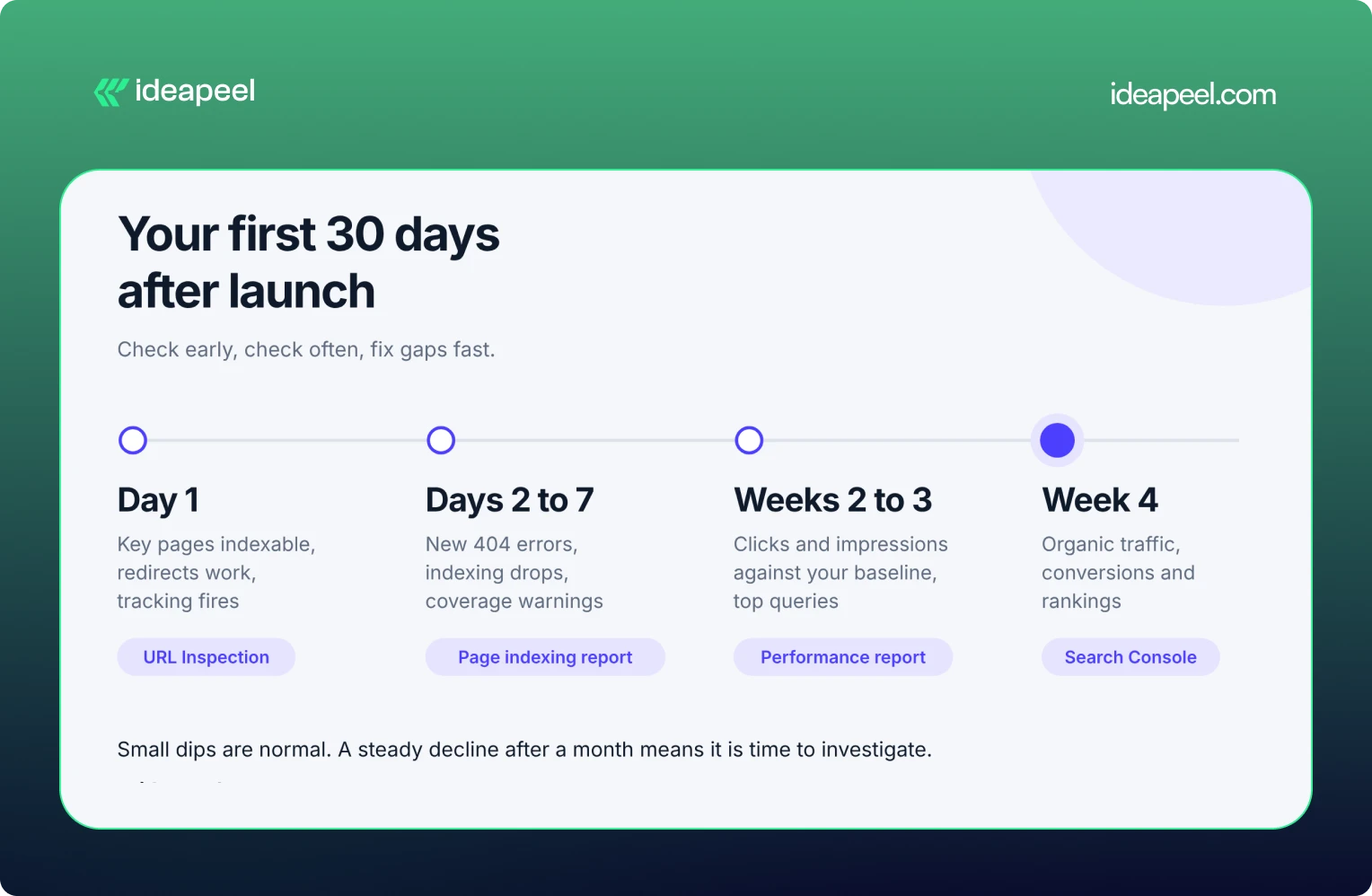
The first 30 days
Fix problems as you find them:
- Redirect old URLs that still get visits and return 404 errors.
- Restore content that was cut from important pages.
- Update internal links that point to redirected addresses.
- Remove redirect chains and loops.
Be patient. Google says that for medium-sized sites it can take a few weeks or more for new URLs to replace old ones in search results, and longer for large sites. A small dip at first is normal. A steady decline after a month is a sign to investigate.
Long-term monitoring
- Compare performance with your pre-redesign baseline every month.
- Track keyword rankings for your protected pages.
- Track organic conversions, not only visits. Traffic alone does not show lead quality.
- Review backlinks and referring pages for old URLs that still need redirects.
- Keep your redirects live for at least a year, and longer if old links keep arriving.
- Update your Google Business Profile, social profiles and directory listings if URLs changed.
Do not forget tracking and forms
A redesign can break measurement without any warning. Then you cannot tell whether the new site works.
- Recreate your analytics tracking and conversion events on the new site.
- Test every form and confirm enquiries reach the right inbox or CRM.
- Count a form as a conversion only after a successful submission, not when someone clicks the button.
- Track phone and chat clicks, and test them on a real phone.
- Check that your cookie consent banner still controls analytics correctly.
Common website redesign SEO mistakes to avoid
- Changing URLs without redirects. The fastest way to lose rankings.
- Redirecting everything to the homepage. It confuses users and wastes the old page's value.
- Cutting high-performing content to make pages look lighter.
- Ignoring internal links when building the new menu.
- Launching with a staging noindex tag or a blocking robots.txt file.
- Skipping technical SEO testing on staging.
- Ignoring mobile speed. Heavy designs often fail Core Web Vitals.
- Changing everything at once, so nobody can tell what caused a drop.
- Forgetting analytics and form tracking on the new site.
- Not monitoring after launch. Problems left alone grow.
Who does what: a simple ownership table
When everyone knows their part, nothing falls between the design team and the SEO team.
The complete website redesign SEO checklist
Copy this list into your project tool and tick items off as you go.
Before the redesign: audit, traffic, rankings, keywords
- Export Search Console queries, pages and clicks
- Export analytics traffic and conversions
- Crawl the current site and save the data
- Build a full URL inventory from several sources
- List pages with backlinks, traffic and conversions
- Decide keep, improve, merge or retire for each page
During planning: URL mapping, architecture, content
- Keep existing URLs wherever possible
- Write the old-to-new URL map
- Plan navigation and internal links
- Keep and improve ranking content
During development: redirects, technical SEO, UX
- Set up one-to-one 301 redirects
- Check canonical tags, robots rules and noindex tags
- Carry over titles, descriptions, headings and structured data
- Match mobile and desktop content
- Meet Core Web Vitals targets in testing
- Test forms, calls to action and tracking on staging
Launch day: indexing, sitemap, tracking
- Remove staging blocks
- Test the top redirects
- Submit the XML sitemap
- Inspect key pages in Search Console
- Confirm analytics and forms work
After launch: traffic, rankings, crawl errors
- Check Search Console daily in week one
- Crawl old URLs and fix 404s
- Compare traffic and conversions to the baseline every week
- Keep redirects for at least a year
Final thoughts
A redesign does not have to be a gamble. The pattern is simple: audit what you have, map what changes, test before you launch, and monitor after. SEO belongs in the project from the first meeting, not as a last-minute check before launch day.
If you want a partner who plans design, UX and search visibility together, explore IdeaPeel's web design services and UI/UX design services, or visit the ideapeel homepage to start a conversation.
Running a law firm? Trust and enquiries matter even more for you. LegalPeel, IdeaPeel's legal division, builds high-converting websites and growth systems for attorneys, and uses the same safe redesign process described here.
Planning a redesign and want a second pair of eyes on your redirect map or audit? Get in touch with the IdeaPeel team before you launch, not after.
Frequently Asked Questions on Website Redesign SEO Checklist
Enter your website URL to receive a detailed website analysis report in just 5 minutes!

How can Google Search Console help monitor a website redesign?
Search Console shows indexing problems, 404 errors, sitemap status, clicks, impressions and queries. Compare it with your pre-launch export to see which pages gained or lost visibility.