Webflow Development Cost in 2026: What Should You Actually Pay?

Post By
Shazzad Shoikat
Published Date
Sep 20, 2026
Last Updated
Sep 20, 2026
Category
Website Development

Summarize with Ai

ChatGPT logo with intertwined hexagonal shape and text.Grok logo featuring a stylized crossed-out eye symbol followed by the word 'Grok'.Claude logo with an abstract orange starburst icon to the left of the word 'Claude' in white text.Perplexity logo.Google AI logo with multicolored pattern and text.

Key Takeaways

  • Webflow costs vary by project scope
  • Platform and development costs are separate
  • Custom features increase development costs
  • SEO and integrations add to the budget
  • Plan ongoing costs before starting

If you've been searching around for a straight answer on Webflow pricing, you've probably noticed something annoying: every article gives you a different number. That's because most of them mix up two totally different things: the cost of the Webflow platform itself and the cost of actually building a website on it.

Let's clear that up right away.

Webflow development cost in 2026 usually falls somewhere between a few hundred dollars for a small template based site, and $80,000 or more for a complex enterprise build. The Webflow subscription itself is separate from that. As of the platform's May 2026 pricing update, paid site plans start at $15 a month for Basic and $25 a month for Premium, both billed yearly.

That's the short version. Now let's break down where your money actually goes, because "it depends" isn't a budget.

Development Cost vs Platform Cost: Two Different Bills

Here's the mental model worth keeping in your head the whole time you're reading this:

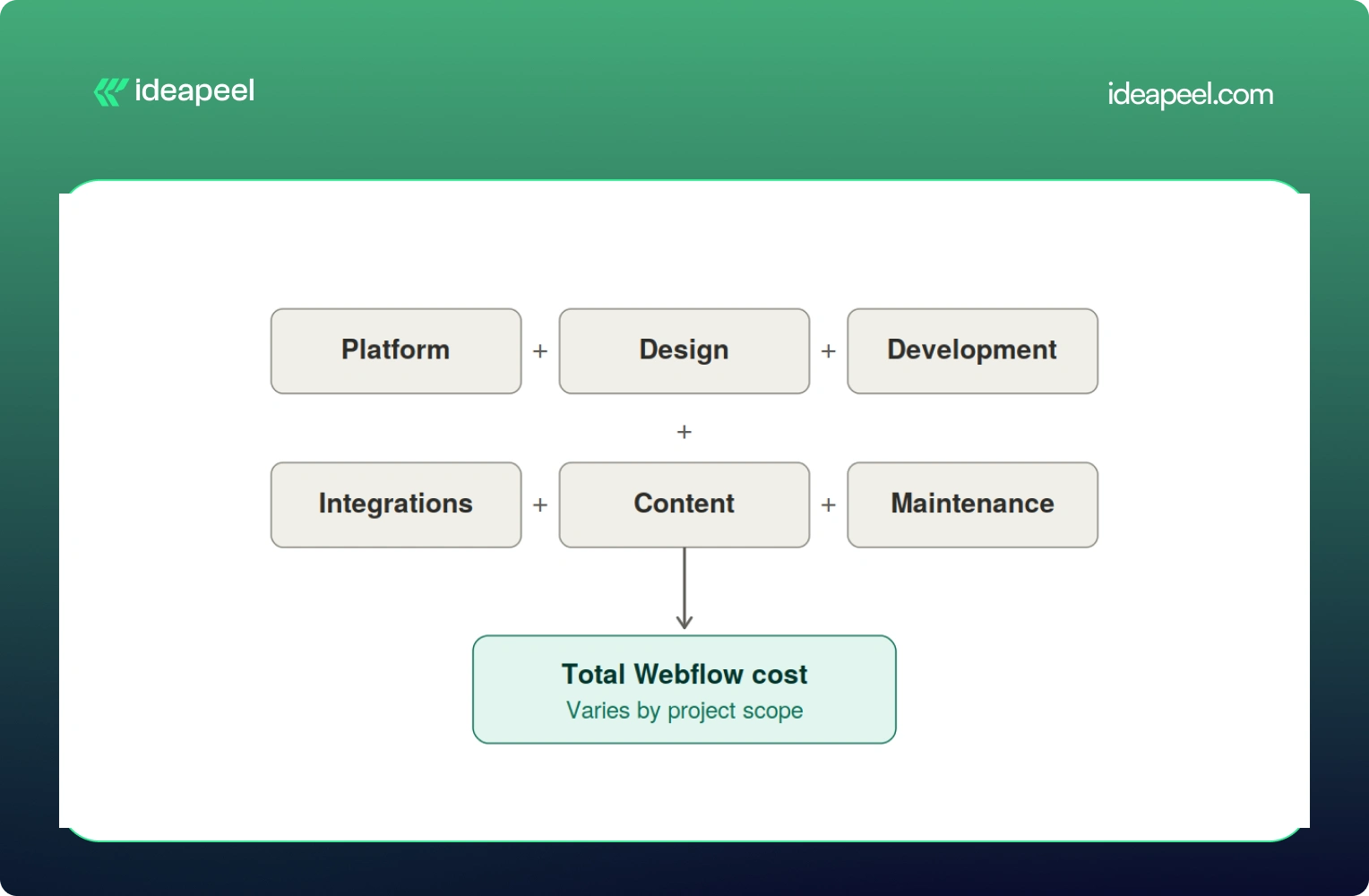
Total Webflow cost = Platform cost + Design + Development + Integrations + Content + Ongoing maintenance

The platform cost is what you pay Webflow every month to keep your site live. It's predictable and doesn't change much no matter who builds your site.

The development cost is what you pay a freelancer or agency to actually design, build, and launch the thing. This is the part that swings wildly, and it's the part most people are really asking about when they type "how much does Webflow cost" into Google.

Keeping these separate matters because a $5,000 website and a $20,000 website can run on the exact same $25 a month plan. The platform isn't what drives the price up. The scope of the work is.

Webflow Pricing in 2026 (Straight From Webflow)

Before anything else, let's get the official numbers on the table, because a lot of guides floating around still quote 2025 prices that no longer exist.

Webflow made its biggest pricing shake up in years back in May 2026. The old CMS plan and the old Business plan are both gone. They've been folded into one new plan called Premium.

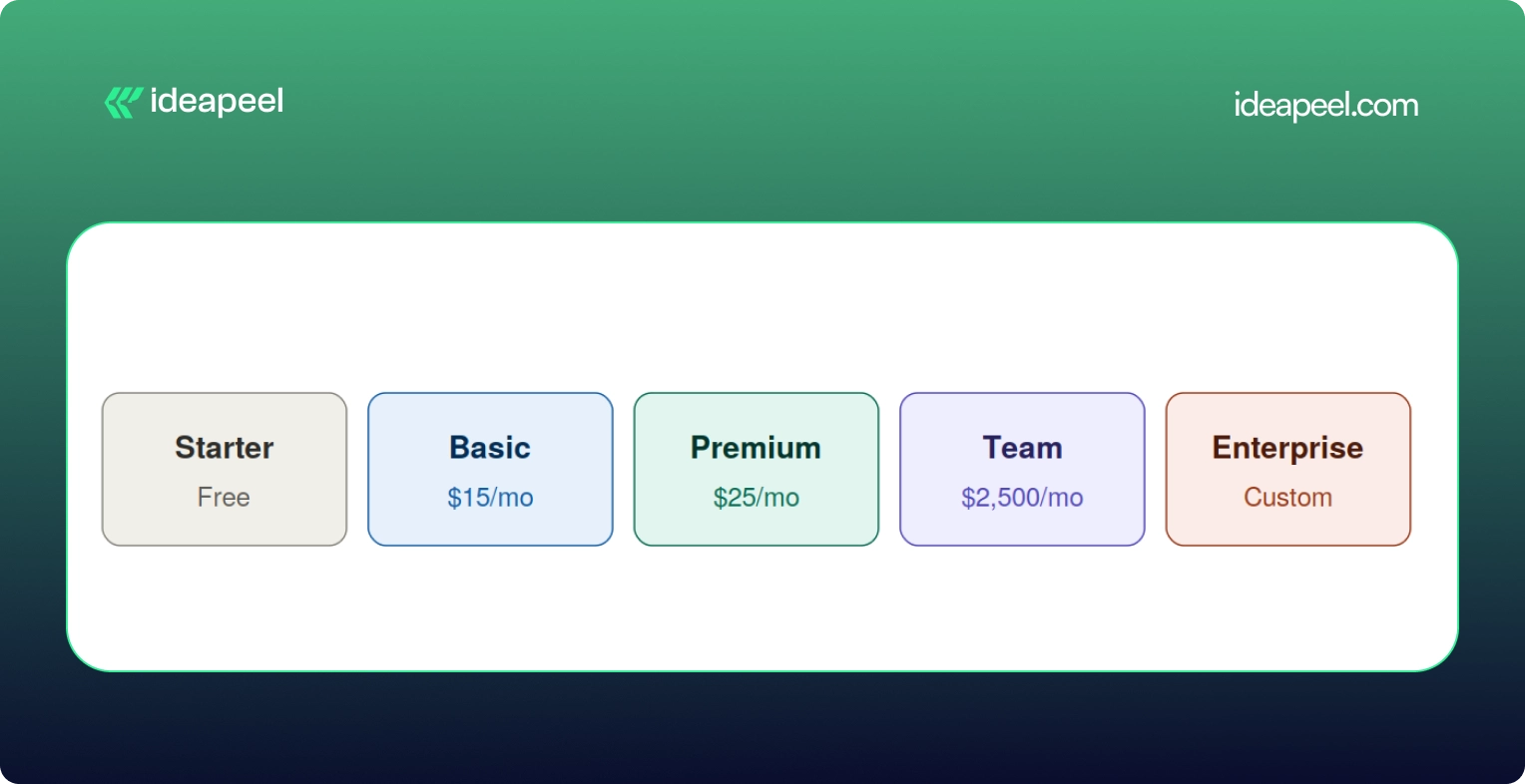
Site Plan Price (billed yearly) Price (billed monthly) Best for
Starter Free Free Testing and prototypes
Basic $15/mo $25/mo Simple static sites, no CMS
Premium $25/mo CMS blogs, marketing sites, SaaS
Team $2,500/mo Annual contract only Growing organizations
Enterprise Custom Custom Large orgs with governance needs

A few things worth knowing about this change:

  • The old Basic plan used to cost $18 a month. It's now $15 a month, and the page limit doubled from 150 to 300 static pages.
  • The old CMS plan ($29/mo) and Business plan ($49/mo) are both retired. Premium replaces both at $25/mo and now comes with 20,000 CMS items included by default.
  • If you already have an active site, none of this hits you immediately. Pricing changes apply at your next renewal or billable change on or after June 29, 2026.
Workspace Price What it covers
Starter Free Solo use, one full seat
Core $19/mo More staging sites, custom code, code export
Growth $49/mo Unlimited staging, publishing permissions, site roles

On top of the Site Plan, there's a Workspace Plan, which is a separate bill many people forget about entirely.

And if more than one person needs to log in and edit the site, you'll pay per seat too, $39 a month for a full seat, $15 for a limited seat, and $0 for someone who just leaves comments.

So for a small marketing team with two editors, a realistic all in monthly number looks more like $70 to $95 a month once you add the Premium Site Plan, a Workspace plan, and an extra seat. Not $25. That's the number people get burned by when they only look at the homepage pricing.

[[inner-cta]]

Does Webflow Development Cost Include the Webflow Subscription?

No, and this trips up a lot of first time buyers. Development is a one time (or project based) cost that covers strategy, design, building the site, setting up the CMS, integrations, and getting it live. The Webflow subscription is what keeps that site running month to month, forever, whether you built it yourself or paid an agency $40,000 for it.

Think of it like buying a house versus paying your utility bill. Very different expenses, and mixing them up is how budgets go sideways.

How Much Does Webflow Development Cost by Website Type?

This is the question most people actually want answered, so let's get specific.

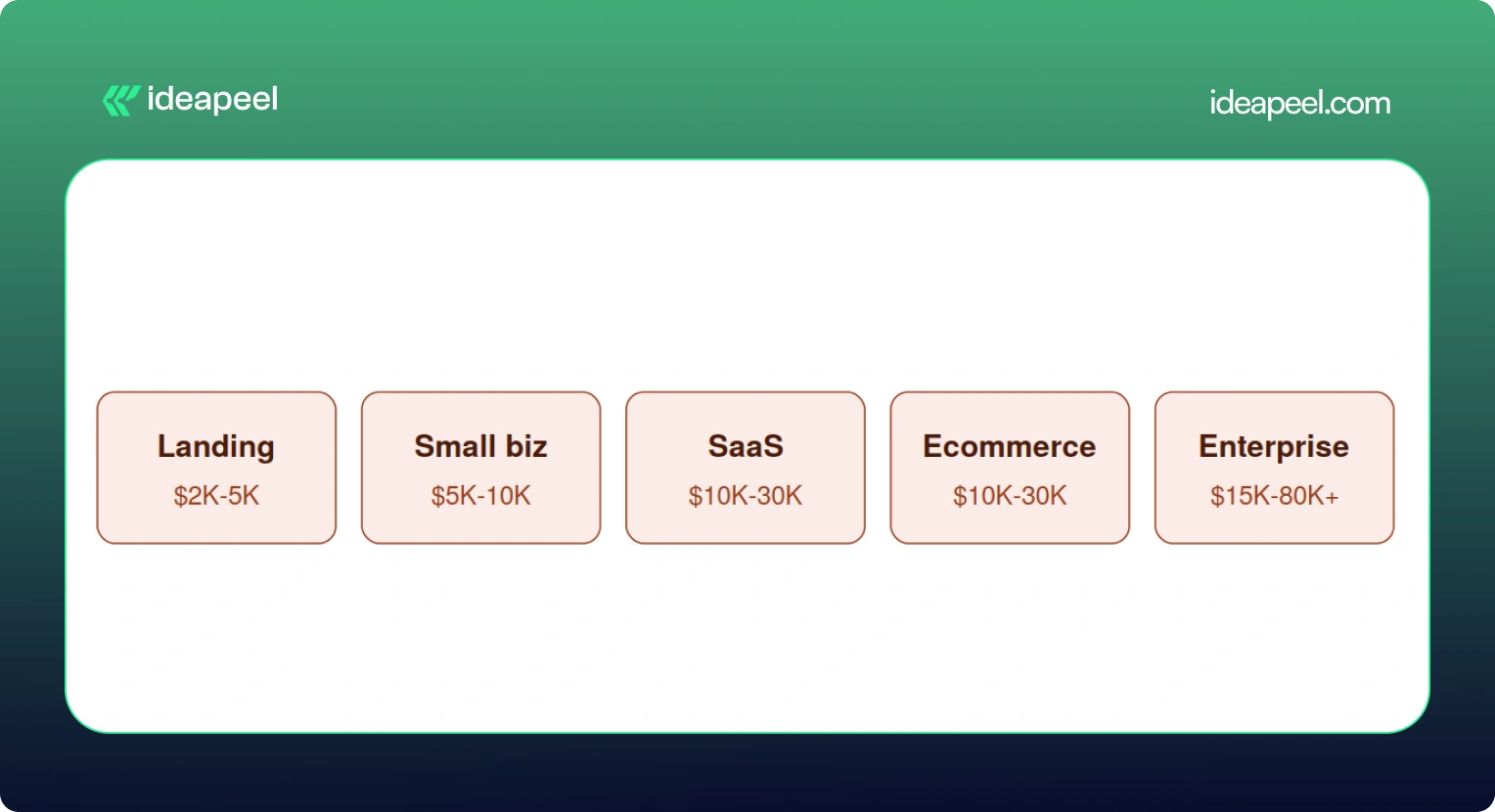
Project Type Typical Price Range Timeline
Landing page (1 to 5 pages) $2,000 to $5,000 1 to 2 weeks
Small business website $5,000 to $10,000 2 to 4 weeks
Custom / corporate website $10,000 to $15,000 4 to 8 weeks
SaaS or growth website $10,000 to $30,000+ 6 to 12 weeks
Ecommerce store $10,000 to $30,000 6 to 12 weeks
Enterprise website $15,000 to $80,000+ 8 to 16 weeks

Keep in mind these are planning ranges pulled from what's actually happening in the market right now, not official Webflow numbers. A DIY project using a $49 to $149 premium template can bring the low end down to a few hundred dollars if you're comfortable doing the work yourself.

Landing Page

A single page or a small handful of pages, usually built to support a launch, a fundraise, or a campaign. Costs stay low here because there's less to design and fewer moving parts. Expect a template or lightly customized design, basic forms, and light SEO setup.

Small Business Website

Usually five to fifteen pages, with a blog or basic CMS, custom sections, and a handful of integrations like a contact form or email tool. This is the sweet spot for most local businesses and service providers.

SaaS Website

This is where things get more involved. A proper SaaS site needs a homepage that actually explains what you do, product and feature pages, a pricing page that converts, a CMS for the blog and case studies, and enough SEO and content structure to bring in organic traffic. Expect this to run $10,000 and up, and often well past $20,000 once you factor in conversion focused design.

Ecommerce Website

Product pages, collections, a working checkout, payment integration, and filtering all add real development hours. A store with 45 products and a few third party integrations (think Klaviyo or ShipStation) commonly lands in the $20,000 to $30,000 range.

Enterprise Website

Big CMS structures, multiple templates, localization for different markets, complex integrations with sales and marketing tools, accessibility requirements, and heavier governance and security needs. These projects regularly cross $30,000 and can go past $80,000 depending on scope.

[[question-block]]

What Actually Drives the Price Up

Here's a mistake a lot of people make: assuming more pages automatically means more money. That's not quite right.

Unique page designs and complexity matter far more than raw page count. A 40 page site built from five repeatable templates can be cheaper than a 10 page site where every single page has its own custom layout.

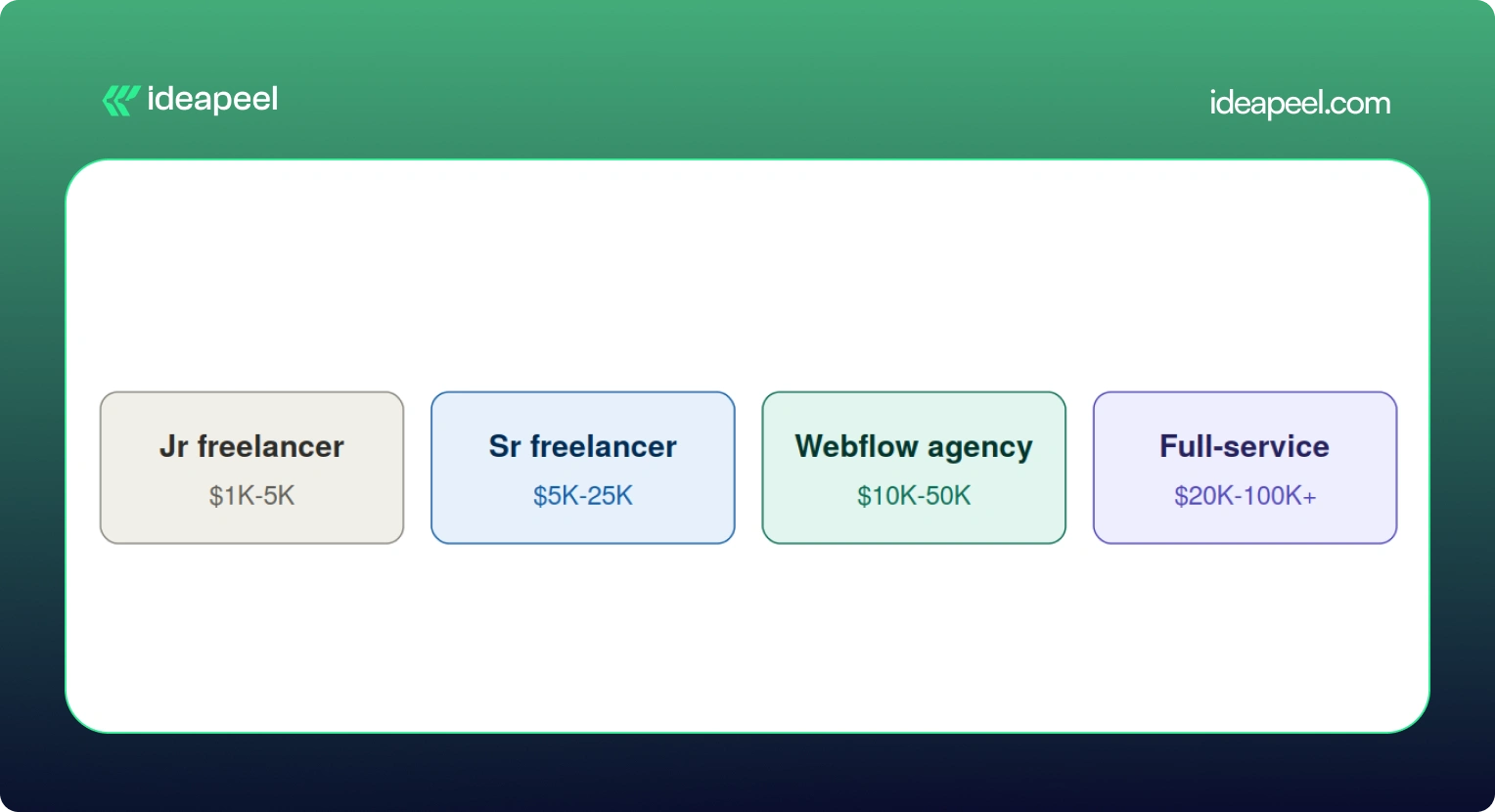
Provider Hourly Rate Typical Project Cost Good For
Junior freelancer $25 to $50/hr $1,000 to $5,000 Small, simple projects
Senior freelancer $100 to $200/hr $5,000 to $25,000 Higher quality custom builds
Webflow specialized agency $125 to $200/hr $10,000 to $50,000 SaaS and serious marketing sites
Full service digital agency $150 to $300/hr $20,000 to $100,000+ Brand plus strategy plus web

A few specific numbers worth knowing:

  • Custom animations or GSAP heavy interactions typically add $1,000 to $5,000.
  • Each third party integration (HubSpot, Salesforce, Zapier, a payment processor) runs $500 to $2,000, with complex ones like custom auth or dashboards going up to $10,000.
  • Multi language sites using Webflow's localization tools add another $2,000 to $8,000 depending on how many locales you need.
  • Migrating content from WordPress or another CMS adds $1,000 to $5,000 depending on how messy the existing data is.

What's Actually Included in a Webflow Website Development Project?

If you've never gone through this process before, here's roughly what you're paying for when you hire someone to build a Webflow site.

Strategy: discovery calls, sitemap planning, competitor research, figuring out what actually needs to be on the site

Design: wireframes, UI design (often in Figma first), responsive layouts for desktop and mobile, building out a reusable design system

Development: the actual Webflow build, CMS collections, interactions and animations, reusable components, responsive behavior

Technical work: forms, analytics setup, third party integrations, redirects, technical SEO, schema markup, accessibility, page speed

Launch: QA across browsers and devices, mobile testing, redirect mapping, checking indexing, confirming analytics are firing correctly

Skipping any of these steps is usually how projects end up needing expensive rework a few months later.

Does SEO Increase Webflow Development Cost?

Yes, a bit, and it's worth it. A properly done technical SEO setup, meta tags, schema, sitemap, clean URL structure, image optimization, internal linking, page speed, usually adds somewhere between $500 and $3,000 depending on site size. Given that a large majority of buying journeys still start with a search engine, this isn't a line item to cut to save a few hundred dollars.

Does AEO or GEO Change What You Pay?

This is newer territory, and it's genuinely one of the more useful things to understand right now if your site needs to show up in AI-ge answers, not just Google's blue links.

AEO (Answer Engine Optimization) is about nerated structuring your content so tools like ChatGPT, Perplexity, and Google's AI Overviews can pull a clear answer straight out of your page. That usually means adding question-based content, clearer CMS field structure, and schema that spells out exactly what your business does.

GEO (Generative Engine Optimization) goes a step further. It's about making your brand something AI systems actually want to cite as a source, through comparison pages, case studies, clear author information, evidence-backed claims, and content that other sites and AI tools can confidently reference.

Neither of these replaces SEO. They sit on top of it. And yes, they can add scope, usually in the form of extra content architecture and structured data work, which might add anywhere from a few hundred to a couple thousand dollars depending on how deep you go. But for businesses trying to stay visible as more searches shift toward AI tools, it's quickly becoming table stakes rather than a nice to have.

Real World Examples

Numbers on a chart only tell you so much, so here's what actual projects have looked like.

Startup landing page, $3,500. A pre-seed SaaS company needed three pages (homepage, features, pricing) to support a fundraising push. A mid-level freelancer delivered it in about 10 days, including a basic blog CMS and HubSpot form integration.

Professional services site, $12,000. A 50-person consulting firm needed a 20 page site with team bios, case studies, a blog, and a contact system. A Webflow specialized agency delivered it in six weeks, covering discovery, custom design, development, CMS setup, and SEO.

Ecommerce brand, $22,000. A direct-to-consumer skincare company needed 45 products, a content hub, and integrations with Klaviyo and their inventory system. This included brand identity work, full ecommerce build, and product photography direction.

Enterprise migration, $45,000. A Series C fintech company moved an 80-page site from WordPress to Webflow over 12 weeks with a three-person team. The budget covered a full content audit, a new design system, CMS architecture, redirect mapping, and integrations with HubSpot, Salesforce, and Segment.

Webflow vs WordPress: Which Actually Costs More?

On paper, the build costs look similar, both platforms range from roughly $2,000 to $60,000 depending on scope. The real difference shows up after launch.

Cost Factor Webflow WordPress (self hosted)
Hosting Included in Site Plan $10 to $50/mo, separate
Security and maintenance Handled by Webflow $50 to $200/mo in plugins or agency fees
Page builder Included $50 to $200/yr for tools like Elementor
Developer dependency Low High, ongoing plugin and PHP updates
Typical annual cost after launch $216 to $2,820 $1,200 to $5,000+

WordPress can still make sense for content-heavy sites that lean hard on a specific plugin ecosystem. But for most marketing and SaaS teams who want to move fast without filing a developer ticket every time they need a small change, Webflow tends to come out ahead once you look at total cost over two or three years.

Additional Costs People Forget to Budget For

A handful of expenses regularly catch people off guard:

  • Stock photography, usually $10 to $500 per image, with most sites needing 20 to 50 images
  • Custom fonts, $50 to $500 for a commercial web license if Google Fonts won't cut it
  • Copywriting, $100 to $300 per page, so a 20-page site can mean $2,000 to $6,000 just for the words
  • Domain registration, $10 to $50 a year
  • A maintenance retainer, $300 to $2,000 a month if you want someone on call for updates
  • Add-ons like Optimize (A/B testing), which starts at $299 a month and isn't bundled into any standard plan

None of these are dealbreakers on their own, but stacked together they can add 15 to 20% to a project you thought you'd already priced out.

How to Get an Accurate Webflow Quote

A few things that consistently lead to a tighter, more honest quote:

  1. Have your content ready before you start. Delays in copy and images are one of the most common reasons projects run over budget and over timeline.
  2. Write down your scope clearly. A sitemap, a feature list, and a rough page count prevent the slow creep of "just one more page" that inflates every project.
  3. Decide your must haves versus nice to haves. Do you actually need multi language support on day one, or can that wait for phase two?
  4. Ask providers for a phase by phase breakdown, not just one lump number. It makes it much easier to see where your money is actually going.
  5. Consider launching an MVP first. Getting a smaller version live and adding features later based on real user behavior often costs less overall than trying to build everything up front.

Is Webflow Worth the Cost in 2026?

For most growing businesses, yes. A well-built website isn't really an expense; it's closer to a sales tool that works around the clock. Reports on website redesigns consistently show meaningful jumps in lead generation and conversion rate within the first year after a proper rebuild, and even a modest improvement in conversion rate can pay back a five-figure project within months.

That said, not every business needs a $30,000 site. If you're testing an idea or need something up fast, a $2,000 to $5,000 build on a solid template is a completely reasonable place to start. The bigger point is this: the cheapest option isn't automatically the smartest one. What actually matters is whether the site can bring in traffic, support your team, convert visitors, and grow with you instead of needing a full rebuild in a year.

Webflow itself, as a platform, is fairly predictable and easy to budget for. The real variable is always the scope of the work you're asking someone to do on top of it.

Final Thoughts

The Webflow website cost in 2026 depends on your project, design complexity, development time, and customization. A simple Webflow template can keep the build cost low, while custom Webflow development can increase the overall cost.

When budgeting for a Webflow website, consider the full cost of ownership, including the Webflow site plan, Webflow Workspace, development, maintenance, and SEO.

Hiring a Webflow developer is not only about comparing developer rates. An experienced Webflow expert can make better design decisions, create a responsive design system, and reduce rework. The right development partner can help with Webflow development and website design.

For SaaS and growing businesses, the goal is not simply to cost less. It is to build a professional website that balances quality, performance, budget, and long-term growth.

If you need professional design and development for a high-performing Webflow website, ideapeel can help turn your goals into a scalable Webflow build.

[[last-cta]]

Frequently Asked Questions on Webflow Development Cost

Does the Webflow subscription cost count as part of development?
How much does a Webflow ecommerce site cost?
Does SEO increase Webflow development cost?
Does AEO or GEO increase the cost?
How long does a Webflow project usually take?
Free AI Powered website audit

Enter your website URL to receive a detailed website analysis report in just 5 minutes!

Invalid website URL
Analyze My Website Now

How much does Webflow development cost in 2026?

Anywhere from a few hundred dollars for a small freelancer or template project up to $80,000 or more for a complex enterprise build. Most small to mid sized business sites land somewhere between $5,000 and $30,000.

Related Articles

See More Articles
Website Development
Webflow Development Cost in 2026: What Should You Actually Pay?
Sep 20, 2026
August 31,2024

If you've been searching around for a straight answer on Webflow pricing, you've probably noticed something annoying: every article gives you a different number. That's because most of them mix up two totally different things: the cost of the Webflow platform itself and the cost of actually building a website on it.

Let's clear that up right away.

Webflow development cost in 2026 usually falls somewhere between a few hundred dollars for a small template based site, and $80,000 or more for a complex enterprise build. The Webflow subscription itself is separate from that. As of the platform's May 2026 pricing update, paid site plans start at $15 a month for Basic and $25 a month for Premium, both billed yearly.

That's the short version. Now let's break down where your money actually goes, because "it depends" isn't a budget.

Development Cost vs Platform Cost: Two Different Bills

Here's the mental model worth keeping in your head the whole time you're reading this:

Total Webflow cost = Platform cost + Design + Development + Integrations + Content + Ongoing maintenance

The platform cost is what you pay Webflow every month to keep your site live. It's predictable and doesn't change much no matter who builds your site.

The development cost is what you pay a freelancer or agency to actually design, build, and launch the thing. This is the part that swings wildly, and it's the part most people are really asking about when they type "how much does Webflow cost" into Google.

Keeping these separate matters because a $5,000 website and a $20,000 website can run on the exact same $25 a month plan. The platform isn't what drives the price up. The scope of the work is.

Webflow Pricing in 2026 (Straight From Webflow)

Before anything else, let's get the official numbers on the table, because a lot of guides floating around still quote 2025 prices that no longer exist.

Webflow made its biggest pricing shake up in years back in May 2026. The old CMS plan and the old Business plan are both gone. They've been folded into one new plan called Premium.

Site Plan Price (billed yearly) Price (billed monthly) Best for
Starter Free Free Testing and prototypes
Basic $15/mo $25/mo Simple static sites, no CMS
Premium $25/mo CMS blogs, marketing sites, SaaS
Team $2,500/mo Annual contract only Growing organizations
Enterprise Custom Custom Large orgs with governance needs

A few things worth knowing about this change:

  • The old Basic plan used to cost $18 a month. It's now $15 a month, and the page limit doubled from 150 to 300 static pages.
  • The old CMS plan ($29/mo) and Business plan ($49/mo) are both retired. Premium replaces both at $25/mo and now comes with 20,000 CMS items included by default.
  • If you already have an active site, none of this hits you immediately. Pricing changes apply at your next renewal or billable change on or after June 29, 2026.
Workspace Price What it covers
Starter Free Solo use, one full seat
Core $19/mo More staging sites, custom code, code export
Growth $49/mo Unlimited staging, publishing permissions, site roles

On top of the Site Plan, there's a Workspace Plan, which is a separate bill many people forget about entirely.

And if more than one person needs to log in and edit the site, you'll pay per seat too, $39 a month for a full seat, $15 for a limited seat, and $0 for someone who just leaves comments.

So for a small marketing team with two editors, a realistic all in monthly number looks more like $70 to $95 a month once you add the Premium Site Plan, a Workspace plan, and an extra seat. Not $25. That's the number people get burned by when they only look at the homepage pricing.

[[inner-cta]]

Does Webflow Development Cost Include the Webflow Subscription?
No, and this trips up a lot of first time buyers. Development is a one time (or project based) cost that covers strategy, design, building the site, setting up the CMS, integrations, and getting it live. The Webflow subscription is what keeps that site running month to month, forever, whether you built it yourself or paid an agency $40,000 for it.

Think of it like buying a house versus paying your utility bill. Very different expenses, and mixing them up is how budgets go sideways.

How Much Does Webflow Development Cost by Website Type?

This is the question most people actually want answered, so let's get specific.

Project Type Typical Price Range Timeline
Landing page (1 to 5 pages) $2,000 to $5,000 1 to 2 weeks
Small business website $5,000 to $10,000 2 to 4 weeks
Custom / corporate website $10,000 to $15,000 4 to 8 weeks
SaaS or growth website $10,000 to $30,000+ 6 to 12 weeks
Ecommerce store $10,000 to $30,000 6 to 12 weeks
Enterprise website $15,000 to $80,000+ 8 to 16 weeks

Keep in mind these are planning ranges pulled from what's actually happening in the market right now, not official Webflow numbers. A DIY project using a $49 to $149 premium template can bring the low end down to a few hundred dollars if you're comfortable doing the work yourself.

Landing Page

A single page or a small handful of pages, usually built to support a launch, a fundraise, or a campaign. Costs stay low here because there's less to design and fewer moving parts. Expect a template or lightly customized design, basic forms, and light SEO setup.
Small Business Website

Usually five to fifteen pages, with a blog or basic CMS, custom sections, and a handful of integrations like a contact form or email tool. This is the sweet spot for most local businesses and service providers.

SaaS Website

This is where things get more involved. A proper SaaS site needs a homepage that actually explains what you do, product and feature pages, a pricing page that converts, a CMS for the blog and case studies, and enough SEO and content structure to bring in organic traffic. Expect this to run $10,000 and up, and often well past $20,000 once you factor in conversion focused design.

Ecommerce Website

Product pages, collections, a working checkout, payment integration, and filtering all add real development hours. A store with 45 products and a few third party integrations (think Klaviyo or ShipStation) commonly lands in the $20,000 to $30,000 range.

Enterprise Website

Big CMS structures, multiple templates, localization for different markets, complex integrations with sales and marketing tools, accessibility requirements, and heavier governance and security needs. These projects regularly cross $30,000 and can go past $80,000 depending on scope.

[[question-block]]

What Actually Drives the Price Up

Here's a mistake a lot of people make: assuming more pages automatically means more money. That's not quite right.

Unique page designs and complexity matter far more than raw page count. A 40 page site built from five repeatable templates can be cheaper than a 10 page site where every single page has its own custom layout.

Provider Hourly Rate Typical Project Cost Good For
Junior freelancer $25 to $50/hr $1,000 to $5,000 Small, simple projects
Senior freelancer $100 to $200/hr $5,000 to $25,000 Higher quality custom builds
Webflow specialized agency $125 to $200/hr $10,000 to $50,000 SaaS and serious marketing sites
Full service digital agency $150 to $300/hr $20,000 to $100,000+ Brand plus strategy plus web

A few specific numbers worth knowing:

  • Custom animations or GSAP heavy interactions typically add $1,000 to $5,000.
  • Each third party integration (HubSpot, Salesforce, Zapier, a payment processor) runs $500 to $2,000, with complex ones like custom auth or dashboards going up to $10,000.
  • Multi language sites using Webflow's localization tools add another $2,000 to $8,000 depending on how many locales you need.
  • Migrating content from WordPress or another CMS adds $1,000 to $5,000 depending on how messy the existing data is.

What's Actually Included in a Webflow Website Development Project?

If you've never gone through this process before, here's roughly what you're paying for when you hire someone to build a Webflow site.

Strategy: discovery calls, sitemap planning, competitor research, figuring out what actually needs to be on the site

Design: wireframes, UI design (often in Figma first), responsive layouts for desktop and mobile, building out a reusable design system

Development: the actual Webflow build, CMS collections, interactions and animations, reusable components, responsive behavior

Technical work: forms, analytics setup, third party integrations, redirects, technical SEO, schema markup, accessibility, page speed

Launch: QA across browsers and devices, mobile testing, redirect mapping, checking indexing, confirming analytics are firing correctly

Skipping any of these steps is usually how projects end up needing expensive rework a few months later.

Does SEO Increase Webflow Development Cost?

Yes, a bit, and it's worth it. A properly done technical SEO setup, meta tags, schema, sitemap, clean URL structure, image optimization, internal linking, page speed, usually adds somewhere between $500 and $3,000 depending on site size. Given that a large majority of buying journeys still start with a search engine, this isn't a line item to cut to save a few hundred dollars.

Does AEO or GEO Change What You Pay?

This is newer territory, and it's genuinely one of the more useful things to understand right now if your site needs to show up in AI-ge answers, not just Google's blue links.

AEO (Answer Engine Optimization) is about nerated structuring your content so tools like ChatGPT, Perplexity, and Google's AI Overviews can pull a clear answer straight out of your page. That usually means adding question-based content, clearer CMS field structure, and schema that spells out exactly what your business does.

GEO (Generative Engine Optimization) goes a step further. It's about making your brand something AI systems actually want to cite as a source, through comparison pages, case studies, clear author information, evidence-backed claims, and content that other sites and AI tools can confidently reference.

Neither of these replaces SEO. They sit on top of it. And yes, they can add scope, usually in the form of extra content architecture and structured data work, which might add anywhere from a few hundred to a couple thousand dollars depending on how deep you go. But for businesses trying to stay visible as more searches shift toward AI tools, it's quickly becoming table stakes rather than a nice to have.

Real World Examples
Numbers on a chart only tell you so much, so here's what actual projects have looked like.

Startup landing page, $3,500. A pre-seed SaaS company needed three pages (homepage, features, pricing) to support a fundraising push. A mid-level freelancer delivered it in about 10 days, including a basic blog CMS and HubSpot form integration.

Professional services site, $12,000. A 50-person consulting firm needed a 20 page site with team bios, case studies, a blog, and a contact system. A Webflow specialized agency delivered it in six weeks, covering discovery, custom design, development, CMS setup, and SEO.

Ecommerce brand, $22,000. A direct-to-consumer skincare company needed 45 products, a content hub, and integrations with Klaviyo and their inventory system. This included brand identity work, full ecommerce build, and product photography direction.

Enterprise migration, $45,000. A Series C fintech company moved an 80-page site from WordPress to Webflow over 12 weeks with a three-person team. The budget covered a full content audit, a new design system, CMS architecture, redirect mapping, and integrations with HubSpot, Salesforce, and Segment.

Webflow vs WordPress: Which Actually Costs More?

On paper, the build costs look similar, both platforms range from roughly $2,000 to $60,000 depending on scope. The real difference shows up after launch.

Cost Factor Webflow WordPress (self hosted)
Hosting Included in Site Plan $10 to $50/mo, separate
Security and maintenance Handled by Webflow $50 to $200/mo in plugins or agency fees
Page builder Included $50 to $200/yr for tools like Elementor
Developer dependency Low High, ongoing plugin and PHP updates
Typical annual cost after launch $216 to $2,820 $1,200 to $5,000+

WordPress can still make sense for content-heavy sites that lean hard on a specific plugin ecosystem. But for most marketing and SaaS teams who want to move fast without filing a developer ticket every time they need a small change, Webflow tends to come out ahead once you look at total cost over two or three years.

Additional Costs People Forget to Budget For

A handful of expenses regularly catch people off guard:

  • Stock photography, usually $10 to $500 per image, with most sites needing 20 to 50 images
  • Custom fonts, $50 to $500 for a commercial web license if Google Fonts won't cut it
  • Copywriting, $100 to $300 per page, so a 20-page site can mean $2,000 to $6,000 just for the words
  • Domain registration, $10 to $50 a year
  • A maintenance retainer, $300 to $2,000 a month if you want someone on call for updates
  • Add-ons like Optimize (A/B testing), which starts at $299 a month and isn't bundled into any standard plan

None of these are dealbreakers on their own, but stacked together they can add 15 to 20% to a project you thought you'd already priced out.

How to Get an Accurate Webflow Quote

A few things that consistently lead to a tighter, more honest quote:

  1. Have your content ready before you start. Delays in copy and images are one of the most common reasons projects run over budget and over timeline.
  2. Write down your scope clearly. A sitemap, a feature list, and a rough page count prevent the slow creep of "just one more page" that inflates every project.
  3. Decide your must haves versus nice to haves. Do you actually need multi language support on day one, or can that wait for phase two?
  4. Ask providers for a phase by phase breakdown, not just one lump number. It makes it much easier to see where your money is actually going.
  5. Consider launching an MVP first. Getting a smaller version live and adding features later based on real user behavior often costs less overall than trying to build everything up front.

Is Webflow Worth the Cost in 2026?
For most growing businesses, yes. A well-built website isn't really an expense; it's closer to a sales tool that works around the clock. Reports on website redesigns consistently show meaningful jumps in lead generation and conversion rate within the first year after a proper rebuild, and even a modest improvement in conversion rate can pay back a five-figure project within months.

That said, not every business needs a $30,000 site. If you're testing an idea or need something up fast, a $2,000 to $5,000 build on a solid template is a completely reasonable place to start. The bigger point is this: the cheapest option isn't automatically the smartest one. What actually matters is whether the site can bring in traffic, support your team, convert visitors, and grow with you instead of needing a full rebuild in a year.

Webflow itself, as a platform, is fairly predictable and easy to budget for. The real variable is always the scope of the work you're asking someone to do on top of it.

Final Thoughts

The Webflow website cost in 2026 depends on your project, design complexity, development time, and customization. A simple Webflow template can keep the build cost low, while custom Webflow development can increase the overall cost.

When budgeting for a Webflow website, consider the full cost of ownership, including the Webflow site plan, Webflow Workspace, development, maintenance, and SEO.

Hiring a Webflow developer is not only about comparing developer rates. An experienced Webflow expert can make better design decisions, create a responsive design system, and reduce rework. The right development partner can help with Webflow development and website design.

For SaaS and growing businesses, the goal is not simply to cost less. It is to build a professional website that balances quality, performance, budget, and long-term growth.

If you need professional design and development for a high-performing Webflow website, ideapeel can help turn your goals into a scalable Webflow build.

[[last-cta]]

SEO
Building LLM-Friendly Sites: Semantic HTML, Clean Code & Content Architecture for AI Indexing
Sep 7, 2026
August 31,2024

Search is changing. More people now ask ChatGPT, Perplexity, Gemini, or Google's AI Overviews a question instead of typing keywords into a search box. If your website isn't easy for these AI systems to read, you become invisible in that conversation, even if your content is great.

This guide explains, in plain words, what makes a website "LLM-friendly," and gives you a clear, honest framework to follow. We'll also flag where common advice online overstates what actually helps, based on what Google and OpenAI have publicly confirmed.

If you want a hand implementing any of this, ideapeel's web development team builds sites with this exact architecture in mind.

What Is an LLM-Friendly Website?

An LLM-friendly website is one where crawlers and AI retrieval systems can easily reach, read, and understand your important content, and where that content is written clearly enough to be pulled into an AI-generated answer.

It's not one trick. It's a chain of small things working together: a crawler must be able to reach the page, get the real content (not a blank JavaScript shell), understand what each part means, and trust it enough to quote it.

How Do AI Search Systems Actually Read a Website?

Most AI systems follow a simple path: crawl → render → parse → understand → connect → retrieve → cite.

  1. Crawl: the bot requests your page.
  2. Render: it tries to get the actual content (many AI bots skip JavaScript entirely).
  3. Parse: it reads the HTML structure to find headings, lists, and text.
  4. Understand: it works out what each section means.
  5. Connect: it links your content to entities and concepts it already knows.
  6. Retrieve: it pulls the relevant passage when someone asks a related question.
  7. Cite: it quotes or references your page in its answer.

Most articles online only talk about step 3 (structure). The real opportunity is making sure your site works at every step in this chain. That's the core idea behind ideapeel's GEO strategy work.

Does Semantic HTML Help AI Search?

Semantic HTML helps AI systems understand your content faster and more accurately, but it is not a confirmed ranking factor on its own.

Google has stated there are no special technical requirements beyond normal indexing and Search eligibility for a page to appear in AI Overviews or AI Mode. Semantic HTML is recommended mainly because it improves accessibility and human readability, and that clarity happens to help machines too.

So use semantic HTML because it's good practice, not because it's a magic switch.

A weak example:

<div class="title">What Is GEO?</div>
<div class="text">GEO means optimizing content for AI search...</div>

A strong example:

<article>

  <header>

    <h1>What Is Generative Engine Optimization?</h1>

  </header>

  <section>

    <h2>What Is GEO?</h2>

    <p>GEO is the practice of structuring content so AI search tools can find, understand, and cite it.</p>

  </section>

</article>

The second version tells a crawler exactly what's a heading, what's an article, and what's a self-contained section.

Semantic HTML Elements Every Site Should Use

Keep headings in logical order (H1 → H2 → H3). Skipping levels or using headings purely for visual styling confuses both AI parsers and screen readers.

How Clean Code Improves AI Accessibility

"Clean code helps AI" is vague advice. Here's what it actually means in practice:

  • Reduce JavaScript dependency. Many AI crawlers don't execute JavaScript at all. If your key content only appears after a script runs, it may be invisible to them. Server-side rendering (SSR) or static generation puts real content directly in the HTML.
  • Keep primary content in the HTML source. Your headline, intro, headings, and body text should be visible without any interaction.
  • Avoid deeply nested <div> soup. Flat, logical markup is easier to parse and easier for your own team to maintain.
  • Don't hide key information behind tabs or accordions unless there's a real usability reason; crawlers usually won't click.
  • Maintain a sensible source order. The HTML should read logically top to bottom, even before CSS repositions anything visually. MDN's accessibility guidelines cover this well.

A simple test: turn off JavaScript in your browser and reload your most important page. Whatever's still visible is roughly what many AI crawlers see.

[[inner-cta]]

How to Structure Content for LLM Retrieval

AI systems tend to pull short, self-contained passages rather than reading an entire page in context. Structure your content so each section can stand on its own.

  • Answer first. Put the direct answer to the heading's question in the first sentence or two, then explain further.
  • One idea per paragraph. Keep paragraphs short, two to four sentences.
  • Define terms as you use them. Don't assume the reader (or the AI) already knows what a term means.
  • Use tables for comparisons. Tables are easy for AI systems to extract and quote cleanly.
  • Add FAQs and summaries. These are naturally structured for extraction.

Build an Entity-First Content Architecture

Beyond individual pages, AI systems build an internal map of how topics and organizations relate to each other. Writing clearly about these relationships helps.

Weaker: "ideapeel builds websites. It also does Webflow work. The company works with SaaS brands."

Stronger: "ideapeel is a Webflow development agency that designs and builds websites for B2B SaaS companies."

The second sentence makes the relationships explicit:

  • ideapeel → is a → Webflow agency
  • ideapeel → serves → B2B SaaS companies

Apply the same idea to your whole site by grouping related content into a clear cluster, connected with internal links:

Linking a pillar page to its subtopics, and back again, gives both readers and AI systems a clear map of how your content connects.

Technical SEO Requirements for AI Search

Does Google require special HTML for AI search? No. Google has confirmed there are no additional technical requirements for appearing in AI Overviews or AI Mode beyond meeting normal Search requirements and being eligible for a standard snippet.

That means the basics still matter most:

  • Crawlability: nothing important is blocked in robots.txt
  • Indexability: pages aren't accidentally set to noindex
  • A clean XML sitemap: listing only real, indexable pages
  • Canonical tags: one clear version per piece of content
  • Fast load times: a slow, heavy page can fail before it's even read

Does Schema Markup Help AI Search?

Schema markup helps search engines and AI systems understand what your page is about and can make it eligible for rich results, but it doesn't guarantee an AI citation on its own.

Add schema where it genuinely matches your visible content:

  • Article or BlogPosting for guides and posts
  • Organization for your homepage
  • FAQPage for pages with real Q&A content
  • BreadcrumbList for site navigation
  • Product or Service for commercial pages

Test your markup with Google's Rich Results Test before publishing.

Does llms.txt Improve AI Visibility?

This is one of the most debated points in AI search advice right now, and it deserves an honest answer instead of a confident one.

llms.txt is a proposed (not official) plain-text file placed at your site's root that summarizes your most important pages for AI systems, similar in spirit to a sitemap. Google has stated plainly that it does not require llms.txt and that Google Search ignores it for generative AI features. Independent log analysis from several agencies has also found little to no crawl activity from major AI bots on llms.txt files specifically.

The honest takeaway: llms.txt is low-effort and probably harmless to add, but it should never replace real technical SEO and content structure. Treat it as a small experiment, not a strategy.

How to Make Your Site Accessible to ChatGPT Search

OpenAI has said that sites that want their content discoverable and cited in ChatGPT Search should avoid blocking its search-related crawler in robots.txt. If you want visibility there, check that:

  • OAI-SearchBot isn't blocked
  • Your key pages return real HTML content on first load (not just after JavaScript runs)
  • Internal links use standard <a href> tags, not JavaScript-only navigation

LLM-Friendly Website: Before and After

Before: Content loads via a JavaScript framework after the initial page request. Headings are styled <div> tags. Key answers are buried in paragraph eight. No internal links connect related topics.

After: Content is server-rendered and present in the raw HTML. Headings use proper <h1>–<h3> tags in order. Each section opens with a direct answer. Related pages link to each other with descriptive anchor text, not "click here."

The difference isn't a redesign; it's making sure the right things are already true in your source code.

[[question-block]]

Beyond the Basics: What Actually Builds Trust for AI Citation

Most guides stop at structure and code. But structure only gets you understood; it doesn't get you trusted. Two things matter more than most checklists admit:

  1. Third-party corroboration. AI systems tend to weigh independent sources (reviews, comparison articles, forum discussions, Wikipedia) more heavily than a company's own claims about itself. Being mentioned accurately elsewhere on the web matters as much as your own pages.
  2. Original data. A specific, original stat or finding is far more likely to be quoted than recycled general advice, simply because no one else has it.

If citation share matters to your business, these two levers are worth as much attention as the technical checklist.

LLM-Friendly Website Audit Checklist

  • [ ] Key content is visible in raw HTML (test with JavaScript disabled)
  • [ ] Headings follow a logical H1–H4 order
  • [ ] Each section opens with a direct answer
  • [ ] Important pages are within 3 clicks of the homepage
  • [ ] Internal links use descriptive anchor text
  • [ ] Robots.txt doesn't accidentally block useful AI bots
  • [ ] XML sitemap is accurate and up to date
  • [ ] Canonical tags are set correctly
  • [ ] Relevant schema markup is added and validated
  • [ ] Site loads quickly with minimal render-blocking scripts

Make Your Website Ready for AI Search With ideapeel

Building an LLM-friendly website is no longer just about making a page accessible to search engines. As AI changes how people discover businesses, your website needs a strong technical and content foundation that helps both traditional search and AI systems understand what you offer.

That starts with clean HTML, logical semantic HTML, and a clear content structure. Proper H1 and H2 headings, descriptive URLs, accurate metadata, accessible navigation, and relevant structured data markup help crawlers understand how your pages are organized. At the same time, important content should not depend entirely on JavaScript, CSS, or complex framework behavior that can make it harder for a crawler to access and parse.

But technical optimization is only one piece of the process.

Connect SEO, AEO, GEO, and LLM Optimization

An AI-ready website brings multiple disciplines together. SEO helps search engines discover and index your pages. Semantic HTML and accessibility make the information easier to interpret. Structured data gives additional context about your content. And LLM optimization focuses on making your information clear enough for AI systems to understand, retrieve, and potentially reference.

This requires a consistent workflow across your website:

Crawl → Parse → Understand → Connect → Retrieve → Answer

Your HTML structure, content architecture, internal links, metadata, APIs, and CMS should all support that workflow.

For businesses building on Webflow, this is where a technically strong development partner can make a difference.

How ideapeel Builds AI-Ready Websites

ideapeel combines web development, SEO, content architecture, and AI-search thinking to help SaaS and technology companies build websites that are designed for both people and machines.

Our approach can include:

  • Semantic HTML and accessible website structures
  • SEO-friendly headings, metadata, and URLs
  • Clean Webflow development and CMS architecture
  • LLM-friendly content and page structures
  • Structured data and relevant schema markup
  • Technical SEO and indexing best practices
  • Internal linking and topic-cluster architecture
  • Content structures designed for AI search and answer engines
  • Performance-focused development with unnecessary JavaScript dependencies reduced where appropriate

If you're building a new website, redesigning an existing one, or trying to improve your AI search visibility, these elements should be considered from the beginning rather than added after development.

Explore ideapeel's Web Development Services to see how we approach modern website architecture, or learn more about GEO for AI search and Webflow development.

Your Website Should Be Easy for AI to Understand

The future of search is not only about ranking a URL. It is increasingly about whether your website can be found, understood, connected, and referenced when someone asks an AI system a question.

You do not need to rebuild everything around AI or add every new technology. Start with the fundamentals: clean HTML, semantic structure, accessible content, logical headings, strong SEO, reliable indexing, useful structured data, and a content architecture that clearly communicates what your business does.

Then build on that foundation with AEO and GEO.

If your website is difficult for a crawler to access, difficult for a search engine to index, or difficult for an LLM to parse and understand, great content may never reach the people searching for it.

ideapeel helps SaaS and technology brands turn their websites into clearer, faster, search-ready digital experiences built for the next generation of AI-powered search.

Ready to make your website AI-ready? Talk to the ideapeel team for an AI search, SEO, and website architecture assessment.

[[last-cta]]

SEO
Generative Engine Optimization (GEO) for B2B SaaS: How to Get Cited in AI Search
Aug 31, 2026
August 31,2024

More B2B buyers are starting their research in ChatGPT, Perplexity, and Google AI Overviews before they ever open a search results page. If your SaaS company isn't structured for those systems to find, understand, and cite it, you're invisible at the exact moment someone is deciding who to shortlist.

This guide breaks down what Generative Engine Optimization actually means for a B2B SaaS company, how it's different from (and connected to) SEO and AEO, and what to change on your website so AI systems can accurately represent your product - and hopefully recommend it.

Quick answer

Generative Engine Optimization (GEO) for B2B SaaS is the practice of structuring your website, content, and external presence so AI systems like ChatGPT, Perplexity, and Google AI Overviews can understand what your product does, who it's for, and why it's credible enough to cite. It builds on SEO fundamentals but adds a heavier emphasis on entity clarity, evidence, and machine-readable structure.

Key takeaways

  • GEO isn't a replacement for SEO - it's what happens when SEO, entity clarity, and evidence-backed content work together for AI systems instead of just search rankings.
  • AI search engines don't rank pages the way Google does. They gather evidence, compare it, and decide what's worth citing. That changes what "good content" looks like.
  • Comparison pages, case studies, and author pages carry more weight in GEO than in traditional SEO, because they give AI systems something concrete to evaluate.
  • No platform - not ChatGPT, not Perplexity, not Google - guarantees citations. The realistic goal is improving your eligibility and likelihood of being cited, not forcing a result.
  • Webflow now ships native AEO tooling (Enterprise tier) and an MCP server (available on every plan, including the free tier) that both play into a GEO strategy in different ways.

What is Generative Engine Optimization for B2B SaaS?

Traditional SEO helps your SaaS website compete for rankings on a results page. GEO helps make your company easier for AI systems to understand, evaluate, and potentially cite when someone asks for a recommendation.

The difference matters because the underlying task is different. A search engine matches a query to a set of pages and ranks them. A generative engine has to do more work: it interprets what the user actually needs, pulls together information from multiple sources, compares options, and produces an answer - with citations attached, if it's confident enough in what it found.

Take a query like "best Webflow development agencies for a B2B SaaS company." To answer that well, an AI system has to:

  1. Understand what the user actually needs (not just match keywords)
  2. Identify companies that plausibly fit
  3. Compare them against each other
  4. Evaluate the evidence available for each one
  5. Decide which sources are trustworthy enough to cite
  6. Generate a recommendation
  7. Attribute it to specific pages

Every one of those seven steps is a place where a well-structured SaaS website has an advantage over a vague one - and where GEO work actually pays off.

[[inner-cta]]

GEO vs. SEO vs. AEO vs. LLM optimization

These terms get used interchangeably a lot, which causes confusion. They're related, not identical, and none of them replaces the others.

Factor SEO AEO GEO LLM Optimization
Primary goal Search visibility Answer visibility AI visibility Machine understanding
Main environment Google, Bing Answer engines Generative search LLM-powered systems
Core output Ranking Direct answer Mention or citation Accurate representation
Entity clarity Important Very important Critical Critical
Original research Valuable Valuable Extremely valuable Extremely valuable
Brand mentions off-site Useful Useful Very important Very important
Technical accessibility Essential Essential Essential Essential

A strong SEO foundation feeds AEO, which feeds GEO, which feeds how well LLMs represent your brand when someone asks about you in a completely different context. Treat them as layers on the same foundation, not four separate strategies competing for budget.

Why GEO matters for B2B SaaS specifically

B2B SaaS buying decisions involve research, comparison, and validation - which happens to be exactly the kind of query AI search engines are built to answer. Someone evaluating a new tool isn't typing one search and clicking the top result. They're asking follow-up questions, comparing named competitors, and asking an AI system to summarize the trade-offs.

If your product only exists as marketing copy with no comparison content, no evidence, and no clear entity definition, an AI system has very little to work with. It'll either skip you or, worse, describe you inaccurately based on scraps of information from third-party sites you don't control.

The 6E framework for GEO readiness

Most GEO advice stops at "write good content." That's not specific enough to act on. Here's a framework built around what AI systems actually need to extract and trust information about a B2B SaaS company.

Entity - Clearly identify the company, the product, the people behind it, and the concepts it's associated with. An AI system needs to know what category you belong to before it can decide whether you're relevant to a query.

Explanation - State plainly what the company does. Not "we help companies grow," but a specific, checkable description of the product, who it serves, and the problem it solves.

Evidence - Back up claims with something concrete: numbers, named clients, measurable outcomes, third-party validation. Claims without evidence are easy for an AI system to ignore.

Experience - Show first-hand knowledge. Case studies, original research, documented projects. This is what separates a company that clearly does the work from one that's just describing a service category.

Ecosystem - Connect your company to the broader landscape: technologies, industries, partners, and related concepts. Isolated pages read as thin. Pages embedded in a network of related content read as authoritative.

Extraction - Structure content so a specific, useful answer can be pulled out cleanly. Clear headers, direct answers near the top, tables where comparison is the point.

Put together: GEO readiness = Entity + Explanation + Evidence + Experience + Ecosystem + Extraction.

How to structure a B2B SaaS website for GEO

Generic advice to "create quality content" doesn't tell you what to build. Here's the actual architecture.

Homepage - Company description, core value proposition, primary services, target customers, industry expertise, differentiators, and proof (logos, numbers, testimonials).

Service or product pages - What it is, who it's for, the problem it solves, the process, deliverables, pricing context where it makes sense, FAQs, related case studies.

Case studies - Client, industry, the specific problem, the solution, how it was implemented, the results, the technology used, and a timeline. Vague case studies ("we improved their results") give an AI system nothing to cite.

Comparison pages - Product A vs. Product B, honest use cases, real limitations, pricing context, and who each option is actually best for.

Author pages - Name, role, expertise, experience, credentials, publications, and relevant work. This matters more than most companies realize - AI systems weigh author credibility as part of trust signals.

[[question-block]]

How to create content AI search engines can cite

AI systems cite specific claims, not vague marketing language. Compare these three versions of the same statement:

Weak: "ideapeel builds high-converting Webflow websites."

Stronger: "ideapeel specializes in Webflow development for SaaS and technology companies, combining UI/UX design, Webflow development, CMS architecture, and SEO."

Evidence-rich: "ideapeel specializes in Webflow development for SaaS and technology companies. Its portfolio includes [named project], where the team handled [specific scope of work] and achieved [a verifiable, specific outcome]."

The third version is the only one an AI system can actually use as a citable claim, because it's specific enough to check.

Why comparison content matters more than you'd think

A large share of AI search queries are inherently comparative: "which is better," "what's the best tool for X," "alternatives to Y," "X vs. Y." That's the natural language version of how B2B buyers actually shop.

That means comparison pages, alternative pages, "best for" pages, and use-case pages carry real weight in a GEO strategy. The catch: thin competitor pages built purely to manipulate rankings don't hold up. Give readers genuine differences, real limitations, honest use cases, and pricing context. AI systems (and skeptical B2B buyers) can tell the difference between an honest comparison and a sales pitch dressed up as one.

Optimizing for Perplexity

Perplexity describes itself as a web-first answer engine that provides cited answers, and it weighs site-level trust factors - including whether a site identifies its authors and corrects mistakes - as part of its source evaluation.

Its crawler, PerplexityBot, follows robots.txt directives. Block it, and Perplexity won't index the page's text content, though it may still index the domain, headline, and a brief factual summary pulled from elsewhere.

A practical checklist:

  • Confirm robots.txt allows PerplexityBot
  • Use clear, specific page titles
  • Include visible author information
  • Publish original information, not repackaged summaries
  • Build external authority and third-party mentions
  • Keep content dated and current

Optimizing for ChatGPT Search

OpenAI's current documentation states that public websites can appear in ChatGPT Search and recommends allowing OAI-SearchBot to crawl your content - but it also explicitly says placement isn't guaranteed.

That's the honest framing to use: you can't force ChatGPT to cite your site. You can improve your eligibility and likelihood by making content accessible, relevant, clear, authoritative, and easy to verify.

Optimizing for Google AI Overviews

Google's own guidance for generative AI features is consistent on one point: existing SEO best practices still matter. There's no separate playbook where schema markup alone earns you a spot in an AI Overview.

The formula holds up: a solid SEO foundation, useful content, entity clarity, original information, strong internal linking, structured data, and authority combine into AI-search readiness. Schema markup helps, but it's a supporting signal, not a shortcut.

How LLMs understand your brand

Entity clarity is the single biggest lever here. Compare:

"We help companies grow." - An LLM has almost nothing to work with. No category, no audience, no service.

"ideapeel is a Webflow development and digital design agency that helps SaaS and technology companies build, redesign, and optimize marketing websites." - Entity, category, audience, and service, all in one sentence.

Keep your core positioning language consistent across the site. If you're a "Webflow development agency," don't randomly switch to "website company," "digital agency," or "design studio" in different places. Natural variation is fine; inconsistent core positioning confuses entity recognition.

Internal linking as GEO architecture

Internal links aren't just for crawl paths anymore - they're how you signal topical relationships to AI systems parsing your site. A logical chain might look like:

Webflow Development → Webflow SaaS Websites → SaaS Website Design → SaaS Conversion Optimization → Webflow SEO AEO for Webflow → GEO for B2B SaaS → AI Search Optimization

Each link in that chain reinforces what the next page is about, and builds a network an AI system can traverse to understand the full scope of what you do.

External authority matters as much as your own site

Your website shouldn't be the only source an AI system uses to understand your company. Build a broader evidence network: industry publications, LinkedIn, product directories, review platforms, partner sites, interviews, podcasts, guest contributions, and third-party mentions.

Your website is one part of your entity's online evidence - not the whole thing.

Schema and structured data

Structured data helps, but it's a supporting signal rather than the deciding factor. Prioritize:

  • Organization and Person schema for entity clarity
  • Article and FAQ schema on blog and resource content
  • Product or Service schema where applicable
  • BreadcrumbList schema to reinforce site structure

Technical GEO checklist

  • Site is crawlable by major AI bots (verify robots.txt for GPTBot, PerplexityBot, ClaudeBot, and Google-Extended)
  • Fast load times and clean mobile rendering
  • Clear, unique page titles and meta descriptions
  • Consistent entity naming across every page
  • Author bylines with real credentials on published content
  • Regularly updated dates on evergreen content
  • Comparison, case study, and author pages actually exist (not just service pages)

GEO for B2B SaaS in Webflow

Webflow has become genuinely relevant to this conversation in 2026, though it's worth being precise about what's available to whom.

Webflow AEO launched in April 2026 as a closed-loop, agent-driven product: it measures AI citation activity, recommends fixes, and helps execute them from inside Webflow. It's a real, useful product - but it currently sits on the Enterprise tier as part of the Analyze add-on, so it isn't something every SaaS company on Webflow has access to out of the box.

Webflow MCP, on the other hand, is available on every Site plan, including the free Starter tier. It's an open-source (MIT-licensed) server that connects AI tools like Claude, Cursor, and ChatGPT directly to your Webflow site, letting you manage CMS collections, pages, and content through natural language instead of manual work in the Designer.

It's worth keeping these two straight: GEO is about optimizing your website so AI systems can discover and cite it. Webflow MCP is about letting AI tools help you build and maintain that website. They support the same goal from different directions, and the MCP server in particular is a practical entry point for smaller SaaS teams who won't have Enterprise-tier AEO access.

A GEO-ready CMS structure in Webflow typically includes:

  • Services - name, description, target audience, benefits, process, related case studies
  • Case studies - client, industry, challenge, solution, results, technology, related services
  • Authors - name, role, expertise, bio, experience
  • Industries - industry, problems, solutions, related services and case studies
  • Blog - primary topic, search intent, a short direct answer near the top, full content, author, sources, related articles, updated date

Structured this way, the website functions less like a marketing brochure and more like a queryable information system - which is exactly what AI search engines are built to work with.

How to measure GEO performance

There's no single dashboard that tells you "GEO is working," but a few methods together give a reasonably clear picture:

  1. Manual prompt testing. Regularly ask ChatGPT, Perplexity, Gemini, and Google AI Overviews the questions your buyers would ask, and track whether and how you're mentioned or cited.
  2. AI-referral traffic. Check analytics for referral traffic from chat.openai.com, perplexity.ai, and similar sources - a signal that's grown from negligible to meaningful for most B2B sites over the past year.
  3. Third-party AI visibility tools. Platforms built specifically for tracking brand mentions across AI answers can automate what manual prompt testing does at a small scale.
  4. Webflow AEO analytics (if you're on Enterprise) - native tracking of citation frequency and the specific prompts triggering them.
  5. Citation source audits. When you are cited, note which page got cited and why. That tells you what kind of content is actually working, so you can build more of it.

GEO vs. traditional SEO

Key Factor Traditional SEO GEO
Success metric Ranking position Citation or mention
Content depth needed Moderate High - claims need evidence
Comparison content Helpful Central
Update frequency Periodic More frequent - freshness matters more
Off-site presence Backlinks Backlinks plus brand mentions and citations

Common GEO mistakes

  • Treating GEO as a checklist of keywords instead of a structural and evidentiary problem
  • Publishing thin competitor comparison pages that read as manipulative rather than useful
  • Inconsistent entity naming across the site, which confuses how AI systems categorize the brand
  • No author information on published content
  • Promising or implying guaranteed AI citations to clients or stakeholders
  • Skipping case studies and evidence in favor of generic claims

B2B SaaS GEO checklist

  • Clarify your brand entity and keep positioning language consistent
  • Build out service, case study, comparison, and author pages - not just a homepage and blog
  • Publish original evidence: data, named results, real case studies
  • Create honest comparison content for your category
  • Strengthen internal linking between related topics
  • Build external authority through third-party mentions and publications
  • Confirm crawlability for AI bots
  • Set up a regular process for measuring AI visibility

GEO for B2B SaaS: The Final Step

In 2026, Generative Engine Optimization (GEO) is becoming essential for B2B SaaS brands that want stronger AI search visibility. Unlike traditional SEO, which focuses mainly on ranking and organic search, GEO focuses on helping AI systems, search engines, and large language models understand your brand, content, and expertise.

An effective GEO strategy helps SaaS companies get cited by AI, increase AI visibility, earn more AI citations and brand mentions, and improve their chances of appearing in AI-generated answers across platforms like Perplexity, Gemini, and ChatGPT.

The fundamentals are simple: optimize content, structure content clearly, use structured data, strengthen internal and external authority, support claims with evidence, and make your website accessible to AI crawlers. Google confirms that traditional SEO best practices still support visibility in Google AI Overviews, while platforms such as Perplexity evaluate web content when generating cited answers. Google AI Features guidance, Perplexity crawler documentation

For SaaS companies and B2B brands, GEO is not about manipulating an AI platform. It is about building trustworthy content that AI tools can understand, verify, and confidently reference. Track citation frequency, AI referral traffic, share of voice, AI mentions, and how your brand appears in AI responses across platforms.

Ideapeel can help you build an AI-ready SaaS website through Webflow development, AEO for Webflow, and Webflow SEO for B2B SaaS.

Want to get your B2B SaaS brand cited in AI search? Get an AI Search & GEO Audit →

[[last-cta]]

•  contact us

Ready to turn your website into a growth asset?

Shazzad Shoikat
Founder ideapeel & LegelPeel
+ 1 (470) 659 - 3317
Submit
Thank you! Your submission has been received!
Oops! Something went wrong while submitting the form.

Get Your Free Website Audit Report in Minutes 🚀

Check My Pulse™
Thank you! Your submission has been received!
Oops! Something went wrong while submitting the form.